Final Project Plan #18

Description

For my final project addition where we need to create an algorithm and relate it our CPT project made from tri 2, I decided to create a system to change the color of the character depending on the class chosen with my partner Grayson. This is going to be part of our demonstration at N@TM coming up in 2 weeks. We are going to split up the following work:
-
Loops (Algorithmic)
We are going to incorporate a list and iteration by creating a list of photos of the game board for each character class and depending on the selection, we will select which list of photos to portray -
Sorting / Searching (Algorithmic)
We will apply searching and sorting by searching for the specific list of photos based on the class selected, and based on the current position on the gameboard, we will sort the series of images to display the correct location. -
Big(O): Illustrate Space and Time complexity used in your Sorting / Searching algorithm.
Algorithm should run in a reasonable amount of time (instantly) as all it need to do is to refer to the correct array of photos. The only time constraint here is the downloading of the images off the web locally. -
2D Iteration: Show examples of code that use 2D iteration. This can be anywhere in your code where you are using rows and columns.
2d iteration will be shown through the searching of the array. The javascript procedure will call for the array of images that corresponds to the class chosen, so iteration will be needed to correctly determine the array. -
Deployment (Full Stack)
We will deploy our website and potentially add a feature to save your data so when you come back to the website and hit 'play', you will be brought straight to the game board with the same stats and character class.
I plan to create the images during next week Monday-Tuesday as this will not take too long. I will use Canva for this and create separate images for each possible combination of character classes, and create arrays for them in the gamescreen JavaScript. Grayson and I will work on the JavaScript Tuesday-Friday. I will assign images to their corresponding locations, and Grayson and I will work to filter the images based on classes.
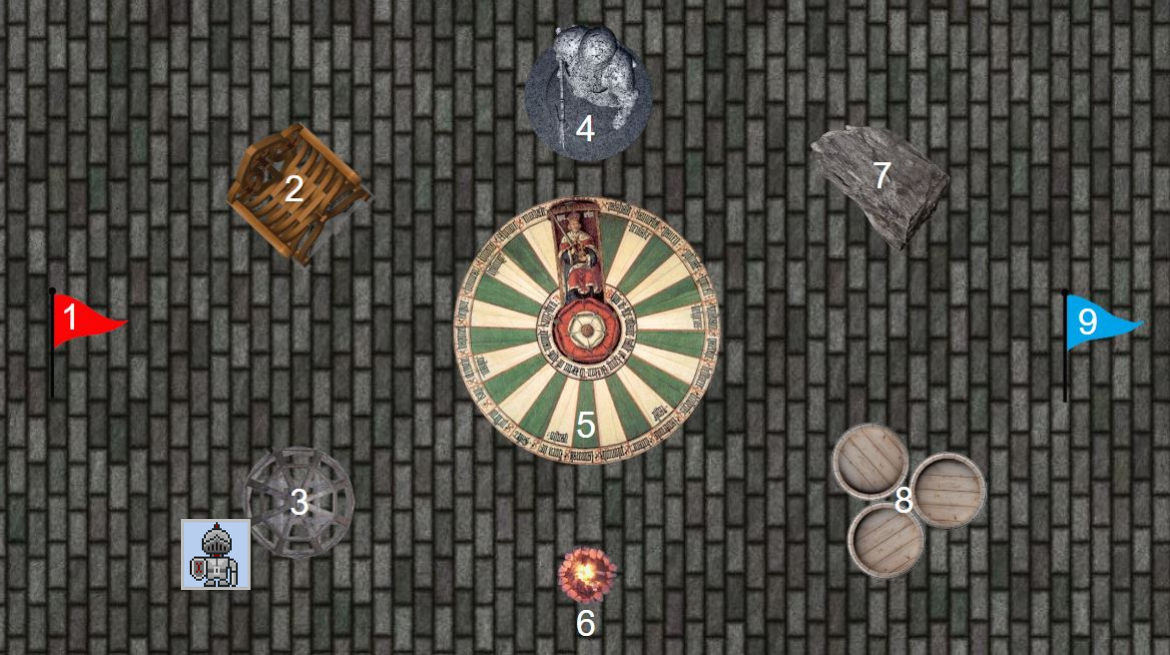
Here is an example gamescreen for the 3rd position with the Knight class. As the player moves, the Knight icon will switch positions to the corresponding spot. This will work for all of our classes: knight, mage, rogue, shield bearer, grand wizard.