Challenge Part III: Writing a command line client #5

Description

Command Line Interface (CLI) client
The next part of the challenge is designed to improve the understanding of what sorts of clients can use this api. In reality the most likely client is a FE web application making async requests but we are going to keep things moving forward in python. As such we need to build a CLI (command line interface) application that can speak to this api.
A CLI is essentially a program that can be used from the terminal. An example of such a program is the git command line tool you use to commit and push code. The advantage of such a CLI is that it is easy to use and the user (i.e. you) doesnt need to know anything about the underlying git api that it is communicating with.
Here we want to be able to have such a program that will be easy to use on any linux command line such that the user can easily ask for jokes without knowing the anything about the joke api.
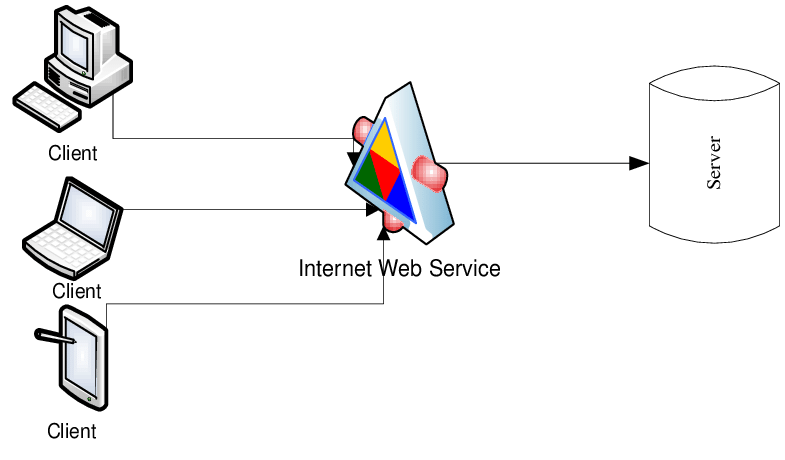
The idea is that your joke api server is always running (one day in the cloud) and that many devices can connect to it and request jokes. The plan is for one of these devices to be a computer running this CLI:
Acceptance criteria:
On your terminal you should be able to execute the following command:
vkjokes random --count=2 --lang=pl
In the above command both count and lang are optional but allow the user to easily request any joke(s) they want.
Advice
This may seem daunting to begin with but I promise you it is not too bad.
There is a great package called click (link here) which allows anyone to create an lovely CLI in python.
Essentially you will want to do the following:
- Create a brand new repository called
vkjoke-clias techincally this CLI runs completely independantly of the actual api - a bit like how your joke api runs completely separate from theofficial-joke-api. Once you have done this, I will close this issue and add it to the new repo you create. - Try to keep in mind the single responsibility of each class and why it exists. For instance you will again likely have some at least one client but this time its resposibility will be to call your joke api (which we assume is always running - in reality you will have to run it locally in a separate terminal window).
Good luck and let me know if you need any help!
(Notes for scott - Tests, DB, Docker)