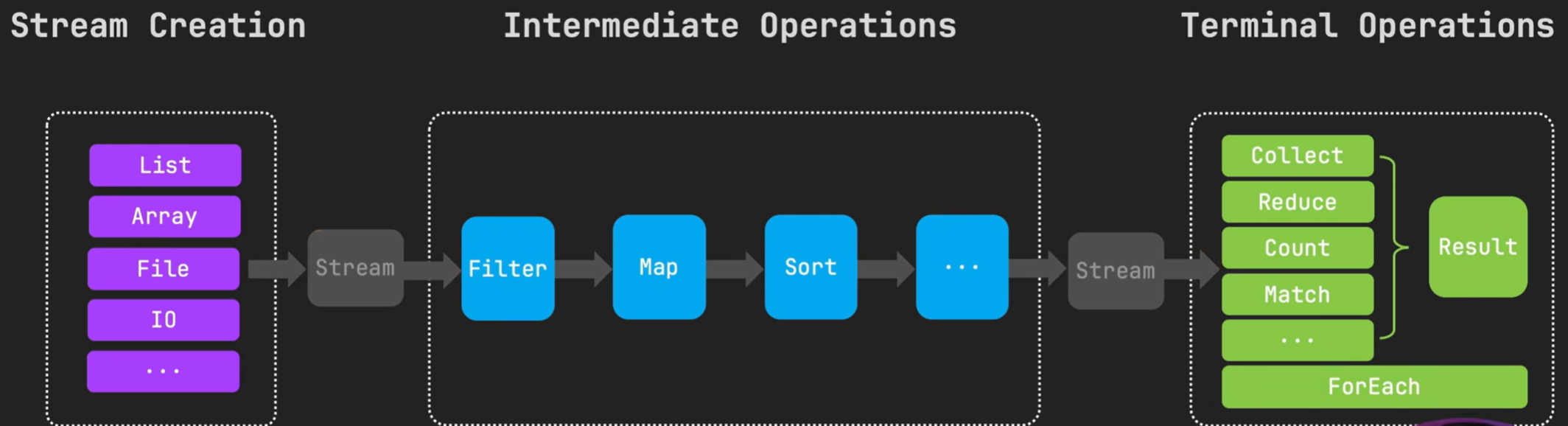
对于任何实现了Collection的接口,比如 List 、Set,可以通过 Stream 方法直接创建一个 Stream流。
public static void main(String[] args) {
    List<String> list = List.of("a", "b", "c");
    Stream<String> stream = list.stream();
    stream.forEach(System.out::println);
}对于数组,可以使用Arrays工具类的stream方法创建流。
public static void main(String[] args) {
    String[] array = {"a","b","c"};
    Stream<String> stream = Arrays.stream(array);
    stream.forEach(System.out::println);
}
还可以通过 Stream.of 方法直接从一组值创建一个流。
public static void main(String[] args) {
    Stream<String> stream = Stream.of("a", "b", "c");
    stream.forEach(System.out::println);
}
可以通过 concat 方法将两个流合并。
public static void main(String[] args) {
    Stream<String> stream1 = Stream.of("a", "b", "c");
    Stream<String> stream2 = Stream.of("d", "e", "f");
    Stream<String> concat = Stream.concat(stream1, stream2);
    concat.forEach(System.out::println);
}如果我们想动态的构建流,比如通过特定条件动态的决定是否将元素加入流中,可以使用 StreamBuilder 来添加元素和创建流。
public static void main(String[] args) {
    Stream.Builder<Object> streamBuilder = Stream.builder();
    streamBuilder.add("a");
    streamBuilder.add("b");

    if (Math.random() > 0.5){ // 表示会有50%的概率添加c
        streamBuilder.add("c");
    }
    Stream<Object> stream = streamBuilder.build();
    stream.forEach(System.out::println);
}
注意: 一旦调用了build方法,就不能再向 StreamBuilder 里面添加更多元素了。
public static void main(String[] args) {
    Path path = Paths.get("file.txt");

    // 逐行读取,每行文本会被当作字符串处理,将其作为元素放入流中
    try(Stream<String> lines = Files.lines(path)) {
        lines.forEach(System.out::println);
    }catch (IOException e){
        e.getStackTrace();
    }
}对于基本数据类型,Stream API 提供了 IntStream、LongStream 和 DoubleStream 来分别处理 int、long 和 double 类型。
通过使用 range 和 rangeClosed 等方法可以方便地创建这些基本类型流。
public static void main(String[] args) {
    IntStream intStream1 = IntStream.of(1, 2, 3);
    // range 是左闭右开
    IntStream intStream2 = IntStream.range(1,4);
    // rangeClosed 是左闭右闭
    IntStream intStream3 = IntStream.rangeClosed(1,4);

    intStream3.forEach(System.out::println);
}
可以把基本类型的流转换为对象流,通过在基本类型上调用 boxed
public static void main(String[] args) {
    IntStream intStream = IntStream.rangeClosed(1,4);
    Stream<Integer> boxed = intStream.boxed();
}