An Arduino library for controlling pilot wire electric heaters via Zigbee with ESP32-H2 or ESP32-C6.






The following example creates a virtual Zigbee Pilot Wire Control device using the ZigbeePilotWireControl class. It outputs the current pilot wire mode to the serial console whenever it changes.
The controller can be tested using a Zigbee coordinator with support for the Pilot Wire Control cluster, such as ZHA (Zigbee Home Automation) in Home Assistant.
From Home Assistant with Zigbee integration, you can control the pilot wire mode using the Pilot Wire Control card automtically created for the device with the epsilonrt quirks provided:
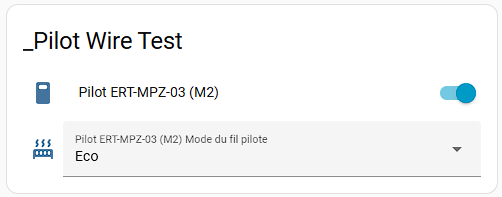
On the serial console, you will see output like this when changing the mode from the controller:
Zigbee Virtual Pilot Wire Control starting...
Adding ZigbeePilotWireControl endpoint to Zigbee Core
Connecting to network
Zigbee connected to network.
Pilot Wire Mode: ECO
Pilot Wire attributes reported
Pilot Wire Mode: FROST
Pilot Wire Mode: OFF
Pilot Wire Mode: FROST
Button pressed for 0 ms
Pilot Wire Mode: COMFORT-1
The simplified code for this example is as follows:
#include <Zigbee.h>
#include <ZigbeePilotWireControl.h>

const uint16_t ZbeeEndPoint = 1;

// Create ZigbeePilotWireControl instance
ZigbeePilotWireControl  zbPilot (ZbeeEndPoint);

// Callback function to handle pilot wire mode changes
// This is a simulation, for real hardware control, implement the necessary
// to control the pilot wire output accordingly (with opto-triac...)
void
setPilotWire (ZigbeePilotWireMode mode) {
  // Array of mode names for serial output
  static const char *const modeNames[] = {
    "OFF",
    "COMFORT",
    "ECO",
    "FROST",
    "COMFORT-1",
    "COMFORT-2"
  };
  Serial.printf ("Pilot Wire Mode: %s\n", modeNames[mode]);
}

void setup() {
  Serial.begin (115200);
  Serial.println ("Zigbee Virtual Pilot Wire Control starting...");

  // Set callback function for pilot wire mode change and power state change
  zbPilot.onPilotWireModeChange (setPilotWire);

  // Initialize the Pilot Wire Control endpoint
  zbPilot.begin ();

  // Add endpoint to Zigbee Core
  Zigbee.addEndpoint (&zbPilot);

  // When all EPs are registered, start Zigbee in ROUTER mode
  if (!Zigbee.begin (ZIGBEE_ROUTER)) {
    Serial.println ("Zigbee failed to start! Rebooting...");
    ESP.restart();
  }

  Serial.print ("Connecting to network");
  while (!Zigbee.connected()) {

    Serial.print (".");
    delay (500);
  }
  Serial.println ("\nZigbee connected to network.");

  // Report initial attributes
  zbPilot.reportAttributes();
}

void loop() {

  delay (100);
}
The complete example code can be found in the examples/VirtualPilotSerial folder of this repository. Other examples demonstrate using an RGB LED.
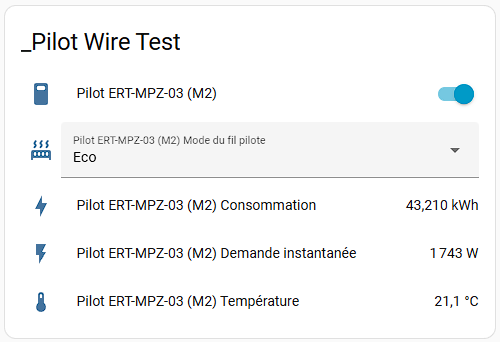
The library also includes support for optional Temperature Measurement and Electrical Measurement clusters. These can be used to report the ambient temperature and power consumption of the heater. See the examples/VirtualPilotWithTempAndMeter example for a demonstration of these features.