A secure client-server messaging application using asymmetric and symmetric encryption.
- Introduction
- Features
- File Structure
- Installation
- Usage
- Secure Communication Process
- Protocol Specifications
- Encryption Details
- Database Schema
- Diagrams
- License
MessageApp is a client-server-based secure messaging system. It uses RSA (asymmetric encryption) for key exchange and AES-CBC (symmetric encryption) for encrypting messages. The system supports user registration, message exchange, and secure key exchange.
- Secure client-server communication
- User registration with UUIDs
- Public key exchange for encrypted messaging
- Secure symmetric key generation and storage
- Message queueing and retrieval
- Supports text messages and file transfers
/MessageApp
 -/src
      -/client
             -/src
               -/ include
                  - AESWrapper.h
                  - RSAWrapper.h
                  - Client.h
                  - Helpers.h
                  - ProtocolManager.h
                  - User.h
               -/client
                  - client.cpp
                  - helpers.cpp
                  - protocolhandler.cpp
                  - user.cpp
               -/encryption
                  - AESWrapper.cpp
                  - RSAWrapper.cpp
      -/server
            - database.py
            - logger.py
            - request.py
            - response.py
            - server.py
git clone https://github.com/gwchar2/MessageApp.git
cd MessageApp-
Check if Python is installed:
python3 --version
If Python is not installed, download and install it from python.org.
-
Install required dependencies:
python3 -m pip install --upgrade pip
python3 -m pip install -r requirements.txt
- Linux (Debian/Ubuntu):
sudo apt install libcryptopp-dev
- MacOS:
brew install cryptopp
- Windows:
-
Download and install Crypto++ from Crypto++ official site.
-
Ensure the include path is set correctly when compiling.
-
You might need to add a complete path to cryptopp folder under CXXFLAGS and LDFLAGS in the makefile or c_cpp_properties.json under "includePath"
Example for makefile addition
CXXFLAGS = -std=c++17 -Wall -g -mrdrnd -I src/client/include -I "C:/Users/some_path/cryptopp"
LDFLAGS = -L "C:/Users/some_path/cryptopp" -lcryptopp -static -lpthread -lws2_32 \
-
-
Check if GCC is installed:
gcc --version
If GCC is not installed, install it:
- Linux (Debian/Ubuntu):
sudo apt install build-essential - MacOS:
brew install gcc - Windows: Install MinGW and add it to the system PATH.
- Linux (Debian/Ubuntu):
-
Compile the modules:
make
- Start the server:
python3 src/server/server.py
- Start the client:
./client
- Reads port from
myport.info - Waits indefinitely for client requests
- Responds to various client requests:
- Sign up: Creates a new user with a UUID (if username does not exist).
- Client list: Returns a list of registered users.
- Send message: Stores a message in memory for retrieval.
- Waiting messages: Delivers queued messages and deletes them after retrieval.
- Reads server and port from
server.info - Reads and stores username, UUID, and encryption key from
me.info - Displays an interactive terminal interface for user actions
- Register User (Request 110) - Registers and saves UUID.
- Request User List (Request 120) - Fetches all users.
- Request Public Key (Request 130) - Fetches a specific user's public key.
- Request Waiting Messages (Request 140) - Fetches unread messages.
- Send Message (Request 150) - Sends a text message.
- Request Symmetric Key (Request 151) - Fetches stored symmetric key.
- Send Symmetric Key (Request 152) - Generates and sends a new symmetric key.
- Send a File (Request 153) - Send a specific user a specific file up to 4gb.
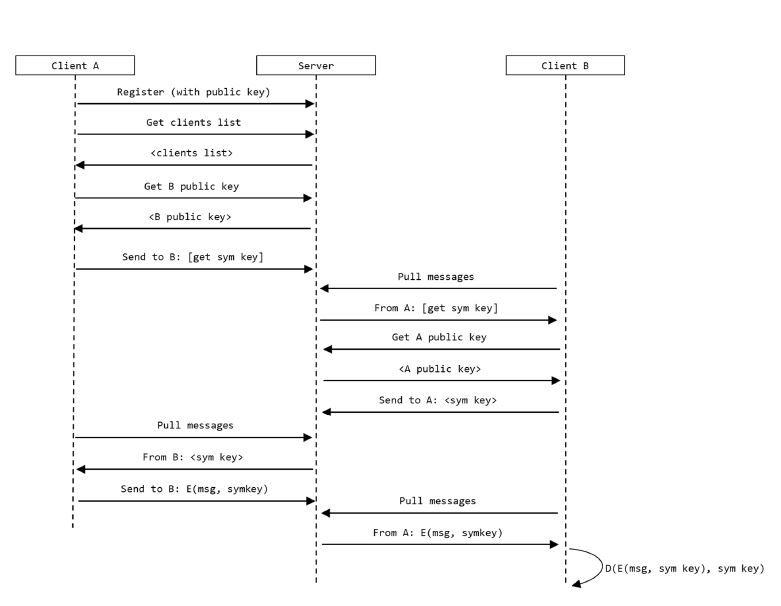
- Client B requests Client A’s public key from the server.
- Client B sends a request to Client A (via the server) for a symmetric encryption key, encrypted using Client A’s public key.
- The server stores the request for Client A to retrieve later.
- Client A pulls the waiting request from the server.
- Client A decrypts the request using its private key.
- Client A requests Client B’s public key from the server.
- Client A sends a response with the symmetric encryption key, encrypted with B’s public key.
- The server stores the response for Client B to retrieve.
- Client B pulls the response from the server.
- Client B decrypts the symmetric key using its private key.
- Both clients can now securely communicate using the shared symmetric key.
| Request Code | Description |
|---|---|
| 600 | Sign up |
| 601 | Get members list |
| 602 | Get a specific user's public key |
| 603 | Send a message |
| 604 | Pull waiting messages |
| Response Code | Description |
|---|---|
| 2100 | Sign up successful |
| 2101 | Members list |
| 2102 | Public key |
| 2103 | Message stored |
| 2104 | All waiting messages |
| 9000 | General error |
- Symmetric Encryption: AES-CBC (128-bit key)
- Asymmetric Encryption: RSA (1024-bit key without header, 1280-bit with header)
For database setup, refer to database_schema.sql.
CREATE TABLE IF NOT EXISTS clients (
    ID BLOB(16) PRIMARY KEY,
    UserName VARCHAR(255) NOT NULL,
    PublicKey BLOB(160) NOT NULL,
    LastSeen DATETIME NOT NULL
);

CREATE TABLE IF NOT EXISTS messages (
    ID INTEGER PRIMARY KEY AUTOINCREMENT,
    ToClient BLOB(16) NOT NULL,
    FromClient BLOB(16) NOT NULL,
    Type TINYINT NOT NULL,
    Content BLOB,
    FOREIGN KEY (ToClient) REFERENCES clients(ID),
    FOREIGN KEY (FromClient) REFERENCES clients(ID)
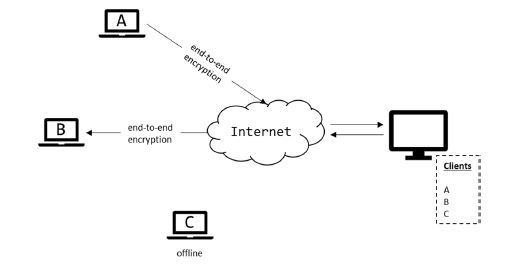
);Below are diagrams that illustrate the message exchange process:
This project is licensed under the MIT License.