The case for aliases #38

Replies: 3 comments 3 replies

-
|
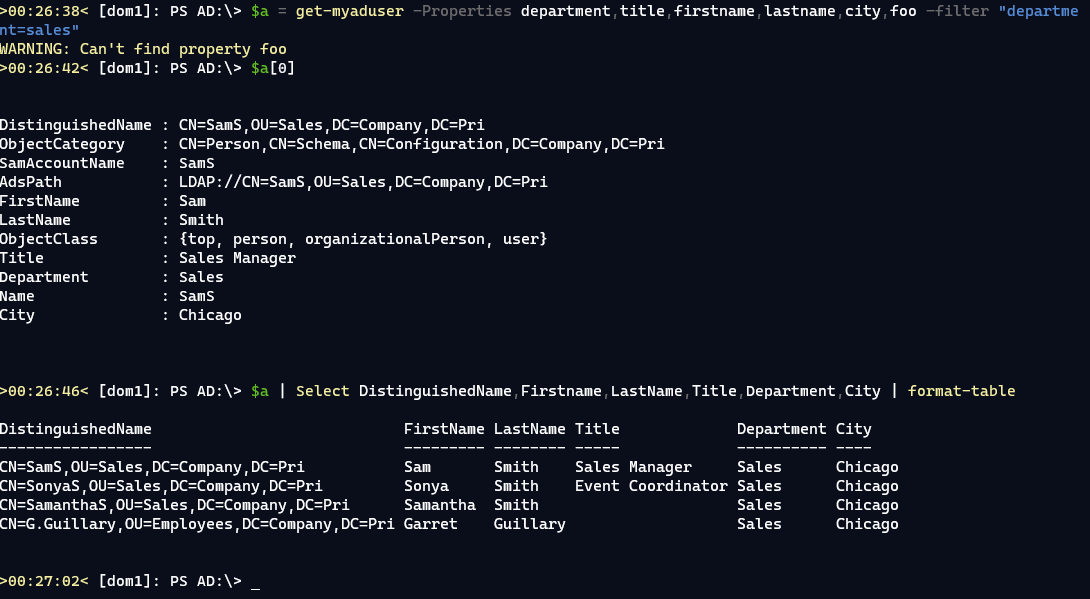
Here's some very rough proof-of-concept code using the ADSI Searcher. Function Get-myADUser {
[cmdletbinding()]
Param(
[Parameter(HelpMessage = "use syntax like 'department=sales'")]
[string]$Filter,
[string[]]$Properties
)
$PropertyData = @{
accountexpires = 'AccountExpires'
admincount = 'AdminCount'
adspath = 'AdsPath'
badpasswordtime = 'BadPasswordTime'
badpwdcount = 'BadPwdCount'
cn = 'CN'
codepage = 'CodePage'
countrycode = 'CountryCode'
department = "Department"
description = 'Description'
displayname = "DisplayName"
distinguishedname = 'DistinguishedName'
dscorepropagationdata = 'DscorePropagationData'
givenname = "FirstName"
instancetype = 'InstanceType'
iscriticalsystemobject = 'IsCriticalSystemObject'
l = 'City'
lastlogoff = 'LastLogoff'
lastlogon = 'Lastlogon'
lastlogontimestamp = 'LastLogonTimestamp'
logoncount = 'LogonCount'
logonhours = 'LogonHours'
memberof = 'MemberOf'
name = 'Name'
objectcategory = 'ObjectCategory'
objectclass = 'ObjectClass'
objectguid = 'ObjectGuid'
objectsid = 'ObjectSid'
primarygroupid = 'PrimaryGroupId'
pwdlastset = 'PwdlastSet'
samaccountname = 'SamAccountName'
samaccounttype = 'SamAccountType'
sn = "LastName"
title = "Title"
useraccountcontrol = 'UserAccountcontrol'
usnchanged = 'UsnChanged'
usncreated = 'UsnCreated'
whenchanged = 'WhenChanged'
whencreated = 'WhenCreated'
}
Function Optimize-ADSearchResult {
[cmdletbinding()]
Param(
[Parameter(
Position = 0,
Mandatory,
ValueFromPipeline,
HelpMessage = "This should be the input from an ADSearcher FindOne() or FindAll() method."
)]
[System.DirectoryServices.SearchResult]$InputObject,
[Parameter(HelpMessage = "Specify a custom type name, like CorpADUser. You might add this if using a custom format file or type extensions.")]
[ValidateNotNullOrEmpty()]
[string]$TypeName
)
Begin {
Write-Verbose "[$((Get-Date).TimeofDay) BEGIN ] Starting $($myinvocation.mycommand)"
$PropertyData = @{
accountexpires = 'AccountExpires'
admincount = 'AdminCount'
adspath = 'AdsPath'
badpasswordtime = 'BadPasswordTime'
badpwdcount = 'BadPwdCount'
cn = 'CN'
codepage = 'CodePage'
countrycode = 'CountryCode'
department = "Department"
description = 'Description'
displayname = "DisplayName"
distinguishedname = 'DistinguishedName'
dscorepropagationdata = 'DscorePropagationData'
givenname = "FirstName"
instancetype = 'InstanceType'
l = 'City'
lastlogoff = 'LastLogoff'
lastlogon = 'Lastlogon'
lastlogontimestamp = 'LastLogonTimestamp'
logoncount = 'LogonCount'
logonhours = 'LogonHours'
memberof = 'MemberOf'
name = 'Name'
objectcategory = 'ObjectCategory'
objectclass = 'ObjectClass'
objectguid = 'ObjectGuid'
objectsid = 'ObjectSid'
primarygroupid = 'PrimaryGroupId'
pwdlastset = 'PwdlastSet'
samaccountname = 'SamAccountName'
samaccounttype = 'SamAccountType'
sn = "LastName"
title = "Title"
useraccountcontrol = 'UserAccountcontrol'
usnchanged = 'UsnChanged'
usncreated = 'UsnCreated'
whenchanged = 'WhenChanged'
whencreated = 'WhenCreated'
}
} #begin
Process {
Write-Verbose "[$((Get-Date).TimeofDay) PROCESS] Processing input"
$InputObject.properties.GetEnumerator() |
ForEach-Object -Begin {
$new = [ordered]@{ }
if ($TypeName) {
Write-Verbose "[$((Get-Date).TimeofDay) PROCESS] Using typename $TypeName"
$new.Add("PSTypename", $TypeName)
}
} -Process {
Write-Verbose "[$((Get-Date).TimeofDay) PROCESS] Processing property $($_.key)"
#Get formatted property name from configuration data
if ($PropertyData.Contains($_.key)) {
$name = $PropertyData["$($_.key)"]
}
else {
#property name not found in configuration data
#so use the property name as is
$name = $_.key
}
if ($_.value.count -gt 1) {
#value is an array
$value = $_.value
}
else {
#get the single value
$value = $_.value[0]
}
$new.Add($name, $value)
} -End {
Write-Verbose "[$((Get-Date).TimeofDay) PROCESS] Creating output"
New-Object -TypeName psobject -Property $new
}
} #process
End {
Write-Verbose "[$((Get-Date).TimeofDay) END ] Ending $($myinvocation.mycommand)"
} #end
}
$props = "DistinguishedName", "Name", "SamAccountName", "SID", "objectCategory", "objectClass"
$searcher = New-Object System.DirectoryServices.DirectorySearcher
$searcher.filter = "(&(objectcategory=person)(objectclass=user)$filter)"
Foreach ($p in $props) {
[void]($searcher.PropertiesToLoad.Add($p))
}
If ($properties) {
Foreach ($p in $properties) {
#validate property names agains the hashtable
if ($PropertyData.ContainsKey($p)) {
Write-Verbose "Adding LDAP property $p"
[void]($searcher.PropertiesToLoad.Add($p))
}
elseif ($propertydata.values -contains $p ) {
#get the item
$actual = ($propertydata.GetEnumerator() | Where-Object { $_.value -eq $p }).Name
Write-Verbose "Adding LDAP property $actual"
[void]($searcher.PropertiesToLoad.Add($actual))
}
else {
Write-Warning "Can't find property $p"
}
}
}
$user = $searcher.FindAll() | Optimize-ADSearchResult
$user
}I'm using a hashtable to map LDAP names with user-friendly names. But now the user can run my command like this, without having to know the native LDAP property names.
|
Beta Was this translation helpful? Give feedback.

-
|
While I agree that aliases can be beneficial, the majority of the aliases you have in your example are just a PascalCase-ised version of the LDAP attribute itself. There seems to be 2 cases you are bringing up here in terms of aliases
I'll try and address each one separately Aliases for -PropertyThis is the one where I'm a bit more dubious about the benefits of aliases. Due to PowerShell and LDAP not being case sensitive the simple examples of
You did mention tab completion and this is something I think is key for using any module really. I understand it's more of an advanced functionality in PowerShell and not everyone knows about it but I've made sure that tab completion works for # This can be skipped if the session for the server has already been created
New-OpenADSession -Server dc
Get-OpenADUser my-username -Property d<tab>
# description displayName displayNamePrintable dSCorePropagationData
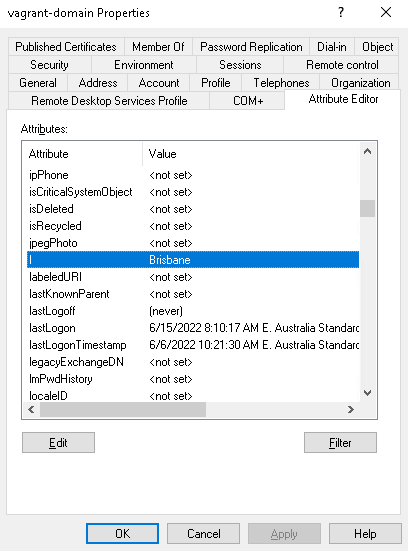
# distinguishedName dSASignature directReportsOnce a session has been created it will cache the properties based on the schema that was created and allow you to use tab completion to select any attribute that is known in the schema. The other method I've found that is useful is doing Aliases for Return PropertiesThis one is a bit more tricky as I can see it being more useful but I have concerns about how to implement it safely without causing future conflicts. From a general perspective properties in pwsh and dotnet are in the PascalCase format. This flies in the face of LDAP attributes which are typically in camelCase. That means the return properties will be (Get-OpenADUser username -Properties lastLogoff).lastLogoff
(Get-OpenADUser username -Properties lastLogoff).LastLogoffWhere this might be more important is for generating reports. I could see people preferring their headers be in PascalCase compared to camelCase and I see how it would be annoying to manually change that using select expressions or other code. This makes me think that instead of adding the NoteProperty with the raw LDAP attribute name I should return a more dotnet friendly PascalCase version. The benefits of just having the note property itself being in this form and not adding an alias is so the formatting output of the object isn't just full of duplicates. I can't hide the original LDAP attribute ones in something like a format.ps1xml as the names are dynamic and are dependent on what was requested through Where this gets tricky is for attribute there the name is a bit vague, like |
Beta Was this translation helpful? Give feedback.
-
|
What you've said here is great, I initially was on the fence leaning towards no but now I'm leading towards at least pascalising the attribute names in the return object's note properties. Whether I have some static map to translate known values or whether I find some library to do this for me I'm not sure. I am still less sure about using aliases for some of the shorter LDAP attributes like |
Beta Was this translation helpful? Give feedback.
-
|
I've opened #41 which tests out making the LDAP attributes into a PascalCase form by upper casing the first letter of the attribute name. I'm fairly ok with the implementation and will play around with it some more but it is relatively simple. The purist in me doesn't like the fact the case doesn't match the LDAP attribute name but that's not the end of the world. I did play around with adding aliases for some of the short attribute names like |
Beta Was this translation helpful? Give feedback.
-
|
I realize I am muddying the waters a bit with my example. The mapping hashtable solves two problems. One, it presents nicer formatted property names than what ADSI returns. But I can also use it to map an alias, such as These are really two different issues: casing and aliases. The real point I am trying to make with property aliases comes down to useability. IT Pros don't care about LDAP property names. They want to be able to easily get the information they want or make the changes they need and the output should be easy to read and understandable. You have to consider that a user may be creating reports or output that will be consumed by someone else. That output needs to be easy to understand and ideally easy to create. |
Beta Was this translation helpful? Give feedback.

-
|
I'm not particularly in favour of aliases for properties personally. I wouldn't say it comes up all that often, but some moderate amount of time is spent explaining why I suggest that, if aliases are introduced at all, no more than already exist in the AD module are implemented, and ideally that the feature can be disabled. The MS AD module does include a fair collection of aliases. If you're curious what then I wrote a function to extract them: https://gist.github.com/indented-automation/629a00167a74e9cb3329eabd6662bc0c One or more of these commands will reveal the most interesting I think: Get-ADAttributeAlias Principal | Sort-Object PropertyName
Get-ADAttributeAlias User | Sort-Object PropertyName
Get-ADAttributeAlias Computer | Sort-Object PropertyNamePrincipal is the parent class, users, computers, groups, and so on get the aliases defined there.
I too would be concerned that aliasing like this tramples on schema extensions people may have implemented. I'd also be concerned that if you support aliasing inside an LDAP filter that you ultimately ensure that the filter is no longer portable. If you don't support it there then you have a filter asking for one thing and the output being something completely different. Ultimately, if you manage AD then you will have to start caring about LDAP property names. But for me, that's better than having to learn the arbitrary aliases a module implements; it saves the "because x is y" conversations. |
Beta Was this translation helpful? Give feedback.


Uh oh!
There was an error while loading. Please reload this page.
-
For an IT Pro using PowerShell, aliases are very useful. Property aliases are defined on many objects for several reasons. The first is ease of use. An IT Pro shouldn't have to be a .NET developer. An IT pro is more likely to think about the
nameof a process, not the officialProcessNameproperty name. This also makes it easier to write PowerShell expressions.This is much easier to write:
Than
Granted, there is tab completion, but often the aliases are more meaningful.
In the case of this module, a strong case can be made for including object property aliases. Especially since the standard LDAP property names are not intuitive and can be outright cryptic. An IT Pro wanting a list of user names will find it much easier to select FirstName,Lastname,SamAccountname,Title,Department,City than using the native LDAP properties.
Module authors should write code that doesn't force the user to jump through hoops. Yes, they could use custom hashtables with Select-Object. But why force them when you can do it yourself.
Beta Was this translation helpful? Give feedback.
All reactions