


Stellar Suite is the ultimate developer toolkit for building, deploying, and managing smart contracts on the Stellar network—directly from your editor.
Stop context switching between your IDE and the terminal. Stellar Suite brings the power of the Stellar CLI into a streamlined, interactive VS Code experience, allowing you to focus on what matters most: writing great code.
- Zero Friction: Build and deploy contracts with a single click.
- Interactive UI: Manage deployments and simulations through a dedicated sidebar.
- Smart Error Handling: Don't just see errors—understand them with guided CLI feedback.
- Identity Management: Integrated signing workflows (Interactive, File-based, Secure Storage).
- Prototyping Speed: Rapidly simulate transactions with real-time resource profiling.
Build and deploy your Soroban contracts without leaving your editor. Captures IDs, stores metadata, and handles the CLI heavy lifting for you.
A dedicated dashboard to view discovered contracts, build statuses, deployment history, and quick-access actions.
Run transactions against the network and see formatted return values, execution resource usage, and storage diffs—all in one place.
Securely sign transactions using your preferred method (Interactive, Keypair files, Secure Storage, or External).
Live-stream CLI output and get parsed, actionable feedback when things go wrong.
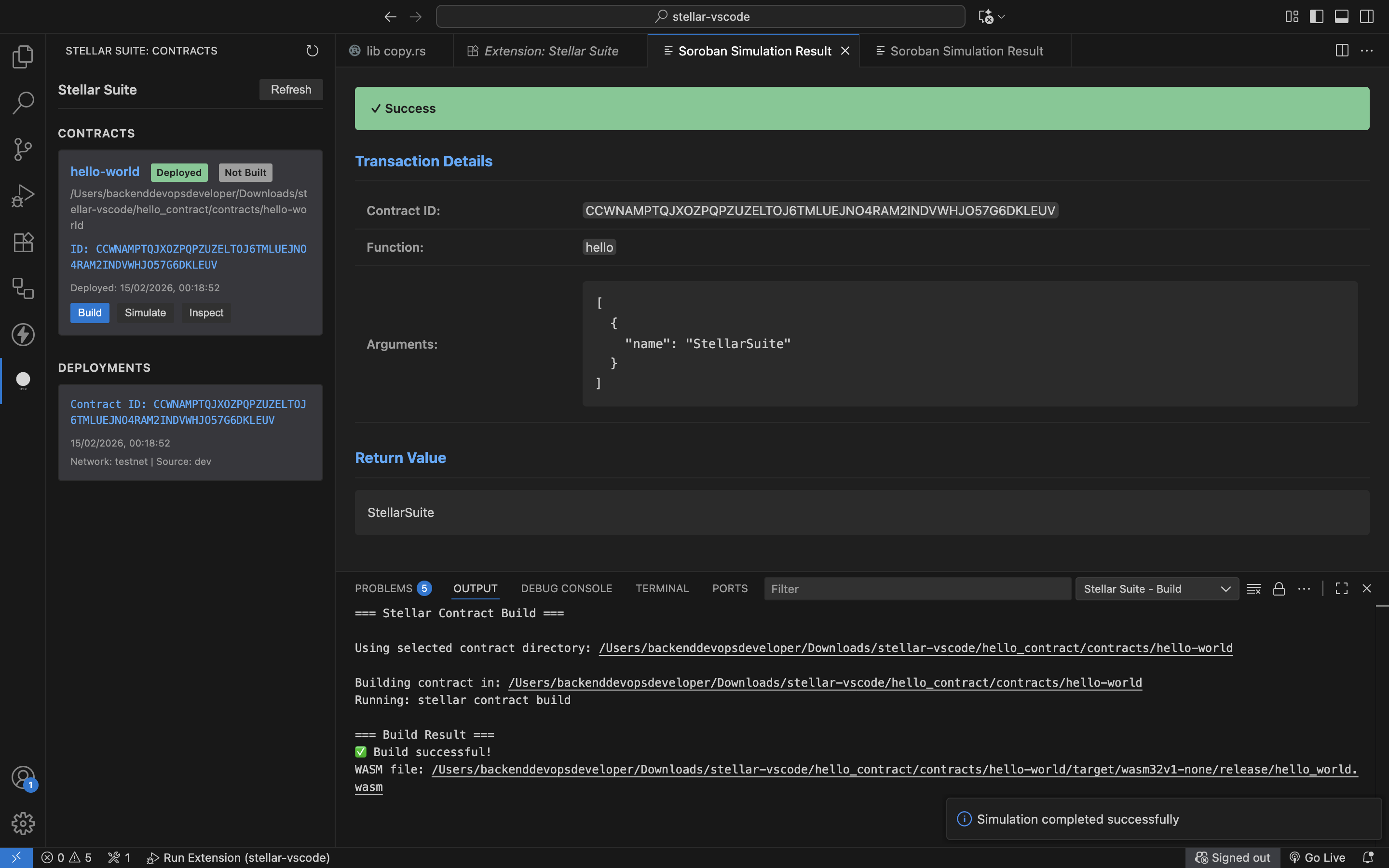 Screenshot showing the current Stellar Suite MVP
Search for "Stellar Suite" in the VS Code Extensions view (Ctrl+Shift+X) and click Install.
- Open a workspace containing a Soroban contract (
Cargo.tomlwithsoroban-sdk). - Open the Stellar Suite Sidebar from the Activity Bar.
- Click Build on your contract!
- Clone the repository:
git clone https://github.com/0xVida/stellar-suite.git - Install dependencies:
npm install - Compile the extension:
npm run compile - Run locally: Press
F5to open the Extension Development Host.
- Open your contract project in VS Code
- Open the Command Palette:
Cmd + Shift + P(Mac)Ctrl + Shift + P(Windows/Linux)
- Run: Stellar Suite: Deploy Contract
- Follow interactive prompts to:
- Select compiled WASM file
- Select network
- Select source account
- Choose deployment signing method
Stellar Suite will:
- Run build and deployment using the official CLI
- Run signing workflow before deployment submission
- Capture the deployed contract ID
- Display results inside VS Code
- Save deployment metadata for later use
Deployment now includes a signing phase before transaction submission. Supported methods:
- Interactive signing (prompt for secret key)
- Keypair file signing
- Stored keypair signing from VS Code secure storage
- Hardware wallet signature verification (external sign + paste signature)
- Source-account delegated signing via Stellar CLI
For hardware wallet signing, Stellar Suite copies the payload hash to clipboard and validates the returned signature before deploy.
For local keypair signing and signature verification, install @stellar/stellar-sdk in the extension development environment.
- Open the Command Palette
- Run: Stellar Suite: Build Contract
- Select the contract directory if multiple contracts are detected
The extension will compile your contract and display build results.
- Open the Command Palette
- Run: Stellar Suite: Simulate Soroban Transaction
- Enter contract ID, function name, and arguments
Results are displayed in a formatted panel with return values and resource usage.
Use Stellar Suite: Configure CLI to manage CLI settings with profiles.
You can:
- Create and switch configuration profiles
- Validate CLI/network/source/RPC settings
- Apply active profile settings to workspace configuration
- Export and import profiles as JSON
The Stellar Suite sidebar provides a visual interface for managing contracts:
- View all detected contracts in your workspace
- See build status at a glance
- See detected contract template/category (token, escrow, voting, custom, unknown)
- Access quick actions (Build, Deploy, Simulate)
- Run template-specific actions from the contract card/context menu
- Manually assign template categories from the context menu
- View deployment history
- Inspect contract functions
Stellar Suite supports custom template definitions through a workspace config file:
stellar-suite.templates.json(workspace root), or.stellar-suite/templates.json
Example:
{
  "version": "1",
  "templates": [
    {
      "id": "amm",
      "displayName": "AMM",
      "category": "amm",
      "keywords": ["swap", "liquidity_pool"],
      "dependencies": ["soroban-sdk"],
      "actions": [
        { "id": "amm.swap", "label": "Swap Assets" }
      ]
    }
  ]
}
Each template can define keyword, dependency, and path hints used for detection. Unknown contracts are shown as Unknown / Unclassified until matched or manually assigned.
Stellar Suite can be configured through VS Code settings.
Default network used for deployment.
Path to the Stellar CLI executable.
Source identity to use for contract invocations (e.g., 'dev').
RPC endpoint URL for transaction simulation when not using local CLI.
Use local Stellar CLI instead of RPC endpoint.
Default signing method used when deployment signing begins.
Require a validated signature before deployment is submitted.
Allow saving keypairs in VS Code SecretStorage for reuse.
Example:
{
  "stellarSuite.network": "testnet",
  "stellarSuite.cliPath": "stellar",
  "stellarSuite.source": "dev",
  "stellarSuite.rpcUrl": "https://soroban-testnet.stellar.org:443",
  "stellarSuite.useLocalCli": true,
  "stellarSuite.signing.defaultMethod": "interactive",
  "stellarSuite.signing.requireValidatedSignature": true,
  "stellarSuite.signing.enableSecureKeyStorage": true
}Stellar Suite aims to become a full smart contract development assistant for Stellar developers. The goal is to remove repetitive CLI workflows and replace them with interactive tooling built directly into VS Code.
Stellar Suite is being developed in stages.
Contract Invocation UI
- Select deployed contracts from stored workspace data
- Automatically detect contract functions
- Generate input fields based on function parameters
- Run contract invocations directly from VS Code
Simulation Integration
- Run contract simulations before invoking transactions
- Display execution results in a readable interface
- Show storage state diff (created/modified/deleted entries)
- Show authorization requirements
- Display resource usage metrics
Deployment Profiles
- Save deployment configurations per project
- Allow quick redeployment with saved settings
- Support multiple networks per workspace
Contract Interface Parsing
- Read contract source files
- Extract function names and parameter types
- Automatically generate invocation forms
- Provide autocomplete for contract functions
Deployment History & Replay
- Track past deployments
- Allow redeployment of previous contract versions
- Provide version comparison tools
Multi-Contract Workspace Support
- Manage multiple deployed contracts per project
- Link deployments to specific contract files
- Provide workspace-level contract explorer
Stellar Suite aims to evolve into a full development environment for Stellar smart contracts, including:
- Interactive contract debugging tools
- Execution tracing and state inspection
- Transaction replay tools
- Gas and resource profiling dashboards
- Contract testing and simulation suites
- Visual contract interaction builder
- Multi-network contract management
Contributions are welcome.
Fork the repository and clone your fork:
git clone https://github.com/0xVida/stellar-suite.git
cd stellar-suite
Install dependencies:
npm installCompile TypeScript:
npm run compileWatch mode:
npm run watchRun tests (executes the full suite):
npm testRun specific test suites (e.g., contract deployer tests):
npm run test:contract-deployerDeployment workflow integration suite:
npm run test:deployment-workflow-integrationNote: Unit tests are fully isolated and use mock implementations to prevent actual CLI execution or network access during testing.
- Open project in VS Code
- Press
Fn + F5(Mac) orF5(Windows/Linux) - Test extension inside Extension Development Host
- Keep code modular and readable
- Provide clear error handling
- Add tests when introducing new features
- Update documentation when functionality changes
Stellar Suite follows several guiding principles:
- Reduce developer friction: Minimize context switching and manual steps
- Stay lightweight and focused: Essential features without bloat
- Enhance existing CLI tooling: Work with the official Stellar CLI rather than replace it
- Provide interactive developer workflows: Replace command-line prompts with IDE integration
- Build practical tooling developers actually need: Focus on real-world use cases
The extension is designed to feel like a natural extension of the development environment rather than a separate tool.
Issues and feature requests can be submitted through GitHub.