See a short video on this project here-please download it to play it
Project map
¦   .gitignore
¦   file
¦   MasterPage.master
¦   MasterPage.master.vr
¦   README.md
¦   Web.config
¦   Web.config.authentication
¦   WorkWithAjax.sln
¦   ~README.md.saved.bak
¦
+---App_Code
¦       AutoCompleteItem.vr
¦       CustomerByNameList.vr
¦       CustomerByNameListService.vr
¦       CustomerList.ashx.vr
¦
+---assets
¦   +---css
¦   ¦   ¦   CustomerAutoComplete.css
¦   ¦   ¦   main.css
¦   ¦   ¦
¦   ¦   +---smoothness
¦   ¦       ¦   jquery-ui-1.8.16.custom.css
¦   ¦       ¦   jquery-ui-1.8.5.custom.css
¦   ¦       ¦
¦   ¦       +---images
¦   ¦               images.zip
¦   ¦               ui-anim_basic_16x16.gif
¦   ¦               ui-bg_flat_0_aaaaaa_40x100.png
¦   ¦               ui-bg_flat_75_ffffff_40x100.png
¦   ¦               ui-bg_glass_55_fbf9ee_1x400.png
¦   ¦               ui-bg_glass_65_ffffff_1x400.png
¦   ¦               ui-bg_glass_75_dadada_1x400.png
¦   ¦               ui-bg_glass_75_e6e6e6_1x400.png
¦   ¦               ui-bg_glass_95_fef1ec_1x400.png
¦   ¦               ui-bg_highlight-soft_75_cccccc_1x100.png
¦   ¦               ui-icons_222222_256x240.png
¦   ¦               ui-icons_2e83ff_256x240.png
¦   ¦               ui-icons_454545_256x240.png
¦   ¦               ui-icons_888888_256x240.png
¦   ¦               ui-icons_cd0a0a_256x240.png
¦   ¦
¦   +---js
¦           jquery-1.6.2.min.js
¦           jquery-ui-1.8.16.custom.min.js
¦           jquery-ui-1.8.5.custom.min.js
¦
+---Bin
¦       VPS.DataNavigationServices.dll
¦       VPS.DataNavigationServices.dll.refresh
¦       VPS.DataNavigationServices.pdb
¦
+---services
¦       CustomerList.ashx
¦       Handler.ashx
¦
+---views
    +---main
            CustomerAutoComplete.html
            Home.aspx
            Home.aspx.vr
            SimpleAjaxCall.html
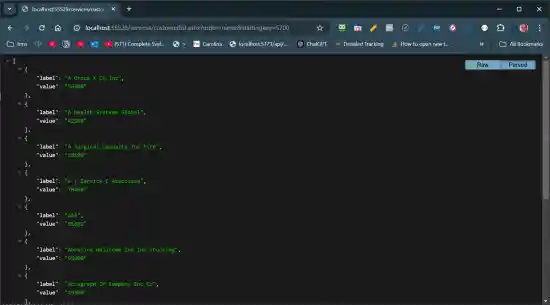
This image shows the raw Json display. This Chrome extension formats the Json for a rational display.
The following two images show the project's two HTML pages. An HTML page is used instead of an ASPX page to illustrate that Ajax, not ASP.NET, is loading the data.
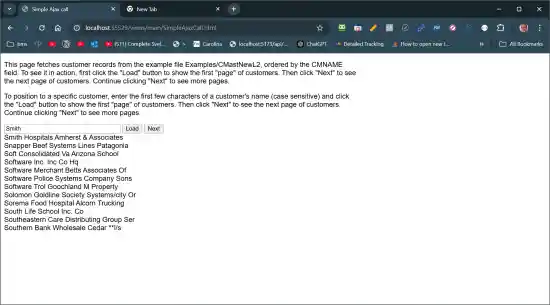
This image shows the SimpleAjaxCall.html page
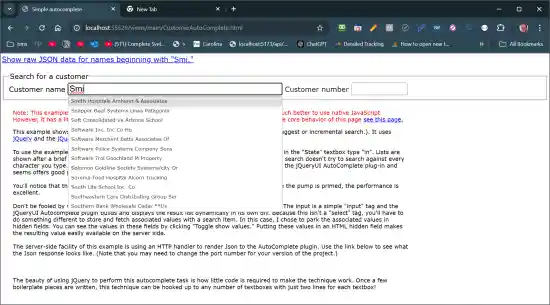
This image shows the CustomerAutoComplete.html page
Later versions of C# offers a Web API framework that creates HTTP endpoints. AVR doesn't support the Web API but with the little effort you can create an HTTP ending with a "Generic Handler." Generic handlers have the ASHX file extension.
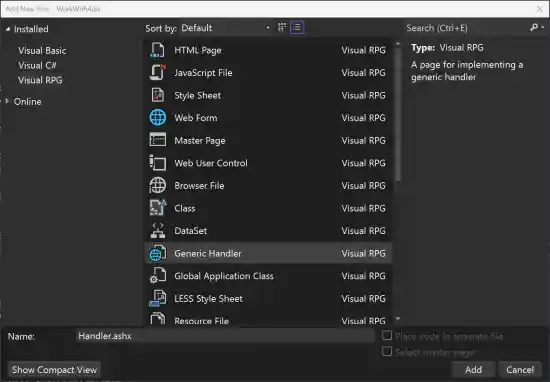
For this example project, the customerlist.ashx file in the services folder provides the generic handler for its Ajax services. This hander provides an HTTP endpoint at:
/services/customerlist.ashx
The 'ashx' file itself dosn't provide any code. Its source is just this one line:
<%@ WebHandler Language="AVR" class="CustomerList" CodeBehind="CustomerList.ashx.vr" %>
This line points assigns the CustomerList class in the CustomerList.ashx.vr file as the handler for the HTTP endpoint. That file is in the App_Code folder. (the .ashx part of the extension isn't necessary; it's a convention to help identify this file as a HTTP handler; )
CustomerList.ashx.vr uses the CustomerByNameListService in the CustomerByNameListService.vr file to do the initial processing to fetch DataGate data, as shown below:
ListByName = *New CustomerByNameListService()
context.Response.ContentType = ListByName.ContentType
Output = ListByName.GetAutoCompleteResponse(StartingKey)
context.Response.Write(Output)
The CustomerByNameListService uses the VPS.DataNavagationServices.CustomerByNameList to connect to DataGate and fetch the data.
The context.Response.Write(output) is what emits the HTTP response--which in this case is a Json document with a list of customers in it. In this case, two fields are returned: the CMName field is identified as label and the CMCustNo field is identified as value. This data was intended for an autocomplete and it was originally intended to populate LI tags in a SELECT tag.
{
    "label": "A Y Service C Associate",
    "value": "70400"
},
In SimpleAjaxCall.html JavaScript's native fetch reads the response from apiUrl provided. Two arguments: order and startingKey are passed to the HTTP endpoint and passed to the AVR logic in `
var apiUrl = `/services/customerlist.ashx?order=name&startingkey=${customerName}`;

try {
    const response = await fetch(apiUrl);
...