Conversation


There was a problem hiding this comment.
안녕하세요 규진 님 🙌🏻
우선 전체적으로 깔끔한 코드와 여기저기 남겨 주신 주석 덕분에 리뷰하기가 정말 수월했습니다 :) 변수의 이름도 직관적으로 잘 지어 주시고, 네이밍 컨벤션까지 고려하여 코드를 작성해 주셔서 감동받았습니다. 뿐만 아니라 구석구석 디자인까지 신경쓰신 모습도 굉장히 인상적입니다 👍🏻👍🏻 코드를 읽어 보니 크게 변경해야 하는 부분은 없었고, 몇 가지 제안 사항만 남겨 드리니 확인해 보시면 좋을 것 같습니다!
또한 말씀하신 이벤트를 등록할 때에는 보통 addEventListener를 많이 사용합니다. 해당 내용에 관련해서는 이 글을 참고하시면 좋을 것 같아요!
과제하느라 고생 많으셨습니다. 그럼 스터디 시간에 뵙겠습니다~!
| <!-- <li class="item"> | ||
| <div class="item-content todo">잘 먹고 잘 자기</div> | ||
| <button class="item-remove"></button> | ||
| </li> --> |
There was a problem hiding this comment.
필요없는 부분은 깔끔하게 지워 주시는 게 좋을 것 같아요~
| <input id="input-form" onkeyup="enterPush()" placeholder="할 일을 입력해 주세요." /> | ||
| <button id="input-button" onclick="pushTodo()">+</button> |
There was a problem hiding this comment.
엘리먼트에 인라인으로 이벤트를 바인딩하는 것은 유지보수성을 악화시켜서 지양하는 것이 좋습니다. script.js 파일 내에서 addEventListener()를 사용해 보세요!
There was a problem hiding this comment.
이런 부분은 정말 기본적인 것 같은데도 처음 알게되었네요!!😭
| item.className = 'item '; | ||
| item.className += isItToDo; |
There was a problem hiding this comment.
| item.className = 'item '; | |
| item.className += isItToDo; | |
| item.className = `item ${isItToDo}`; |
템플릿 리터럴을 사용하면 간략하게 쓸 수 있습니다!
| const pushTodo = () => { | ||
| const input = document.getElementById('input-form'); | ||
| if (todoArr.indexOf(input.value) == -1 && doneArr.indexOf(input.value) == -1) { | ||
| //해당하는 값이 없을때만 추가!! : 이름이 같으면 토글할때 문제가 생기던데 |
There was a problem hiding this comment.
말씀하신 문제는 토글할 때 content를 기준으로 비교하기 때문에 발생하는 듯합니다.
| todo.innerHTML = '(' + todoArr.length + ')'; | ||
| done.innerHTML = '(' + doneArr.length + ')'; |
There was a problem hiding this comment.
이 부분에도 템플릿 리터럴을 사용해 볼 수 있을 것 같아요
| todo.innerHTML = '(' + todoArr.length + ')'; | |
| done.innerHTML = '(' + doneArr.length + ')'; | |
| todo.innerHTML = `(${todoArr.length})`; | |
| done.innerHTML = `(${doneArr.length})`; |
| done.innerHTML = '(' + doneArr.length + ')'; | ||
| }; | ||
|
|
||
| //토스트 알림 |
There was a problem hiding this comment.
알림을 토스트 형태로 구현하신 점이 인상깊습니다! 디자인에도 신경 쓰시는 모습 최고예요 👍🏻
| display: grid; | ||
| grid-template-rows: 150px 1fr 1fr; |
| ul::-webkit-scrollbar { | ||
| width: 5px; | ||
| } | ||
| ul::-webkit-scrollbar-thumb { | ||
| background-color: #d3d3d3; /*스크롤바의 색상*/ | ||
| border-radius: 2.5px; | ||
| } | ||
| ul::-webkit-scrollbar-track { | ||
| background-color: none; /*스크롤바 트랙 색상*/ | ||
| } |
There was a problem hiding this comment.
스크롤바까지 고려하시는 이런 디테일 아주 좋습니다 🙌🏻


| <input id="input-form" onkeyup="enterPush()" placeholder="할 일을 입력해 주세요." /> | ||
| <button id="input-button" onclick="pushTodo()">+</button> |
There was a problem hiding this comment.
HTML에 인라인으로 이벤트를 바인딩하는 것은 vanillaJS 에서는 일반적으로 안티패턴으로 인식되는 경향이 있어 지양하시는 것이 좋습니다. 가독성과 유지보수성을 해칠 우려가 있기 때문이죠. 다만 컴포넌트 단위로 분리하여 작성하는 리액트에서는 JSX에 인라인으로 이벤트를 바인딩 하는것이 크게 문제가 되지는 않습니다.
| </li> --> | ||
| </ul> | ||
| </section> | ||
| <div id="toast"></div> |
There was a problem hiding this comment.
토스트 메세지는 보통 고려하지 못하는 부분인데,,, 좋은 UX에 대해 고민해보신 흔적이 보입니다.
| //로컬스토리지에 데이터가 있을때에만 가져온다 | ||
| if (localTodo) { | ||
| todoArr = JSON.parse(localTodo); | ||
| todoArr.map((v) => createTodoElement(v, 'todo')); |
There was a problem hiding this comment.
iterator는 되도록이면 명확한 네이밍을 갖는게 좋습니다.
| todoArr.map((v) => createTodoElement(v, 'todo')); | |
| todoArr.map((todoItem) => createTodoElement(todoItem, 'todo')); |
There was a problem hiding this comment.
습관처럼 쓰는 v, i 등등 고쳐야겠군요,,!!
| const todoList = document.getElementById('todo-list'); | ||
| const doneList = document.getElementById('done-list'); |
There was a problem hiding this comment.
createTodoElement()는 어플리케이션 전반에 걸쳐 많은 횟수가 호출되는데, 이 부분은 함수 내부에 있지 않아도 될 것 같다는 생각입니다!
| const toggleTodo = () => { | ||
| if (isItToDo === 'todo') { | ||
| todoArr = todoArr.filter((v) => v !== content); | ||
| doneArr.push(content); |
There was a problem hiding this comment.
| doneArr.push(content); | |
| doneArr = [...doneArr, content] |
개인적으로 array 조작은 항상 assignment로 이루어지는게 좋다고 생각합니다. ES6도 최대한 활용해보자구요...!
There was a problem hiding this comment.
감사합니다!! es6를 활용하는 연습을 계속 해봐야겠습니다.
There was a problem hiding this comment.
제가 C/C++ 방식의 매서드 호출을 통한 array 조작이 익숙해서, 할당 방식이 어색하게 느껴집니다.
array 조작이 할당 방식으로 이루어지는게 좋은 이유가 무엇인지 알려주실 수 있을까요?
동일한 맥락으로 가령 array의 특정 원소 1개를 삭제하는 과정이 필요할때 findIndex로 해당 원소의 위치를 찾고 splice로 원소를 삭제하는것 보다 filter를 사용해서 특정 조건을 만족하는 원소를 제외한 나머지 모든 원소를 배열에 재할당 하는 방법을 지향해야 할까요?
// 1번 방법
const keyToDel = items.findIndex(<조건>);
if (keyToDel !== -1) {
    items.splice(keyToDel, 1);
}
// 2번 방법
items = items.filter(<조건>);There was a problem hiding this comment.
js를 쓴지 오래되다 보니 1번 방식에 대해선 전혀 생각도 못했네요. 음... 다음주부터 리액트를 사용해서 상태를 관리하게 되면, 불변성을 지키면서 상태를 업데이트하게 됩니다!! 배열 자체를 수정하게 되면 리액트 안에서 상태변화를 감지하기 어려워서, 원하는대로 재렌더링이 안될수도 있습니다. 그렇기 때문에 filter로 반환된 새로운 배열을 넣어주는것으로 알고 있습니다. 불변성 유지에 대해서 찾아보시면 될것 같습니다. 바닐라JS로 사용할때는 1번방식도 좋은 방식이 아닐까요??
저도 제가 맞다고 확신은 못드립니다..ㅠㅠ 혹시 제가 틀렸다거나 더욱 자세하게 아시는 분이 있으면 코멘트 달아주시면 감사하겠습니다!!
제가 리액트를 공부하면서 자주 봤던 사이트입니다. 도움 되실것 같아 남겨드려요.
There was a problem hiding this comment.
맞습니다! JS의 immutability(불변성) 관련된 문제인데 이 글에 자세히 나와 있어서 참고하시면 좋을 것 같습니다!
간단히 설명드리자면, 배열의 값을 직접 변경할 경우 디버깅이 어렵고 의도치 않은 결과를 불러올 수 있기 때문에 배열의 값을 직접 변경하는 방식이 아닌 새로운 배열을 만들어 할당하는 방식을 추천합니다. 따라서 값을 직접 변경하는 push(), splice() 등의 메소드보다 새로운 배열을 반환하는 map(), filter() 혹은 spread 연산자를 사용하는 방식을 권장합니다. 더 많은 array 메소드는 이 글을 참고하시면 좋을 것 같아요. 또한 나중에 React를 사용하실 때에도 배열 불변성을 지켜 주셔야 상태 변화 감지와 성능 최적화 부분에서 용이하답니다!
There was a problem hiding this comment.
생각 못했던 부분인데 참고자료까지 친절하게 알려주시고 규진님, 주현님 너무너무 감사합니다 😭😭
| while (todoList.firstChild) { | ||
| todoList.removeChild(todoList.lastChild); | ||
| } | ||
| while (doneList.firstChild) { | ||
| doneList.removeChild(doneList.lastChild); | ||
| } |
There was a problem hiding this comment.
결국 todoList, doneList의 내부 요소들을 전부 지워버리는 부분인데 이렇게 하는게 더 빠르지 않을까 싶습니다!
| while (todoList.firstChild) { | |
| todoList.removeChild(todoList.lastChild); | |
| } | |
| while (doneList.firstChild) { | |
| doneList.removeChild(doneList.lastChild); | |
| } | |
| todoList.innerHTML = ''; | |
| doneList.innerHTML = ''; |
| <link rel="stylesheet" href="style.css" /> | ||
| </head> | ||
| <body> | ||
| <main> |
| #toast { | ||
| position: fixed; | ||
| bottom: 50px; | ||
| left: 50%; | ||
| padding: 15px 20px; | ||
| transform: translate(-50%, 10px); | ||
| border-radius: 30px; | ||
| overflow: hidden; | ||
| font-size: 0.8rem; | ||
| opacity: 0; | ||
| visibility: hidden; | ||
| transition: opacity 0.5s, visibility 0.5s, transform 0.5s; | ||
| background: rgba(0, 0, 0, 0.35); | ||
| color: #fff; | ||
| z-index: 10000; | ||
| } |
There was a problem hiding this comment.
속성들을 공통점으로 묶어서 공백으로 분류하면 조금더 가독성이 올라갈것 같습니다. 특히나 css는 길기 때문에,,,
| border-radius: 50%; | ||
| border: 2px solid #8989bb; | ||
| cursor: pointer; | ||
| transform: translateY(-1px); |

 sungwoo-shin
left a comment
sungwoo-shin
left a comment
sungwoo-shin
left a comment
There was a problem hiding this comment.
안녕하세요~ 1주차 리뷰 파트너 신성우 입니다 🙌
리뷰를 해드리기엔 부족한 실력이지만 공부한다는 생각으로 해보았습니다. 토스트 알림과 라디오 버튼 등 UI/UX에 대해 고민하신점이 인상깊었고 저에겐 새로운 내용을 공부할 수 있는 참고가 되었습니다.
| </section> | ||
| <section> | ||
| <h4>TO DO <span id="todo-count"></span></h4> | ||
| <ul class="list" id="todo-list"> |
There was a problem hiding this comment.
list 클래스를 만들고 각각의 id를 통해 todo-list, done-list를 구분하는 방법이 깔끔하네요!
| background-color: #fff; | ||
| border-radius: 15px; | ||
| box-shadow: rgba(0, 0, 0, 0.2) 0 0 20px; | ||
| display: grid; |
There was a problem hiding this comment.
덕분에 grid 사용법을 공부해 볼 수 있었습니다. 호환성 이슈로 flex box사용을 지향해야 한다고 배웠는데, 여기서 flex box가 아닌 grid를 사용한 이유가 있을까요?
There was a problem hiding this comment.
처음엔 매우 큰 데스크탑 화면이나 작은 스마트폰화면에서도 컨테이너 크기가 이쁘게 보이도록 height 를 80vh로 설정했었습니다. grid template을 150px 1fr 1fr로 설정을 하면 첫번째 요소만 150px로 고정되고 나머지 두 요소가 1:1 비율로 자동으로 맞춰집니다. 반응형 앱으로 처음 생각을 하고 개발을 하다가 중간에 선회를 했네요ㅎㅎ
| h4 { | ||
| margin: 20px 0px; | ||
| } | ||
| section:not(:last-of-type) { |
There was a problem hiding this comment.
not을 사용해서 일반화된 코드로 작성하신점이 인상깊습니다!
| border-radius: 15px; | ||
| background-color: #f0f0f0; | ||
| padding: 15px; | ||
| box-sizing: border-box; |
There was a problem hiding this comment.
border-box 설정 같은 경우는 css 파일 시작부에서 전체 selector를 사용해서 다음과 같이 작성하는것이 일반적이라고 알고있습니다.
* {
  box-sizing: border-box;
};| } | ||
| #input-form:focus { | ||
| outline: 0; | ||
| transform: scale(1.02); |
| ul { | ||
| padding-inline-start: 0px; | ||
| height: 175px; | ||
| overflow-y: auto; |
There was a problem hiding this comment.
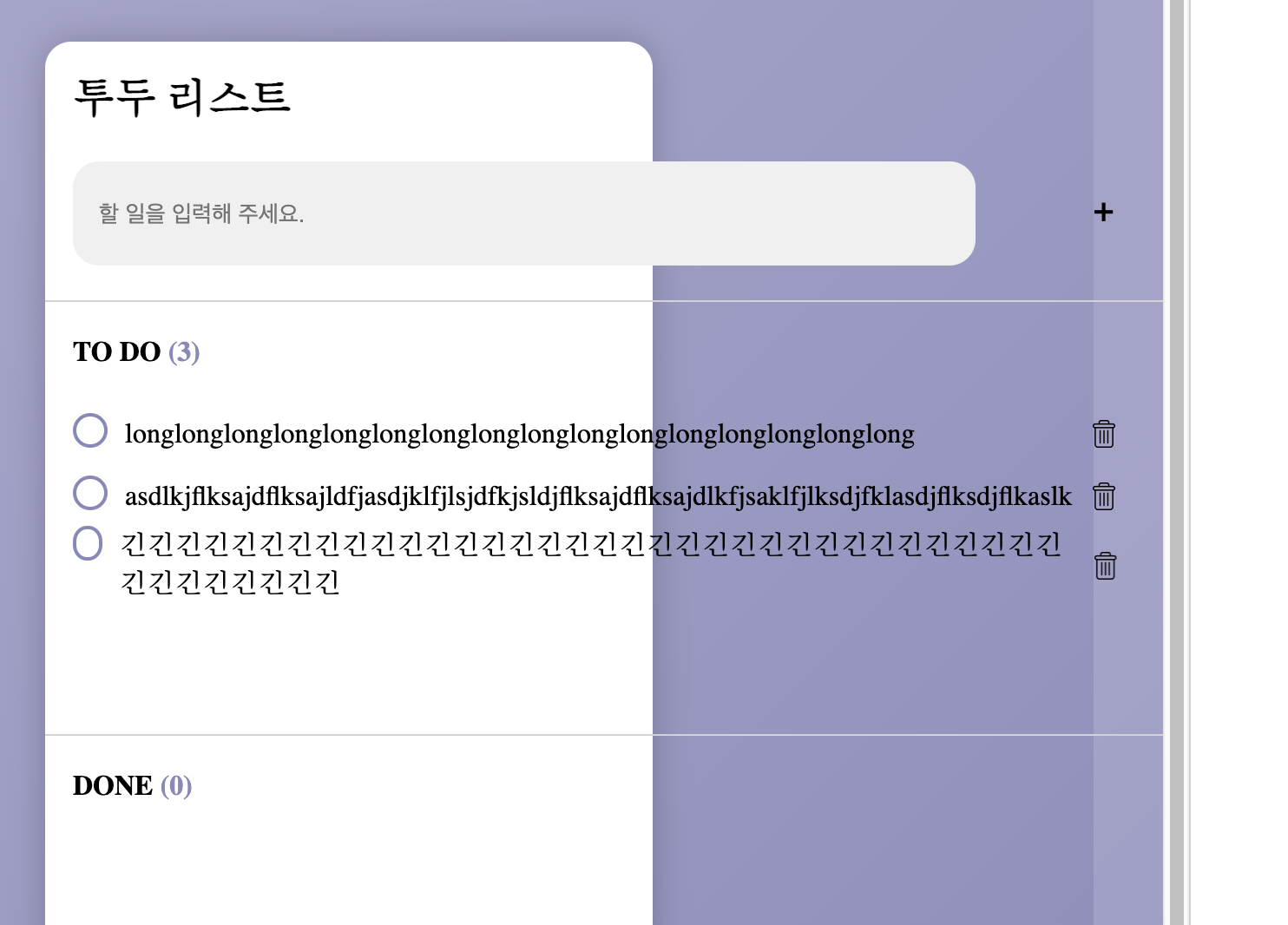
입력이 길어지면 라디오 버튼이 찌그러지고 화면이 깨지는 문제가 발생하는것 같습니다.
text-overflow: ellipsis;설정을 고려해 보셔도 좋을것 같습니다!
There was a problem hiding this comment.
허걱..! 크롬 환경에서 테스트하며 작업하다보니 몰랐네요. 항상 다른 브라우저에서도 확인을 해보아야겠습니다. 꼼꼼하게 체크해주셔서 감사합니다!!
| }; | ||
|
|
||
| /*아이템 생성하기 함수*/ | ||
| const createTodoElement = (content, isItToDo) => { |
There was a problem hiding this comment.
isItToDo 라는 변수명이 직관적이지 않아 조금 아쉽습니다.
| const toggleTodo = () => { | ||
| if (isItToDo === 'todo') { | ||
| todoArr = todoArr.filter((v) => v !== content); | ||
| doneArr.push(content); |
There was a problem hiding this comment.
제가 C/C++ 방식의 매서드 호출을 통한 array 조작이 익숙해서, 할당 방식이 어색하게 느껴집니다.
array 조작이 할당 방식으로 이루어지는게 좋은 이유가 무엇인지 알려주실 수 있을까요?
동일한 맥락으로 가령 array의 특정 원소 1개를 삭제하는 과정이 필요할때 findIndex로 해당 원소의 위치를 찾고 splice로 원소를 삭제하는것 보다 filter를 사용해서 특정 조건을 만족하는 원소를 제외한 나머지 모든 원소를 배열에 재할당 하는 방법을 지향해야 할까요?
// 1번 방법
const keyToDel = items.findIndex(<조건>);
if (keyToDel !== -1) {
    items.splice(keyToDel, 1);
}
// 2번 방법
items = items.filter(<조건>);| toast.innerText = string; | ||
| }; | ||
|
|
||
| window.onload = getLocalStorage(); |
There was a problem hiding this comment.
onload 오버로딩까지 덕분에 공부할 수 있었습니다. 감사합니다~!

 jhj2713
left a comment
jhj2713
left a comment
jhj2713
left a comment
There was a problem hiding this comment.
안녕하세요! 코드리뷰 파트너 주효정입니다:smile:
실행해보면서 생각도 못했던 부분들을 세세하게 구현해두신 걸 보고 많이 감탄했습니다.. 시맨틱 태그부터 토스트 메시지까지, 코드보면서 많이 배웠습니다:thumbsup: 다른 분들이 좋은 말씀 많이 남겨주셔서 저는 보고 인상깊었던 부분만 짧게,, 남겨봤습니다!
| </head> | ||
| <body> | ||
| <main> | ||
| <section> |
There was a problem hiding this comment.
저도 시맨틱 태그 잘 활용하면서 코드 짜야할 것 같네요.. 배워갑니다!!
|
|
||
| //엔터키로 추가 가능 | ||
| const enterPush = () => { | ||
| if (window.event.keyCode == 13) { |
There was a problem hiding this comment.
form으로 enter 처리하지 않고 keyCode로 처리하는 방법은 생각 못해봤던 부분이네요!
| transform: translateY(-1px); | ||
| } | ||
| /* 완료된 할일엔 동그라미 채우기 */ | ||
| .done > .item-content-box > .radio-button { |
There was a problem hiding this comment.
radio-button처럼 구현한 부분 아기자기하고 좋은 것 같네요~!

 poodlepoodle
left a comment
poodlepoodle
left a comment
poodlepoodle
left a comment
There was a problem hiding this comment.
안녕하세요 규진님!! CEOS 15기 프론트로 함께 활동하게 된 최어진입니다ㅎㅎ
규진님은 이번 스터디에서 코드 리뷰 파트너는 아니셨지만,
사실 제가 localStorage를 포함한 몇 가지 기능을 구현할려고 마지막에 애썼을 때
규진님께서 작성하신 코드의 방식을 많이 참고해서 감사 인사 드리러 왔습니다ㅎㅎ
앞으로 함께 활동하면서 규진님께 많은 부분 배우게 될 것 같습니다ㅎㅎ
새싹같은 저에게 아낌없는 햇살 뿌려 주세요...!! ☀️☀️☀️☀️
| background-color: #fff; | ||
| border-radius: 15px; | ||
| box-shadow: rgba(0, 0, 0, 0.2) 0 0 20px; | ||
| display: grid; |
6 participants


안녕하세요 한규진입니다!!😁
자바스크립트는 늘 새롭고.. CSS는 늘 어렵습니다.. 디자인은 크게 바꾸지 않은 선에서 조금씩 제 입맛대로 해보았습니다. 전 연보라색을 좋아해요. 프리티어는 vscode 내 익스텐션으로 따로 사용하고 있습니다.
https://vanilla-todo-9yujin.vercel.app/
배열에 있는 값과 로컬스토리지에 있는 값을 항상 똑같이 유지시키면서 화면에 바로바로 그려지도록 하는게 생각보다 까다로웠습니다. 할일이 토글될때마다 DONE으로 이동하는 게 아니라 전부 지우고 새로 불러와 그려지는 방식을 선택했습니다.
추가로 사용자가 기존과 똑같은 내용의 할 일을 입력하거나, 할 일을 삭제할 때 토스트 알림을 띄우도록 해보았습니다. 아무 생각 없이 똑같은 내용을 썼을때 아무일도 일어나지 않으면 꽤 당황했을것 같습니다.
제일 어려웠던 부분은
createTodoElement()함수 내에서removeTodo함수를 만들고 사용할 때 였습니다. 요소를 생성하면서 바로 이벤트를 달았습니다. 좋은 방식인지는 잘 모르겠습니다. 알려주시면 감사하겠습니다!습관대로 화살표함수로 만들어서 사용하려고 하니 this가 제대로 전달되지 않았던 경험이 있었습니다. 화살표 함수는 일반함수와 가리키는 this가 다르다는걸 알았습니다. 근데 나중에 보니 굳이 this를 사용하지 않아도
createElement()로 만들었던 변수를 그대로 사용할 수 있었더군요..또
before선택자를 이용해서 보통 투두 앱에 있는 체크 버튼처럼 만들고자 했었는데,before선택자로 만들어진 것에는 이벤트를 달 방법을 못찾아서 방법을 바꿨습니다.. 될 줄 알았는데 약간 아쉽네요.Key Questions
1. DOM은 무엇인가요?
2. HTML (tag) Element를 JavaScript로 생성하는 방법은 어떤 것이 있고, 어떤 방법이 가장 적합할까요?
createElement()로 요소를 생성하고appendChild()로 추가할 수 있습니다. 선택한 요소의 자식요소로 들어가게 됩니다.3. Semantic tag에는 어떤 것이 있으며, 이를 사용하는 이유는 무엇일까요?
<header>,<footer>,<section>등이 있습니다. 무의미한 div에 class를 붙여서 사용하는것이 아니라 자체로 의미가 있는 태그를 말합니다. 웹사이트에 대한 접근성과 코드의 가독성을 위해 사용합니다. 앞으로 열심히 사용하도록 노력해야겠군요..!4. Flexbox Layout은 무엇이며, 어떻게 사용하나요?
flex-direction으로 주 축을 설정하고,justify-content와align-items을 주로 이용해 레이아웃을 구성했습니다. 찾아보니 제가 몰라서 사용하지 않았던 수많은 기능들이 있었네요. Flexbox Froggy 끝까지 한번 해봐야겠습니다.5. JavaScript가 다른 언어들에 비해 주목할 만한 점에는 어떤 것들이 있나요?
6. 코드에서 주석을 다는 바람직한 방법은 무엇일까요?
뜨거운 리뷰와 일침.. 부탁드립니다😁