Hello! If you’re enjoying the script and feel like supporting the work that went into it, consider buying me a coffee ☕ https://buymeacoffee.com/core_scripts
An advanced FiveM GPS Marker script with multi-framework support (QBCore, ESX, ESX Extended, Qbox) featuring device-based storage where each GPS device has its own unique ID and saved locations.
- ✅ QBCore - Full support
- ✅ ESX - Full support (works with both old ESX and ESX Legacy)
- ✅ ESX Extended - Full support
- ✅ Qbox - Full support
Easy Configuration: Just set Config.Framework in config.lua to your framework!
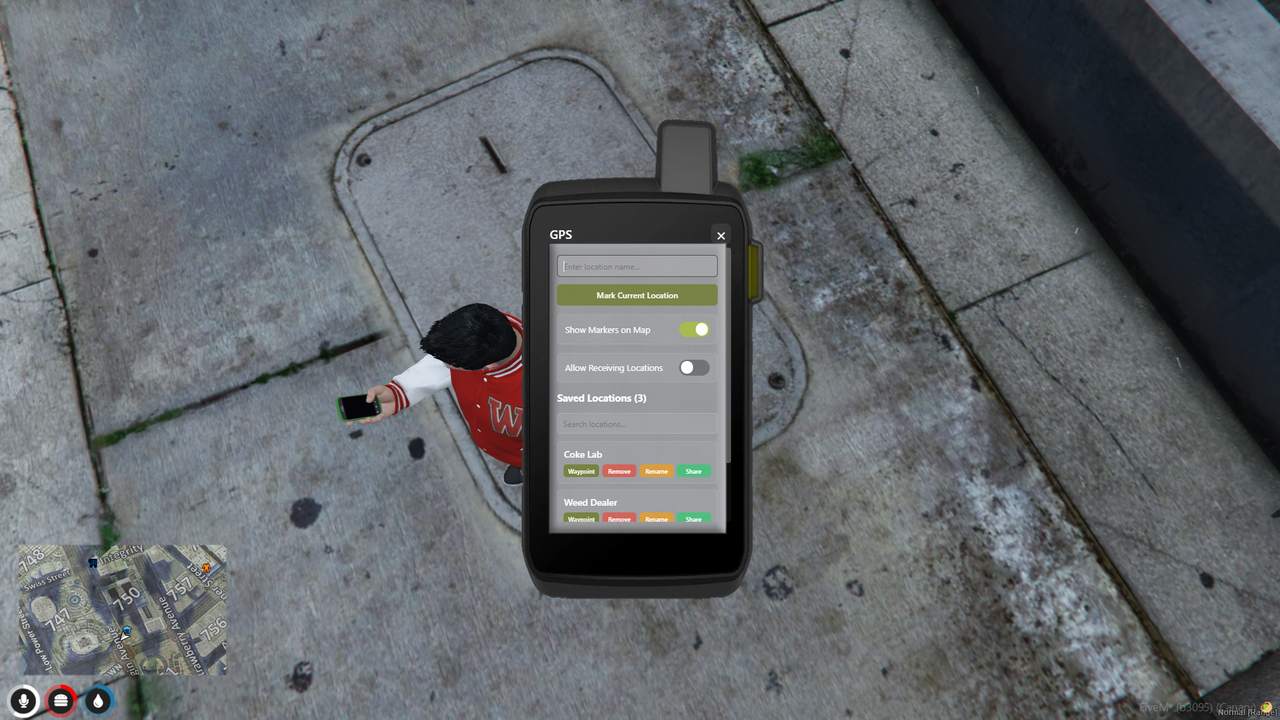
- Unique GPS IDs - Each GPS device has a unique identifier in the format:
GPS-PLAYERNAME-XXXXXXXX- Example:
GPS-JOHN_DOE-A3K9X2M7 - Player name is automatically included for easy identification
- 8 random alphanumeric characters ensure uniqueness
- Example:
- Data Saved to Device - Markers are saved to the GPS device itself, not the player
- Multiple GPS Devices - Players can own multiple GPS devices with different markers on each
- Device Trading - GPS devices can be traded between players (with their saved locations)
Mark Current Location - Save your current position with custom labels Visual Map Markers - See all markers saved on your GPS device on the map Toggle Markers - Show/hide all markers with one click Set Waypoints - Quickly navigate to saved locations Remove Markers - Delete markers with confirmation dialog Persistent Storage - All data saved to database via oxmysql
Share Locations - Share specific markers with other players Accept/Decline System - Receivers get a popup to accept or decline shared locations Location Preview - See location details before accepting Smart Validation - Requires GPS device to accept shared locations
GPS Required - Markers only display when GPS device is in inventory Auto Detection - Automatically detects when GPS is added/removed Device Switching - Switching GPS devices loads that device's markers Event-Driven - No polling, uses proper inventory events
Modern UI - Clean, radio-style interface Marker Counter - Shows how many locations are saved GPS ID Display - Shows current device ID Dark Theme - Easy on the eyes Keyboard Shortcuts - ESC to close, Enter to submit
One of the following frameworks: - QBCore Framework - ESX Legacy - Qbox
Mandatiory for all frameworks - oxmysql - Required for all frameworks
-
Add the resource
- Copy the
core_gps_advancedfolder to your server'sresourcesdirectory
- Copy the
-
Set your framework in
config.lua:Config.Framework = 'qbcore' -- Options: 'qbcore', 'esx', 'qbox'
-
Import the SQL file to your database:
- Run
install/core_gps_advanced.sql - Works for all frameworks (QBCore, ESX, Qbox)
- Run
-
Add the item to your framework - See detailed instructions in
install/INSTALLATION.mdorinstall/item_examples.lua -
Add to server.cfg:
ensure oxmysql
ensure core_gps_advanced
-
Restart your server and enjoy!
For ESX: See install/item_examples.lua for ESX-specific configuration (differs between ESX Legacy and older versions)
For Qbox: Add to qbx-core/shared/items.lua (requires ox_inventory)
Important: The item MUST be set as unique = true (or stack = false for ox_inventory) to support metadata (GPS ID storage).
All frameworks support:
/givegpsa - Give yourself a GPS device (Admin only)
The script includes an automatic version checker that runs when the server starts.
Enjoy your advanced GPS system! 📍🗺️
- Framework: QB-Core
- Developer: ChrisNewmanDev