For the latest version, please visit: https://github.com/CryptoGnome/aster_lick_hunter_node



This bot is completely free and open-source! If you find it useful and want to support ongoing development, please consider creating your Aster DEX account using our referral link:
By using this referral link for your new account, you help fund continued improvements and new features while getting the exact same trading conditions. Thank you for your support!
The Aster Liquidation Hunter Bot is an automated trading system that:
- 🔍 Monitors cryptocurrency liquidations in real-time
- 📊 Analyzes market conditions automatically
- 💰 Executes profitable counter-trades
- 🛡️ Manages risk with automated stop-loss and take-profit
Think of it as your automated trading assistant that watches the market 24/7 and trades when big liquidations happen!
If you're new to programming or trading bots, we have a special guide just for you: 👉 CLICK HERE FOR BEGINNER'S GUIDE 👈
# 1. Clone the repository
git clone https://github.com/CryptoGnome/aster_lick_hunter.git
cd aster_lick_hunter

# 2. Install Python dependencies
pip install -r requirements.txt

# 3. Set up your API keys
cp .env.example .env
# Edit .env with your API credentials

# 4. Run the bot
python launcher.py

# 5. Open dashboard
# Navigate to http://localhost:5000
- Real-time Liquidation Monitoring - Connects directly to Aster DEX liquidation stream
- Smart Trade Execution - Analyzes order books for optimal entry prices
- Volume-Based Triggers - Only trades when liquidations exceed your thresholds
- Opposite Trading - Takes the opposite side of liquidations (contrarian strategy)
- Automated Stop-Loss & Take-Profit - Every trade is protected automatically
- Position Size Limits - Never risk more than you configure
- Maximum Exposure Control - Limits total capital at risk
- Hedge Mode Support - Manage LONG and SHORT positions separately
- Unified TP/SL Management - Centralized control of all protective orders
- Real-time Price Monitoring - WebSocket-based instant price tracking
- Instant Profit Capture - Closes positions immediately when profit targets are exceeded
- Thread-Safe Operations - Re-entrant lock protection for reliability
- Dynamic Position Scaling - Automatically splits positions into tranches
- Loss-Based Triggers - Creates new tranches at configurable loss thresholds
- Profit Optimization - Merges profitable tranches to maximize capital efficiency
- Risk Limiting - Maximum tranches per symbol/side for controlled exposure
- Batch Order Submission - Combines multiple orders for efficiency
- Liquidation Buffering - Collects liquidations before processing
- API Rate Optimization - Reduces API calls by up to 70%
- Configurable Windows - Adjust batch timing to your needs
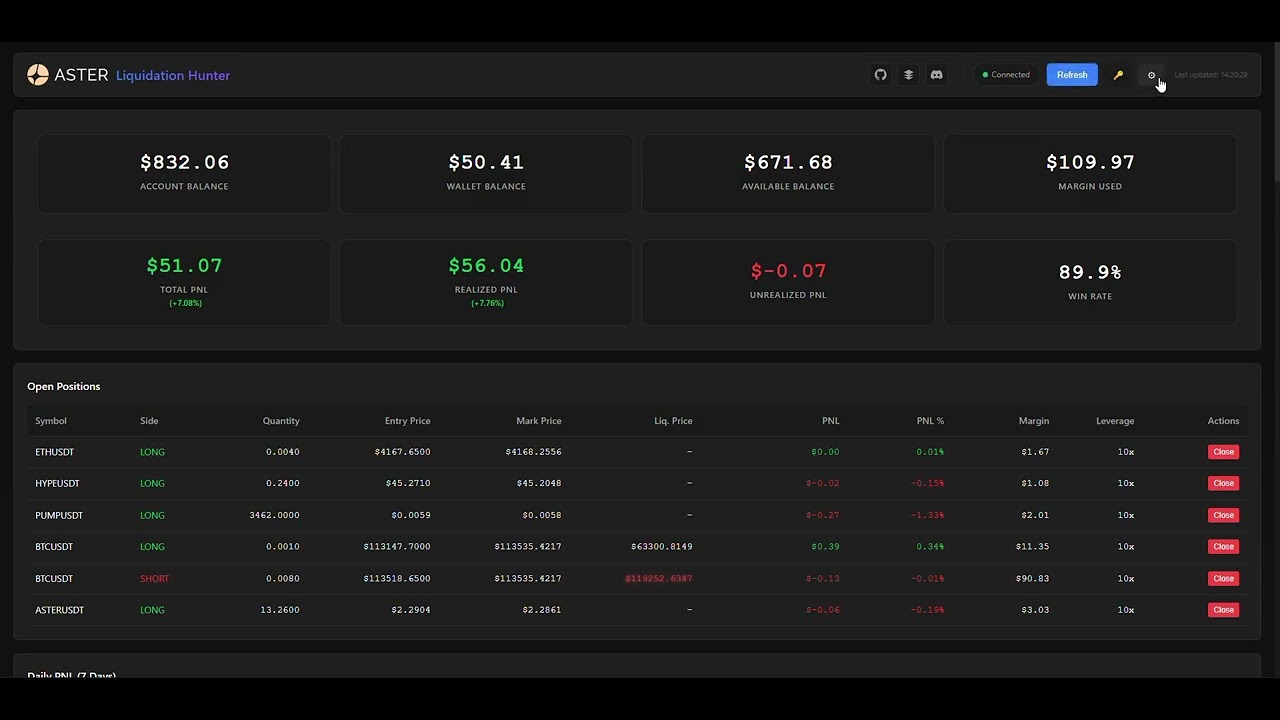
- Real-time Updates - Live position and P&L tracking
- Trade History - Complete record of all trades
- Performance Analytics - Charts and statistics
- Easy Configuration - Change settings without editing files
- Mobile Responsive - Monitor from any device
{
  "globals": {
    "simulate_only": true,              // START IN SIMULATION MODE!
    "volume_window_sec": 60,            // Time window for volume calculation
    "max_total_exposure_usdt": 1000,    // Maximum total risk
    "use_position_monitor": true,       // Enable advanced position management
    "instant_tp_enabled": true          // Enable instant profit capture
  },
  "symbols": {
    "BTCUSDT": {
      "volume_threshold_long": 100000,  // Min liquidation volume to trade
      "leverage": 10,                   // Trading leverage
      "trade_value_usdt": 100,         // Position size
      "take_profit_pct": 2.0,          // Take profit at 2%
      "stop_loss_pct": 1.0             // Stop loss at 1%
    }
  }
}⚠️ ALWAYS start withsimulate_only: true- 💡 Start with small
trade_value_usdt(like $10-20) - 📊 Monitor for a few days before going live
- 🎯 Adjust
volume_thresholdbased on market activity
- 📖 Quickstart Guide - Get started in 5 minutes
- 🔧 Configuration Guide - Detailed settings explanation
- ❓ Troubleshooting - Common issues and solutions
- 📊 Trading Strategies - Optimize your settings
- 🏗️ Architecture Overview - System design
- 🔌 API Reference - Endpoint documentation
- 🧪 Testing Guide - Run and write tests
- 🤝 Contributing - How to contribute
- 🎯 Position Monitor - Advanced position management
- 📈 Tranche System - Dynamic position scaling
- ⚡ Performance Tuning - Optimize speed and efficiency
- OS: Windows 10/11, macOS 10.14+, Ubuntu 20.04+
- Python: 3.8 or higher
- RAM: 2GB minimum, 4GB recommended
- Storage: 500MB free space
- Internet: Stable broadband connection
- VPS/Cloud: AWS, DigitalOcean, or similar for 24/7 operation
- Python: 3.10 or 3.11 for best performance
- RAM: 4GB or more
- CPU: 2+ cores
graph TD
    A[Aster DEX WebSocket] --> B[Liquidation Stream]
    B --> C[Volume Analyzer]
    C --> D{Threshold Met?}
    D -->|Yes| E[Order Placement]
    D -->|No| F[Continue Monitoring]
    E --> G[Position Monitor]
    G --> H[TP/SL Management]
    H --> I[Dashboard Updates]

    J[User Data Stream] --> G
    K[Database Layer] --> L[Trade History]
    K --> M[Performance Metrics]
    L --> I
    M --> I
- 🔍 Monitor - Bot watches for liquidation events 24/7
- 📊 Analyze - Calculates total liquidation volume in time window
- ✅ Trigger - When volume exceeds threshold, prepare to trade
- 🎯 Execute - Place opposite trade (SHORT if longs liquidated)
- 🛡️ Protect - Automatically set stop-loss and take-profit
- 📈 Manage - Monitor position and adjust as needed
- 💰 Profit - Close at profit target or manage risk
🔴 Large Liquidation Detected:
├── Symbol: BTCUSDT
├── Type: LONG positions liquidated
├── Volume: $150,000
└── Action: Preparing SHORT trade

📊 Volume Analysis:
├── 60-second window: $250,000
├── Threshold: $100,000
└── Decision: ✅ EXECUTE TRADE

💼 Trade Execution:
├── Side: SHORT (opposite of liquidation)
├── Entry: $65,432 (0.1% below market)
├── Size: $1,000 (100 USDT × 10 leverage)
├── Take Profit: $64,123 (2% profit)
├── Stop Loss: $66,086 (1% loss)
└── Status: ✅ Orders Placed
IMPORTANT: Cryptocurrency trading carries significant risk!
- 📉 You can lose all your invested capital
- 🎰 Past performance doesn't guarantee future results
- 📚 Understand the strategy before using real money
- 💵 Never invest more than you can afford to lose
- 🧪 ALWAYS test in simulation mode first
- 👀 Monitor the bot regularly, don't "set and forget"
- 💬 Discord Community - Get help and share strategies
- 🐛 Report Issues - Bug reports
- 💡 Discussions - Feature requests
- 📚 Wiki - Detailed guides
We welcome contributions! See our Contributing Guide for details.
- Response Time: < 100ms order placement
- WebSocket Latency: < 50ms processing
- Memory Usage: ~150-200MB typical
- CPU Usage: < 5% on modern systems
- Results vary based on market conditions and settings
- Past performance does not guarantee future results
- Always monitor and adjust your strategy
- 🔐 API credentials stored in
.envfile (never in code) - 🛡️ HMAC SHA256 signature authentication
- ⚡ Rate limit protection with smart buffering
- 🔍 Pre-trade validation checks
- 💾 Database backups and recovery
- Use API keys with trading permissions only
- Enable IP whitelist on Aster DEX
- Regularly update the bot
- Monitor for unusual activity
- Keep your system secure and updated
See CHANGELOG.md for version history and updates.
This project is licensed under the MIT License - see LICENSE for details.
- Aster DEX - For providing the trading platform and API
- Community Contributors - For testing and improvements
- Open Source Libraries - Making this project possible
- 🏠 Homepage
- 📖 Documentation
- 💬 Discord
- 🐛 Issues
- ⭐ Star on GitHub
⚡ Start in Simulation Mode | 📚 Read the Docs | 💬 Join Discord | 🚀 Trade Safely!
Made with ❤️ by the Aster Liquidation Hunter Team

