A custom-built drag-and-drop engine for reordering and moving items across lists in React Native. Built from scratch because existing third-party drag-and-drop libraries are outdated, relying on the old React Native architecture and deprecated APIs that no longer align with the modern ecosystem.
- @elham-en/drag-n-drop-engine
Third-party drag-and-drop libraries for React Native have not kept pace with the platform. Most still target the legacy architecture (Bridge-based) and depend on older versions of Reanimated, Gesture Handler, and lack support for the new worklets threading model. This leads to:
- Dropped frames during drag — gesture callbacks crossing the JS bridge introduce latency that breaks smooth 60/120fps tracking.
- Stale layout data — libraries that measure positions on the JS thread get out-of-date values when the UI thread has already moved on.
- Incompatibility with New Architecture — the Bridgeless mode, Fabric renderer, and TurboModules require libraries to adopt new threading patterns that most drag-and-drop solutions haven't adopted yet.
This engine was built to run entirely on the New Architecture with the latest stable releases of its core dependencies.
npm install @elham-en/drag-n-drop-engineInstall these alongside the library:
npm install react-native-reanimated react-native-gesture-handler react-native-worklets expo-haptics| Package | Minimum Version |
|---|---|
react |
>=19.0.0 |
react-native |
>=0.76.0 |
react-native-reanimated |
>=4.0.0 |
react-native-gesture-handler |
>=2.20.0 |
react-native-worklets |
>=0.4.0 |
expo-haptics |
>=15.0.0 |
You must also wrap your app root with GestureHandlerRootView from react-native-gesture-handler and follow the Reanimated setup guide.
import React, { useState } from "react";
import { View } from "react-native";
import {
  DragProvider,
  DragList,
  DragGhost,
  DragScrollView,
  DragItem,
} from "@elham-en/drag-n-drop-engine";

// Your items must satisfy the DragItem shape
type Task = DragItem; // or extend it: type Task = DragItem & { priority: string }

const INITIAL_TASKS: Task[] = [
  { taskId: "t1", listId: "list1", order: 0, title: "Buy groceries", description: "Milk and eggs" },
  { taskId: "t2", listId: "list1", order: 1, title: "Team standup", description: "9am daily sync" },
  { taskId: "t3", listId: "list2", order: 0, title: "Write tests",  description: "Cover main components" },
];

export default function App() {
  const [tasks, setTasks] = useState<Task[]>(INITIAL_TASKS);

  // Filter and sort tasks for a given list
  function getTasksForList(listId: string) {
    return tasks
      .filter((t) => t.listId === listId)
      .sort((a, b) => a.order - b.order);
  }

  return (
    // DragProvider owns all drag state — pass setTasks so it can commit drops
    <DragProvider setTasks={setTasks}>
      <View style={{ flex: 1 }}>

        {/* DragScrollView wires up the scroll ref and auto-scroll logic */}
        <DragScrollView>
          <DragList
            listId="list1"
            listName="Inbox"
            listIconLeft={<Text>📥</Text>}
            tasks={getTasksForList("list1")}
          />
          <DragList
            listId="list2"
            listName="Today"
            listIconLeft={<Text>📅</Text>}
            tasks={getTasksForList("list2")}
          />
        </DragScrollView>

        {/* DragGhost must be outside DragScrollView so it floats above everything */}
        <DragGhost />

      </View>
    </DragProvider>
  );
}Wraps the screen and creates all shared drag state. Required parent for all other components.
| Prop | Type | Required | Description |
|---|---|---|---|
setTasks |
React.Dispatch<React.SetStateAction<T[]>> |
Yes | Called after a drop to commit the new item order into React state |
children |
React.ReactNode |
Yes | Screen content |
Generic over T extends DragItem — pass your extended item type to setTasks for full type safety.
A collapsible list container that accepts draggable items.
| Prop | Type | Required | Description |
|---|---|---|---|
listId |
string |
Yes | Unique identifier for this list |
listName |
string |
Yes | Display name in the list header |
listIconLeft |
React.ReactNode |
Yes | Icon element rendered to the left of the list name |
tasks |
DragItem[] |
Yes | Pre-filtered and sorted items for this list |
A pre-wired ScrollView that connects the scroll ref, scroll enabled state, and current scroll offset to the drag context. Wrap your DragList components inside this.
No props required — it reads everything it needs from DragProvider.
The floating visual copy of the dragged item that follows the finger. Renders above all other content.
Place this outside DragScrollView (but inside DragProvider) so it is never clipped.
No props required.
The minimum shape your items must satisfy:
type DragItem = {
  taskId: string;      // unique ID
  listId: string;      // which list this item belongs to
  order: number;       // position within the list — used for sorting
  title: string;       // displayed in the item row and ghost
  description: string; // displayed below the title
};
You can extend it with additional fields:
type MyTask = DragItem & {
  priority: "low" | "medium" | "high";
  dueDate: string;
};| Dependency | Version | Role |
|---|---|---|
| React Native | 0.81 | New Architecture (Bridgeless, Fabric) |
| Reanimated 4 | ~4.1.1 | Shared values, useAnimatedStyle, measure() on UI thread |
| Gesture Handler | ~2.28.0 | Pan gesture with long-press activation, simultaneous gesture handling |
| React Native Worklets | 0.5.1 | scheduleOnUI / scheduleOnRN for cross-thread communication |
| Expo Haptics | ~15.0.8 | Tactile feedback on pickup, slot change, and drop |
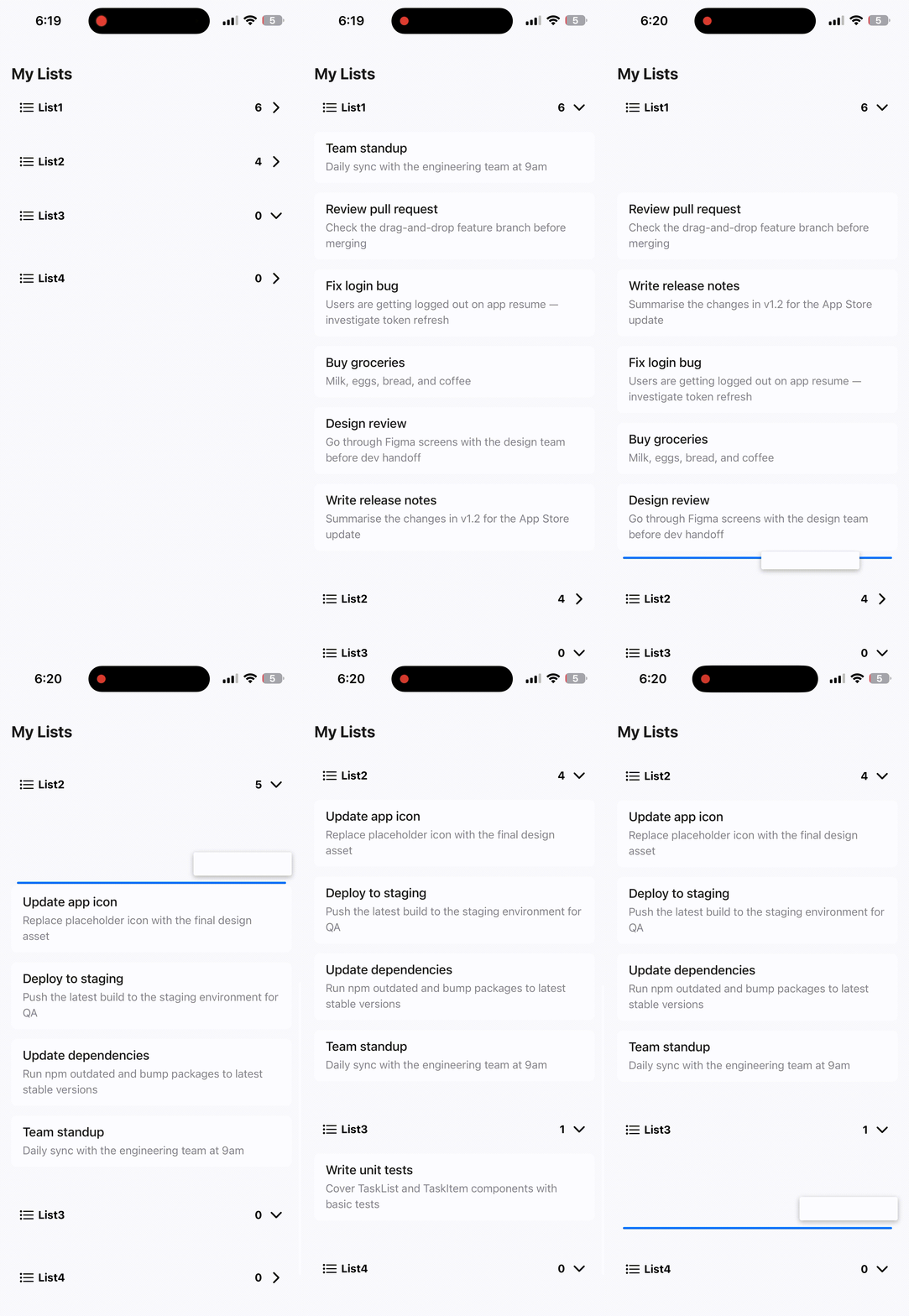
- Within-list reorder — long-press an item, drag it to a new position in the same list, and drop it. The list reorders instantly.
- Cross-list move — drag an item from one list and drop it into any other list at any position.
- Visual drop indicator — a blue insertion line appears at the exact gap where the item will land, updating in real-time as you drag.
- Floating ghost — a scaled-down copy of the dragged item follows the finger, rendered above all other content so it's never clipped by scroll containers.
- Auto-scroll — when dragging near the top or bottom edge of the ScrollView, the list scrolls automatically at a speed proportional to how close the finger is to the edge.
- Haptic feedback — four distinct haptic responses: medium impact on pickup, selection tick on slot change, success notification on valid drop, warning notification on invalid drop.
- Collapsible lists — each list can be expanded or collapsed with a smooth height animation. The drag engine respects collapsed state and only targets expanded lists.
- Dynamic list sizing — list containers grow and shrink automatically as items are added or removed via drag.
- Scroll-corrected hit-testing — layout measurements are captured with the scroll offset at measure time, and the hit-test worklet corrects for any scroll that happened since, so positions are always accurate.
The engine is split into three layers:
A React context that holds all Reanimated shared values: drag identity, ghost position, drop target tracking, scroll control, and the layout registry. Every component reads from and writes to these values during a drag.
Each task item owns a Pan gesture (activated after a 400ms long-press). All gesture callbacks (onBegin, onStart, onUpdate, onEnd, onFinalize) run as worklets on the UI thread for zero-latency tracking. The hit-test function runs every frame during drag — it walks the layout registry, corrects for scroll offset, and determines which list and slot the finger is over.
Both items and lists register their absolute screen positions into shared value arrays via scheduleOnUI + measure(). This runs on the UI thread so measurements are always frame-accurate. The registry is the single source of truth for hit-testing.
UI Thread (worklets)          RN/JS Thread
├── Gesture callbacks         ├── commitDrop (React setState)
├── Hit-test every frame      ├── Haptic feedback calls
├── Ghost position updates    └── Layout registration triggers
├── Auto-scroll via scrollTo
└── measure() for layout
scheduleOnRN bridges from UI to JS thread for state commits and haptics. scheduleOnUI bridges from JS to UI thread for layout measurements. No legacy bridge involved.
- Long-press (400ms) activates the drag. The item's position is measured, the ghost is placed over it, and the item becomes invisible.
- Drag — every frame, the ghost follows the finger, the hit-test worklet determines the target list and insertion slot, and the insertion line updates.
- Drop — if the finger is over a valid slot,
commitDropis called on the JS thread. It updates React state in a singlesetTaskscall, handling both same-list reorder and cross-list move. If the drop is invalid, the ghost springs back to its origin. - Cleanup — scroll is re-enabled, drop indicators are cleared, and the item's opacity is restored.
Contributions are welcome! This project is open source under the MIT License.
- Fork the repository
- Create a branch for your feature or fix
git checkout -b feature/your-feature-name
- Make your changes — follow the existing code style and comment conventions
- Test on a real device — drag-and-drop behaviour can differ between simulators and physical devices, so always verify on hardware
- Commit with a clear message describing what changed and why
- Push your branch and open a Pull Request against
main
- Keep it simple — avoid over-engineering. Only add what is needed for the feature or fix.
- Comment your code — every function and significant variable should have a short comment explaining what it does and why.
- UI thread awareness — gesture callbacks and hit-test logic run as worklets. Any new logic in these paths must use the
"worklet"directive and avoid JS-thread APIs. UsescheduleOnRNto call JS-thread functions from worklets. - Test across lists — verify within-list reorder, cross-list move, empty list drops, and auto-scroll behaviour.
- No breaking changes without discussion — if your change affects the public API or drag behaviour, open an issue first to discuss the approach.
- Drag handle support (drag from a specific grip icon instead of long-press anywhere)
- Animated item reflow (items slide apart to make room for the dragged item)
- Horizontal list support
- Accessibility improvements (screen reader announcements during drag)
- Performance profiling and optimisation for very long lists (100+ items)
This project is licensed under the MIT License.