




What.can.OpenStoryline.do.mp4
FireRed-OpenStoryline turns complex video creation into natural, intuitive conversations. Designed with both accessibility and enterprise-grade reliability in mind, FireRed-OpenStoryline makes video creation easy and friendly to beginners and creative enthusiasts alike.
Deriving from the saying "A single spark can start a prairie fire", the name FireRed represents our vision: to spread our SOTA capabilities—honed in real-world scenarios—like sparks across the wilderness, igniting the imagination of developers worldwide to reshape the future of AI together.
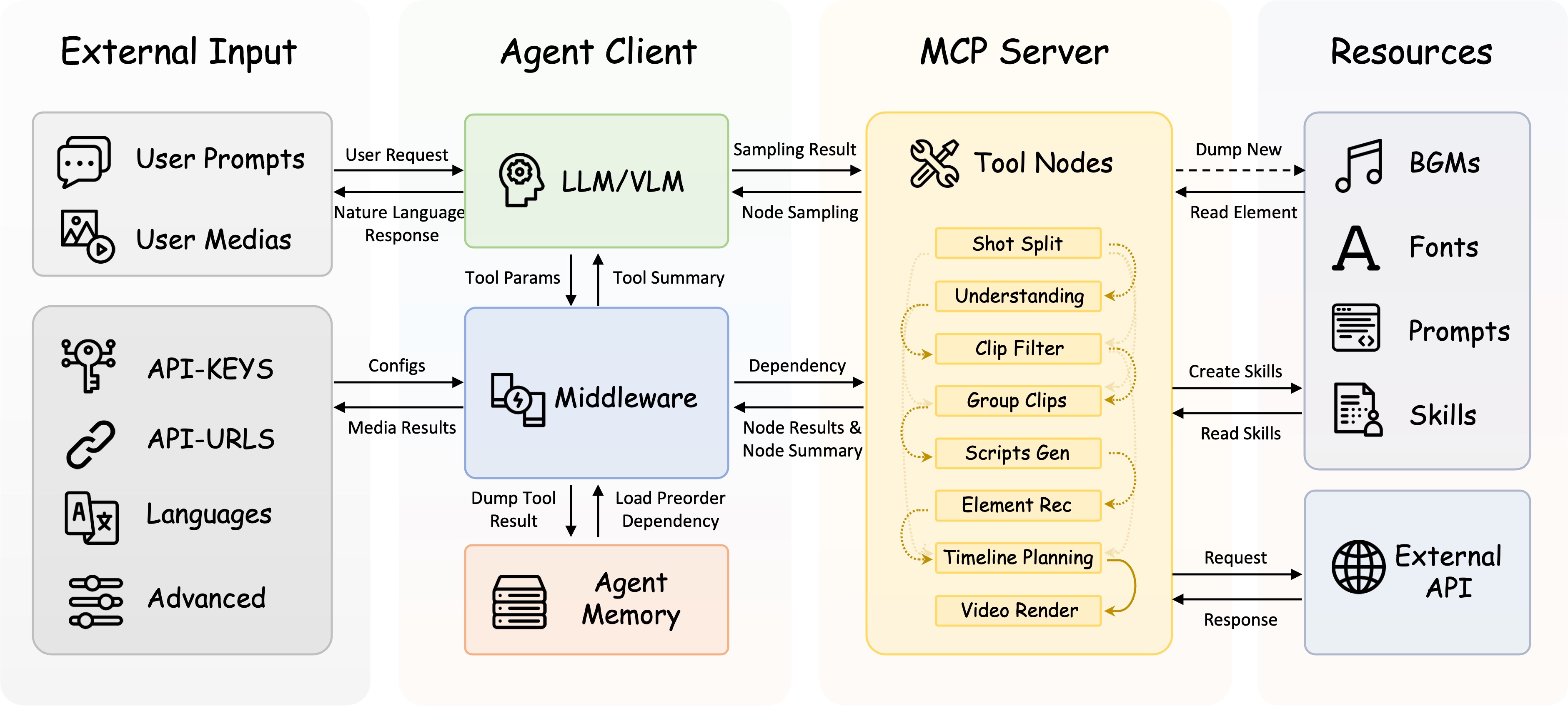
- 🌐 Smart Media Search & Organization: Automatically searches online and downloads images and video clips that match your requirements. Performs clip segmentation and content understanding based on your thematic media.
- ✍️ Intelligent Script Generation: Combines user themes, visual understanding, and emotion recognition to automatically construct storylines and context-aware narration. Features built-in Few-shot style transfer capabilities, allowing users to define specific copy styles (e.g., product reviews, casual vlogs) via reference text, achieving precise replication of tone, rhythm, and sentence structure.
- 🎵 Intelligent Music, Voiceover & Font Recommendations: Supports personal playlist imports and auto-recommends BGM based on content and mood, featuring smart beat-syncing. Simply describe the desired tone—e.g., "Restrained," "Emotional," or "Documentary-style"—and the system matches suitable voiceovers and fonts to ensure a cohesive aesthetic.
- 💬 Conversational Refinement: Rapidly cut, swap, or resequence clips. Edit scripts and fine-tune visual details—including color, font, stroke, and position. All edits are performed exclusively via natural language prompts with immediate results.
- ⚡Editing Skill Archiving: Save your complete editing workflow as a custom Skill. Simply swap the media and apply the corresponding Skill to instantly replicate the style, enabling efficient batch creation.
| Zhongcao Style | Humorous Style | Product Picks | Artistic Style |
0001.mp4 |
0002.mp4 |
0003.mp4 |
0004.mp4 |
| Unboxing | Talking Pet | Travel Vlog | Year-in-Review |
0005.mp4 |
0006.mp4 |
0007.mp4 |
0008.mp4 |
🎨 Effects Note: Due to licensing restrictions on open-source assets, the elements (fonts/music) in the first row represent only basic effects. We highly recommend following the Custom Asset Library Tutorial to unlock commercial-grade fonts, music, and VFX for significantly better video quality.
⚠️ Quality Note: To save space in the README, the demo videos are heavily compressed. The actual output retains the original resolution by default and supports custom dimensions.
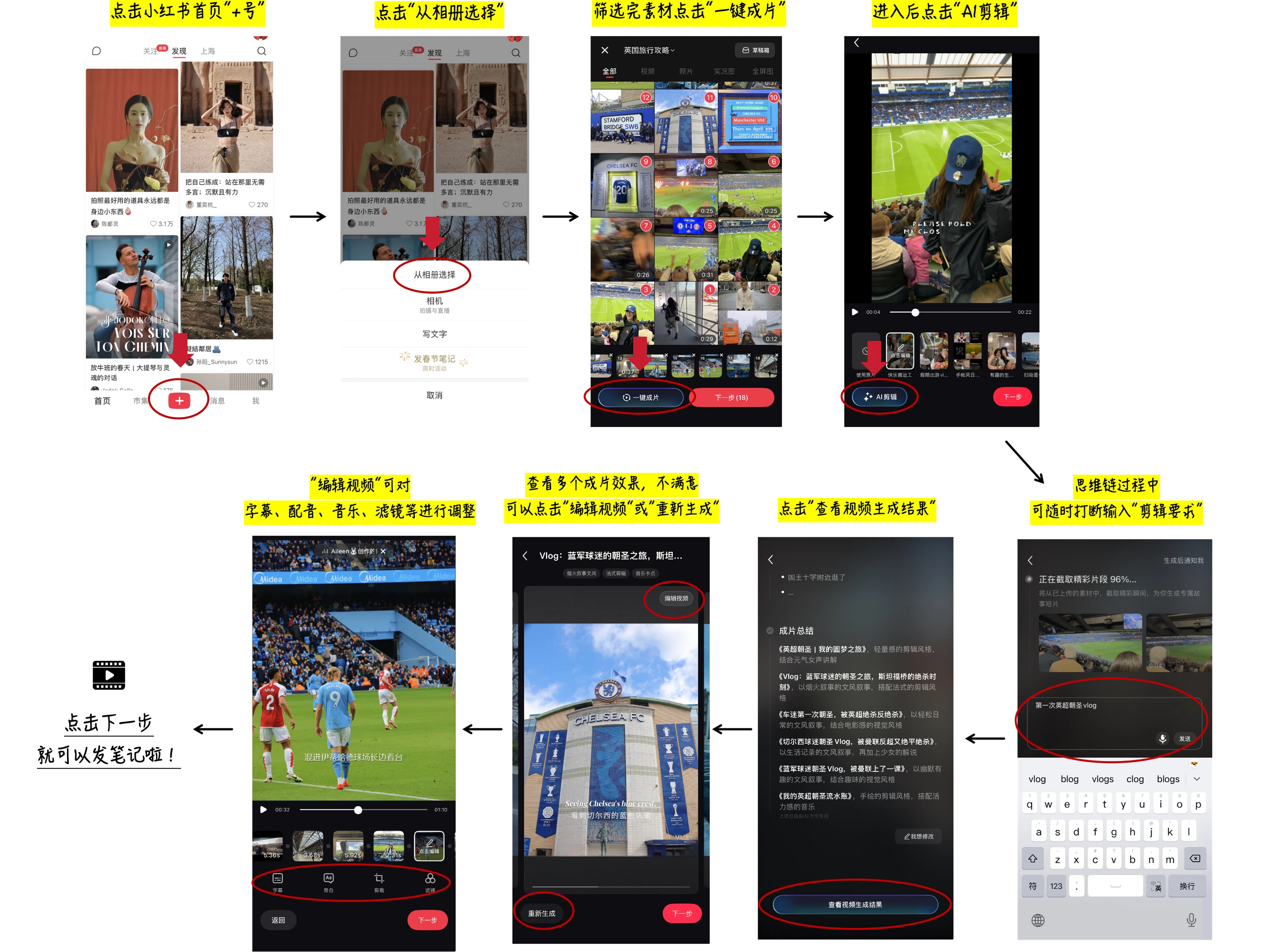
In the Demo: The first row shows default open-source assets (Restricted Mode); the second row shows Xiaohongshu App "AI Clip" asset library effects. 👉 Click to view tutorial
⚖️ Disclaimer: User footage and brand logos shown in the demos are for technical demonstration purposes only. Ownership belongs to the original creators; redistribution is strictly prohibited. Please contact us for copyright concerns.
# If git is not installed, refer to the official website for installation: https://git-scm.com/install/
# Or manually download the code
git clone https://github.com/FireRedTeam/FireRed-OpenStoryline.git
cd FireRed-OpenStoryline
Install Conda according to the official guide (Miniforge is recommended, it is suggested to check the option to automatically configure environment variables during installation): https://docs.conda.io/projects/conda/en/latest/user-guide/install/index.html
# Recommended python>=3.11
conda create -n storyline python=3.11
conda activate storyline
sh build_env.sh
-
Step 1: Install wget (if not already installed)
# MacOS: If you haven't installed Homebrew yet, please install it first: https://brew.sh/ brew install wget # Ubuntu/Debian sudo apt-get install wget # CentOS sudo yum install wget -
Step 2: Download Resources
sh download.sh -
Step 3: Install Dependencies
pip install -r requirements.txt
-
Step 1: Prepare Directory: Create a new directory named
.storylinein the project root directory. -
Step 2: Download and Extract:
-
Download Models (models.zip) -> Extract to the
.storylinedirectory. -
Download Resources (resource.zip) -> Extract to the
resourcedirectory.
-
-
Step 3: Install Dependencies:
pip install -r requirements.txt
Note: Before starting, you need to configure the API-Key in config.toml first. For details, please refer to the documentation API-Key Configuration
PYTHONPATH=src python3 -m open_storyline.mcp.server$env:PYTHONPATH="src"; python -m open_storyline.mcp.server
-
Method 1: Command Line Interface
python cli.py
-
Method 2: Web Interface
uvicorn agent_fastapi:app --host 127.0.0.1 --port 8005
docker pull openstoryline/openstoryline:v1.0.0
docker run \
  -v $(pwd)/config.toml:/app/config.toml \
  -v $(pwd)/outputs:/app/outputs \
  -p 7860:7860 \
  openstoryline/openstoryline:v1.0.0
After starting, access the Web interface at http://127.0.0.1:7860
FireRed-OpenStoryline/
├── 🎯 src/open_storyline/           Core application
│   ├── mcp/                         🔌 Model Context Protocol
│   ├── nodes/                       🎬 Video processing nodes
│   ├── skills/                      🛠️ Agent skills library
│   ├── storage/                     💾 Agent Memory
│   ├── utils/                       🧰 Helper utilities
│   ├── agent.py                     🤖 Build Agent
│   └── config.py                    ⚙️ Configuration management
├── 📚 docs/                         Documentation
├── 🐳 Dockerfile                    Docker Configuration
├── 💬 prompts/                      LLM prompt templates
├── 🎨 resource/                     Static resources
│   ├── bgms/                        Background music library
│   ├── fonts/                       Font files
│   ├── script_templates/            Video script templates
│   └── unicode_emojis.json          Emoji list
├── 🔧 scripts/                      Utility scripts
├── 🌐 web/                          Web interface
├── 🚀 agent_fastapi.py              FastAPI server
├── 🖥️ cli.py                        Command-line interface
├── ⚙️ config.toml                   Main configuration file
├── 🚀 build_env.sh                  Environment Build Script
├── 📥 download.sh                   Resource downloader
├── 📦 requirements.txt              Runtime dependencies
└── ▶️ run.sh                        Launch script
- API Key Configuration - How to configure and manage API keys
- Usage Tutorial - Common use cases and basic operations
- FAQ - Frequently asked questions
- Add the function of voiceover type video editing.
- Add support for voice cloning
- Add more transition/filter/effects effects functions.
- Add image/video generation and editing capabilities.
- GPU-accelerated rendering and highlight selection.
This project is built upon the following excellent open-source projects:
- MoviePy - Video editing library
- FFmpeg - Multimedia framework
- LangChain - A framework that provides pre-built Agents
This project is licensed under the Apache License 2.0 - see the LICENSE file for details.