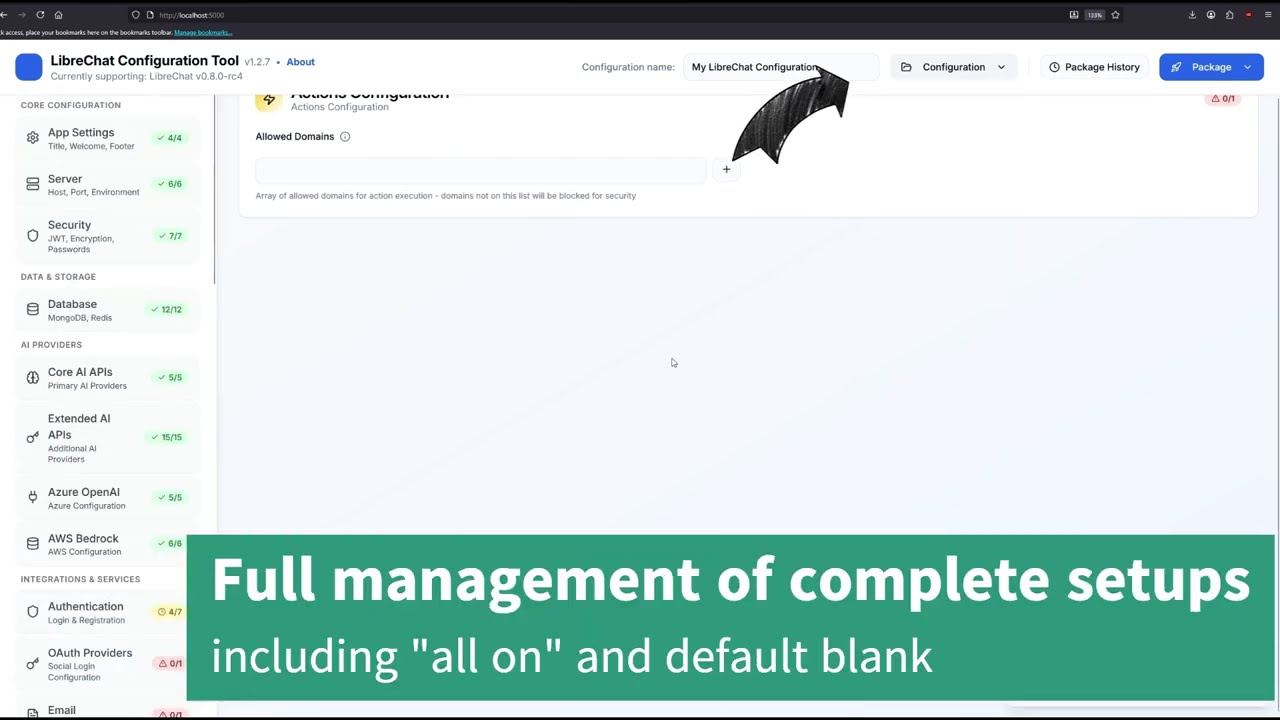



LibreChat is powerful, but configuration shouldn't require a PhD in YAML.
This tool provides a clean UI for managing 480+ LibreChat settings (100% coverage of all 176 ENV variables + 191+ YAML fields) and generates complete deployment packages. No more manually editing environment files or debugging YAML syntax errors.
Key Benefits:
- ✅ Progressive disclosure - Pick providers first, see only relevant fields
- ✅ Real-time validation - Catch errors before deployment
- ✅ Complete packages - All deployment files generated in one click
- ✅ Smart updates - Update LibreChat without overwriting your database
- ✅ Beginner-friendly - No YAML or Docker expertise required
- ✅ Configure all LibreChat settings
- ✅ Download individual files (.env, YAML, JSON)
- ❌ ZIP package generation unavailable (no backend)
Prerequisites: Node.js 20+ and Docker Desktop
# Clone repository
git clone https://github.com/Fritsl/LibreChatConfigurator.git
cd LibreChatConfigurator

# Install and start
npm install
npm run dev

# Open http://localhost:5000
Full features locally:
- ✅ Complete ZIP package generation with Docker Compose setup
- ✅ Cross-platform installation scripts (.sh for Linux/macOS, .bat for Windows)
- ✅ Smart update system using configuration names as unique identifiers
- ✅ Profile management and configuration backup/restore
The generated ZIP package includes intelligent installation scripts that handle both fresh installations and updates:
- Download & Extract: Download your ZIP package from the configurator and extract it to a folder
- Ensure Docker is Running: Make sure Docker Desktop is running before proceeding
- Run Installation: Open the extracted folder and double-click
install_dockerimage.bat
chmod +x install_dockerimage.sh
./install_dockerimage.shConfiguration Name = Unique Identifier
The system uses the Configuration Name you set in the tool (not the ZIP filename) as a unique identifier. This name is embedded in LibreChatConfigSettings.json within your package.
First Installation:
- Creates complete LibreChat Docker setup
- Pulls all required images from Docker Hub
- Initializes MongoDB database
- Starts LibreChat on port 3080
Subsequent Updates (Same Configuration Name):
- ✅ Preserves MongoDB - Your data stays intact
- ✅ Updates LibreChat only - Applies new .env and YAML settings
- ✅ Restarts containers - Changes take effect immediately
- ✅ Works across folders - Even from a new ZIP download
Different Configuration Name:
- Treated as new installation
- Creates separate Docker instance
- Configure in Tool → Set "Configuration Name" at the top (e.g., "Production-LibreChat")
- Download ZIP → Generate package with all files
- First Run →
install_dockerimage.batcreates full Docker setup on port 3080 - Make Changes → Adjust settings in configurator tool
- Update Live → Download new ZIP, run
install_dockerimage.batagain- Database preserved ✅
- LibreChat updated with new settings ✅
Each generated package contains these files:
| File | Purpose | When to Use |
|---|---|---|
.env |
Environment variables (API keys, secrets, server settings) | Automatically used by installation scripts. Can also manually place in LibreChat directory. |
librechat.yaml |
Main LibreChat configuration (UI settings, endpoints, features) | Automatically used by installation scripts. Can also manually place in LibreChat directory. |
docker-compose.override.yml |
Docker service configuration with environment passthrough | Automatically used by installation scripts for Docker deployments. |
LibreChatConfigSettings.json |
Configuration metadata with unique name identifier | Used by installation scripts to detect update vs. fresh install. Also for backup/restore in this tool. |
install_dockerimage.bat |
Windows installation script | Run this on Windows - handles Docker setup and updates automatically. |
install_dockerimage.sh |
Linux/macOS installation script | Run this on Linux/macOS - handles Docker setup and updates automatically. |
00-README-INSTALLATION.txt |
Installation instructions | Read this first - contains step-by-step setup guide. |
README.md |
Documentation about your configuration | Reference for what settings you configured. |
| File | Purpose | When to Use |
|---|---|---|
backup_mongodb.bat |
Windows MongoDB backup script | Run on Windows to create a database backup before major changes. |
backup_mongodb.sh |
Linux/macOS MongoDB backup script | Run on Linux/macOS to create a database backup before major changes. |
restore_mongodb.bat |
Windows MongoDB restore script | Run on Windows to restore a previous database backup. |
restore_mongodb.sh |
Linux/macOS MongoDB restore script | Run on Linux/macOS to restore a previous database backup. |
Quick Start: Run the installation script for your OS (.bat for Windows, .sh for Linux/macOS) - it handles everything automatically.
Manual Installation: If not using Docker, copy .env and librechat.yaml to your LibreChat directory.
Best Approach: Configuration Export → Local Development
If you want to develop LibreChat locally in VS Code with hot-reload and full debugging capabilities instead of using Docker, this workflow combines the power of this configuration tool with local development:
-
Configure in This Tool
- Use this configurator to visually set up all your LibreChat settings
- Configure API keys, endpoints, features, UI settings, etc.
- Generate and download the ZIP package
-
Extract Configuration Files
- Open the downloaded ZIP package
- Extract only these two files:
.env- All environment variableslibrechat.yaml- All YAML configuration
-
Clone LibreChat from GitHub
# Create a development folder
mkdir librechat-dev
cd librechat-dev

# Clone the official LibreChat repository
git clone https://github.com/danny-avila/LibreChat.git
cd LibreChat
-
Copy Configuration Files
# Copy the extracted files into your LibreChat root directory
# Place .env and librechat.yaml in the same folder as package.json
-
Set Up Local Development
# Install dependencies
npm install

# Start MongoDB (using Docker)
npm run backend:dev:docker

# In a new terminal: Start backend with hot-reload
npm run backend:dev

# In another terminal: Start frontend with hot-reload
npm run frontend:dev
-
Access LibreChat
- Frontend: http://localhost:3090
- Backend API: http://localhost:3080
- Changes to code auto-reload instantly
- ✅ Visual Configuration - Use this tool's UI instead of manually editing files
- ✅ Full Source Access - Edit LibreChat source code directly in VS Code
- ✅ Hot Reload - See changes instantly without rebuilding containers
- ✅ Debugging - Use VS Code debugger, breakpoints, step-through
- ✅ AI Assistant Ready - Use GitHub Copilot or cursor.ai on the actual codebase
- ✅ Version Control - Commit your changes with git
- ✅ Fast Iteration - No Docker build times
Starting from an empty folder with AI help:
-
Ask your AI assistant (Copilot, Cursor, etc.):
"Clone LibreChat from https://github.com/danny-avila/LibreChat.git and set it up for local development. I have a .env and librechat.yaml configuration file ready to use." -
Let AI guide you through:
- Installing Node.js dependencies
- Setting up MongoDB (local or Docker)
- Starting backend and frontend servers
- Troubleshooting any setup issues
-
AI can help with:
- Customizing LibreChat features
- Adding new endpoints or models
- Debugging configuration issues
- Understanding the codebase structure
Pro tip: Keep this configurator open in a browser tab. When you need to change settings, use the UI, re-download the package, and copy the new .env and librechat.yaml files to your local LibreChat folder. Restart the servers to apply changes.
| Deployment Method | Best For | Setup Time |
|---|---|---|
| Docker (.bat/.sh scripts) | Production deployments, quick setup, no code changes | 2 minutes |
| Local Development | Development, testing, customization, learning LibreChat | 10-15 minutes |
| Docker Dev with Volumes | Hybrid: Docker but with local file editing | 5 minutes |
This tool is under active development and may contain bugs. Always backup your configurations and test in a non-production environment first.
- 480+ Settings Coverage - Complete LibreChat v0.8.0-rc4 configuration (176 ENV variables + 191+ YAML fields)
- 100% ENV Coverage - All environment variables supported
- Tabbed Interface - 18 organized categories (Server, Security, AI Providers, etc.)
- Profile System - Save and load configuration profiles with versioning
- Auto-Save - Browser localStorage prevents data loss on refresh/close
- Strict YAML-First Policy - Clean separation between .env and librechat.yaml files
- Complete Deployment Files:
.env- Environment variableslibrechat.yaml- Main configurationdocker-compose.override.yml- Docker setupLibreChatConfigSettings.json- Configuration metadata- Installation scripts (.bat for Windows, .sh for Linux/macOS)
- Versioned Exports - Metadata tracking (tool version, schema version, LibreChat target)
- Import Compatibility Checking - Warns about version mismatches
- Custom Endpoints - Multiple OpenAI-compatible endpoints with individual API keys
- DALL-E Integration - Complete image generation setup
- Web Search (RC4) - Serper and SearXNG with auto-Docker integration
- Smart Defaults - Optimal configurations applied automatically
- Search Functionality - Find any setting instantly
- Real-time Validation - Immediate feedback on errors
- Technical Metadata - Hover over info icons to see env var names and file paths
- Responsive Design - Works on desktop, tablet, and mobile
We enforce clean separation between .env and librechat.yaml files.
LibreChat RC4 uses two configuration files with different purposes:
.env- Environment variables (API keys, secrets, server settings)librechat.yaml- UI and feature configuration (interface settings, endpoints, capabilities)
Our Design Choice:
This tool enforces a strict policy: any field that CAN be configured in librechat.yaml will NEVER appear in .env files, even if LibreChat technically supports both locations.
Why This Matters:
- Prevents Confusion - Users know exactly where each setting belongs
- Cleaner Files -
.envcontains only true environment variables and secrets - Better Maintainability - Clear separation makes configuration easier to understand
- Follows Best Practices - YAML for structured configuration, ENV for secrets/runtime settings
How It Works:
- Export: 196 YAML-only fields are automatically excluded from
.envfiles - Import: If you try to import a
.envfile containing YAML-only fields, the tool will:- Block the import completely
- Show you exactly which fields need to move
- Provide the correct YAML path for each field
- Explain how to fix it
Example:
If your .env contains CUSTOM_FOOTER=My Footer, the tool will reject it and tell you:
CUSTOM_FOOTER → interface.customFooter
You need to remove it from .env and add it to librechat.yaml as:
interface:
  customFooter: "My Footer"
This strict enforcement keeps your configuration clean and prevents the common mistake of mixing YAML-configurable fields into environment files.
This tool supports all LibreChat v0.8.0-rc4 settings with 100% coverage:
- 480+ Total Configuration Fields
- 176 Environment Variables (100% coverage)
- 191+ YAML Configuration Fields
- 196 YAML-Only Fields (strict enforcement)
Core (.env)
- Server (APP_TITLE, HOST, PORT, domains)
- Security (JWT secrets, session settings)
- Database (MongoDB, Redis, PostgreSQL)
- UI/Visibility (welcome message, footer, menu toggles)
AI Providers (.env + YAML)
- OpenAI, Anthropic, Google, Azure OpenAI
- AWS Bedrock, Groq, Mistral, Cohere
- Custom OpenAI-compatible endpoints
- 15+ additional providers
Authentication (.env)
- Email/Password login
- OAuth (Google, GitHub, Discord, Facebook, Apple, OpenID Connect)
- Domain restrictions and registration controls
Advanced Features (YAML)
- Web Search & RAG (Serper, SearXNG, Firecrawl)
- File Storage (Local, S3, Azure Blob, Firebase)
- Email Services (SMTP, Mailgun)
- Rate Limiting & Caching
- MCP Servers (Model Context Protocol)
- Image Generation (DALL-E 2/3)
📚 Full Documentation: LibreChat Configuration Guide
Modern full-stack TypeScript application:
├── client/          # React 18 Frontend
│   ├── components/  # Tabbed UI, Forms, Inputs
│   ├── lib/        # Configuration defaults & utilities
│   └── pages/      # Main configuration interface
├── server/          # Express.js Backend
│   ├── routes.ts   # API endpoints & file generation
│   └── storage.ts  # In-memory storage with DB interface
├── shared/          # Type-safe schemas (Zod)
│   ├── schema.ts           # Configuration data models
│   ├── schema-defaults.ts  # Dynamic defaults generator
│   └── version.ts          # Version metadata
└── scripts/         # Build & deployment automation
Tech Stack:
- Frontend: React, TypeScript, Tailwind CSS, shadcn/ui
- Backend: Express.js, Zod validation
- State: TanStack Query, React Hook Form
- Build: Vite, ESBuild
npm run dev          # Development server (port 5000)
npm run build        # Production build
npm start            # Production server
npm run lint         # ESLint
npm run type-check # TypeScript validation- Update schema in
shared/schema.ts - Add UI component in
client/src/components/ - Update file generators in
server/routes.ts - Test end-to-end
We welcome contributions! Here's how to help:
- Fork the repository
- Create branch:
git checkout -b feature/your-feature - Make changes and test thoroughly
- Submit PR with clear description
Areas needing help:
- 🤖 New AI provider integrations
- 🎨 UI/UX improvements
- 📚 Documentation enhancements
- 🧪 Test coverage
- 🌍 Internationalization
See CONTRIBUTING.md for detailed guidelines.
Current Version: 2.1.3 (October 31, 2025)
- ✅ 100% ENV Coverage - All 176 LibreChat environment variables supported
- ✅ Strict YAML-First Policy - Clean architectural separation with import/export enforcement
- ✅ 480+ Configuration Fields - Complete coverage of all LibreChat RC4 settings
- ✅ Bidirectional Parity - Perfect import/export fidelity across all fields
- ✅ Enhanced Validation - Pre-import checks prevent data loss
- modelSpecs.addedEndpoints: LibreChat RC4 has a known issue where this setting causes interface visibility problems. Keep it disabled (empty array) unless you need custom model specs.
- Active Development: Tool is evolving with LibreChat. Report bugs via GitHub Issues.
MIT License - see LICENSE file for details.
- LibreChat Team - For the amazing open-source AI platform
- Contributors - Everyone improving this tool
- Community - Users providing feedback and bug reports
Made with ❤️ by the LibreChat community