A modern, high-quality full-page screenshot extension with a beautiful glassmorphic interface. Capture entire web pages with automatic scrolling and chunked rendering for pages exceeding browser canvas limitations.
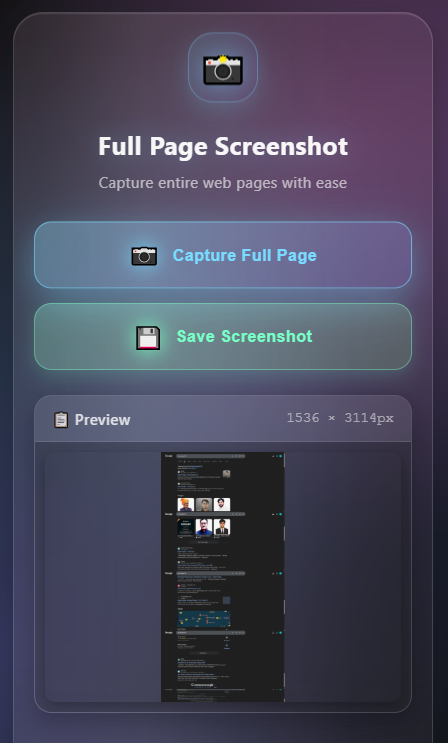
- 🎯 Full Page Capture: Automatically captures entire web pages, not just the visible viewport
- 📏 Large Page Support: Handles pages exceeding 32,000px by automatically dividing them into chunks
- 🎨 Modern UI: Beautiful glassmorphic interface with futuristic design
- ⚡ Smart Processing: Intelligent chunking and stitching for very long pages
- 🔄 Progress Tracking: Real-time progress updates showing chunk processing (X of Y)
- 📱 Responsive Design: Works perfectly on all screen sizes
- ⏱️ Live Updates: Visual progress bar and status messages
- 🎯 Error Recovery: Graceful error handling with clear user messages
- 💾 High Quality: PNG format with maximum quality settings
- ⏸️ Cancellable: Abort long-running captures at any time
- Download the latest release from Releases
- Extract the ZIP file
- Open Chrome/Edge and go to
chrome://extensions/ - Enable "Developer mode"
- Click "Load unpacked" and select the
dist/chromefolder (ordist/edge)
- Download the latest release from Releases
- Extract the ZIP file
- Open Firefox and go to
about:debugging - Click "This Firefox" tab
- Click "Load Temporary Add-on" and select
manifest.jsonfrom thedist/firefoxfolder
# Clone the repository
git clone https://github.com/HarshYadav152/ss-capture.git
cd ss-capture

# Install dependencies
npm install

# Build for all browsers
npm run build

# Or build for specific browser
node scripts/build.js chrome
node scripts/build.js firefox- Navigate to any webpage you want to capture
- Click the extension icon in your browser toolbar
- Click "Capture Full Page" button
- Wait for the progress bar to complete (chunks will be processed sequentially for large pages)
- Preview the captured screenshot
- Click "Save" to download the screenshot
- Alt + Shift + S (Mac: Cmd + Shift + S): Open Extension Popup
- Alt + Shift + F (Mac: Cmd + Shift + F): Invoke extension in bankgroud
- ✅ Regular web pages (HTTP/HTTPS)
- ✅ Single Page Applications (SPAs)
- ✅ Dynamic content
- ✅ Long scrolling pages (automatically chunked at ~30,000px intervals)
- ✅ Pages with infinite scroll
- ✅ Complex layouts with fixed elements
- ❌ Chrome internal pages (
chrome://) - ❌ Extension pages (
chrome-extension://) - ❌ Browser new tab pages
- ❌ Local file URLs (
without proper permissions)
When a page exceeds 32,000px in height (browser canvas limitation):
- Page is automatically divided into ~30,000px chunks
- Each chunk is captured sequentially
- Progress shows "Capturing chunk X of Y"
- All chunks are stitched together seamlessly
- Final image is rendered and displayed
ss-capture/
├── src/
│   ├── manifest.json          # Extension manifest (V3)
│   ├── js/
│   │   ├── background.js      # Service worker
│   │   └── content.js         # Screenshot capture logic
│   ├── popup/
│   │   ├── popup.html         # UI interface
│   │   └── popup.js           # UI logic
│   └── css/
│       └── style.css          # Glassmorphic styling
├── scripts/
│   ├── build.js               # Build automation
│   ├── validate.js            # Extension validation
│   └── zip.js                 # Package for distribution
├── tests/
│   ├── test-build.js          # Build tests
│   └── test-build-fixed.js    # Fixed build tests
├── icons/                     # Extension icons
├── docs/                      # Documentation
├── dist/                      # Built extensions (gitignored)
│   ├── chrome/
│   ├── firefox/
│   └── edge/
├── README.md
├── UNDERSTAND.md              # Project documentation
├── CHANGELOG.md
├── CONTRIBUTING.md
├── LICENSE
├── package.json
└── jest.config.js
Extension configuration with:
- Manifest V3 compliance
- Permissions:
activeTab,scripting,downloads - Host permissions for all URLs
- Firefox-specific settings (
browser_specific_settings)
Modern glassmorphic UI with:
- Capture, Cancel, and Save buttons
- Real-time progress bar (0-100%)
- Status messages and error alerts
- Screenshot preview
- 120-second timeout for very large pages
Core screenshot logic:
- Page dimension calculation
- Automatic chunking for pages > 32,000px
- Sequential chunk capture with scrolling
- Canvas stitching of multiple chunks
- Progress reporting to popup
- Error handling and recovery
Service worker:
- Message routing between popup and content scripts
- Download coordination
- Capture state management
- Cancel request handling
Glassmorphic design:
- Frosted glass effect with backdrop-filter
- Smooth animations and transitions
- Responsive button states
- Progress bar styling
- Fork the repository
- Clone your fork:
git clone https://github.com/YOUR_USERNAME/ss-capture.git - Install dependencies:
npm install - Build the extension:
npm run build - Load in browser:
- Chrome: Load
dist/chromefolder - Firefox: Load
dist/firefox/manifest.json
- Chrome: Load
- Make your changes in the
src/directory - Rebuild after changes:
npm run build - Test thoroughly
- Submit a pull request
# Build extension for all browsers
npm run build

# Validate extension structure
npm run validate

# Create distribution ZIP files
npm run zip

# Run tests
npm test

# Build for specific browser
node scripts/build.js chrome
node scripts/build.js firefox
node scripts/build.js edge- Capture short pages (< 5,000px)
- Capture medium pages (5,000-32,000px)
- Capture very long pages (> 32,000px) - verify chunking
- Test progress updates during chunked capture
- Test cancel functionality mid-capture
- Test save functionality
- Test error handling (timeout, restricted pages)
- Test on different browsers (Chrome, Firefox, Edge)
- Test responsive popup design
- Verify preview image displays correctly
Try these sites for chunked capture testing:
- Long documentation pages
- Social media infinite scroll feeds
- E-commerce product listings
- News article archives
# Run Jest tests
npm test

# Run specific test file
npm test test-build-fixed.js| Browser | Version | Status | Notes |
|---|---|---|---|
| Chrome | 88+ | ✅ Full Support | Primary target, Manifest V3 |
| Edge | 88+ | ✅ Full Support | Chromium-based |
| Firefox | 109+ | ✅ Full Support | Manifest V3 support |
| Safari | 16+ | ❌ Not Supported | No Manifest V3 support |
Adjust in src/js/content.js:
const MAX_CANVAS_HEIGHT = 32000; // Browser limit
const CHUNK_HEIGHT = 30000; // Safe chunk sizeModify in src/popup/popup.js:
setTimeout(() => {
  if (captureInProgress) {
    showErrorAlert('Capture timeout');
  }
}, 120000); // 120 secondsContent script sends progress messages:
chrome.runtime.sendMessage({
  type: 'PROGRESS',
  message: `Capturing chunk ${i+1} of ${numChunks}`,
  percentComplete: Math.round((i / numChunks) * 100)
});- Build:
node scripts/build.js chrome - Package:
node scripts/zip.js chrome - Upload ZIP to Chrome Web Store Dashboard
- Fill in listing details (screenshots, description)
- Submit for review (typically 1-3 days)
- Build:
node scripts/build.js firefox - Package:
node scripts/zip.js firefox - Upload to Firefox Add-ons
- Fill in listing details
- Submit for review (typically 1-5 days)
- Build:
node scripts/build.js edge - Package:
node scripts/zip.js edge - Upload to Edge Add-ons
- Fill in listing details
- Submit for review (typically 1-3 days)
We welcome contributions! Please see CONTRIBUTING.md for detailed guidelines.
- Fork the repository
- Create a feature branch:
git checkout -b feature/amazing-feature - Make changes in
src/directory - Build and test:
npm run build - Add tests if applicable
- Commit:
git commit -m 'Add amazing feature' - Push:
git push origin feature/amazing-feature - Open a Pull Request
- Use GitHub Issues
- Include browser version and OS
- Provide steps to reproduce
- Attach screenshots if applicable
This project is licensed under the MIT License - see the LICENSE file for details.
- Chrome Extensions API for screenshot capabilities
- Canvas API for image stitching
- Glassmorphism Design for modern UI inspiration
- Open Source Community for feedback and contributions
- Issues: GitHub Issues
- Discussions: GitHub Discussions
- Email: harshyadav152@outlook.com
See CHANGELOG.md for detailed version history.
Made with ❤️ by Harsh Yadav