New wiki page : https://matissead.github.io/ReanimateMC/




- Overview
- Features
- Installation
- Quick Start
- Configuration
- Commands
- Permissions
- Gameplay Mechanics
- API for Developers
- Language Support
- Compatibility
- Troubleshooting
- Contributing
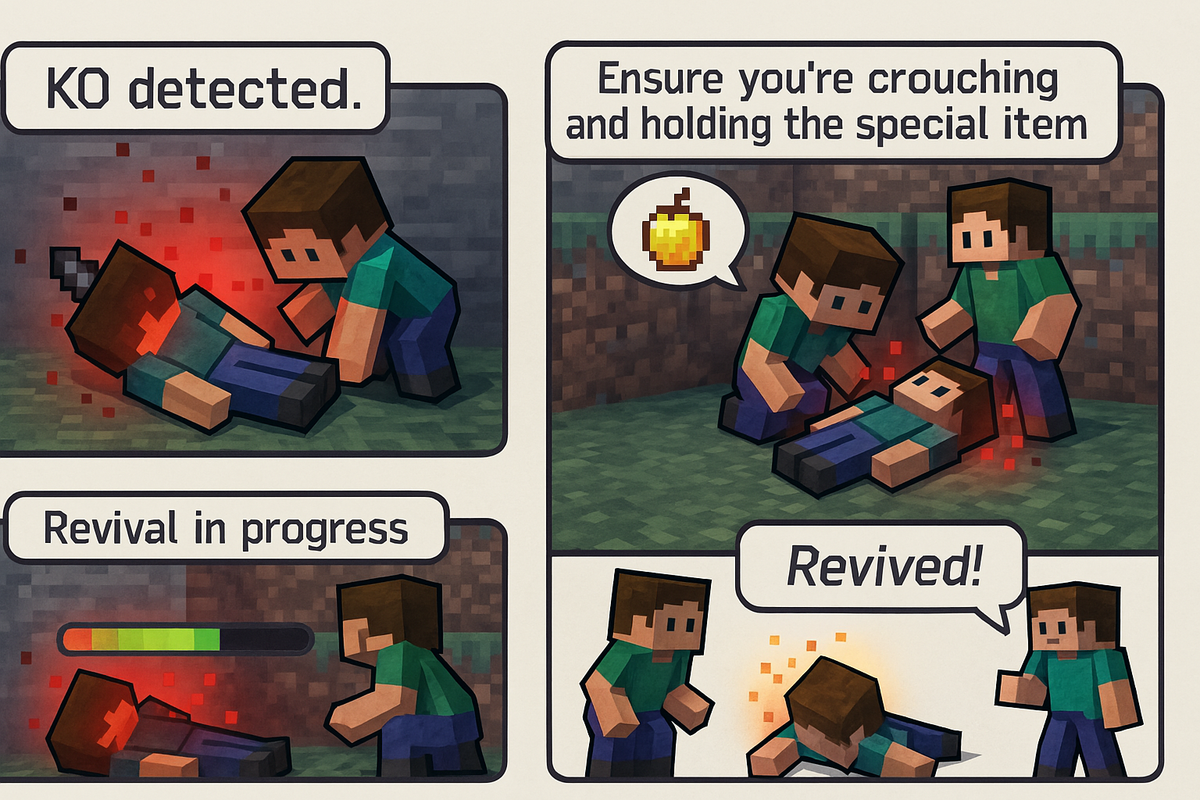
ReanimateMC is a revolutionary Minecraft plugin that transforms the conventional death system by introducing a KO (Knockout) state. Instead of players dying instantly when their health reaches zero, they enter an intermediary knockout state where they can be revived by teammates or executed by enemies.
This innovative mechanic creates dynamic gameplay opportunities perfect for:
- Hardcore Survival servers - Adding tension and teamwork
- Role-play servers - Creating dramatic rescue scenarios
- PvP servers - Strategic decisions between mercy and execution
- Adventure maps - Enhanced cooperative gameplay
- KO State System - Players enter knockout instead of dying instantly
- Revival System - Teammates can revive KO'd players with configurable items
- Execution System - Option to permanently eliminate KO'd players
- Persistent KO - KO state maintained across disconnections
- Distress Signals - KO'd players can call for help with beacons
- Crawling Mode - KO'd players can toggle between immobilized and slow crawling
- Visual Effects - Particles, blindness, and glowing effects during KO
- Audio Feedback - Heartbeat sounds and audio cues
- Tab List Integration - Visual KO indicators in player list
- Inventory Protection - Configurable looting system for KO'd players
- Offline KO Timer - Countdown continues even when players disconnect
- Suicide Prevention - Configurable hold-to-suicide mechanics
- Weakness Effects - Debuffs applied during KO state
- GUI Configuration - In-game configuration interface
- Statistics Tracking - KO and revival statistics
- Multi-language Support - 10+ language translations
- Minecraft Server: 1.20.1 or higher
- Server Software: Spigot, Paper, Bukkit, or compatible forks
- Java: 16 or higher
-
Download the latest ReanimateMC.jar from the releases page
-
Upload the JAR file to your server's
plugins/directory -
Restart your server (or use a plugin manager to load it)
-
Configure the plugin using the command
/reanimatemc configor by editing the generated config files
When you first install the plugin:
- Operators will receive a setup message on join
- Use
/reanimatemc configto open the GUI configuration - Adjust settings to match your server's gameplay style
- Use
/reanimatemc setupto mark setup as complete
- When a player's health reaches 0, they enter KO state instead of dying
- To revive: Crouch near a KO'd player and hold the required item (default: Golden Apple)
- To execute: Left-click and hold on a KO'd player
- Distress signal: KO'd players can press F (swap hands) to send a help signal
/reanimatemc config     # Open configuration GUI
/reanimatemc reload     # Reload plugin configuration
/reanimatemc status <player>  # Check player's KO status
The plugin creates several configuration files in plugins/ReanimateMC/:
# Language settings
language: "en"
first_run: true
setup_completed: false

# Revival system
reanimation:
  require_special_item: true
  required_item: GOLDEN_APPLE
  duration_ticks: 100        # Time to revive (5 seconds)
  health_restored: 4         # Hearts restored after revival
  cooldown: 60              # Cooldown between revivals
  revive_cooldown: 60       # Personal revive cooldown

# KO system settings
knockout:
  enabled: true
  duration_seconds: 30      # How long KO lasts
  movement_disabled: true   # Disable movement during KO
  use_particles: true       # Show particles around KO'd players
  heartbeat_sound: true     # Play heartbeat sound
  blindness: true          # Apply blindness effect
  suicide_hold_seconds: 3   # Hold time to suicide
  weakness_level: 1        # Weakness effect level
  fatigue_level: 1         # Mining fatigue level

# Execution system
execution:
  enabled: true
  hold_duration_ticks: 40   # Hold time to execute (2 seconds)
  message_broadcast: true   # Announce executions

# Effects applied after revival
effects_on_revive:
  nausea: 5                # Nausea duration (seconds)
  slowness: 10             # Slowness duration (seconds)
  resistance: 10           # Resistance duration (seconds)

# Crawling/prone mechanics
prone:
  enabled: true
  allow_crawl: true        # Allow crawling movement
  crawl_slowness_level: 5  # Slowness level when crawling
  auto_crawl: false        # Auto-enable crawling

# Inventory looting
looting:
  enabled: true

# Tab list integration
tablist:
enabled: true # Show [KO] tag in tab listUse /reanimatemc config to access an intuitive GUI for configuring all settings:
- Categories: Settings organized by function
- Live Preview: See changes immediately
- Easy Toggles: Click to enable/disable features
- Value Editing: Click to modify numeric values
- Material Selection: Easy item selection interface
| Command | Permission | Description |
|---|---|---|
/reanimatemc reload |
reanimatemc.admin |
Reload configuration and language files |
/reanimatemc config |
reanimatemc.admin |
Open GUI configuration interface |
/reanimatemc setup |
reanimatemc.admin |
Mark initial setup as complete |
| Command | Permission | Description |
|---|---|---|
/reanimatemc revive <player> |
reanimatemc.revive |
Forcefully revive a KO'd player |
/reanimatemc knockout <player> |
reanimatemc.knockout |
Force a player into KO state |
/reanimatemc status <player> |
reanimatemc.status |
Check a player's current state |
/reanimatemc crawl |
reanimatemc.crawl |
Toggle crawling mode (KO'd players only) |
| Command | Permission | Description |
|---|---|---|
/reanimatemc removeGlowingEffect <player> |
reanimatemc.removeGlowingEffect |
Remove glowing effect from a player |
| Permission | Default | Description |
|---|---|---|
reanimatemc.admin |
op |
Access to all administrative commands and GUI config |
reanimatemc.revive |
true |
Ability to revive KO'd players |
reanimatemc.execute |
true |
Ability to execute KO'd players |
reanimatemc.bypass |
op |
Bypass KO system (die instantly) |
| Permission | Default | Description |
|---|---|---|
reanimatemc.knockout |
op |
Force players into KO state |
reanimatemc.status |
true |
Check player KO status |
reanimatemc.crawl |
true |
Toggle crawling mode when KO'd |
reanimatemc.loot |
op |
Access KO'd player inventories |
reanimatemc.removeGlowingEffect |
op |
Remove glowing effects |
# Example permission setup for different server roles

# Regular Players
- reanimatemc.revive
- reanimatemc.execute
- reanimatemc.status
- reanimatemc.crawl

# Moderators (add to above)
- reanimatemc.knockout
- reanimatemc.loot
- reanimatemc.removeGlowingEffect

# Administrators (add to above)
- reanimatemc.admin
- reanimatemc.bypassWhen a player's health reaches zero:
- KO Trigger: Player enters knockout state instead of dying
- Visual Effects: Player lies down, optional particles and blindness
- Movement: Immobilized or limited crawling based on configuration
- Timer: Countdown begins (configurable duration)
- Options: Can be revived, executed, or will die when timer expires
Requirements:
- Another player must crouch near the KO'd player
- Reviver must hold the required item (default: Golden Apple)
- Revival takes time (configurable, default 5 seconds)
- Both players must remain still during revival
Revival Effects:
- KO'd player regains health
- Temporary effects applied (nausea, slowness, resistance)
- Cooldown applied to prevent spam
Process:
- Any player can execute a KO'd player
- Hold left-click for configured duration (default 2 seconds)
- Optional broadcast message announces executions
- Results in permanent death
Activation:
- KO'd players press F (swap hands key)
- Creates a beacon at their location
- Broadcasts coordinates to nearby players
- One-time use per KO
When KO'd players disconnect:
- KO state is saved to file
- Timer continues counting down
- Player dies if timer expires before reconnection
- State restored when player reconnects
Two Movement States:
- Immobilized: Complete movement restriction
- Crawling: Slow movement with heavy slowness effect
Controls:
- Use
/reanimatemc crawlto toggle states - Configurable auto-crawl option
- Separate permission for crawling ability
ReanimateMC provides a comprehensive API for other plugins to integrate with the KO system.
Fired when a player enters KO state.
@EventHandler
public void onPlayerKO(PlayerKOEvent event) {
    Player player = event.getPlayer();
    int duration = event.getDuration();

    // Cancel the KO event
    event.setCancelled(true);

    // Custom logic here
}Fired when a player is revived from KO state.
@EventHandler
public void onPlayerRevived(PlayerReanimatedEvent event) {
    Player player = event.getPlayer();
    Player reanimator = event.getReanimator();
    boolean successful = event.isSuccessful();
    long timestamp = event.getTimestamp();

    // Custom logic here
}Get the KOManager instance:
// Get the plugin instance
ReanimateMC plugin = (ReanimateMC) Bukkit.getPluginManager().getPlugin("ReanimateMC");

// Access the KO manager
KOManager koManager = plugin.getKoManager();

// Check if player is KO'd
boolean isKO = koManager.isKO(player);

// Force KO a player
koManager.setKO(player, 30); // 30 seconds

// Revive a player
koManager.revive(player, reviverPlayer);

// Execute a player
koManager.execute(player);Add ReanimateMC as a dependency in your plugin.yml:
depend: [ReanimateMC]
# or
softdepend: [ReanimateMC]
Maven dependency:
<dependency>
    <groupId>fr.jachou</groupId>
    <artifactId>ReanimateMC</artifactId>
    <version>1.2.02</version>
    <scope>provided</scope>
</dependency>ReanimateMC supports multiple languages with complete translations:
- English (
en) - Default - French (
fr) - Français - Spanish (
es) - Español - German (
de) - Deutsch - Italian (
it) - Italiano - Dutch (
nl) - Nederlands - Russian (
ru) - Русский - Chinese (
zh) - 中文 - Korean (
kr) - 한국어 - Polish (
pl) - Polski - Portuguese (
pt) - Português
- Via Config: Set
language: "fr"in config.yml - Via GUI: Use
/reanimatemc configand click the language option - Via Command: Reload after changing config:
/reanimatemc reload
Language files are stored in plugins/ReanimateMC/lang/. You can:
- Copy an existing language file (e.g.,
en.yml) - Rename it (e.g.,
custom.yml) - Translate all messages
- Set
language: "custom"in config.yml
- ✅ Spigot - Fully supported
- ✅ Paper - Fully supported
- ✅ Bukkit - Supported
- ✅ Purpur - Compatible
⚠️ Magma - Limited compatibility⚠️ Sponge - Basic compatibility
- Minimum: 1.20.1
- Recommended: 1.20.4+
- Latest Tested: 1.21.x
- Native Version: 1.20.1
Known Compatible Plugins:
- WorldGuard - Respects region flags
- EssentialsX - Works with teleportation
- mcMMO - Integrates with skill systems
- Citizens - NPCs can be revived
- MythicMobs - Custom mobs work with KO system
Potential Conflicts:
- Death/respawn modifying plugins
- Health management plugins
- Combat logging plugins (may need configuration)
Solutions:
- Check that
knockout.enabled: truein config.yml - Verify players don't have
reanimatemc.bypasspermission - Ensure no conflicting death plugins are installed
Solutions:
- Check reviver has
reanimatemc.revivepermission - Verify reviver is crouching and holding correct item
- Check revival cooldowns haven't been triggered
- Ensure
reanimation.require_special_itemsetting matches usage
Solutions:
- Verify player has
reanimatemc.adminpermission - Check console for errors during plugin load
- Try
/reanimatemc reloadand retry
Solutions:
- Check language code is correct in config.yml
- Verify language file exists in
plugins/ReanimateMC/lang/ - Use
/reanimatemc reloadafter changes
Enable debug logging by setting your server's logging level to DEBUG for more detailed error information.
- Check the console for error messages
- Verify configuration using the GUI or config files
- Test permissions using a permission plugin
- Submit issues on GitHub with full error logs
- Disable particles if experiencing lag:
knockout.use_particles: false - Reduce heartbeat sound frequency for lower resource usage
- Consider shorter KO durations on high-population servers
- Use Paper server software for better performance
We welcome contributions to ReanimateMC! Here's how you can help:
- Use the GitHub Issues page
- Include server version, plugin version, and full error logs
- Describe steps to reproduce the issue
- Submit detailed feature requests with use cases
- Explain how the feature would benefit gameplay
- Consider implementation complexity
- Help translate the plugin into new languages
- Improve existing translations
- Submit language files via pull requests
- Fork the repository
- Create feature branches
- Follow existing code style
- Submit pull requests with clear descriptions
Author: Jachou
License: Proprietary - All rights reserved
Support: GitHub Issues
ReanimateMC - Transform your server's death system and create unforgettable gameplay moments.