- 아이젠하워의 매트릭스는 할일에 우선순위를 분류할 수 있는 표를 말합니다.
해당 서비스는 기존의 ToDo 앱에 우선순위를 분류할 수 있는 기능을 추가하여, 사용자 스스로가 할일의 우선순위를 분류/확인할수 있도록 하여 업무를 좀 더 빨리 처리할 수 있도록 도와줍니다.
- 2024.04.09 - 2024.04.25 (16일)
- 위젯을 이용하여 할일을 관리할 수 있도록 하기
- 알림 기능을 사용하여, 앱 종료한 상황에서도 알림이 오도록 하기
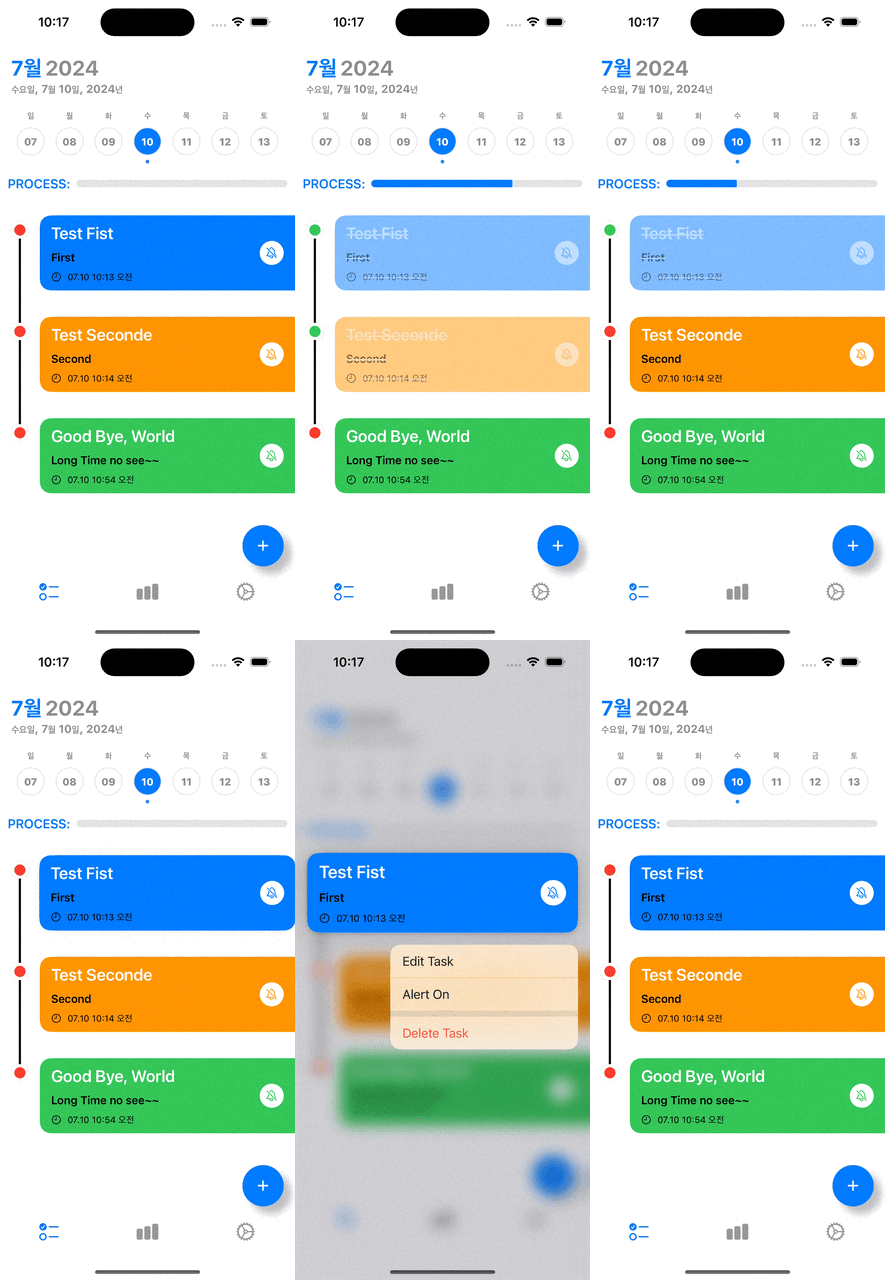
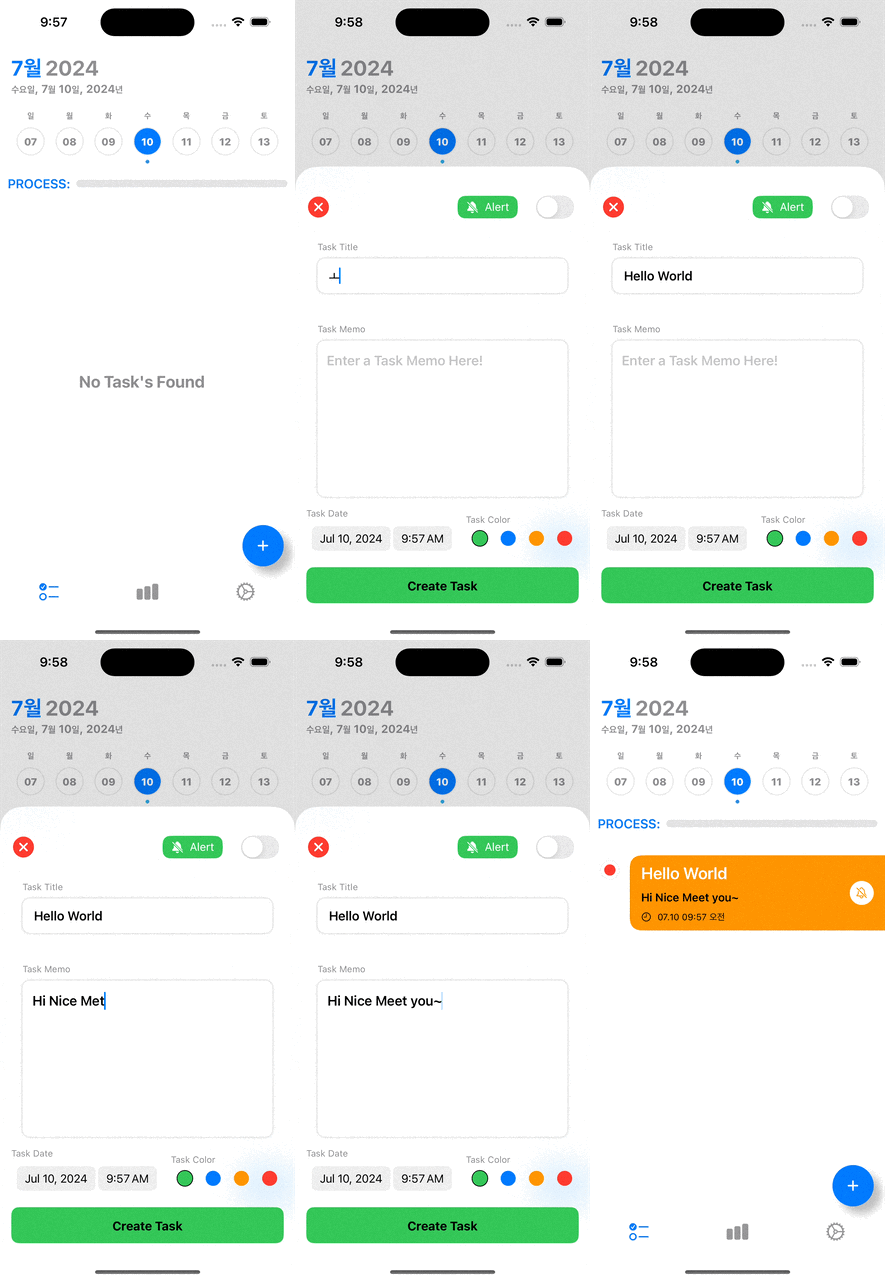
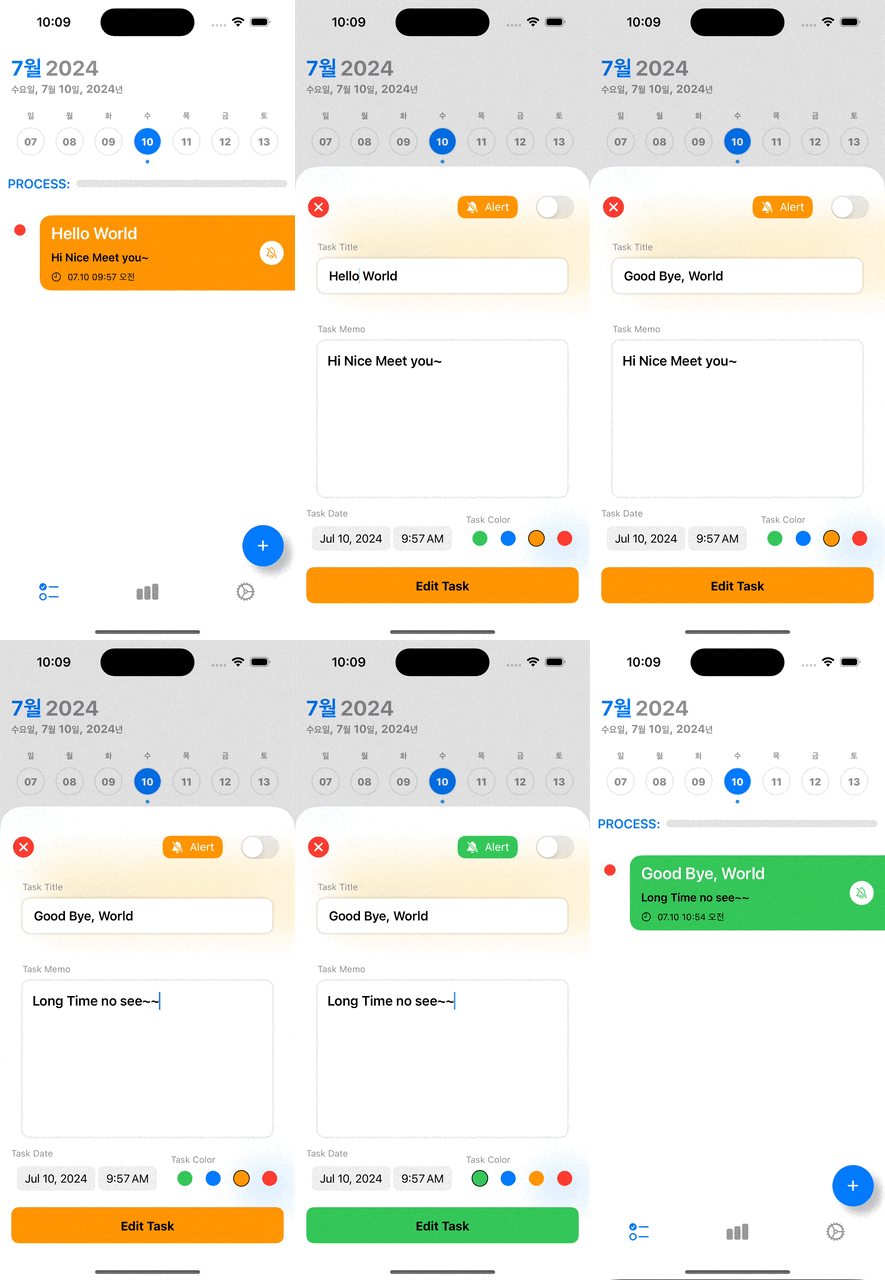
- 할일 작성/조회/편집/삭제 기능
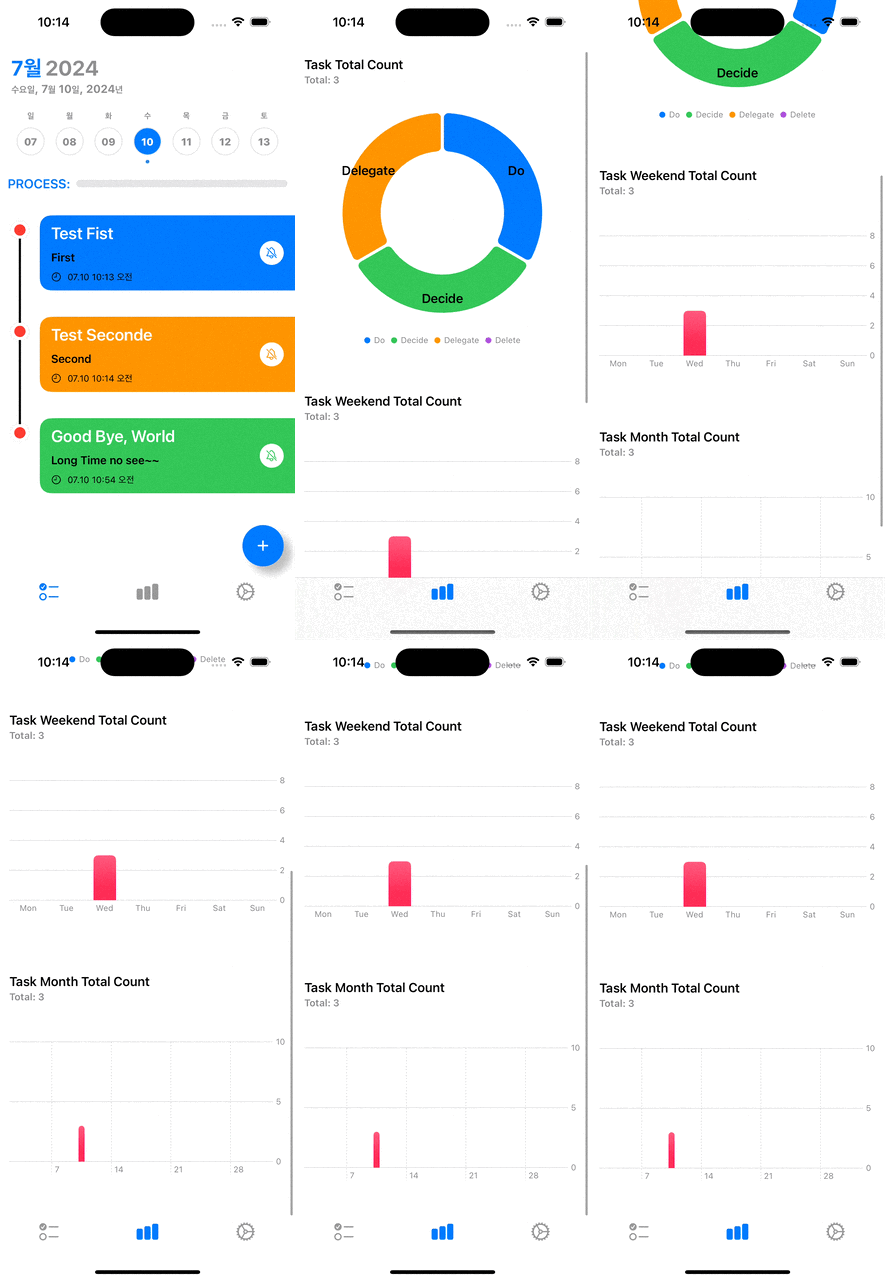
- 할일 통계 기능
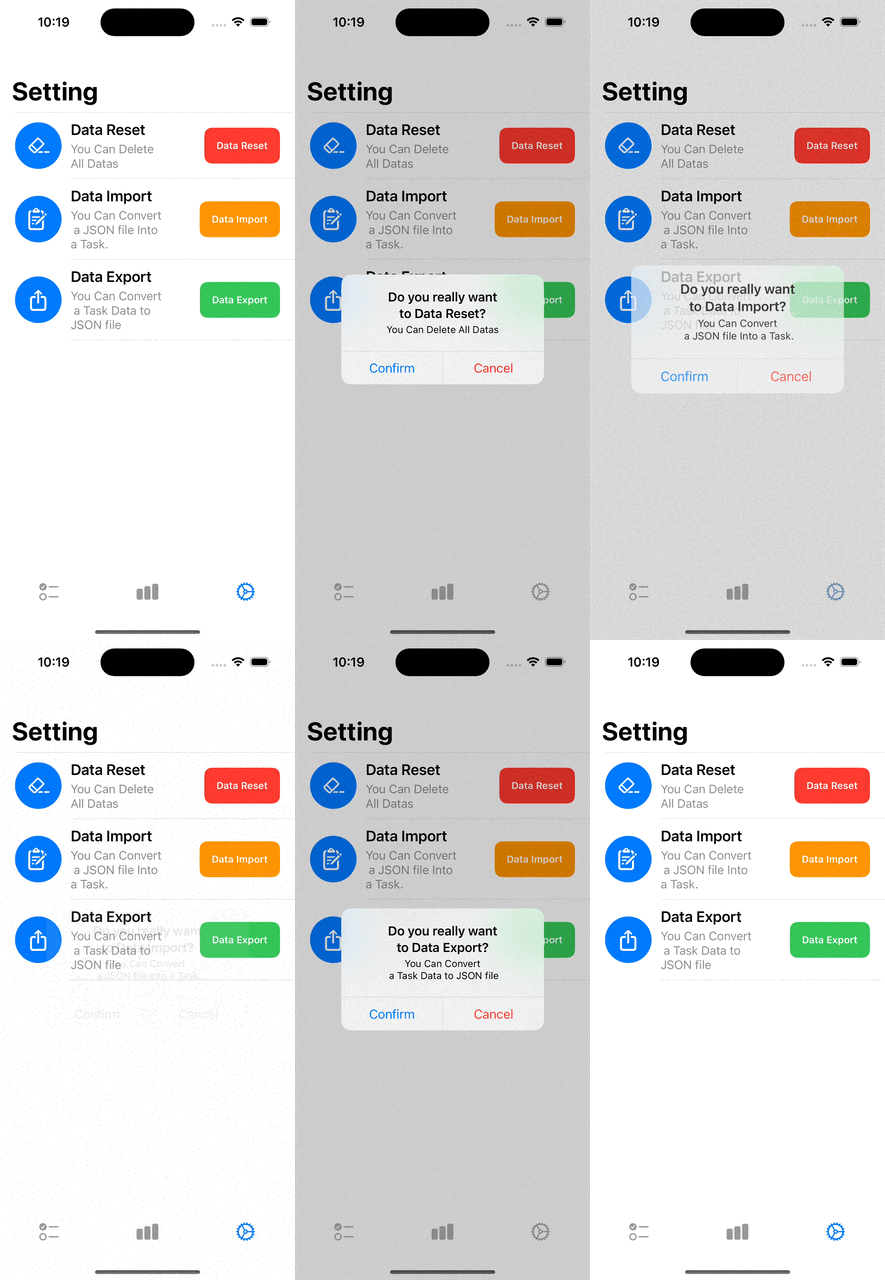
- 설정 기능
- 버전 정보
- iOS 16.0 이상
- 라이브러리 및 프레임워크
SwiftUICombineSwiftData
| 할일 조회 페이지 | 할일 작성 페이지 |
|
|
| 할일 편집 페이지 | 할일 통계 페이지 |
|
|
| 설정 페이지 | |
|
- 지정한 시간에 알림이 안 오는 문제
Appdelegate에 Foreground, Background 알림을 받을 수 있도록 설정한 후, 지정한 시간에 앱의 알림이 오도록 설정했지만, 알림이 오지 않는 문제가 발생했다.
지정한 시간에 앱의 알림을 오도록 해야한다.
- 앱의 알림 기능을 담당할
NotificationService를 싱글톤 객체로 생성했다.(이유는NotificationCenter에 알림을 보내거나 삭제하는 기능만 전담하기 때문)
func pushNotification(title: String, body: String, seconds: Double, identifier: String) {
   // 1️⃣ 알림 내용, 설정
   let notificationContent = UNMutableNotificationContent()
   notificationContent.title = title
   notificationContent.body = body

   // 2️⃣ 조건(시간, 반복)
   let trigger = UNTimeIntervalNotificationTrigger(timeInterval: seconds, repeats: false)

   // 3️⃣ 요청
   let request = UNNotificationRequest(identifier: identifier,
                                       content: notificationContent,
                                       trigger: trigger)

   // 4️⃣ 알림 등록
   UNUserNotificationCenter.current().add(request) { error in
       if let error = error {
           print("Notification Error: ", error)
       }
   }
}OnAppear과OnChange에서task의 알림여부와task의 현재시간과 현재 날짜가 같은지 검사하고, 같다면 알림을 전송하게 했다.
.onAppear(perform: {
     if task.isAlert.wrappedValue == true, task.creationDate.wrappedValue.format("YYYY-MM-dd hh:mm") == Date.now.format("YYYY-MM-dd hh:mm") {
         NotificationService.shared.pushNotification(title: task.taskTitle.wrappedValue, body: task.taskMemo.wrappedValue ?? "n/a", seconds: 1, identifier: task.id.uuidString)
         task.isAlert.wrappedValue?.toggle()
     }
 })

 .onChange(of: task.isAlert.wrappedValue) { oldValue, newValue in
     if task.isAlert.wrappedValue == true, task.creationDate.wrappedValue.format("YYYY-MM-dd hh:mm") == Date.now.format("YYYY-MM-dd hh:mm") {
         NotificationService.shared.pushNotification(title: task.taskTitle.wrappedValue, body: task.taskMemo.wrappedValue ?? "n/a", seconds: 1, identifier: task.id.uuidString)
         task.isAlert.wrappedValue?.toggle()
     }
}- 당연히, 실패였다. 현재시간과 같을 때만 알림을 발생시켰다.
Timer를 만들어,Timer가 지속적으로 현재 시간을 발행하게 했다.
extension DateModel {
   func timeStart() {
       timerCancellable = Timer.publish(every: 1, on: .main, in: .common)
           .autoconnect()
           .sink { [weak self] _ in
               self?.now = Date.now // 매초마다 현재 시간으로 업데이트
           }
   }

   func timeStop() {
       timerCancellable?.cancel()
   }
}View에서Timer를.onReceive를 사용해 계속 이벤트를 전달 받도록 했다.
.onReceive(dateContainer.model.$now, perform: { v in
     print("#### \\(v)")
     if task.isAlert.wrappedValue == true, task.creationDate.wrappedValue.format("YYYY-MM-dd hh:mm") == Date.now.format("YYYY-MM-dd hh:mm") {
         NotificationService.shared.pushNotification(title: task.taskTitle.wrappedValue, body: task.taskMemo.wrappedValue ?? "n/a", seconds: 1, identifier: task.id.uuidString)
         task.isAlert.wrappedValue?.toggle()
     }
})- 앱의
Timer가Foreground,Background상황에서 정상적으로 돌아가는 것을 확인했고, 앱의 알림도 정상적으로 오는 것을 확인 했다.
- 원했던 ****결과를 얻었으나, 반쪽짜리라는 것을 확인했다. 앱이 종료되면,
Timer역시, 종료되어 알림을 발생시키지 않는 것이다.
- 코딩하던 것을 멈추고, 지금의 방법이 잘못된 것은 아닐까?? 하는 생각에 공식문서를 찾아봤다. 계속 공식문서를 읽어보던 중
UNCalendarNotificationTrigger라는 것을 알게 되었고, 천천히 읽어본 결과,UNUserNotificationCenter에 알림을 등록하기 전에, 지정해 놓은 시간에 알림을 발생시킨다는 것을 확인하였다. 그래서 기존의UNTimeIntervalNotificationTrigger→UNCalendarNotificationTrigger변경 시켰다.
- 변경 전 코드
func pushNotification(title: String, body: String, seconds: Double, identifier: String) {
   let notificationContent = UNMutableNotificationContent()
   notificationContent.title = title
   notificationContent.body = body

   let trigger = UNTimeIntervalNotificationTrigger(timeInterval: seconds, repeats: false) // 이 부분 변경

   let request = UNNotificationRequest(identifier: identifier,
                                       content: notificationContent,
                                       trigger: trigger)

   UNUserNotificationCenter.current().add(request) { error in
       if let error = error {
           print("Notification Error: ", error)
       }
   }
}- 변경 후 코드
func pushNotification(date: Date, task: Task) {
    let content = UNMutableNotificationContent()
    content.title = "\\(switchNotificationSymbol(for: task.taskType)): " + task.taskTitle
    content.body = task.taskMemo ?? "N/A"
    content.badge = NSNumber(value: NotificationService.count + 1)
    content.sound = UNNotificationSound.default

    NotificationService.count += 1
    let dateComponents = Calendar.current.dateComponents([.year, .month, .day, .hour, .minute], from: date)

    let trigger = UNCalendarNotificationTrigger(dateMatching: dateComponents, repeats: false) // 이 부분 변경
    let request = UNNotificationRequest(identifier: task.id.uuidString, content: content, trigger: trigger)

    UNUserNotificationCenter.current().add(request) { error in
        if let error = error {
            print("알림을 스케줄링하는 중 에러가 발생했습니다: \\(error)")
        } else {
            print("알림이 성공적으로 설정되었습니다.")
        }
    }
}View에서.OnAppear과.OnChange그리고.OnReceive부분을 삭제하였다. 더 이상 필요가 없기 때문이다.
정상적으로 원하는 시간에 Foreground, Background, 앱이 종료된 상황에서도 알림을 받을 수 있게 되었다.
- 앱 알림 뱃지 처리 문제
앱의 알림이 온 후, 앱의 알림을 확인하기 위해 앱을 실행 후, 들어가면 앱 알림 뱃지 숫자가 초기화 되지 않는 문제가 발생했다.
- 앱의 알림이 도착, 앱 알림 뱃지가 1이 되었다.
- 앱을 실행한 후, 다시 나왔다.
- 앱 알림 뱃지가 1이 유지되고 있다. 0이 되어야 한다.
증가한 숫자를 0으로 초기화 시키고, 앱 알림 뱃지를 없애야 한다.
AppDelegate의applicationDidBecomeActive에 뱃지가 초기화 되도록 설정했다.
func applicationDidBecomeActive(_ application: UIApplication) {
    notificationBadgeReset()
}

private func notificationBadgeReset() {
    UNUserNotificationCenter.current().setBadgeCount(0) // 앱 알림 뱃지 초기화
    NotificationService.count = 0 // 알림 싱글톤 객체에 존해하는 Count 변수
}- 결과는 당연히, 실패였다. 시뮬레이터를 재실행하면, 그 때만
applicationDidBecomeActive가 실행될 뿐, 앱을 종료후 다시 실행하였을 때는 작동하지 않았다.
SwiftUI에는scenePhase라는 현재Scene의 상태(=lifecycle)를 관리하는 값이 존재한다는 것을 공식문서와 구글링을 통해 알게 되었다. 그러면, 앱의 현재 상태를 간접적으로 알 수 있다는 것을 확인했다.scenePhase을 사용하는 변수를 만들어scenePhase의 변화를 수신하기로 했다.
@Environment(\\.scenePhase) private var phase

.onChange(of: phase) { _, _ in
    UNUserNotificationCenter.current().setBadgeCount(0)
    NotificationService.count = 0
}
앱 알림 뱃지가 정상적으로 초기화 되는 것을 확인되었다.