
Generate production-ready MLOps project templates — via Web UI or CLI.
Scikit-learn · PyTorch · TensorFlow · Multi-cloud · Zero setup required.


This stack supports the full MLOps lifecycle:
Data → Train → Track → Orchestrate → Deploy → Monitor → Improve
🚀 Major Enterprise-Grade Enhancements:
- 🔧 Advanced CLI Commands - clone, archive, check_deps, profile, migrate, doctor
- 📊 Enhanced Analytics System - AI-powered insights, trending analysis, benchmarking
- ⚙️ Advanced Configuration Management - Environment configs, templates, pipelines
- ☁️ Production-Ready Cloud Deployment - Real AWS templates, CI/CD, monitoring
- 🔄 Project Lifecycle Management - Smart cloning, migration, health checks
- � Security-First Approach - Vulnerability scanning, best practices, compliance
🆕 New CLI Commands:
mlops-project-generator clone <source> --name <target>
mlops-project-generator archive <project> --type zip
mlops-project-generator check_deps --update --security
mlops-project-generator profile --format json
mlops-project-generator migrate <old> <new-framework>
mlops-project-generator doctor --fix --deep- 🔧 Framework Support: Scikit-learn, PyTorch, TensorFlow/Keras
- 📊 Task Types: Classification, Regression, Time-Series, NLP, Computer Vision
- 🎯 Stack Presets: 6 pre-configured MLOps stacks (Quick Start, Data Science, Deep Learning, Production MLOps, Enterprise, Research)
- 🌐 Web UI: Browser-based generator — no install needed
- 🤖 CI/CD Ready: Non-interactive CLI mode for DevOps pipelines
- 📈 Experiment Tracking: MLflow, W&B, Custom solutions
- 🎯 Orchestration: Airflow, Kubeflow
- 🚀 Deployment: FastAPI, Docker, Kubernetes, Cloud platforms
- � Monitoring: Evidently AI, Custom solutions
- ☁️ Cloud Deployment: Multi-cloud templates (AWS, GCP, Azure)
- 📋 clone: Smart project cloning with configuration preservation
- 📦 archive: Selective project archiving (exclude data/models)
- 🔍 check_deps: Dependency management with security vulnerability scanning
- 📊 profile: Performance profiling and resource usage analysis
- 🔄 migrate: Framework migration with automated code conversion
- 🩺 doctor: Comprehensive health checks with auto-fix capabilities
- 📊 Trending Analysis: Framework usage, complexity trends, deployment patterns
- 🤖 AI-Powered Insights: Actionable recommendations based on project patterns
- 📈 Benchmarking: Compare projects against historical data
- 📊 Productivity Metrics: Projects per month, file/line generation statistics
- 📋 Export Reports: Comprehensive analytics reports in JSON format
- 🌍 Environment Configs: Development/staging/production configurations
- 📋 Configuration Templates: Reusable templates for different use cases
- 🔄 Configuration Pipelines: Multi-stage deployment configurations
- 🔍 Diff & Merge: Configuration comparison and merging capabilities
- 💾 Backup & Restore: Configuration backup and restoration system
- 🐳 Real Dockerfiles: Multi-stage builds with security best practices
- ☁️ AWS Templates: Production-grade CloudFormation, Terraform-ready
- 🔄 CI/CD Integration: GitHub Actions with testing, security scanning, deployment
- 📊 Monitoring Setup: CloudWatch dashboards, alerting configurations
- 🔒 Security Best Practices: IAM roles, VPC configuration, encryption
Choose from 6 pre-configured MLOps stacks tailored for different use cases:
| Preset | Framework | Tracking | Orchestration | Deploy | Monitor |
|---|---|---|---|---|---|
| ⚡ Quick Start | Sklearn | None | None | FastAPI | None |
| 🧪 Data Science | Sklearn | MLflow | None | FastAPI | Custom |
| 🧠 Deep Learning | PyTorch | W&B | None | Docker | None |
| 📡 Production MLOps | PyTorch | MLflow | Airflow | Docker | Evidently |
| 🏢 Enterprise | TensorFlow | MLflow | Kubeflow | Kubernetes | Evidently |
| 🔬 Research | PyTorch | W&B | None | FastAPI | None |
Use presets via CLI: mlops-project-generator init --preset <name> or select them in the Web UI.
The fastest way to generate a project — open it in your browser, fill in the form, and download a ready-to-use ZIP.
cd web_ui
npm install
npm run dev
# → http://localhost:3000The web UI is a Next.js 15 app with no external backend dependency. The generator runs entirely as Next.js API routes — deploy to Vercel, Netlify, Railway, or any Node.js host:
cd web_ui
npm run build
npm start
Vercel one-click deploy: set the root directory to
web_uiand it works out of the box.
| Layer | Technology |
|---|---|
| Framework | Next.js 15 (App Router) |
| Styling | Tailwind CSS v4 + Glassmorphism |
| Forms | react-hook-form + zod |
| Generator | Pure TypeScript (no Python runtime needed) |
| ZIP output | archiver |
Prefer the command line? Install the Python package:
pip install mlops-project-generator==2.0.1git clone https://github.com/NotHarshhaa/MLOps-Project-Generator.git
cd MLOps-Project-Generator
pip install -e .pip install -e ".[dev]"mlops-project-generator init# Quick start with preset
mlops-project-generator init --preset quick-start
# Enterprise stack with custom project name
mlops-project-generator init --preset enterprise --project-name my-platform
# Override preset values
mlops-project-generator init --preset production-mlops --deployment kubernetes
# List all available presets
mlops-project-generator list-presetsmlops-project-generator init \
--framework pytorch \
--task-type classification \
--tracking mlflow \
--orchestration airflow \
--deployment docker \
--monitoring evidently \
--project-name enterprise-ml \
--author-name "ML Team" \
--description "Production ML pipeline"| Command | Description |
|---|---|
init |
Generate a new MLOps project |
validate |
Validate an existing project structure |
version |
Show version |
| Command | Description |
|---|---|
save-preset <name> |
Save current config as a preset |
list-presets |
List all presets |
load-preset <name> |
Load a preset |
delete-preset <name> |
Delete a preset |
| Command | Description |
|---|---|
create-template <name> <framework> |
Create a custom template |
list-templates |
List custom templates |
delete-template <name> |
Delete a template |
add-template-file <template> <path> |
Add a file to a template |
| Command | Description |
|---|---|
clone <source> |
Clone existing projects with configuration preservation |
archive <project> |
Project archiving with selective content inclusion |
check_deps |
Dependency management with security vulnerability scanning |
profile |
Performance profiling and resource usage analysis |
migrate <old> <new> |
Framework migration with automated conversion |
doctor |
Comprehensive project health check with auto-fix capabilities |
| Command | Description |
|---|---|
stats |
Show generation statistics and trends |
analyze <path> |
Analyze a generated project with AI insights |
benchmark <project> |
Compare project against historical baselines |
export-analytics |
Export comprehensive analytics reports |
| Command | Description |
|---|---|
save-preset <name> |
Save current config as a preset |
list-presets |
List all presets |
load-preset <name> |
Load a preset |
delete-preset <name> |
Delete a preset |
backup-config |
Backup all project configurations |
restore-config <backup> |
Restore from configuration backup |
diff-configs <config1> <config2> |
Compare two configurations |
merge-configs <base> <other> |
Merge configuration files |
| Flag | Short | Values |
|---|---|---|
--framework |
-f |
sklearn, pytorch, tensorflow |
--task-type |
-t |
classification, regression, timeseries, nlp, computer-vision |
--tracking |
-r |
mlflow, wandb, custom, none |
--orchestration |
-o |
airflow, kubeflow, none |
--deployment |
-d |
fastapi, docker, kubernetes |
--monitoring |
-m |
evidently, custom, none |
--project-name |
-p |
Any valid identifier |
--author-name |
-a |
Any string |
--description |
--desc |
Any string |
- Vulnerability Scanning: Automated security checks for dependencies
- IAM Best Practices: Proper role-based access controls
- VPC Configuration: Network isolation and security groups
- Encryption: Data encryption at rest and in transit
- Compliance Templates: SOC2, GDPR, HIPAA-ready configurations
- CloudWatch Integration: Real-time metrics and alerting
- Dashboard Templates: Pre-built monitoring dashboards
- Performance Profiling: Resource usage analysis and optimization
- Health Checks: Comprehensive system validation with auto-fix
- SLA Monitoring: Service level agreement tracking
- GitHub Actions: Complete workflows with testing, security, deployment
- Multi-Stage Dockerfiles: Optimized builds with security best practices
- Automated Testing: Unit, integration, and end-to-end tests
- Security Scanning: Code quality and vulnerability analysis
- Rollback Strategies: Automated rollback capabilities
# Generate comprehensive analytics report
mlops-project-generator export-analytics --format json --output report.json

# Analyze project performance
mlops-project-generator profile --project my-ml-platform --format json

# Benchmark against historical data
mlops-project-generator benchmark my-project --baseline industry-standard# Clone project with configuration preservation
mlops-project-generator clone existing-project --name new-project --exclude-data# Migrate from sklearn to pytorch
mlops-project-generator migrate sklearn-project pytorch --auto-convert# Check dependencies with security scanning
mlops-project-generator check_deps --update --security --fix# Comprehensive health check with auto-fix
mlops-project-generator doctor --fix --deep --generate-report
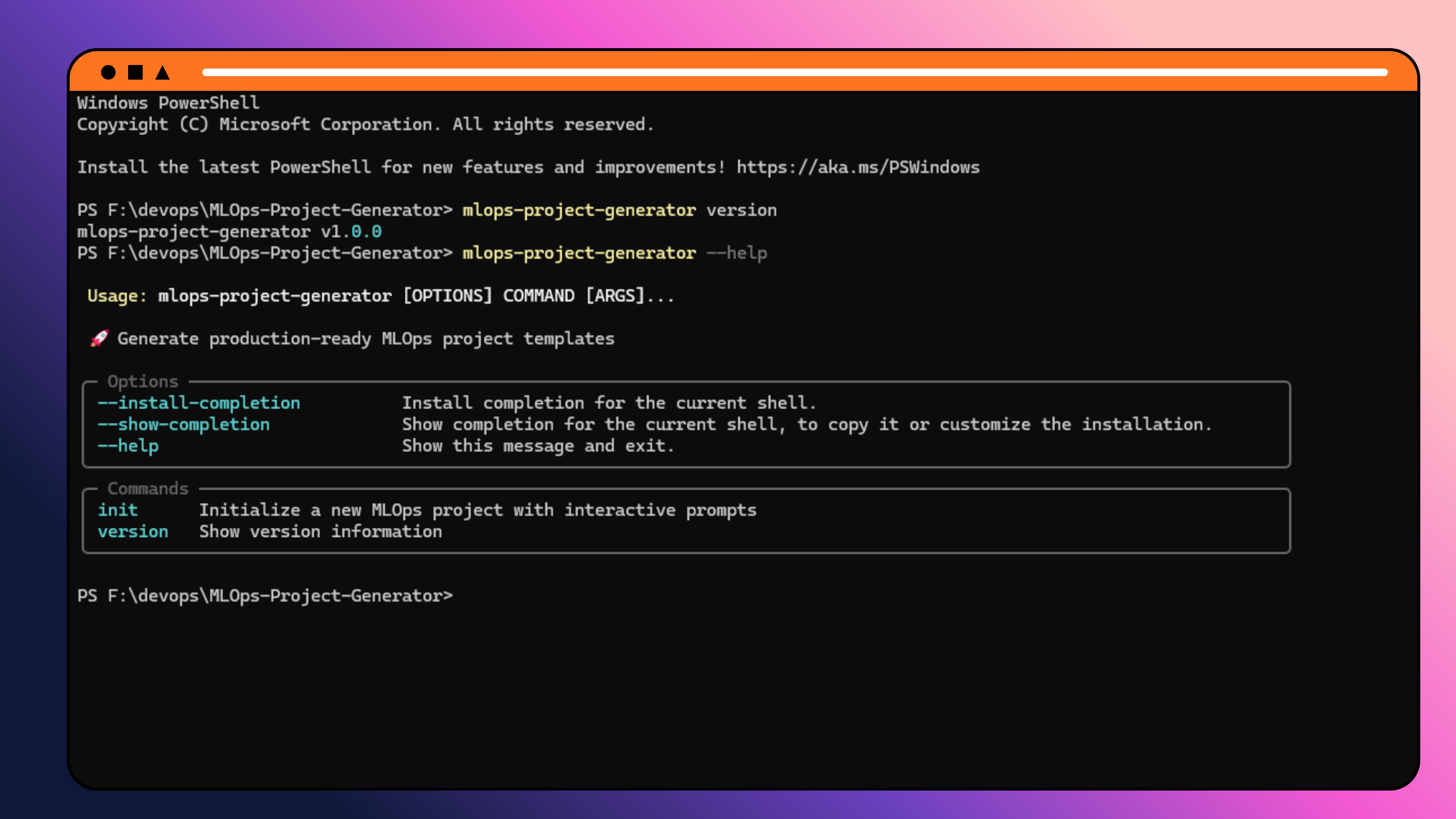
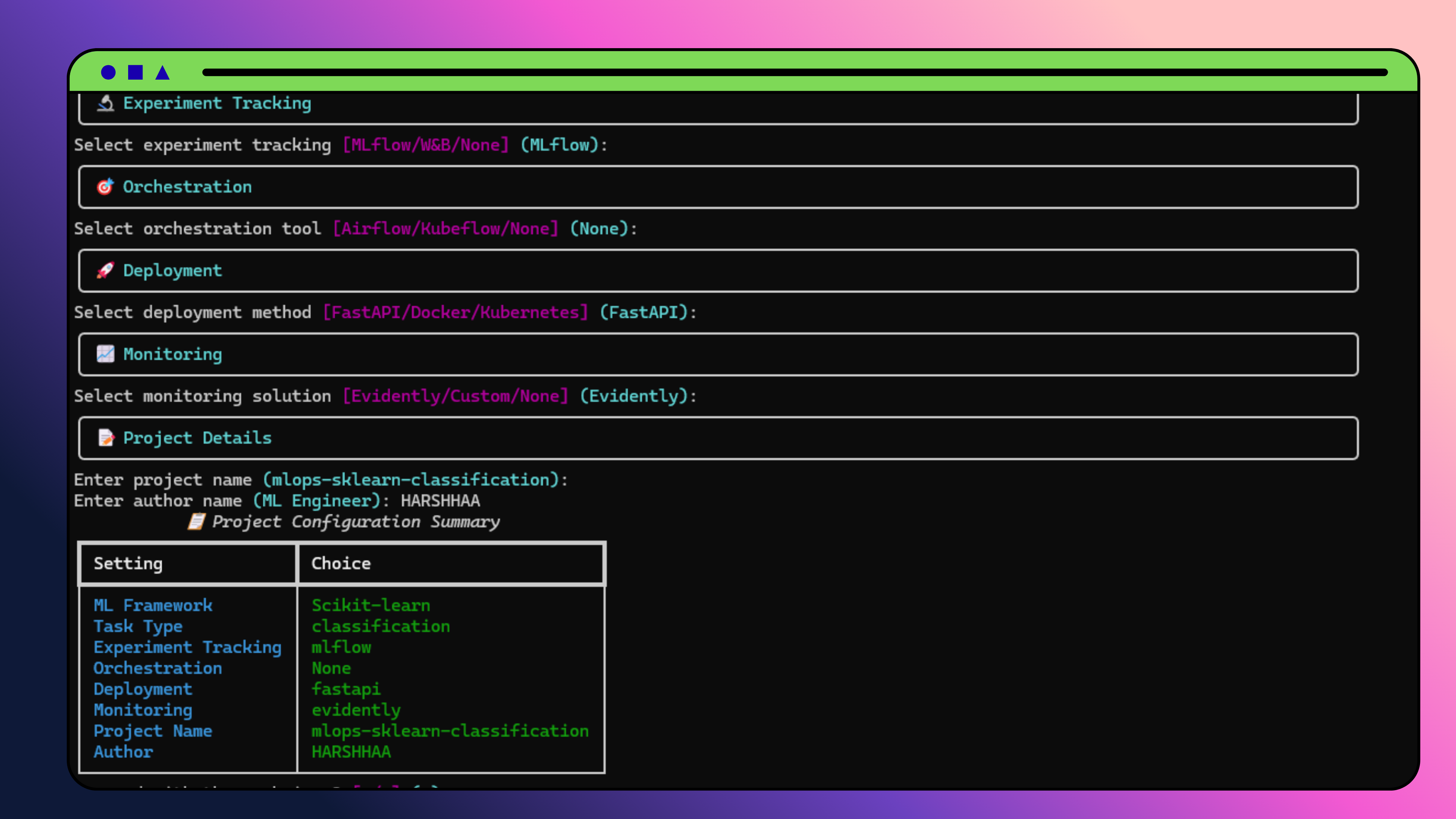
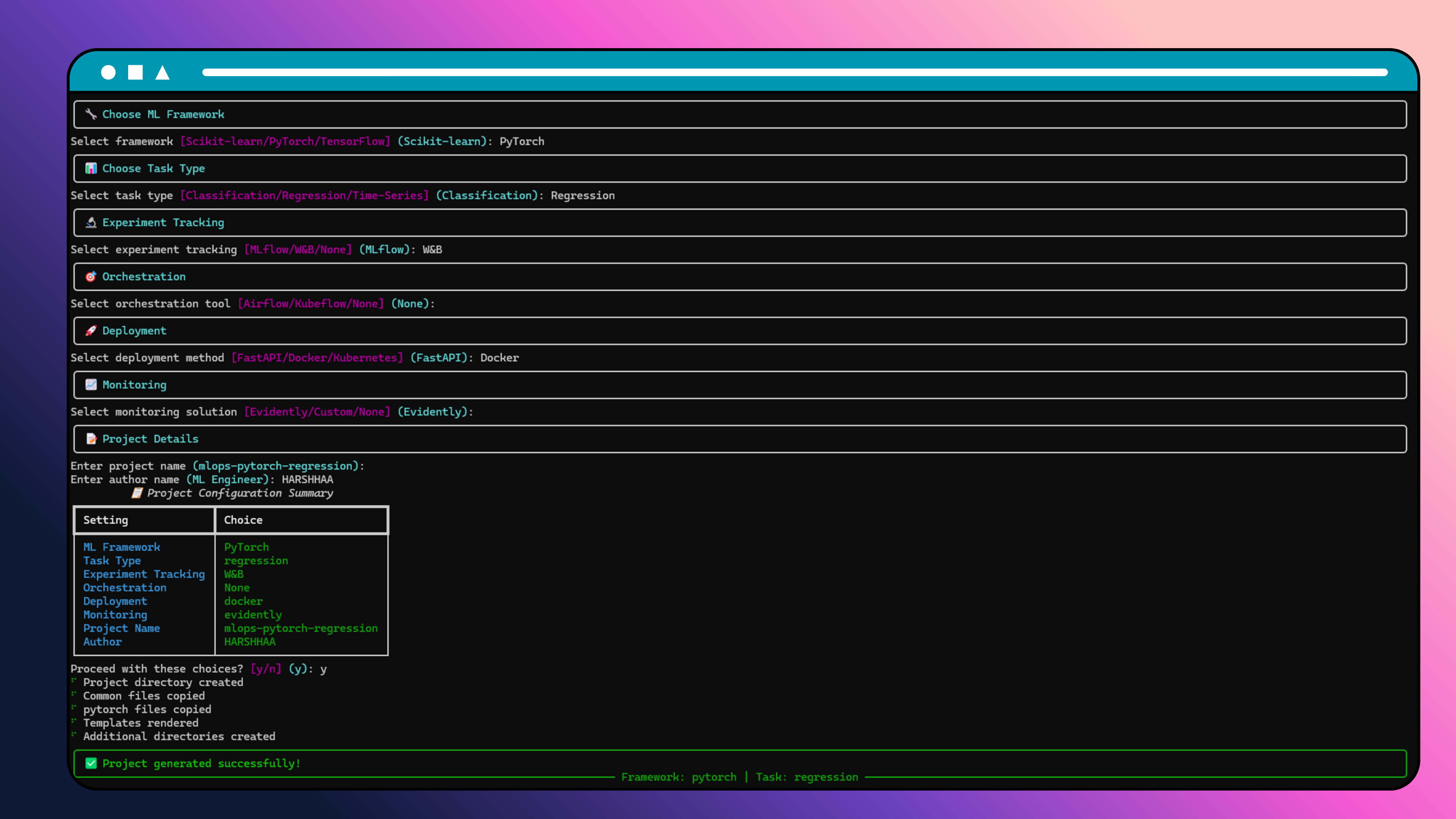
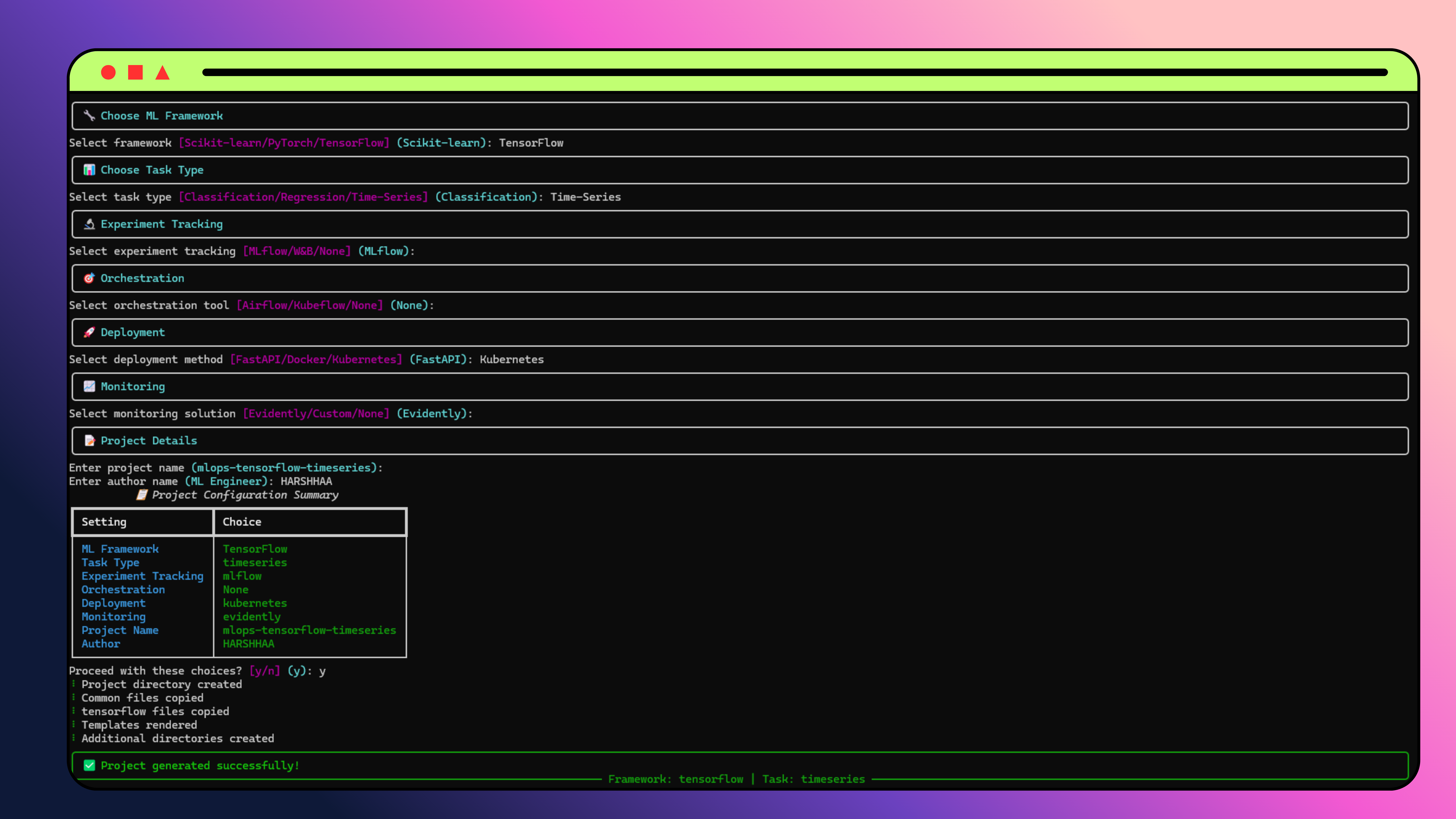
your-project/
├── src/
│   ├── data/              # Data loading utilities
│   ├── models/            # Model implementations
│   ├── features/          # Feature engineering (sklearn)
│   ├── utils/             # Training utilities (pytorch/tensorflow)
│   ├── train.py           # Training entry point
│   └── inference.py       # Inference / FastAPI server
├── configs/
│   └── config.yaml        # Project configuration
├── data/
│   ├── raw/
│   ├── processed/
│   └── external/
├── models/
│   ├── checkpoints/
│   └── production/
├── notebooks/
├── tests/
│   └── test_model.py
├── cloud/                 # Cloud deployment files (if selected)
│   └── <provider>/<service>/
│       ├── Dockerfile
│       ├── cloud-config.yaml
│       └── deploy.sh
├── requirements.txt
├── Makefile
├── .gitignore
├── .env.example
├── project_config.json
└── README.md
- RandomForest / Ridge with cross-validation and joblib serialization
DataLoader+FeatureEngineerclasses ready to extend- FastAPI inference server included when
--deployment fastapi
- Configurable
nn.Sequentialmodel with Dropout - Full training loop with
DataLoader, early stopping torch.save/torch.loadmodel persistence
keras.Sequentialwith BatchNorm and DropoutEarlyStoppingcallback pre-configuredmodel.save()/tf.keras.models.load_model()persistence
mlflow.set_tracking_uri("http://localhost:5000")
with mlflow.start_run():
    mlflow.log_params(config["model"])
mlflow.log_metrics({"accuracy": 0.95})wandb.init(project="my-project")
wandb.log({"loss": 0.12, "accuracy": 0.95})
wandb.finish()uvicorn src.inference:app --reload
# → http://localhost:8000/docsdocker build -t my-ml-project .
docker run -p 8000:8000 my-ml-projectkubectl apply -f k8s/from evidently.report import Report
from evidently.metric_preset import DataDriftPreset
report = Report(metrics=[DataDriftPreset()])
report.run(current_data=current, reference_data=reference)name: Generate ML Project
on:
workflow_dispatch:
inputs:
framework:
type: choice
options: [sklearn, pytorch, tensorflow]
project_name:
type: string
default: ml-project
jobs:
generate:
runs-on: ubuntu-latest
steps:
- uses: actions/checkout@v4
- uses: actions/setup-python@v4
with:
python-version: '3.11'
- run: pip install mlops-project-generator
- run: |
mlops-project-generator init \
--framework ${{ github.event.inputs.framework }} \
--project-name ${{ github.event.inputs.project_name }} \
--tracking mlflow \
--deployment docker
- uses: actions/upload-artifact@v3
with:
name: ${{ github.event.inputs.project_name }}
path: ${{ github.event.inputs.project_name }}/generate_ml_project:
image: python:3.11
script:
- pip install mlops-project-generator
- mlops-project-generator init \
--framework $FRAMEWORK \
--project-name $PROJECT_NAME \
--tracking mlflow \
--deployment docker
artifacts:
paths: [$PROJECT_NAME/]
expire_in: 1 weekMLOps-Project-Generator/
├── generator/ # Python CLI source
│ ├── cli.py # Typer CLI entry point
│ ├── renderer.py # Jinja2 template renderer
│ ├── validators.py # Input validation
│ ├── cloud_deployer.py # Cloud template generation
│ └── ...
├── templates/ # Jinja2 project templates
│ ├── common/ # Shared across all frameworks
│ ├── sklearn/
│ ├── pytorch/
│ └── tensorflow/
├── web_ui/ # Next.js web application
│ ├── app/
│ │ └── api/ # Next.js API routes (generator backend)
│ │ ├── generate/ # POST — start generation
│ │ ├── status/ # GET — poll task status
│ │ ├── download/ # GET — download ZIP
│ │ └── options/ # GET — dropdown options
│ └── src/
│ └── lib/
│ ├── generator/ # Pure TS generator (no Python needed)
│ └── task-store.ts
├── tests/ # Python CLI tests
├── pyproject.toml
└── README.md
pytest tests/ -v
pytest tests/ --cov=generator --cov-report=htmlgit clone https://github.com/NotHarshhaa/MLOps-Project-Generator.git
cd MLOps-Project-Generator
pip install -e ".[dev]"
black generator/ tests/
isort generator/ tests/
flake8 generator/ tests/
mypy generator/Contributions are welcome! Please:
- Fork the repository
- Create a feature branch
- Add tests for new functionality
- Submit a pull request
MIT — see LICENSE for details.
- Typer · Beautiful Python CLI framework
- Next.js · React framework powering the Web UI
- Rich · Stunning terminal output
- archiver · ZIP generation for project downloads
- Python CLI with interactive + non-interactive modes
- Scikit-learn, PyTorch, TensorFlow project templates
- MLflow, W&B experiment tracking integration
- Multi-cloud deployment templates (AWS, GCP, Azure)
- Configuration presets and template customization
- Project analytics and validation
- Web UI — Next.js app with glassmorphism UI (v1.0.8)
- Backend migration — generator ported to pure TypeScript, no Python runtime needed on the server (v1.0.8)
- Stack Presets — 6 pre-configured MLOps stacks (Quick Start, Data Science, Deep Learning, Production MLOps, Enterprise, Research) (v1.0.8)
- Advanced CLI Commands — clone, archive, check_deps, profile, migrate, doctor (v2.0.0)
- Enhanced Analytics — AI-powered insights, trending analysis, benchmarking (v2.0.0)
- Production-Ready Deployment — Real AWS templates, CI/CD, monitoring (v2.0.0)
- Security-First Approach — Vulnerability scanning, best practices (v2.0.0)
- Configuration Management — Environment configs, templates, pipelines (v2.0.0)
- Additional frameworks (XGBoost, LightGBM, HuggingFace)
- Shareable project config links
- Template marketplace
- Team collaboration features
⭐ If you find this useful, please give it a star on GitHub!
Generated with ❤️ by MLOps Project Generator