


Control4 Matrix Amplifier integration for Home Assistant.
This integration alllows you to use your amplifier without a Control4 Controller and turn the channel/zones into media players in Home Assistant.
- Highlights
- Installation
- Migrating from configuration.yaml
- Configuration
- Behavior Notes & Guardrails
- Troubleshooting
- Known Limitations
- Changelog
- Acknowledgements
- Support
- License
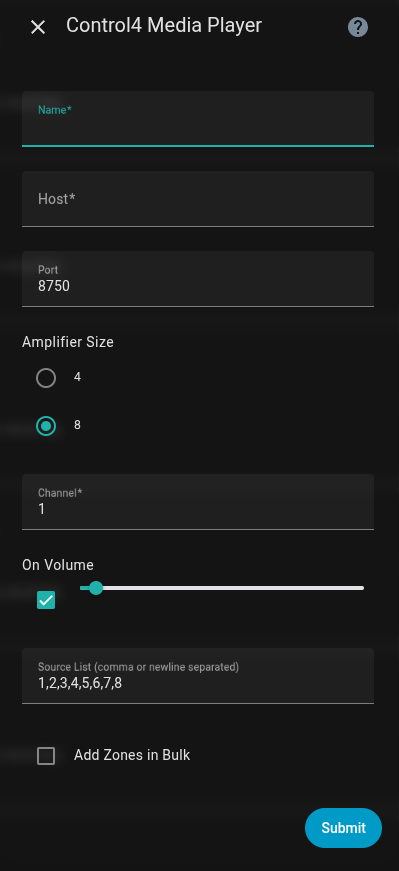
- Add zones via Settings → Devices & Services → Add Integration → Control4 Media Player
- Creates a media player per zone managed via the GUI
- Bulk Add zones with one-pass naming and channel selection
- Tracks used channels to avoid duplicate media players
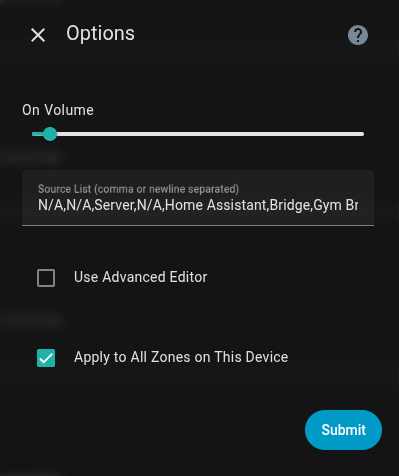
- Easily edit default volome and sources for zones after creation:
- Simple editor (comma/newline separated list of inputs/sources)
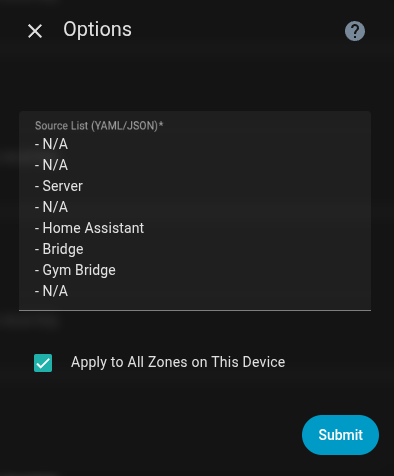
- Advanced Editor (YAML/JSON textarea) editing option + option to “Apply to all zones on this device”
You can install this integration directly from HACS:

After installation, restart Home Assistant and add the integration:

- In Home Assistant, open HACS → Integrations.
- Click Explore & Download Repositories, search for Control4 Media Player, then click Download.
- Restart Home Assistant.
- Go to Settings → Devices & Services → Add Integration → Control4 Media Player.
- Copy the folder
custom_components/control4_mediaplayerinto your HAconfig/custom_componentsdirectory. - Restart Home Assistant.
- Go to Settings → Devices & Services → Add Integration → Control4 Media Player.
⚠️ Noconfiguration.yamlentries are required. Remove any legacy YAML after migrating to the UI.
If you already had zones defined in configuration.yaml using the original integration (platform: control4-mediaplayer), you can migrate them into the new format by editing the file:
media_player:
  - platform: control4_mediaplayer
    host: 192.168.1.50
    port: 8750
    channel: 1
    name: Great Room
...- Change
platform: control4-mediaplayer→platform: control4_mediaplayer(underscore). - Restart Home Assistant. Your existing devices will be created in the UI under the integration.
⚠️ This method is intended only as a bridge.
The recommended approach is to delete the YAML and re-add zones through the UI via the integration, which generates unique IDs and registers your devices/entities properly in HA.
Once you confirm your devices exist in the UI, you can safely remove the YAML block from configuration.yaml.
- Name: Friendly name for the zone (e.g., “Great Room”).
- Host / Port: IP of your Control4 amp and UDP port (default
8750). - Amplifier Size:
4or8.
This bounds Channel numbers and limits Source List size. - Channel: Required, bounded by amplifier size.
- If a channel is already in use, the form re-shows with the next available channel selected.
- On Volume: 0–100 (default integration value).
- Source List: Comma/newline separated.
Defaults to1..Nbased on amp size, or inherits from another zone on the same amp.
- Toggle Add Zones in Bulk and press Submit once → the form re-renders showing:
- Zone Prefix (bulk)
- Zone Count (bulk) (bounded by remaining free channels)
- If all zones are already configured for that
host:port, the flow shows:
“All zones are already configured for host:port.” - After submit, a second screen allows unique names per channel, prefilled using the prefix.
- Simple Editor
- On Volume: 0–100
- Source List: comma/newline separated (auto-normalized)
- Apply to All Zones on This Device: propagate the Source List to other zones with the same
host:port.
- Advanced Editor (YAML/JSON)
- Multiline textarea
- Accepts YAML or JSON
- Example:
- HC800-1
- HC800-2
- Server
- Home Assistant
- Parse errors keep you on the page with a friendly error + inline example.
- Form re-render occurs only when:
- Amplifier Size changes, or
- Add Zones in Bulk is toggled
- Channel values are automatically clamped to
1..AmpSize. - Zone Count is clamped to the number of available channels.
- Source List longer than Amp Size is truncated.
- When editing/adding on the same
host:port, the Source List auto-inherits unless overridden.
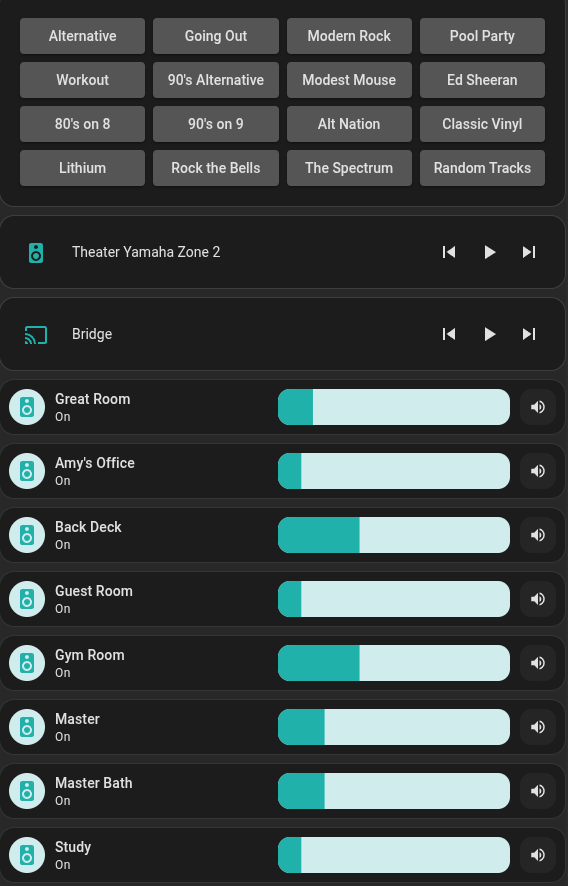
Example Dashboard Cards:
- “All zones are already configured for host:port.”
→ You’ve used all channels for the selected Amp Size. - “Channel X is already configured on host:port. Next available is Y.”
→ Select Y or another free channel. - “Channel must be between 1 and N.”
→ Adjust the channel or set the correct Amp Size. - Fields don’t appear until after I toggle “Add Zones in Bulk”.
→ Expected: forms re-render after you press Submit once. - If UI looks stale, hard-refresh your browser (Shift+F5).
- No automatic network discovery (Control4 protocol without a controller is limited).
- The form can’t live-update fields without submit; a minimal “soft refresh” pattern is used.
This integration is a fork of the original control4-mediaplayer by @Hansen8601 and based off the work of @kmakar89.
Huge thanks to their initial work building the foundation that made this project possible.
This fork expands with config flow (UI), bulk add, advanced source editing, and other enhancements.
- Open an issue if you find a bug.
- Contributions via PRs are welcome.
If you find this integration useful and want to support development, you can:


This project is licensed under the terms of the MIT license.