Steganographic Online Codec allows you to hide a password encrypted message within the images & photos using AES encryption algorithm with a 256-bit PBKDF2 derived key.
You can use it for free at:
https://www.pelock.com/products/steganography-online-codec
This SDK provides programming access to the codec and its encoding and decoding functions through a WebAPI interface.
Steganography is a term describing the art and science of hiding information by embedding messages within other, seemingly harmless image files.
In this case, the individual bits of the encrypted hidden message are saved as the least significant (LSB) bits in the RGB color components in the pixels of the selected image.
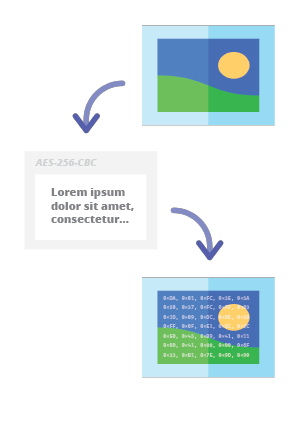
With our steganographic encoder you will be able to conceal any text message in the image in a secure way and send it without raising any suspicion. It will only be possible to read the message after providing valid, decryption password.
The preferred way of Web API SDK installation is via pip (Package Installer for Python).
Run:
pip install steganography-online-codec
or
python3 -m pip install steganography-online-codec
And then add this import to your source code:
from steganography_online_codec import *Installation package is available at https://pypi.org/project/steganography-online-codec/
If you don't want to use Python module, you can import directly from the file:
from pelock.steganography_online_codec import *The installation packages have been uploaded to repositories for several popular programming languages and their source codes have been published on GitHub:
| Repository | Language | Installation | Package | GitHub |
|---|---|---|---|---|
 |
Python | Run pip install steganography-online-codec |
PyPi | Sources |
 |
JavaScript, TypeScript | Run npm i steganography-online-codec or add the following to dependencies section of your package.json file "dependencies": { "steganography-online-codec": "latest" }, |
NPM | Sources |
#!/usr/bin/env python

###############################################################################
#
# Steganography Online Codec WebApi interface usage example.
#
# This example shows how to hide an encrypted secret message in an image file.
#
# Version      : v1.00
# Language     : Python
# Author       : Bartosz Wójcik
# Project      : https://www.pelock.com/products/steganography-online-codec
# Homepage     : https://www.pelock.com
#
###############################################################################

#
# include Steganography Online Codec module
#
from steganography_online_codec import *

#
# create Steganography Online Codec class instance (we are using our activation key)
#
mySteganographyOnlineCodec = SteganographyOnlineCodec("YOUR-WEB-API-KEY")

#
# encode a hidden message (encrypted with your password) within an image file
#
result = mySteganographyOnlineCodec.encode("input_file.jpg", "Secret message", "Pa$$word", "output_file_with_hidden_secret_message.png")

#
# result[] array holds the encoding results as well as other information
#
if result and "error" in result:
	if result["error"] == Errors.SUCCESS:
		print(f'Secret messaged encoded and saved to the output PNG file.')
	else:
		print(f'Error code {result["error"]}')
else:
print("Something unexpected happen while trying to encode the message.")#!/usr/bin/env python
###############################################################################
#
# Steganography Online Codec WebApi interface usage example.
#
# In this example, we will see how to hide an encrypted message in an
# image file using our codec.
#
# Version : v1.00
# Language : Python
# Author : Bartosz Wójcik
# Project : https://www.pelock.com/products/steganography-online-codec
# Homepage : https://www.pelock.com
#
###############################################################################
#
# include Steganography Online Codec module
#
from steganography_online_codec import *
#
# if you don't want to use Python module, you can import directly from the file
#
#from pelock.steganography_online_codec import *
#
# create Steganography Online Codec class instance (we are using our activation key)
#
mySteganographyOnlineCodec = SteganographyOnlineCodec("YOUR-WEB-API-KEY")
#
# encode a hidden message within the source image file
#
# full version image size limit is set to 10 MB (demo 50 kB max)
# supported image formats are PNG, JPG, GIF, BMP, WBMP, GD2, AVIF, WEBP (mail me for more)
input_file_path = "input_file.webp"
# full version message size is unlimited (demo 16 chars max)
secret_message = "Secret message"
# full version password length is 128 characters max (demo 8 chars max)
password = "Pa$$word"
# where to save encoded image with the secret message
output_file_path = "output_file_with_hidden_secret_message.png"
# encode a hidden message (encrypted with your password) within an image file
result = mySteganographyOnlineCodec.encode(input_file_path, secret_message, password, output_file_path)
#
# result[] array holds the encoding results as well as other information
#
if result and "error" in result:
print(f'You are running in {"full" if result["license"]["activationStatus"] is True else "demo"} version')
if result["error"] == Errors.SUCCESS:
print(f'Secret messaged encoded and saved to {output_file_path}')
elif result["error"] == Errors.INVALID_INPUT:
print(f'Invalid input file {input_file_path} or file doesn''t exist')
elif result["error"] == Errors.MESSAGE_TOO_LONG:
print(f'Message is too long for the provided image file, use larger file')
elif result["error"] == Errors.IMAGE_TOO_BIG:
print(f'Image file is too big, current limit is set to {mySteganographyOnlineCodec.convert_size(result["limits"]["maxFileSize"])}')
elif result["error"] == Errors.LIMIT_MESSAGE:
print(f'Message is too long, current limit is set to {result["limits"]["maxMessageLen"]}')
elif result["error"] == Errors.LIMIT_PASSWORD:
print(f'Password is too long, current limit is set to {result["limits"]["maxPasswordLen"]}')
elif result["error"] == Errors.INVALID_PASSWORD:
print(f'Invalid password')
else:
print(f'An unknown error occurred, error code: {result["error"]}')
else:
print("Something unexpected happen while trying to encode the message.")#!/usr/bin/env python
###############################################################################
#
# Steganography Online Codec WebApi interface usage example.
#
# In this example, we will see how to extract a previously encrypted & hidden
# secret message from an image file.
#
# Version : v1.00
# Language : Python
# Author : Bartosz Wójcik
# Project : https://www.pelock.com/products/steganography-online-codec
# Homepage : https://www.pelock.com
#
###############################################################################
#
# include Steganography Online Codec module
#
from steganography_online_codec import *
#
# if you don't want to use Python module, you can import directly from the file
#
#from pelock.steganography_online_codec import *
#
# create Steganography Online Codec class instance (we are using our activation key)
#
mySteganographyOnlineCodec = SteganographyOnlineCodec("YOUR-WEB-API-KEY")
#
# extract a hidden message from the previously encoded image file
#
# full version image size limit is set to 10 MB (demo 50 kB max)
# supported image format is PNG and only PNG!
input_file_path = "output_file_with_hidden_secret_message.png"
# full version password length is 128 characters max (demo 8 chars max)
password = "Pa$$word"
# extract a hidden message from the image (PNG files only)
result = mySteganographyOnlineCodec.decode(input_file_path, password)
#
# result[] Dict holds the decoding results as well as other information
#
if result and "error" in result:
print(f'You are running in {"full" if result["license"]["activationStatus"] is True else "demo"} version')
if result["error"] == Errors.SUCCESS:
print(f'Secret message is "{result["message"]}"')
elif result["error"] == Errors.INVALID_INPUT:
print(f'Invalid input file {input_file_path} or file doesn''t exist')
elif result["error"] == Errors.IMAGE_TOO_BIG:
print(f'Image file is too big, current limit is set to {mySteganographyOnlineCodec.convert_size(result["limits"]["maxFileSize"])}')
elif result["error"] == Errors.LIMIT_MESSAGE:
print(f'Extracted message is too long, current limit is set to {result["limits"]["maxMessageLen"]}')
elif result["error"] == Errors.LIMIT_PASSWORD:
print(f'Password is too long, current limit is set to {result["limits"]["maxPasswordLen"]}')
elif result["error"] == Errors.INVALID_PASSWORD:
print(f'Invalid password')
else:
print(f'An unknown error occurred, error code: {result["error"]}')
else:
print("Something unexpected happen while trying to extract the secret message.")#!/usr/bin/env python
###############################################################################
#
# Steganography Online Codec WebApi interface usage example.
#
# In this example we will verify our activation key status.
#
# Version : v1.00
# Language : Python
# Author : Bartosz Wójcik
# Project : https://www.pelock.com/products/steganography-online-codec
# Homepage : https://www.pelock.com
#
###############################################################################
#
# include Steganography Online Codec module
#
from steganography_online_codec import *
#
# if you don't want to use Python module, you can import directly from the file
#
#from pelock.steganography_online_codec import *
#
# create Steganography Online Codec class instance (we are using our activation key)
#
mySteganographyOnlineCodec = SteganographyOnlineCodec("YOUR-WEB-API-KEY")
#
# login to the service
#
result = mySteganographyOnlineCodec.login()
#
# result[] Dict holds the information about the license & current limits
#
if result:
print(f'You are running in {"full" if result["license"]["activationStatus"] is True else "demo"} version')
# information about the current license
if result["license"]["activationStatus"] is True:
print(f'Registered for - {result["license"]["userName"]}')
print(f'License type - {"personal" if result["license"]["type"] == 0 else "company"}')
print(f'Total number of purchased usage credits - {result["license"]["usagesTotal"]}')
print(f'Remaining number of usage credits - {result["license"]["usagesCount"]}')
# current limits (different for DEMO and FULL versions)
print(f'Max. password length - {result["limits"]["maxPasswordLen"]}')
print(f'Max. message length - {"unlimited" if result["limits"]["maxMessageLen"] == -1 else result["limits"]["maxMessageLen"]}')
print(f'Max. input image file size - {mySteganographyOnlineCodec.convert_size(result["limits"]["maxFileSize"])}')
else:
print("Something unexpected happen while trying to login to the service.")If you are interested in the Steganography Online Codec Web API or have any questions regarding SDK packages, technical or if something is not clear, please contact me. I'll be happy to answer all of your questions.
Bartosz Wójcik
- Visit my site at — https://www.pelock.com
- X — https://x.com/PELock
- GitHub — https://github.com/PELock