Need to make a WhatsApp Group for more than 100 people from an Excel Sheet?
You can export the sheet to CSV, import the Contacts to Google Contacts, then add each contact individually. Then delete the extra added contacts from Google Contacts.
Or, you could use this script for automating the process for you.
Currently it only supports sending the WhatsApp Group Invite to each person individually without saving the contacts.
- macOS or Windows
- WhatsApp Desktop (for macOS, for Windows 64-bit, for Windows 32-bit)
- Download the ZIP file of the Repository and unzip it.
- Head over to System Preferences -> Security & Privacy -> Accessibility.
- Click the Lock to make changes.
- Click + and search Terminal from the list of Applications.
- Tick it.
- Close the System Preferences.
- Open WhatsApp Desktop and make sure you're logged in and all the syncing is completed.
- Open WhatsApp_Automation -> numbers.txt
- Add all the contacts from your excel sheet in this format -> CCXXXXXXXXXX (Where CC is the Country Code and XXXXXXXXXX is the WhatsApp number of individual, eg: 919876543210. Make sure there are no '+' or '-' or spaces in the number. This is how it shall look. Don't remove the
END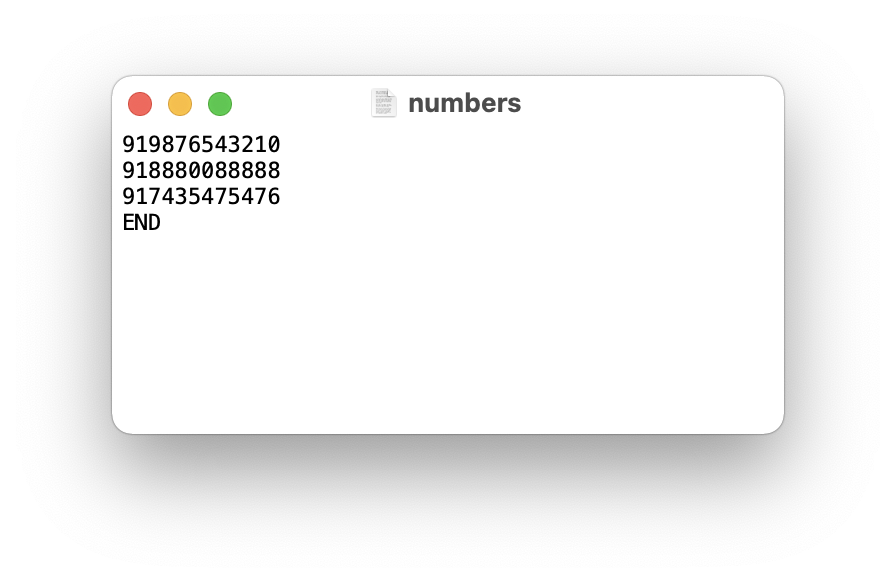
- Open Terminal and cd to the WhatsApp_Automation repository.
- Run the Script using this command
sh WhatsApp_Invite_Automation.sh - You will get a prompt asking you to paste the WhatsApp Group Invite Link. Paste it.
- The Script will run in the foreground. Don't disturb the process.
- Download the ZIP file of the Repository and unzip it.
- Open WhatsApp Desktop and make sure you're logged in and all the syncing is completed.
- Open WhatsApp_Automation -> numbers.txt
- Add all the contacts from your excel sheet in this format -> CCXXXXXXXXXX (Where CC is the Country Code and XXXXXXXXXX is the WhatsApp number of individual, eg: 919876543210. Make sure there are no '+' or '-' or spaces in the number.
Remove theEND. This is how it shall look.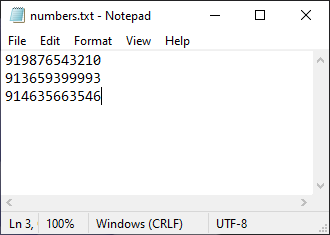
- Run the script by double clicking whatsapp_windows.vbs.
- Follow the on-screen instructions.
- You will get a prompt asking you to paste the WhatsApp Group Invite Link. Paste it.
- The Script will run in the foreground. Don't disturb the process.
This was built using WhatsApp API and AppleScript. This is not a new concept, people have been doing it since a long time back, but no one applied it to this usecase.
- Primary:
- Currently the Automation Process only works on macOS. I'm implementing it on Windows also.
- Script only sends WhatsApp group invite to people. Need to add a way to Add Them to Group Directly.
- Planning to Automate the whole process; taking the numbers from Google Sheets and Adding them to Group.
- Secondary:
- Making a GUI