

Firebase authentication via OAuth2 'Device Flow' for Node.js CLI applications on limited input devices (i.e. IoT).

- Create new OAuth client ID credentials in the GCP Credentials page. For the Application Type, select "TVs and Limited Input devices".
- Copy the Client ID and Client Secret values into either an
.envfile, or input directly into the config object (seetest.ts).
- Create a new GitHub OAuth app (guide).
- Copy the Client ID and Client Secret values into either an
.envfile, or input directly into the config object (seetest.ts). - Set the Client ID and Client Secret fields in the Firebase Console under Authentication > Sign-in method > Sign-in providers > GitHub
- Finally, copy the Authorization callback URL from the Firebase Console to your GitHub OAuth app's settings.
See test.ts.
- Import
FirebaseDeviceFlow. - Initialize your Firebase app.
- Pass Firebase app reference and OAuth config object to
DeviceFlowUIconstructor. If any parameters are absent from the OAuth config object, the relevant auth provider will be excluded from the UI. - Execute
DeviceFlowUI.signIn(). This will return a Promise<UserCredential>.
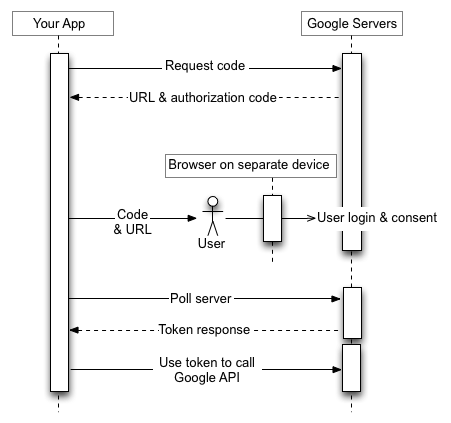
Google has a great resource on "OAuth 2.0 for TV and Limited-Input Device Applications".
Build and test with the usual npm run build, npm run test. For testing, you will have to initialize your own Firebase app and provider support.
- Node.js and
npm - Dependencies (install with
npm install)
- Convert to Typescript
- Change package structure for easier import (currently
import { DeviceFlowUI } from 'FirebaseDeviceFlow/dist/FirebaseDeviceFlow';) - Fix testing
- 'Slow down' error code handling?
- Add more providers?

Make sure you've done the following:
- All per-provider setup (outlined above)