




Your i18n bestie for Vue projects. Auto-translate with dynamic language support.
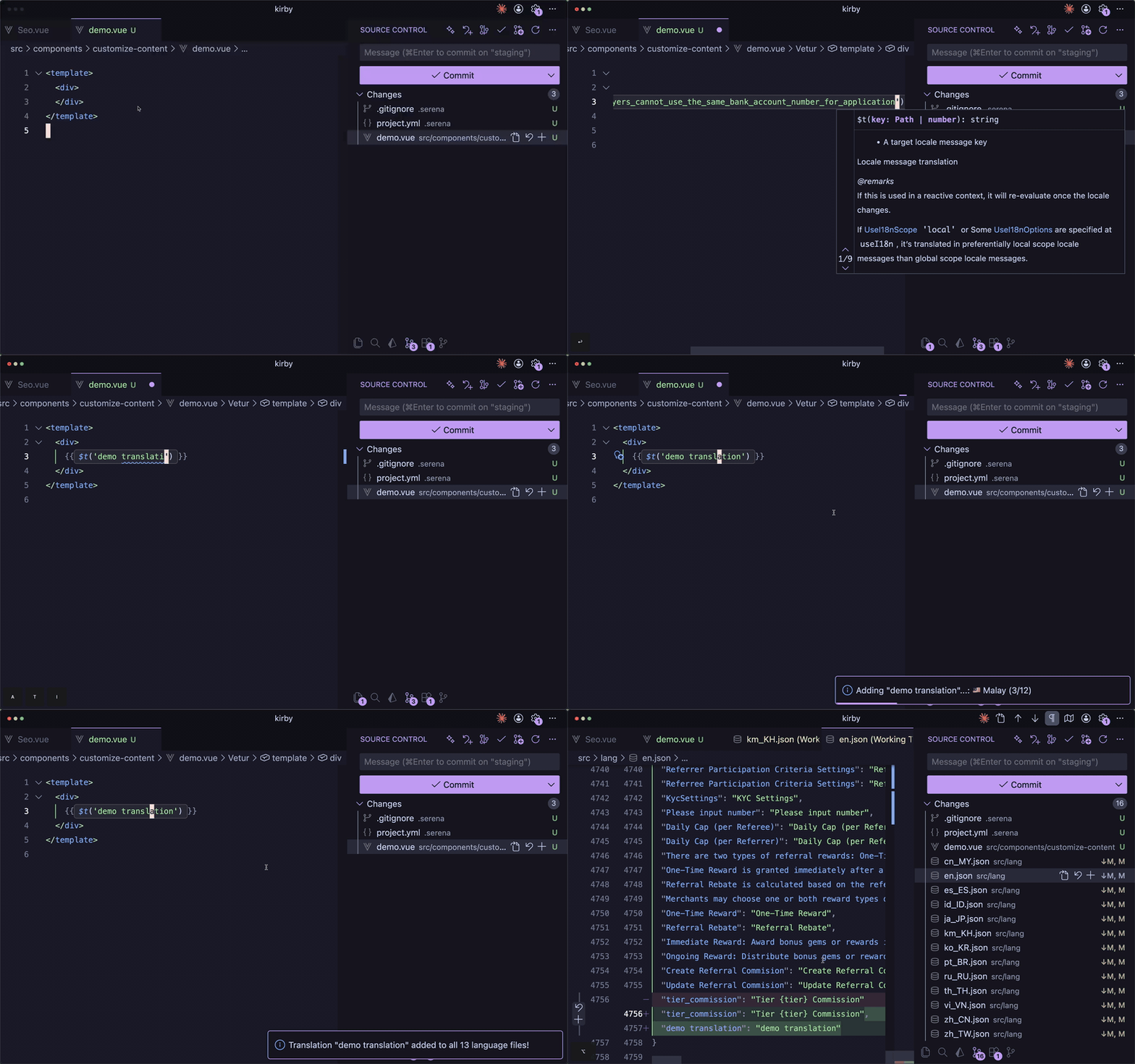
Type $t(' and get instant suggestions from all your translation files.
Hover any translation key to see all languages at once. No more file jumping.
Missing a key? Select text, press Cmd+. / Ctrl+., and add translations to all language files instantly.
Ctrl+Click on any $t('key') to jump directly to the translation in your JSON file.
Right-click on a translation key and select "Find All References" to see every usage across your codebase.
Get instant visual feedback with squiggly underlines on missing translation keys. No more silent failures.
Select any hardcoded text, press Cmd+. / Ctrl+., and extract it to an i18n key with auto-translation.
See completion percentages for each language at a glance. Expand to see missing keys.
The extension automatically detects languages from your JSON files. Add a new language file and it's instantly recognized!
| Command | Shortcut | Description |
|---|---|---|
| Add Translation | Cmd+Shift+T |
Add a new translation key |
| Search & Insert | Cmd+Shift+K |
Search existing keys and insert |
| Refresh Cache | - | Reload all translation files |
- Open VS Code
- Press
Cmd+P/Ctrl+P - Type
ext install RithyTep.kirby-i18n - Press Enter
Install from VS Code Marketplace
- VS Code 1.85+
- Vue/TypeScript/JavaScript project with language JSON files
Add to your .vscode/settings.json:
{
  // Path to language files (relative to workspace)
  "kirby-i18n.langPath": "src/lang",

  // Source language for translations (default: "en")
  "kirby-i18n.sourceLanguage": "en",

  // Custom language definitions for unknown codes
  "kirby-i18n.customLanguages": {
    "fr": {
      "name": "French",
      "flag": "🇫🇷",
      "apiCode": "fr-FR"
    },
    "de": {
      "name": "German",
      "flag": "🇩🇪",
      "apiCode": "de-DE"
    }
  }
}| Setting | Default | Description |
|---|---|---|
kirby-i18n.langPath |
src/lang |
Path to language JSON files directory |
kirby-i18n.sourceLanguage |
en |
Source language code for translations |
kirby-i18n.customLanguages |
{} |
Custom language definitions |
The extension includes 100+ languages with proper names and flag emojis:
Popular Languages:
- 🇺🇸 English (
en) • 🇨🇳 Chinese Simplified (zh_CN) • 🇹🇼 Chinese Traditional (zh_TW) - 🇯🇵 Japanese (
ja_JP) • 🇰🇷 Korean (ko_KR) • 🇹🇭 Thai (th_TH) • 🇻🇳 Vietnamese (vi_VN) - 🇫🇷 French (
fr,fr_FR) • 🇩🇪 German (de,de_DE) • 🇪🇸 Spanish (es,es_ES) - 🇮🇹 Italian (
it,it_IT) • 🇵🇹 Portuguese (pt,pt_BR) • 🇷🇺 Russian (ru_RU) - 🇳🇱 Dutch (
nl) • 🇵🇱 Polish (pl) • 🇺🇦 Ukrainian (uk) • 🇹🇷 Turkish (tr) - 🇸🇦 Arabic (
ar) • 🇮🇱 Hebrew (he) • 🇮🇷 Persian (fa) • 🇮🇳 Hindi (hi)
Regional Languages:
- Southeast Asia: 🇮🇩 Indonesian, 🇲🇾 Malay, 🇵🇭 Filipino, 🇰🇭 Khmer, 🇱🇦 Lao, 🇲🇲 Myanmar
- South Asia: 🇧🇩 Bengali, 🇮🇳 Tamil, Telugu, Marathi, Gujarati, 🇳🇵 Nepali, 🇱🇰 Sinhala
- Europe: 🇸🇪 Swedish, 🇩🇰 Danish, 🇳🇴 Norwegian, 🇫🇮 Finnish, 🇨🇿 Czech, 🇭🇺 Hungarian, 🇷🇴 Romanian, 🇬🇷 Greek
- Africa: 🇰🇪 Swahili, 🇿🇦 Afrikaans, 🇪🇹 Amharic
Note: Unknown language codes display as 🌐 CODE. Use customLanguages setting to add custom names and flags.
- Extension auto-detects
*.jsonfiles in your language directory - Watches for changes and updates in real-time
- Uses MyMemory API for auto-translation
- Supports any number of languages (100+ built-in!)
- Fixed Duplicate Matches - No more duplicate Quick Fix actions or hover messages
- Negative Lookbehind - Prevents
t()pattern from matching$t()calls
- Apostrophe Support - Keys with apostrophes now work correctly:
$t("player's wallet") - Improved Regex - Separate patterns for single/double quotes for proper text matching
- Fixed Hover Preview - Properly escape special characters (|, newlines) in translations
- Long Text Support - Truncates very long translations in hover for better readability
- Simplified Key Input - Removed batch comma-separated key feature for cleaner UX
- Streamlined Code - Cleaner, more maintainable codebase
- Parallel Translation - 10x faster! Translations now run in parallel batches
- Sub-3 Second Performance - Translate to 10+ languages in under 3 seconds
- Optimized API Calls - Smart batching prevents rate limiting while maximizing speed
- Enhanced Translation Panel - Click missing keys to add translations inline
- Bulk Actions - Right-click language to "Add All Missing Translations" at once
- Context Menu - Right-click missing keys to Add, Copy, or Delete
- Delete Key - Remove translation keys from all language files
- Smart Key Transformation - Underscore keys auto-convert to readable text:
total_commission_earned→ "Total commission earned" - Auto-Capitalize - First letter automatically capitalized for proper English
- Pre-filled Suggestions - English text input pre-filled with smart suggestions from key names
- Go to Definition - Ctrl+Click on
$t('key')to jump to the JSON file - Find All References - Find every usage of a translation key
- Missing Key Warnings - Visual diagnostics for undefined keys
- Extract to Translation - Select text and extract to i18n with auto-translate
- Translation Status Sidebar - See completion % per language with missing keys
- 100+ built-in languages - Proper names and flag emojis for most common languages
- Dynamic language detection - Auto-detects from JSON files
- Configurable source language - Not limited to English
- Custom language definitions - Add any language with custom flags
- Workspace settings - Configure per project in
.vscode/settings.json
Contributions are welcome! Please open an issue or submit a PR.
MIT © RithyTep
If this extension helps you, please consider:
- Giving it a ⭐ on GitHub
- Leaving a review on the Marketplace