Rust implementation of Shioaji — SinoPac's cross-language, cross-platform trading API for financial markets.

⚠️ Alpha Stage — This project is under active development and not yet production-ready. APIs may change without notice. Use at your own risk.
Shioaji was Python-only. rshioaji transforms it into a universal trading platform — any programming language can now trade through the HTTP API server with SSE real-time streaming.
| Access Layer | Who | How |
|---|---|---|
| Python | Native binding (PyO3) | import shioaji — best performance, sync and async |
| HTTP API + SSE | Any language | REST endpoints + real-time streaming at localhost:8080 |
| CLI | Terminal / scripts | shioaji command for server, trading, data queries |
Python, JavaScript/TypeScript, Go, C/C++, C#, Rust, Java/Kotlin
- Python Trading API — Drop-in Rust replacement for the Python Shioaji library, with PyO3 bindings
- HTTP API Server — RESTful API with SSE streaming, accessible from any language
- Built-in Dashboard — Real-time web UI for monitoring server health, API usage, SSE streams, accounts, and CA certificates
- Custom Apps — Upload and serve your own web apps alongside the dashboard
- OpenAPI Documentation — Auto-generated interactive API docs at
/docs— the single source of truth for request/response schemas - CLI Tool — Manage server, token pool, and API connectivity from the command line
- Claude Code Skill — AI-assisted development with comprehensive trading API documentation
Install the shioaji skill for AI-assisted trading development:
claude plugin marketplace add Sinotrade/rshioaji
claude plugin install rshioaji
The skill covers all access layers — Python, CLI, HTTP API, SSE streaming, and complete project guides for JS/TS, Go, C/C++, C#, Rust, and Java/Kotlin.
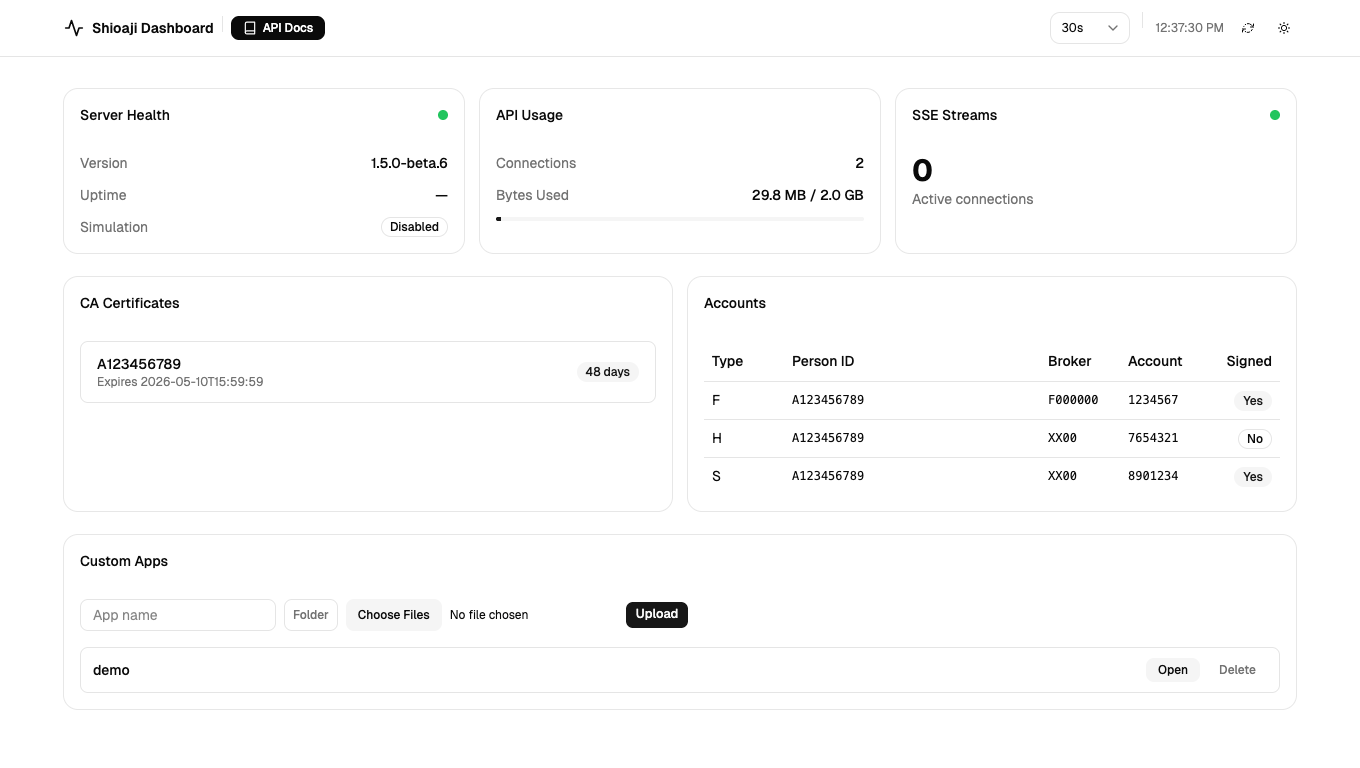
The dashboard provides real-time monitoring of:
- Server Health — version, uptime, simulation mode
- API Usage — connection count, bandwidth usage
- SSE Streams — active stream connections and health status
- CA Certificates — certificate status and expiration
- Accounts — linked trading accounts
Access the dashboard at http://localhost:8080/ when the server is running.
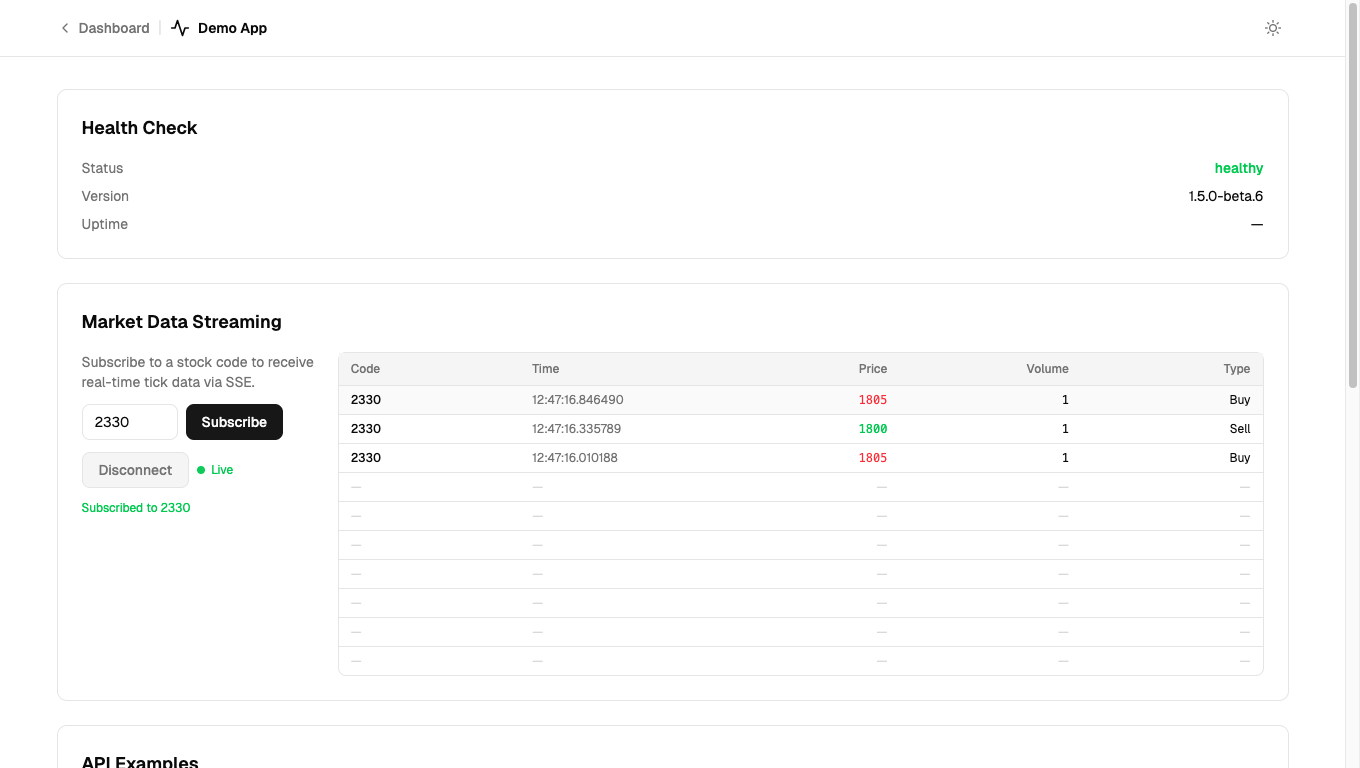
Upload custom web apps from the dashboard's Custom Apps card — supports single files or Vite build output folders. Apps are served at /apps/<name>/.
Get started with the demo template: Sinotrade/shioaji-app-demo
# uv (recommended)
uv add rshioaji

# pip
pip install rshioajiuv tool install rshioaji
shioaji --helpLinux / macOS:
# Stable
curl -fsSL https://raw.githubusercontent.com/sinotrade/rshioaji/main/install.sh | sh

# Pre-release
curl -fsSL https://raw.githubusercontent.com/sinotrade/rshioaji/main/install.sh | CHANNEL=prerelease sh

# Specific version
curl -fsSL https://raw.githubusercontent.com/sinotrade/rshioaji/main/install.sh | VERSION=v1.5.0b2 sh
Windows (PowerShell):
# Stable
irm https://raw.githubusercontent.com/sinotrade/rshioaji/main/install.ps1 | iex

# Pre-release
$env:CHANNEL="prerelease"; irm https://raw.githubusercontent.com/sinotrade/rshioaji/main/install.ps1 | ieximport shioaji as sj
api = sj.Shioaji(simulation=True)
api.login(api_key="YOUR_KEY", secret_key="YOUR_SECRET")
# Snapshots
api.snapshots([api.Contracts.Stocks["2330"]])
# Kbars
api.kbars(api.Contracts.Stocks["2330"])Start the server to expose Shioaji as a REST API:
shioaji server startThe server provides:
- REST API at
http://localhost:8080/api/v1/ - OpenAPI docs at
http://localhost:8080/docs— browse schemas, try endpoints - OpenAPI spec at
http://localhost:8080/openapi.json— auto-generate typed clients - Dashboard at
http://localhost:8080/ - SSE streams for real-time tick, bidask, and quote data
# Get market snapshots
curl -X POST http://localhost:8080/api/v1/data/snapshots \
  -H "Content-Type: application/json" \
  -d '{"contracts":[{"security_type":"STK","exchange":"TSE","code":"2330"}]}'

# Subscribe and stream real-time ticks (SSE)
curl -X POST http://localhost:8080/api/v1/stream/subscribe \
  -H "Content-Type: application/json" \
  -d '{"security_type":"STK","exchange":"TSE","code":"2330","quote_type":"Tick"}'
curl -N http://localhost:8080/api/v1/stream/data/tick_stkshioaji server start # Start HTTP server (simulation)
shioaji server start --production # Production mode
shioaji server check # Check mode and auth status
shioaji server status # Show daemon status
shioaji server stop # Stop the daemon
shioaji auth accounts # List trading accounts
shioaji data snapshots --codes 2330,2317
shioaji order place --code 2330 --action Buy --price 580 --quantity 1
shioaji portfolio balance
shioaji utils token list # List cached tokens
shioaji utils api check # Test API connectivity
shioaji tree --all # Show full command tree| Platform | Wheel | Binary |
|---|---|---|
| Linux x86_64 | manylinux2014 | tar.gz |
| macOS aarch64 (Apple Silicon) | abi3 | tar.gz |
| Windows x86_64 | abi3 | zip |