-
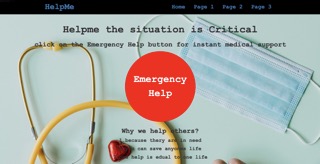
Go to the site which is hosted at: Site Hosted at : https://tejas-dalvi-99.github.io/Help-Me/
-
Click on the red "Emergency Help" button.
-
Fill out the "Details" categories of the form with the description of your emergency (Example: If an accident has occurred near the user, the user can then provide the specific details such as where it occurred, who was injured, and the user can attach pictures (JPEG, JPG) of the injury). Please be as descriptive as possible so that you are able to get the best help.
-
Once the user submits the form, the website will send a notification to all participating hospitals in the area.
-
When the hospital is agreed to take in the patient, the user will receive an "Accepted" notification.
-
Emergency services (e.g. Ambulance) will be sent to the current location of the user.
The next steps for this project would be to edit/update the homepage so that it is more informative and contains a more modern user interface. From there, we would like to build out additional pages that can be seen in the navigation menu of the site. The last step would be to get hospitals involved in this program so that users can join and get the proper help they need. Feel free to contribute to help us achieve our goals!