
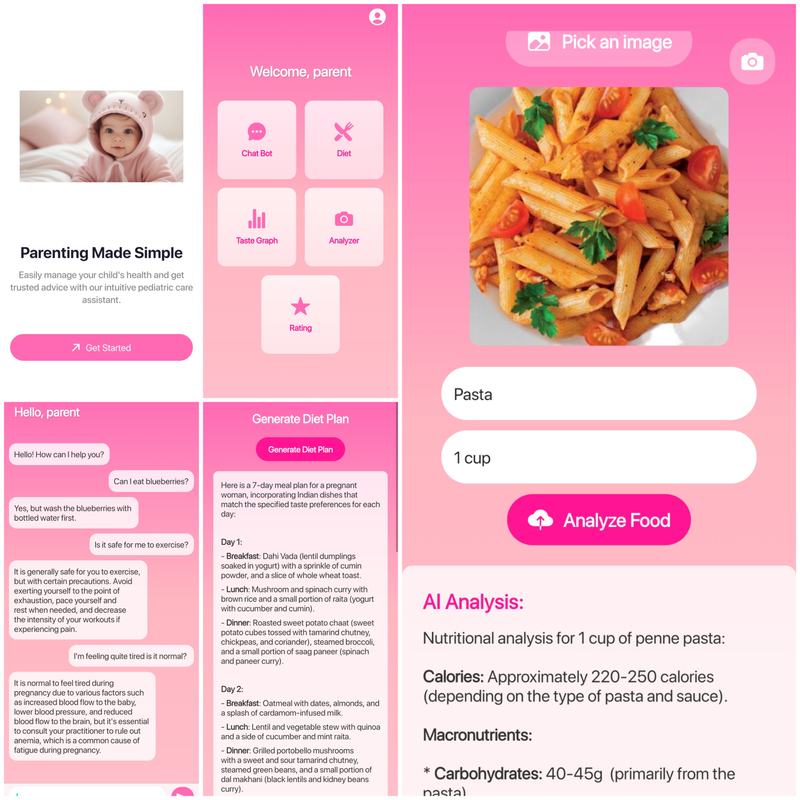
Pedipal is an innovative mobile application designed to support mothers and pregnant women with reliable, personalized healthcare assistance. Built with React Native, MongoDB, Gemini API, Llama, QRoq, and Neo4j, Pedipal provides a holistic experience to its users through advanced AI-driven features.
-
A conversational assistant that uses Retrieval-Augmented Generation (RAG) to answer user queries about health, nutrition, and childcare. Provides accurate and relevant responses by retrieving up-to-date information and generating personalized answers.
-
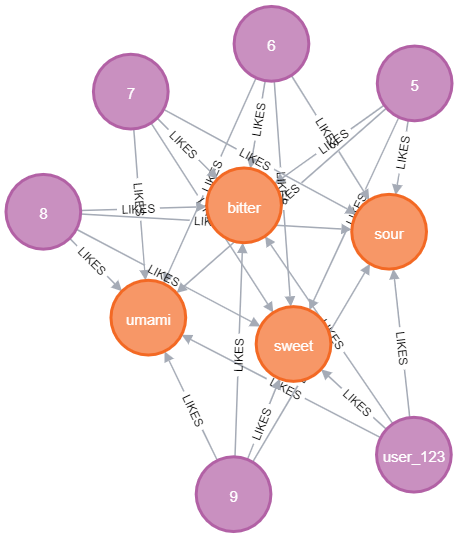
Dynamically generates diet plans tailored to the user's taste preferences. Features include: Taste Preference Tracking: Records user feedback and updates taste preferences using weighted algorithms. Adaptive Recommendations: Regular updates ensure recommendations align with user preferences over time.
-
Users can upload images of food, and the app analyzes them to: Identify if the item is food. Provide detailed nutritional value of the identified food item.
Frontend
- React Native: For building a seamless and cross-platform mobile experience.
Backend
-
FastAPI: To create efficient and scalable RESTful APIs for handling requests.
-
MongoDB: To store user data and weekly taste pallet that was generated.
-
Neo4j: To store taste preferences of the user.
The following APIs and libraries are used to power Pedipal's advanced features:
- FastAPI: Efficient backend framework for API development.
- Groq API: Used for fast retrieval of responses from the llm.
- Gemini API: Used for accurate food nutrient detection from images.
- Node.js (v14 or above)
- MongoDB
- Neo4j Database
- Python 3.9 or above (for FastAPI)
- Clone the repository.
git clone https://github.com/TharunCodes07/Pedipal
cd Pedipal
- Install dependencies for both the frontend and backend:
npm install
- Create a Neo4j Database, start a project and update your credentials
# ./backend/graph.py

conn = Neo4jConnection(uri="your url", user="name", password="your password")
- Create a MongoDB collection and update your Database
# ./backend/database.py

MONGO_DETAILS = "mongodb://localhost:27017/"
- Create a .env inside ./backend folder and update your API keys
GROQ_API_KEY=
GEMINI_API_KEY=
- Update API endpoint
# Search for your-ip and replace them with your IP address
- Start the app and backend servers on separate terminals
npx expo start
cd backend
node app.js
cd backend
python main-auth.js
cd backend
python main-chat.py
cd backend
python main-graph.py
- Login/Sign Up: Users create an account or log in to access personalized features.
- Chatbot Assistance: Use the chatbot to ask questions about pregnancy, child health, or nutrition.
- Diet Generator: Provide feedback on your dietary preferences and receive customized meal plans.
- Nutrient Analysis: Upload food images to view nutritional information.