



Camouf catches the mistakes AI coding assistants make — broken contracts, phantom imports, signature drift, and architectural violations that traditional linters miss entirely.
Claude, Copilot, and Cursor are brilliant at generating code — but they work with limited context windows. When an AI generates frontend code without seeing your backend contracts, or modifies a file without remembering related files, things break in ways that compile but fail at runtime:
// Backend contract (shared/api.ts)
export function getUserById(id: string): Promise<User> { ... }
export interface User { email: string; createdAt: Date; }

// AI generates frontend code (components/Profile.tsx) — looks correct, compiles fine
const user = await getUser(userId);        // ❌ Wrong function name
console.log(user.userEmail);               // ❌ Wrong field name
console.log(user.created_at);              // ❌ Wrong casing
ESLint doesn't catch this. TypeScript passes. Your tests might even pass. Then production breaks.
Camouf scans your codebase for the specific patterns of errors that AI assistants create:

| Error Type | Example | Traditional Tools |
|---|---|---|
| Function Name Drift | getUser() instead of getUserById() |
❌ ESLint ignores it |
| Phantom Imports | import { validate } from './helpers' (file doesn't exist) |
❌ TypeScript ignores at lint time |
| Field Name Mismatch | user.userEmail instead of user.email |
❌ Compiles with any |
| Context Drift | Same concept named User/Customer/Account in different files |
❌ No tool detects this |
| Orphaned Functions | AI generates helpers that are never called | ❌ Tree-shaking hides it |
| Casing Inconsistency | getUserById / get_user_by_id in same project |
❌ Style issue, not error |
Defined in shared/api.ts:15      Used in frontend/user.ts:42
         getUserById(id)    ◄──────────    getUser(userId)
                                  └── 75% similar — likely AI context loss
npx camouf fix-signatures --all    # Fix all mismatches automatically
npx camouf fix --id sig-001        # Fix a specific mismatch
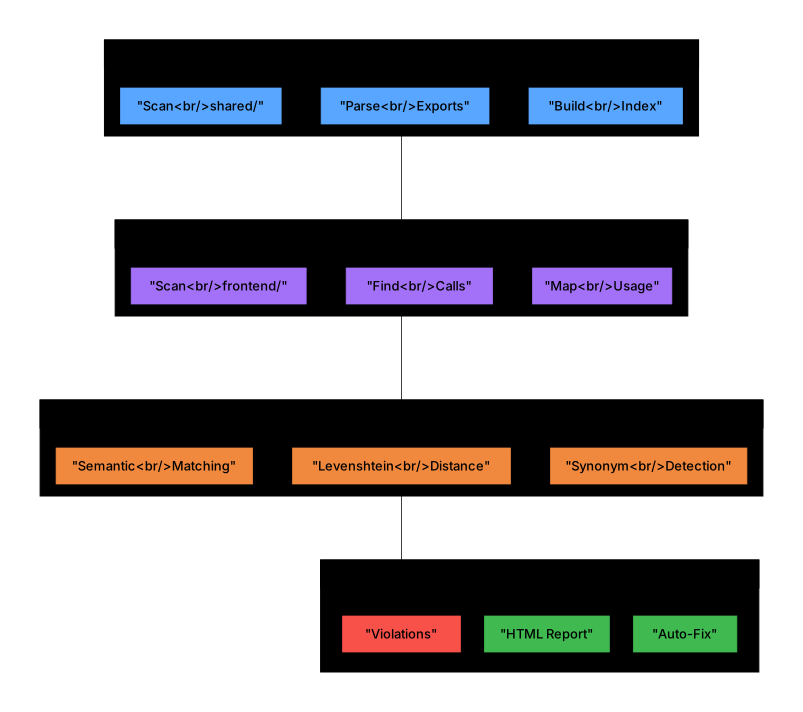
| Aspect | ESLint / Prettier | Camouf |
|---|---|---|
| Focus | Code style, syntax errors | Cross-file contract integrity |
| Scope | Single file at a time | Entire codebase relationships |
| AI Errors | Doesn't detect | Purpose-built for AI mistakes |
| Runtime Safety | No guarantee | Catches compile-but-fail bugs |
| Architecture | No awareness | Layer boundaries, DDD, dependencies |
Camouf is not a replacement for ESLint — it catches what ESLint can't see.
- AI-Native: Built specifically for Claude, Copilot, and Cursor error patterns
- Cross-File Analysis: Detects mismatches across your entire codebase
- Plugin Architecture: Extend with custom rules for React, Next.js, NestJS, or any framework
- Multi-language Support: TypeScript, JavaScript, Python, Java, Go, Rust
- CI/CD Ready: SARIF, JSON, JSOND outputs for GitHub Actions and AI agents
- VS Code Integration: Real-time Problems panel with clickable fixes

- 13+ Built-in Rules: AI-specific and architecture validation rules
- Function/Field Matching: Fuzzy matching to detect AI naming drift
- Circular Dependency Detection: Find and break dependency cycles
- Real-time Watch Mode: Continuous architecture monitoring
- Security Scanning: Detects hardcoded secrets, API keys, credentials
- Multiple Report Formats: HTML, JSON, JSOND, Markdown, SARIF
- VS Code Integration: Problems panel with clickable quick-fixes
- Plugin System: Extend for any framework (React, Next.js, NestJS...)
npm install -g camouf
# or
npm install --save-dev camoufcamouf initcamouf validatecamouf watchRunning npx camouf or npx camouf help displays the full interactive help:
  ██████╗ █████╗ ███╗   ███╗ ██████╗ ██╗   ██╗███████╗
 ██╔════╝██╔══██╗████╗ ████║██╔═══██╗██║   ██║██╔════╝
 ██║     ███████║██╔████╔██║██║   ██║██║   ██║█████╗
 ██║     ██╔══██║██║╚██╔╝██║██║   ██║██║   ██║██╔══╝
 ╚██████╗██║  ██║██║ ╚═╝ ██║╚██████╔╝╚██████╔╝██║
  ╚═════╝╚═╝  ╚═╝╚═╝     ╚═╝ ╚═════╝  ╚═════╝ ╚═╝    v0.7.0

  Architecture guardrails for AI-generated code

  ┌─────────────────────────────────────────────────────────────┐
  │  QUICK START                                                │
  │                                                             │
  │  $ npx camouf init              # Setup config              │
  │  $ npx camouf validate          # One-time check            │
  │  $ npx camouf watch             # Real-time monitoring      │
  └─────────────────────────────────────────────────────────────┘

  COMMANDS

  Setup & Config:
    init [options]            Initialize configuration in the current project
                              --template <t>  Use preset (monorepo, fullstack)
                              --agent <type>  Generate CLAUDE.md / AGENTS.md

  Validation & Analysis:
    validate [options]        One-time architecture validation
                              --rules <r>     Run specific rules (comma-sep)
                              --format <f>    Output: text, json, sarif, vscode
                              --fix           Auto-fix where possible
                              --ci            CI/agent mode (no spinners)
    watch [options]           Real-time file monitoring with live validation
                              --format vscode VS Code Problems panel integration
                              --rules <r>     Watch specific rules only
    analyze [options]         Deep architecture & dependency analysis
                              --metrics       Include code metrics
                              --coupling      Analyze module coupling
                              --format <f>    Output: html, json, dot

  Fixing & Refactoring:
    fix [options]             Fix signature mismatches & fixable violations
                              --interactive   Review and confirm each fix
                              --all           Apply all fixes automatically
                              --dry-run       Preview changes without applying
                              --id <id>       Fix specific mismatch by ID
                              --file <path>   Fix all in a specific file
                              --type <type>   Fix by type (function-name, etc.)
    fix-signatures [options]  Alias: fix function signature mismatches

  Reporting:
    report [options]          Generate comprehensive architecture reports
                              --format <f>    html, pdf, json, markdown
                              --include-code  Include code snippets
                              --include-graphs Include dependency graphs

  AI Agent Integration:
    mcp [options]             Start MCP server for Cursor, Claude, Copilot
                              --stdio         Use stdio transport (default)

  GLOBAL OPTIONS

    -c, --config <path>       Path to configuration file
    -v, --version             Display current version
    --verbose                 Enable verbose output
    --silent                  Suppress all output except errors
    --no-color                Disable colored output

  EXAMPLES

    $ npx camouf validate --format json          # JSON output for scripts
    $ npx camouf validate --rules function-signature-matching
    $ npx camouf fix --interactive               # Review fixes one by one
    $ npx camouf fix --all --dry-run             # Preview all fixes
    $ npx camouf watch --format vscode           # VS Code integration
    $ npx camouf report --format html            # HTML architecture report
    $ npx camouf init --agent claude             # Generate CLAUDE.md
    $ npx camouf mcp --stdio                     # Start MCP server

  AVAILABLE RULES

    AI Safety:          ai-hallucinated-imports, inconsistent-casing,
                        orphaned-functions, phantom-type-references,
                        context-drift-patterns
    Architecture:       layer-dependencies, circular-dependencies,
                        function-signature-matching, contract-mismatch
    Code Quality:       type-safety, performance-antipatterns,
                        data-flow-integrity, hardcoded-secrets
    Advanced:           ddd-boundaries, distributed-transactions,
                        api-versioning, security-context, resilience-patterns

  DOCS & LINKS

    Documentation:      https://github.com/TheEmilz/camouf#readme
    Report Issues:      https://github.com/TheEmilz/camouf/issues
Tip: Run
npx camouf help <command>for detailed help on any specific command.
Extend Camouf for any framework. Plugins can add rules, analyzers, parsers, quick-fixes, and output formatters.
npm install --save-dev camouf-plugin-react{
"plugins": ["camouf-plugin-react"],
"rules": {
"plugin": {
"missing-dependency-array": "error"
}
}
}See Creating Plugins for building your own.
| Plugin | Description | Status |
|---|---|---|
camouf-plugin-react |
React hooks dependency arrays, component naming, prop drilling, stale closures | ✅ Available |
camouf-plugin-nextjs |
Next.js page structure, API routes, middleware | 🔜 Coming Soon |
camouf-plugin-nestjs |
NestJS module boundaries, DI patterns | 🔜 Coming Soon |
Catches AI-generated React mistakes:
npm install --save-dev camouf-plugin-reactRules included:
| Rule | Description |
|---|---|
missing-dependency-array |
Detects useEffect/useCallback with missing dependencies |
inconsistent-component-naming |
Enforces PascalCase for React components |
prop-drilling-detection |
Finds excessive prop passing through component trees |
stale-closure-patterns |
Catches stale closures in hooks (common AI mistake) |
Camouf exposes an MCP (Model Context Protocol) server that allows AI agents like Claude, Cursor, and Copilot to validate their own code before proposing it to you.
npx camouf mcpAdd to your Claude Desktop config (%APPDATA%\Claude\claude_desktop_config.json on Windows, ~/Library/Application Support/Claude/claude_desktop_config.json on macOS):
{
  "mcpServers": {
    "camouf": {
      "command": "npx",
      "args": ["camouf", "mcp"],
      "cwd": "/path/to/your/project"
    }
  }
}| Tool | Description |
|---|---|
camouf_validate |
Validate code against architecture rules |
camouf_analyze |
Analyze project structure and conventions |
camouf_suggest_fix |
Get fix suggestions for violations |
When Claude generates code, it can call camouf_validate to check for:
- Hallucinated imports (modules that don't exist)
- Contract mismatches (wrong function signatures)
- Context drift (inconsistent naming)
- Security issues (hardcoded secrets)
This creates a feedback loop where AI catches its own mistakes before you see them.
See the full CLI Reference above for all commands, options, and examples.
Run
npx camouf helpto see the same reference in your terminal.
Camouf supports multiple configuration formats:
camouf.config.jsoncamouf.config.yamlcamouf.config.js.camoufrc
{
  "name": "my-project",
  "rootDir": "./src",
  "exclude": ["**/node_modules/**", "**/*.test.ts"],
  "layers": [
    {
      "name": "presentation",
      "directories": ["./src/controllers", "./src/routes"],
      "allowedDependencies": ["application", "domain"]
    },
    {
      "name": "application",
      "directories": ["./src/services", "./src/usecases"],
      "allowedDependencies": ["domain"]
    },
    {
      "name": "domain",
      "directories": ["./src/domain", "./src/entities"],
      "allowedDependencies": []
    },
    {
      "name": "infrastructure",
      "directories": ["./src/infrastructure", "./src/repositories"],
      "allowedDependencies": ["domain"]
    }
  ],
  "rules": {
    "builtin": {
      "layer-dependencies": "error",
      "circular-dependencies": "error",
      "function-signature-matching": "error",
      "performance-antipatterns": "warn",
      "type-safety": "warn",
      "data-flow-integrity": "error",
      "distributed-transactions": "warn",
      "api-versioning": "info",
      "security-context": "error",
      "resilience-patterns": "warn",
      "ddd-boundaries": "info"
    }
  },
  "output": {
    "format": "text",
    "colors": true,
    "verbose": false
  }
}| Rule | Description | Default |
|---|---|---|
layer-dependencies |
Validates layer boundary compliance | error |
circular-dependencies |
Detects circular dependency cycles | error |
contract-mismatch |
Validates API contracts (OpenAPI/GraphQL) | error |
ddd-boundaries |
Validates DDD principles and bounded contexts | warn |
function-signature-matching |
Detects mismatched function/field names between contracts and usage | error |
| Rule | Description | Default |
|---|---|---|
hardcoded-secrets |
Detects hardcoded API keys, passwords, and tokens | error |
data-flow-integrity |
Validates data flow and input sanitization | error |
security-context |
Validates authentication and authorization | error |
| Rule | Description | Default |
|---|---|---|
distributed-transactions |
Validates distributed transaction patterns | warn |
resilience-patterns |
Validates circuit breakers, retries, timeouts | warn |
| Rule | Description | Default |
|---|---|---|
performance-antipatterns |
Detects N+1 queries, memory leaks | warn |
type-safety |
Detects unsafe type usage | warn |
api-versioning |
Validates API versioning practices | info |
These rules catch mistakes that AI coding assistants commonly make:
| Rule | Description | Default |
|---|---|---|
ai-hallucinated-imports |
Detects imports of non-existent files/modules | error |
context-drift-patterns |
Finds same concepts with different names across files | warn |
phantom-type-references |
Catches references to types that don't exist | warn |
inconsistent-casing |
Detects mixing of camelCase/snake_case in the same codebase | warn |
orphaned-functions |
Finds functions declared but never called anywhere | warn |
See examples: Check
test-fixtures/ai-errors/in the repository for concrete examples of what each rule catches.
Real-time colored output with violation details.
Compact machine-readable format for CI/CD integration.
JSON with Descriptions — A structured format optimized for AI agent consumption with rich context and actionable information.
npx camouf validate --format jsondJSOND includes:
- Detailed descriptions for every field
- Violations grouped by file, rule, and severity
- AI-specific action items and priorities
- Ready-to-run fix commands
- Workflow instructions for automated remediation
Example output:
{
  "$description": "Camouf Architecture Violations Report - JSOND format optimized for AI agents",
  "summary": {
    "total_violations": 3,
    "by_severity": {
      "errors": {
        "count": 2,
        "description": "Critical violations that must be fixed..."
      }
    }
  },
  "action_items": [
    {
      "priority": "critical",
      "action": "Remove hardcoded secrets",
      "quick_fix": "Move secrets to environment variables"
    }
  ],
  "ai_instructions": {
    "recommended_workflow": [
      "1. Review the summary to understand the scope",
      "2. Prioritize errors over warnings",
      "3. Use 'suggestion' field for fixes"
    ]
  }
}Interactive visualization with dependency graphs.
Static Analysis Results Interchange Format for IDE integration.
Documentation-friendly format for pull requests.
Camouf integrates seamlessly with VS Code's Problems panel for real-time violation feedback.
When you run camouf init, it automatically creates:
.vscode/tasks.json- Build tasks with problem matchers.vscode/settings.json- Optimal settings for Camouf
-
Press
Ctrl+Shift+B(Windows/Linux) orCmd+Shift+B(Mac) -
Select one of the tasks:
- camouf: Validate - One-time scan, results in Problems panel
- camouf: Watch - Continuous monitoring (background task)
-
Open the Problems panel:
Ctrl+Shift+M
# One-time validation with VS Code output format
npx camouf validate --format vscode

# Watch mode with VS Code output format
npx camouf watch --format vscodeViolations appear in the Problems panel with:
- Severity icon (error/warning/info)
- File location (clickable link)
- Rule ID and message
- Suggestion for fix
test.ts(10,1): error hardcoded-secrets: AWS Access Key ID detected
src/api.ts(45,1): warning performance-antipatterns: N+1 query pattern detected
If you didn't run camouf init or need to add tasks manually, create .vscode/tasks.json:
{
  "version": "2.0.0",
  "tasks": [
    {
      "label": "camouf: Validate",
      "type": "shell",
      "command": "npx camouf validate --format vscode",
      "problemMatcher": {
        "owner": "camouf",
        "fileLocation": ["relative", "${workspaceFolder}"],
        "pattern": {
          "regexp": "^(.+)\\((\\d+),(\\d+)\\):\\s+(error|warning|info)\\s+([^:]+):\\s+(.*)$",
          "file": 1,
          "line": 2,
          "column": 3,
          "severity": 4,
          "code": 5,
          "message": 6
        }
      }
    }
  ]
}Camouf integrates natively with AI coding agents. Use camouf init --agent to generate the appropriate configuration files.
camouf init --agent claudeThis creates:
CLAUDE.md— Project instructions teaching Claude how to use Camouf.claude/commands/camouf-validate.md—/camouf-validateslash command for architecture-aware validation.claude/commands/camouf-fix.md—/camouf-fixslash command to automatically fix violations.claude/rules/camouf.md— Architecture rules loaded into every Claude session
Claude Code will automatically read these files and enforce architecture rules when writing code.
camouf init --agent codexThis creates:
AGENTS.md— Agent instructions with Camouf commands, output format, and workflow
Codex reads AGENTS.md and knows how to validate architecture before committing.
camouf init --agent allGenerates integration files for all supported agents (Claude Code + Codex).
For AI agent consumption, use JSOND format (recommended):
npx camouf validate --format jsond --ciJSOND provides rich context and actionable instructions optimized for AI assistants:
{
  "$description": "Camouf Architecture Violations Report",
  "summary": {
    "total_violations": 2,
    "by_severity": {
      "errors": { "count": 1, "description": "Critical violations..." }
    }
  },
  "action_items": [
    {
      "priority": "critical",
      "action": "Remove hardcoded secrets",
      "quick_fix": "npx camouf fix --id sec-001"
    }
  ],
  "ai_instructions": {
    "recommended_workflow": [
      "1. Review summary",
      "2. Prioritize errors",
      "3. Apply quick fixes"
    ]
  }
}
For simpler JSON output:
npx camouf validate --format json --ciUse --ci flag or CAMOUF_CI=1 environment variable for agent/CI environments:
# Suppress spinners, colors, interactive prompts
npx camouf validate --ci

# JSON output automatically enables CI mode
npx camouf validate --format json

# Environment variable alternative
CAMOUF_CI=1 npx camouf validate0— No violations found1— Violations found (or error)
name: Architecture Check
on: [push, pull_request]

jobs:
  architecture:
    runs-on: ubuntu-latest
    steps:
      - uses: actions/checkout@v3
      - uses: actions/setup-node@v3
        with:
          node-version: '18'
      - run: npm ci
- run: npx camouf validate --strictarchitecture:
stage: test
image: node:18
script:
- npm ci
- npx camouf validate --strict| Language | Parser | Features |
|---|---|---|
| TypeScript | ts-morph | Full AST analysis, type resolution |
| JavaScript | ts-morph | ES6+ module support |
| Python | tree-sitter | Import/export detection |
| Java | tree-sitter | Package and class analysis |
| Go | tree-sitter | Module and import analysis |
| Rust | tree-sitter | Crate and module analysis |
Generate interactive HTML visualizations:
camouf analyze --visualize -o ./reportsExport to GraphViz DOT format:
camouf analyze --visualize -f dot -o ./reportsFor project-specific rules, implement the IRule interface:
import { IRule, RuleContext, RuleResult } from 'camouf';

export class MyCustomRule implements IRule {
  readonly id = 'my-custom-rule';
  readonly name = 'My Custom Rule';
  readonly description = 'Description of what the rule checks';
  readonly severity = 'warning';
  readonly tags = ['custom'];

  async check(context: RuleContext): Promise<RuleResult> {
    // Your rule logic here
    return { violations: [] };
  }
}
Register custom rules in configuration:
{
  "rules": {
    "custom": [
      "./rules/my-custom-rule.js"
    ]
  }
}
For framework-specific rules and publishing plugins, see Creating Plugins.
docker run -v $(pwd):/app ghcr.io/camouf/camouf analyzeApache 2.0 - See LICENSE for details.
Contributions are welcome. Please read the contributing guidelines before submitting pull requests.