Process orchestration platform for managing multiple CertPatrol instances with a modern web interface.
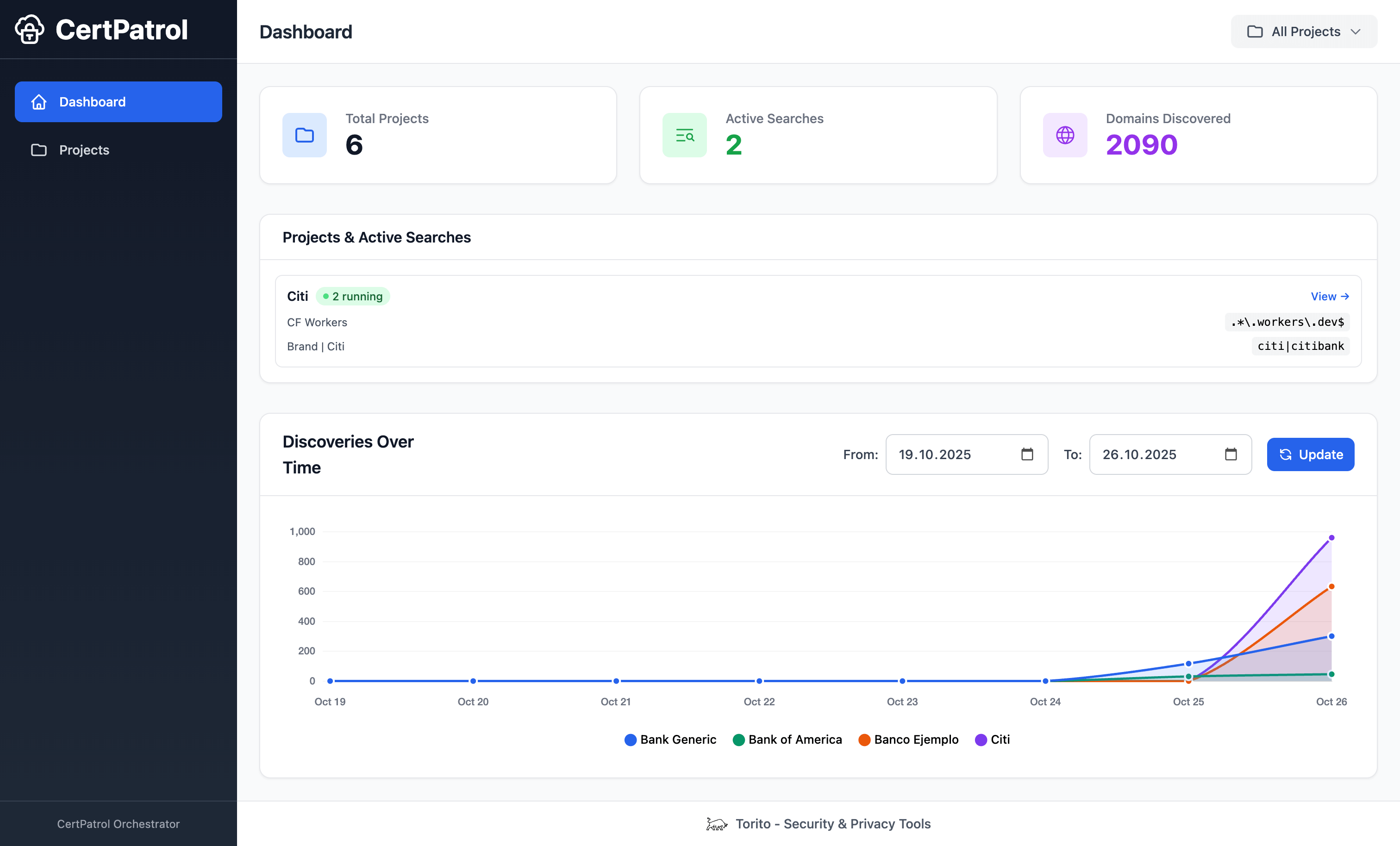
- Process Orchestration: Spawn and manage multiple CertPatrol instances in parallel
- Project Management: Organize searches into projects
- Web UI: Modern, responsive web interface for managing everything
- Real-time Monitoring: Live dashboard showing active searches and recent discoveries
- Database Storage: All results persistently stored in SQLite
- CLI Interface: Command-line tools for automation
- Risk Classification: Inline phishing heuristics with severity scoring and keyword highlights
- Process Isolation: Each search runs independently - crashes don't affect others
CertPatrol Orchestrator acts as a process orchestration platform that:
- Spawns CertPatrol processes with different search patterns
- Captures stdout from each process (one domain per line)
- Stores results in a centralized database
- Provides a web UI for management and monitoring
Install the latest release from PyPI:
pip install certpatrol-orchestratorOr install from source:
git clone https://github.com/ToritoIO/CertPatrol-Orchestrator.git
cd CertPatrol-Orchestrator
pip install -r requirements.txt
pip install -e .certpatrol-orch init
# or point to a custom location (relative paths are resolved from the current directory)
# certpatrol-orch init -f ./localdb.sqlitecertpatrol-orch server
# or pick a different port
# certpatrol-orch server --port 9090
# or reuse the custom database from the previous step
# certpatrol-orch server -f ./localdb.sqliteThen open http://127.0.0.1:8080 in your browser.
Note: The server uses Waitress (production WSGI server) by default. Make sure it's installed:
pip install -r requirements.txtOr use the CLI:
# Create a project
certpatrol-orch add-project "Workers.dev Monitoring" -d "Monitor workers.dev domains"

# Add a search
certpatrol-orch add-search "Workers.dev Monitoring" "Workers Search" "workers\\.dev$"

# List searches to get the ID
certpatrol-orch list-searches

# Start the search
certpatrol-orch start <search_id>

# Check status
certpatrol-orch statuscertpatrol-orch init [-f | --db <path>] # Initialize database
certpatrol-orch server [--port | -p <port>] [-f | --db <path>] # Start web server
certpatrol-orch add-project <name> [-d description] # Create project
certpatrol-orch list-projects [-f | --db <path>] # List all projects
certpatrol-orch add-search <project> <name> <pattern> # Add search
certpatrol-orch list-searches [--project <name_or_id>] [-f | --db <path>] # List searches
certpatrol-orch start <search_id> # Start search
certpatrol-orch stop <search_id> # Stop search
certpatrol-orch status # Show all search statusesBy default the orchestrator stores data in certpatrol_manager.db inside the project directory.
Use any of the equivalent flags -f, --db, or --database to point commands at a different SQLite file:
# Store everything alongside the current project
certpatrol-orch init -f ./data/orchestrator.sqlite

# Run the web UI against the same file later
certpatrol-orch server --db ./data/orchestrator.sqlite

# List projects from a shared database on another disk
certpatrol-orch list-projects --database /Volumes/shared/certpatrol.sqliteThe web interface provides:
- Dashboard: Overview of projects, active searches, and recent results
- Projects: Create, view, and delete projects
- Searches: Manage searches within projects (create, start, stop, delete)
- Results: View discovered domains with pagination
When creating a search, you can configure:
- Search Name: Descriptive name for the search
- Regex Pattern: Regular expression to match domain names
- Batch Size: Number of entries to fetch per request (default: 256)
- Poll Sleep: Initial poll interval in seconds (default: 3.0)
- Match base domains only (eTLD+1): Optional filter to match only base domains (e.g., example.co.uk instead of subdomain.example.co.uk)
All options include helpful tooltips. Advanced CertPatrol options are automatically configured with safe defaults to ensure proper output parsing and Orchestrator compatibility.
CertPatrol Orchestrator uses Waitress, a production-ready pure-Python WSGI server. This ensures:
- ✅ Multi-threaded request handling (4 concurrent requests by default)
- ✅ Stable and battle-tested
- ✅ Works on all platforms (Windows, macOS, Linux)
- ✅ No compilation required
- ✅ Suitable for both local and multi-user deployments
For advanced deployment scenarios (reverse proxies, load balancing, etc.), see the Flask deployment documentation.
Environment variables:
MANAGER_HOST: Web server host (default: 127.0.0.1)MANAGER_PORT: Web server port (default: 8080)MANAGER_DEBUG: Enable debug mode (default: False)MAX_CONCURRENT_SEARCHES: Max parallel searches (default: 10)
- Python 3.8+
- CertPatrol
- Flask 3.0+
- SQLAlchemy 2.0+
projects: Project metadata
- id, name, description, created_at
searches: Search configurations
- id, project_id, name, pattern, ct_logs
- batch_size, poll_sleep, min_poll_sleep, max_poll_sleep, max_memory_mb
- etld1, verbose, quiet_warnings, quiet_parse_errors, debug_all
- checkpoint_prefix, status, pid, created_at
results: Discovered domains
- id, search_id, domain, discovered_at
- Manager spawns CertPatrol as subprocess:
certpatrol -p <pattern> -c search_<id> -q - Background thread reads stdout line-by-line
- Each line (domain) is saved to database
- Domains are scored using phishing heuristics (entropy, keywords, lookalike detection)
- Web UI queries database for display with risk badges and keyword highlights
- Process status tracked in real-time
CertPatrol Orchestrator bundles a lightweight phishing classifier inspired by catch_phishing (credit to @x0rz). Each discovered domain is enriched with:
- Score: Aggregated heuristics (entropy, suspicious keywords, TLD patterns, Levenshtein lookalikes, hyphen/subdomain depth)
- Risk level:
critical,high,medium,low, orunknown(score < 65) - Matched metadata: Top keyword/TLD contributors for non-
unknownresults
You can filter classifications via the Web UI controls or from the CLI:
certpatrol-orch results <search_id> --min-score 80 --risk high- Default rules live in
manager/data/suspicious.yaml. Copy it and tweak keyword weights, TLDs, or thresholds as needed. - Point the orchestrator at a custom rules file by setting
MANAGER_RULES_PATH=/path/to/your_rules.yamlbefore starting the server. - YAML changes are hot-reloaded (mtime check) without restarting the process.
If you have Python-Levenshtein installed it will be used automatically; otherwise the bundled RapidFuzz fallback keeps scoring online.
REST API available at /api/*:
GET /api/projects- List projectsPOST /api/projects- Create projectGET /api/projects/<id>/searches- List searchesPOST /api/searches- Create searchPOST /api/searches/<id>/start- Start searchPOST /api/searches/<id>/stop- Stop searchGET /api/searches/<id>/results- Get resultsGET /api/status- System status
MIT License — see LICENSE file for details.