


Draw simple atomic models consisely using the power of CeTZ and Typst.
To draw a simple atom use
#import "@preview/typsium-atomic:0.1.1":*
#atom-shells(element:"H")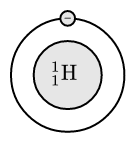
The electrons should be passed in an array where the index corresponds to the shell, while the value is the amount of electrons on that shell. Here is an example:
#atom-shells(element:"Cu", electrons:(1, 8, 18, 2))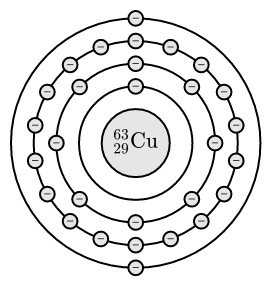
To draw the same in a CeTZ canvas, use draw-atom-shells, which takes the same arguments as atom-shells
#cetz.canvas({
  draw-atom-shells(element: (atomic-number:29, mass-number:64, symbol: "Cu"), electrons:(1, 8, 18, 2))
})
If you'd like to exclusively draw the shells (for example to draw your own core) use
draw-shell(electrons: 20, radius: 5, fill: blue, stroke: 0.5pt + gray)You can use the following options to customise the way atomic draws:
#atom-shells(
  element: (
    atomic-number: 2,       // proton count
    mass-number: 4,         // nucleon count
    symbol: "He"),          // element name
  electrons: (2,8),         // electrons in each shell
  core-distance: 1,         // radius of the first shell
  shell-distance: 0.4,      // distance between each shell
  core-radius: 0.6,         // size of the core
  fill: luma(90%),          // color of core and electrons
  stroke: 1pt + black,      // stroke color and width
)