Production-Ready ML System for Customer Review Analysis





RoBERTA is a versatile ELT (Extract, Load, Transform) platform designed to streamline and enhance business operations. Acting as both a frontend and backend system, RoBERTA helps assess business strategies and suggests targeted advertising campaigns—including scenario-based recommendations and promotional videos.
The platform can process information from web sources as well as existing databases. At its core, RoBERTA employs a three-model AI pipeline (including LLM lama) to analyze content such as customer reviews, extract the most relevant and representative insights (for example, critical feedback and common opinions), and summarize findings. It delivers actionable text and visual reports, including recommendations for business improvement, risk assessments, and insurance-related insights.
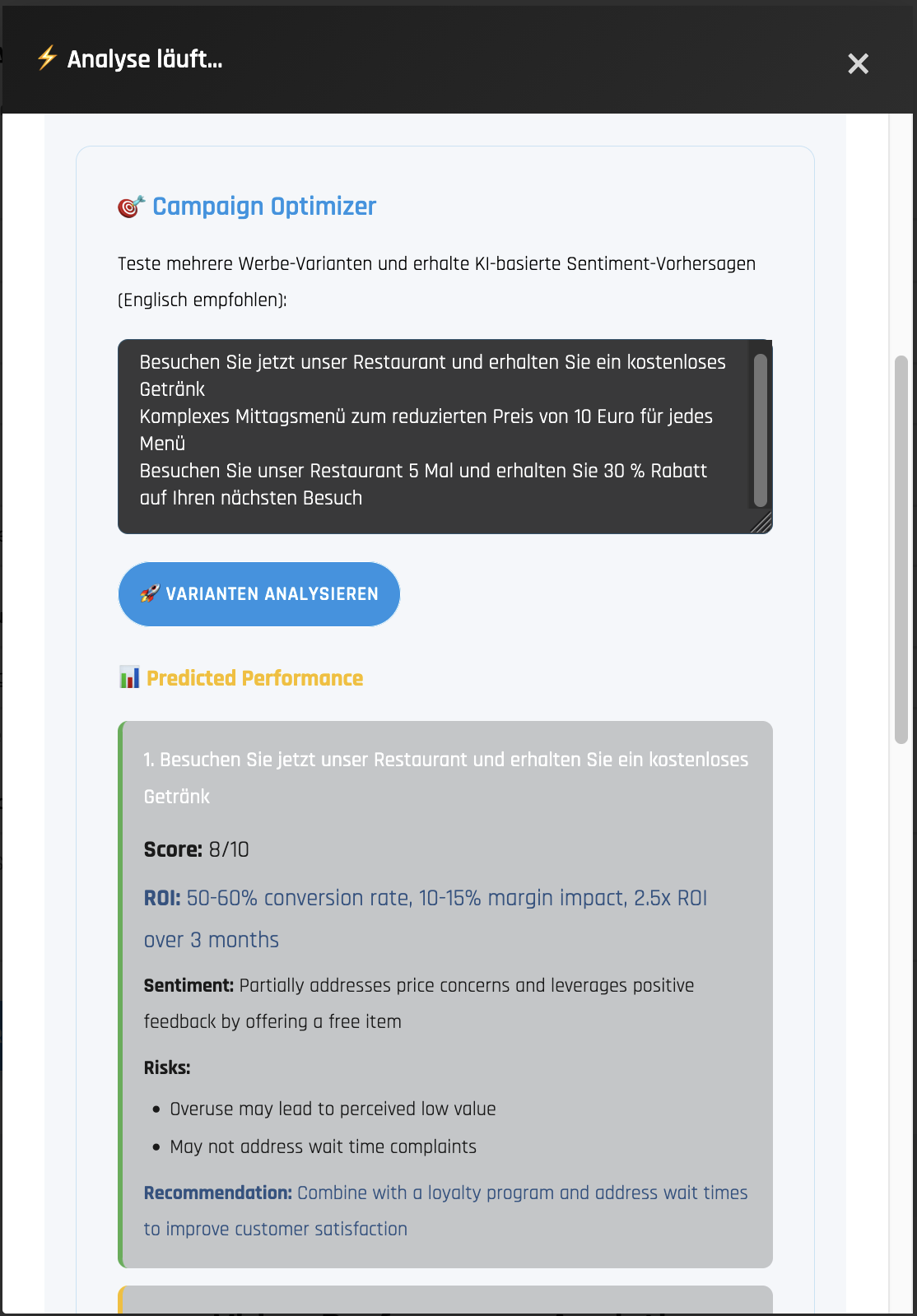
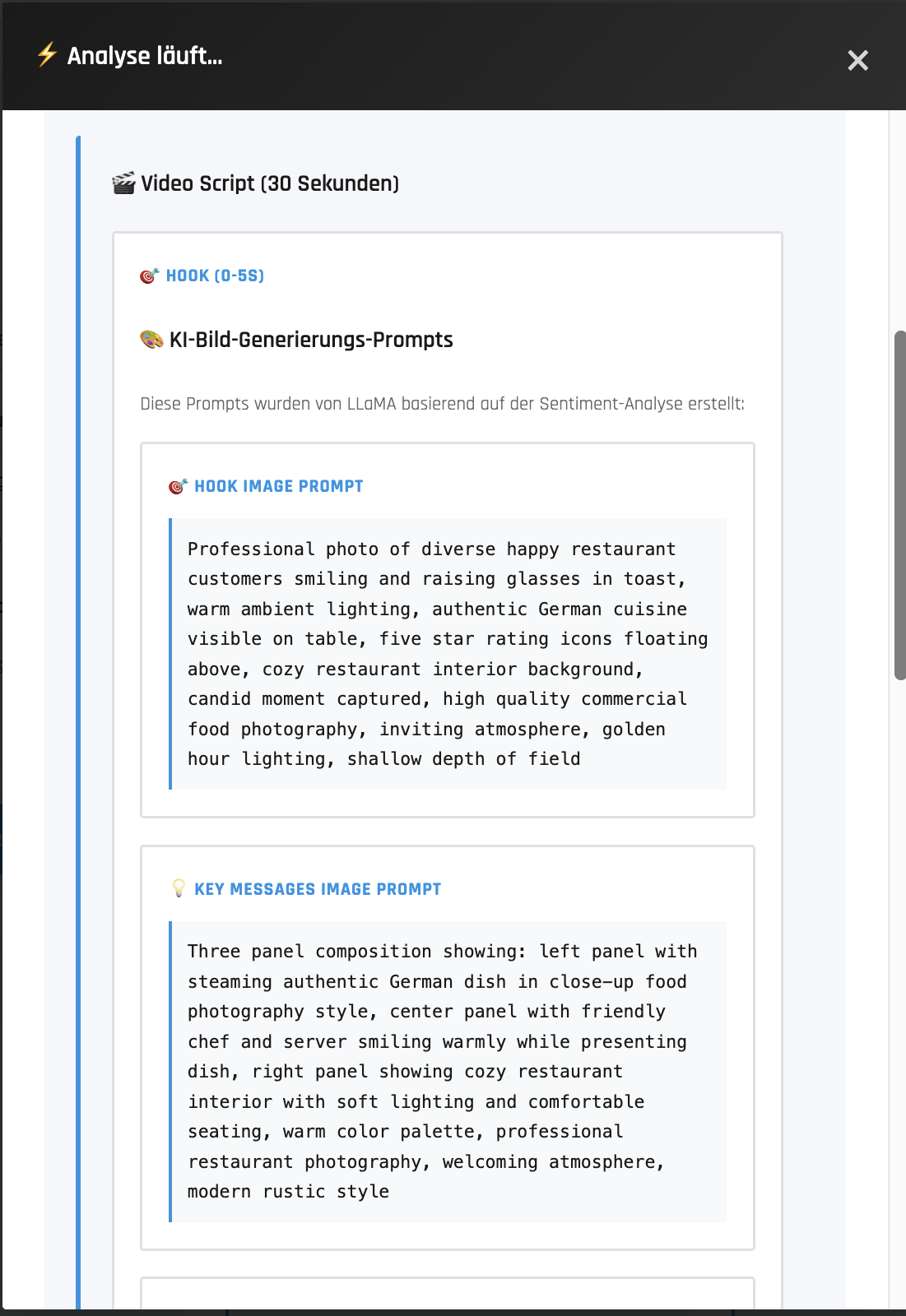
After generating a report, RoBERTA evaluates proposed business strategies for their expected ROI impact, suggests targeted marketing approaches, and can optionally create promotional videos to support campaign deployment.
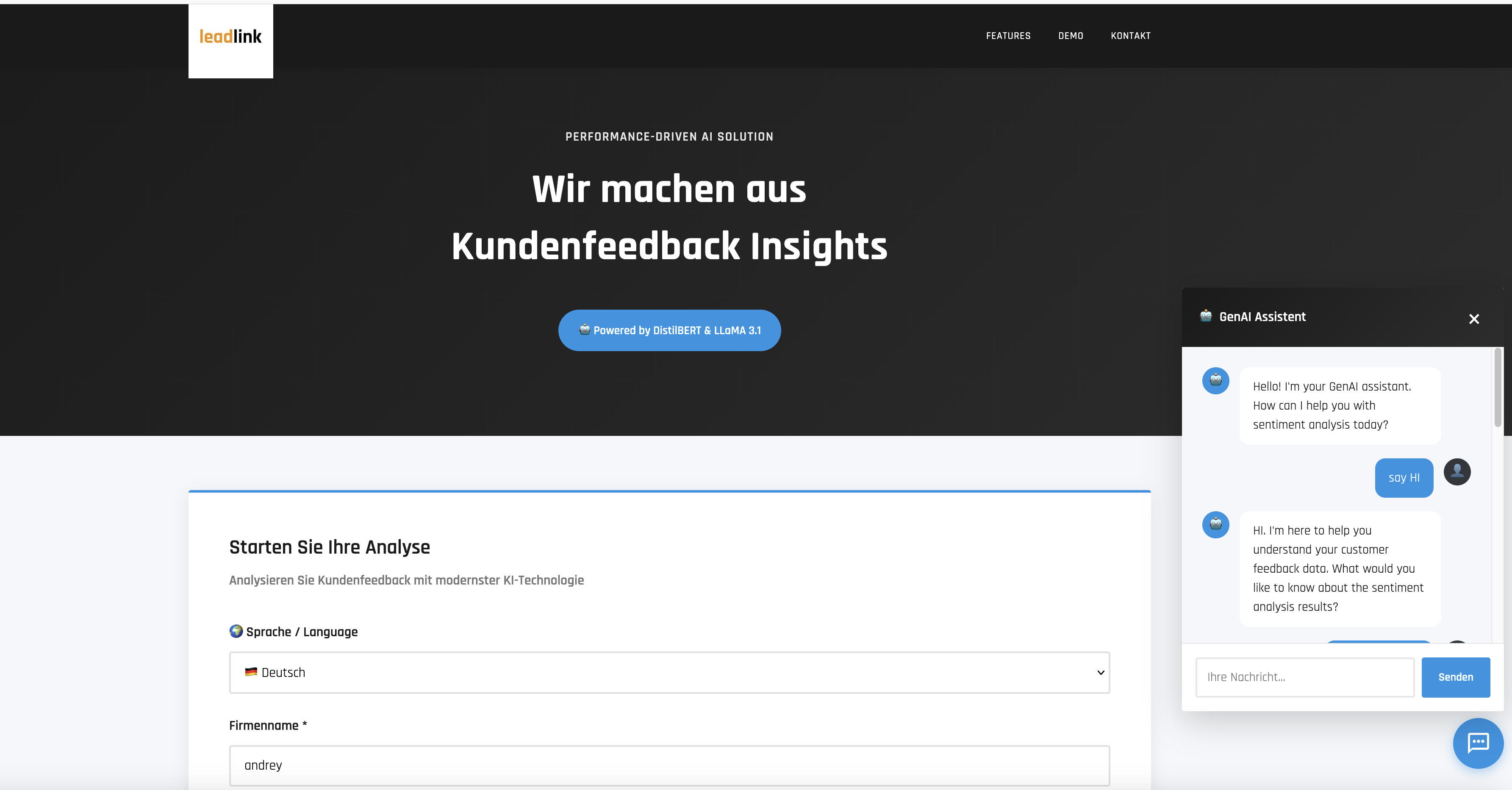
- A user fills and submits a form in index.html with their name/company, email, search keywords, and optional parameters in the
index.htmlform. - The FastAPI establishes communcation between frontend (index.html) top-level subroutine in backend (main.api) sending these requests from/to Python block that performs the main processing. The Python pipeline:
- Loads the specified sites and performs ELT processing.
- Detects and extracts reviews from the raw text using rule-based methods and the DistilBERT model.
- Performs vector and semantic analysis to identify the most representative and the most salient comments.
- Runs semantic analysis using an LLM (Llama).
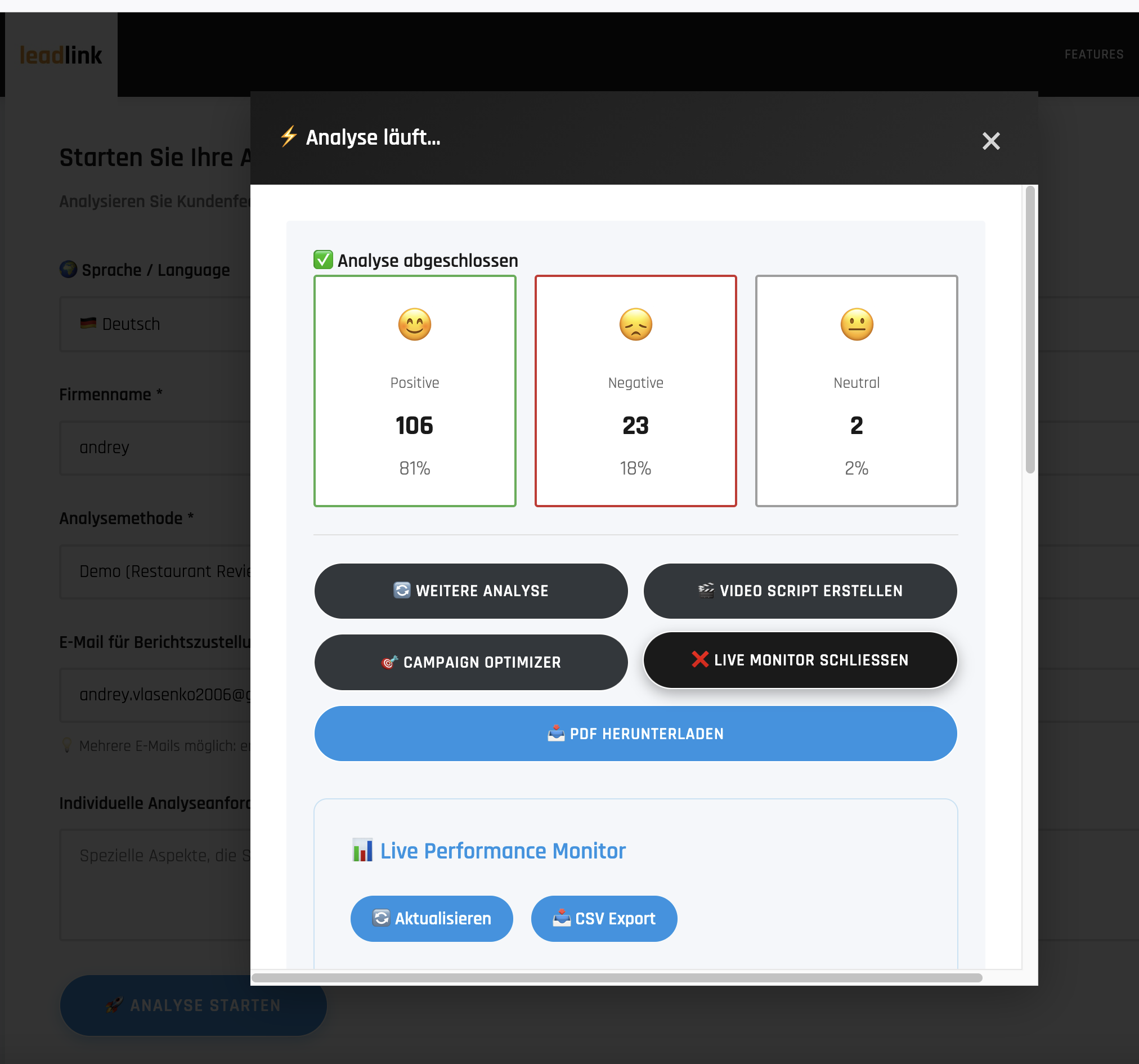
- Generates textual summaries grouped by sentiment category.
- Produces and sends to the user comprehensive .pdf report with:
- Sentiment distribution charts
- Key insights
- Example reviews
- Prioritized recommendations for service improvement
- Risk assesment
- Sends recommendations to the user by email.
- Evaluates customer's buisenes strategies, finding the highest ROI-impacting according to the sentiment report.
- Fenerates targeted advertisemet scenario.
- Generates video according to the suggested scenario (limitted for now)
Roberta includes a Results Chatbot that uses RAG (Retrieval‑Augmented Generation) over the analysis results, so you can ask for clarifications, explanations of individual comments, or details about the analysis methodology at any time.
| Frontend Interface | Analysis Results |
|---|---|
 |
 |
| Campaign Optimizer | Video Script Scenario |
|---|---|
 |
 |
Download Sample Sentiment Analysis Report (PDF)
Watch Platform Demo Video (MP4)
- Flexible — configurable for many business use cases (e.g., restaurants, insurance valuation, creditworthiness assessments).
- Asynchronous processing via FastAPI.
- Production ready: fully dockerized and scalable — already deployed on AWS (in future on Azure).
- CI/CD ready: automated testing; integration with MLflow (with 15+ metrics) and pytest (21+ pytests).
- Caching support using SQLite or Redis.
- RAG augmentation: Database with buiseness rules and report outcomes.
Here is the top-level view how Roberta pipeline evaluates. See also main_api.py pipeline bbelow
\`\`\`
┌─────────────┐
│ index.html  │  User fills form (company, email, URL)
│ (port 3001) │  JavaScript: fetch('/api/analyze', {POST})
└──────┬──────┘
       │
       ▼
┌─────────────┐
│   NGINX     │  Proxies /api/* → python-service:8001
└──────┬──────┘
       │
       ▼
┌──────────────────────────────────────────────────────┐
│  main_api.py (FastAPI on port 8001)                  │
│                                                       │
│  STARTUP: CONFIG = load_all_configs()                │
│           ├─► config/config.yaml      [ML params]    │
│           ├─► config/config_names.yaml [Branding]    │
│           └─► config/config_key.yaml   [API keys]    │
│                                                       │
│  ENDPOINTS:                                           │
│  POST /api/analyze          → run_analysis_pipeline()│
│  GET  /api/dashboard        → get_dashboard_data()   │
│  POST /api/predict-campaign → predict_campaign_variants()
│  POST /api/generate-video   → generate_video_script()│
│  POST /api/chatbot          → chatbot.query()        │
└──────┬───────────────┬───────────────┬───────────────┘
       │               │               │
       ▼               ▼               ▼
┌─────────────┐ ┌──────────────┐ ┌─────────────────┐
│ dashboard_  │ │ campaign_    │ │ video_script_   │
│ data.py     │ │ predictor.py │ │ generator.py    │
│             │ │              │ │                 │
│ Reads:      │ │ Reads:       │ │ Reads:          │
│ my_volume/  │ │ sentiment    │ │ summary.txt     │
│ *.db, JSON  │ │ data         │ │                 │
│             │ │              │ │                 │
│ Returns:    │ │ Calls:       │ │ Calls:          │
│ Dashboard   │ │ query_groq   │ │ query_groq_api()│
│ metrics     │ │ _api()       │ │                 │
└─────────────┘ └──────┬───────┘ └────────┬────────┘
                       │                  │
                       └────────┬─────────┘
                                ▼
                       ┌─────────────────┐
                       │  Groq API       │
                       │  (Llama 3.1)    │
                       └─────────────────┘
\`\`\`
\`\`\`python
load_all_configs()
├─► config/config.yaml         # ML: model_name, cache_dir, thresholds
├─► config/config_names.yaml   # Branding: colors, company name
└─► config/config_key.yaml     # Secrets: groq.api_key, email.smtp
\`\`\`
- Cached URL: 30 seconds
- New URL: 2-5 minutes
- Chatbot: 1-3 seconds
run_analysis_pipeline()
│
├── cleanup_old_jobs()                                    [cleanup_old_jobs.py]
├── initialize_mlflow_tracking()                          [pipeline_helpers.py]
├── setup_analysis_directories()                          [pipeline_helpers.py]
├── prepare_html_content()                                [pipeline_helpers.py]
│   ├── download_page_fun()                              [download_page_fun.py]
│   │   ├── download_with_selenium()
│   │   └── download_with_requests()
│   └── process_search_method()                          [search_methods_fun.py]
│       ├── Google_Search()
│       └── Multiple_URLs()
│
├── execute_sentiment_analysis()                          [pipeline_helpers.py]
│   ├── extract_text_fun()                               [extract_text_fun.py]
│   │   ├── extract_text_blocks()
│   │   ├── clean_text()
│   │   ├── save_text_blocks()
│   │   └── split_by_separators()
│   │
│   ├── Context_analyzer_RoBERTa_fun()                   [Context_analyzer_RoBERTa_fun.py]
│   │   ├── load_combined_dataset()
│   │   ├── analyze_sentiment_enhanced()
│   │   │   └── compute_original_score()
│   │   ├── normalize_scores_by_sentiment()
│   │   └── track_sentiment_run()                       [mlflow_tracking.py]
│   │
│   ├── vizualization()                                  [vizualization.py]
│   │   ├── read_extracted_text_files()
│   │   ├── create_text_vectors()
│   │   └── find_representative_comments()
│   │
│   └── summarize_sentiments_fun()                      [summarize_sentiments_fun.py]
│       ├── read_representatives_json()
│       ├── create_summary_prompt()
│       ├── query_groq_api()
│       ├── save_summary()
│       ├── has_duplicate_sentence()
│       └── is_quoted_or_citation()
│
├── generate_ai_summaries()                              [pipeline_helpers.py]
│   ├── summarize_sentiments_fun()                      [see above]
│   └── recommendation_fun()                            [recommendation_fun.py]
│       ├── read_summary_file()
│       ├── create_recommendation_prompt()
│       ├── query_groq_api()
│       └── save_recommendation()
│
├── calculate_and_save_insurance_risk()                  [pipeline_helpers.py]
│   └── calculate_insurance_risk()                      [insurance_calculator.py]
│       ├── _calculate_risk_score()
│       ├── _determine_risk_level()
│       ├── _analyze_trend_risk()
│       └── _get_trend_status()
│
├── generate_and_copy_pdf()                              [pipeline_helpers.py]
│   └── generate_pdf_fun()                              [pdf_generation/generate_pdf_fun.py]
│       ├── load_company_name()                         [pdf_generation/pdf_styles.py]
│       └── draw_header_stripe()                        [pdf_generation/pdf_header.py]
│
├── finalize_job_success()                               [pipeline_helpers.py]
│   └── send_report_email_fun()                         [send_report_email_fun.py]
│       └── send_email()                                [send_email.py]
│           ├── create_email_message()
│           └── attach_pdf_report()
│
└── handle_job_failure()                                 [pipeline_helpers.py]
ResultsChatbot class
│
├── __init__()
│   ├── SentenceTransformer('paraphrase-MiniLM-L6-v2')
│   ├── _initialize_candidate_kb()
│   │   └── FAISS.from_texts()
│   └── _initialize_results_index()
│
├── query()
│   ├── _route_to_knowledge_base()
│   ├── _retrieve_from_candidate_kb()
│   │   └── candidate_index.similarity_search()
│   ├── _retrieve_from_results()
│   │   └── results_index.similarity_search()
│   └── _generate_response()
│       └── query_groq_api()
│
└── _extract_sentiment_data()
- User Request →
run_analysis_pipeline() - Download/Search →
prepare_html_content()→download_page_fun()orprocess_search_method() - Text Extraction →
extract_text_fun()→ Individual review text files - Sentiment Analysis →
Context_analyzer_RoBERTa_fun()→ JSON with scores - Visualization →
vizualization()→ Representative comments selection - AI Summaries →
summarize_sentiments_fun()→ Groq API → Summary text - Recommendations →
recommendation_fun()→ Groq API → Action items - Risk Calculation →
calculate_insurance_risk()→ Risk metrics JSON - PDF Generation →
generate_pdf_fun()→ Branded PDF report - Email Delivery →
send_report_email_fun()→ SMTP email with attachment - Chatbot Queries →
ResultsChatbot.query()→ FAISS retrieval → Groq API → Response
- HuggingFace Transformers: DistilBERT model for sentiment classification
- Sentence Transformers: paraphrase-MiniLM-L6-v2 for embeddings
- FAISS: Vector similarity search for RAG
- Groq API: LLM for summaries, recommendations, chatbot responses
- MLflow: Experiment tracking and logging
- ReportLab: PDF generation
- SMTP: Email delivery
- Selenium/Requests: Web scraping
run_analysis_pipeline → prepare_html_content (cache hit) → execute_sentiment_analysis → PDF → Email
Time: ~30 seconds
run_analysis_pipeline → download_page_fun (Selenium) → extract_text_fun →
Context_analyzer_RoBERTa_fun (ML inference) → vizualization → summarize_sentiments_fun (Groq) →
recommendation_fun (Groq) → calculate_insurance_risk → generate_pdf_fun → send_report_email_fun
Time: 2-5 minutes
User question → ResultsChatbot.query → route_to_knowledge_base →
FAISS similarity_search → retrieve context → Groq API → response
Time: 1-3 seconds
Parameter Logging | Model, thresholds, settings (15+ per run) | Metric Tracking | Sentiment ratios, processing time, API usage (10+ metrics) | Artifact Storage | PDFs, JSONs, recommendations versioned | Run Comparison | Side-by-side experiment analysis | Experiment History | Complete audit trail of all analyses | Reproducibility | Every run fully reproducible with logged params |
Unit Test Suite | 21+ tests covering API and MLflow | API Endpoint Tests | Health, config, analyze, status validated | MLflow Tests | Parameter/metric/artifact logging verified | Coverage Reports | pytest-cov for code coverage measurement | Async Testing | pytest-asyncio for async endpoint tests | CI/CD Ready | Test automation for GitHub Actions |
Platform normaly runs on AWS micro3 instance (this AWS offers you for free).
- Docker Desktop installed and running
- 8GB RAM minimum
- 10GB free disk space
# Set PATH (macOS)
export PATH="/usr/local/bin:$PATH"

# Navigate to project
cd /path/to/Request

# Build and start
docker compose up -d

# Access services
open http://localhost:3001  # Frontend (or port 3001, not sure. check the dockerfile)
open http://localhost:8001/docs  # API Docs Bthw. it might be 8001, check it in the dockerfile
open http://localhost:5002 # MLflow (after setup)Deploy the sentiment analysis platform to AWS EC2 for production-like hosting with public access.
- AWS account with Free Tier
- Basic AWS knowledge (EC2, Security Groups)
- SSH key pair for EC2 access
Instance Configuration:
- Instance Type:
t3.micro(1 vCPU, 1GB RAM) - Free Tier eligible - AMI: Ubuntu 24.04 LTS
- Storage: 20GB EBS volume (within Free Tier 30GB limit)
- Region: Choose closest to your location (e.g., eu-north-1)
Security Group Rules:
Inbound:
- SSH (22)        → Your IP only (e.g., 95.91.224.181/32)
- HTTP (3000)     → 0.0.0.0/0 (public access to frontend)

Outbound:
- All traffic     → 0.0.0.0/0 (default)
# In AWS Console:
1. EC2 → Elastic IPs → "Allocate Elastic IP address"
2. Select new IP → Actions → "Associate Elastic IP address"
3. Choose your EC2 instance
4. Note the IP (e.g., 13.48.16.109)
Benefits:
- ✅ Permanent IP that survives instance restarts
- ✅ Free while associated with running instance
- ✅ Can point domain names to it
The DistilBERT model and Docker builds require more than 1GB RAM. Add swap:
# SSH into EC2
ssh -i your-key.pem ubuntu@YOUR_ELASTIC_IP

# Create 2GB swap file
sudo fallocate -l 2G /swapfile
sudo chmod 600 /swapfile
sudo mkswap /swapfile
sudo swapon /swapfile

# Verify swap is active
free -h
# Output should show 2.0Gi swap

# Make swap permanent (survives reboots)
echo '/swapfile none swap sw 0 0' | sudo tee -a /etc/fstab
Why needed:
- Docker builds fail with OOM (Out of Memory) without swap
- Model loading requires ~1.5GB memory
- Build process peaks at ~2GB total
# Update system
sudo apt-get update

# Install Docker
curl -fsSL https://get.docker.com -o get-docker.sh
sudo sh get-docker.sh

# Add user to docker group (no sudo needed)
sudo usermod -aG docker ubuntu
exit  # Log out and back in

# Verify installation
docker --version
docker compose version# Clone your repo
git clone https://github.com/YOUR_USERNAME/sentiment-analysis-vector-search.git
cd sentiment-analysis-vector-search
# Switch to deployment branch
git checkout web-service
# Create config file with API keys
nano config_key.yamlconfig_key.yaml template:
# Sensitive Configuration - DO NOT COMMIT TO GIT

# Groq API Configuration
groq:
  api_key: "YOUR_GROQ_API_KEY"  # Get from https://console.groq.com

# Email Configuration (optional)
email:
  smtp_server: "smtp.gmail.com"
  smtp_port: 587
  sender_email: "your@email.com"
  sender_password: "your_app_password"

# Analysis Parameters
analysis:
  key_positive_words:
    - "excellent"
    - "amazing"
    - "wonderful"

  key_neutral_words:
    - "location"
    - "place"

  key_negative_words:
    - "terrible"
    - "awful"

  separator_keywords:
    - "•"
    - "Written "
    - "Reviewed "
    - "Visited "

  sentence_length: 4
default_prompt: "Provide 3 actionable recommendations for improvement."Dockerfile.python to prevent OOM during build:
# Lines 22-25 - COMMENT THESE OUT:
# RUN python -c "from transformers import pipeline; \
#     pipe = pipeline('sentiment-analysis', \
#     model='distilbert-base-uncased-finetuned-sst-2-english'); \
#     print('Model downloaded successfully')"
Then after your images are built and containers running run this fix only once:
docker exec sentiment-python-v2 python -c "
model = AutoModelForSequenceClassification.from_pretrained('distilbert-base-uncased-finetuned-sst-2-english')
tokenizer = AutoTokenizer.from_pretrained('distilbert-base-uncased-finetuned-sst-2-english')
model.save_pretrained('./my_volume/hf_model')
tokenizer.save_pretrained('./my_volume/hf_model')"
I would be grateful, if you suggest me better options to solve tight memory issue on free trial :)
Why: Model downloads during runtime (first API call), not build time. This prevents build failures.
# Export API key for docker-compose
export GROQ_API_KEY=$(grep 'api_key:' config_key.yaml | awk '{print $2}' | tr -d '"')

# Build and start all containers
docker compose up -d --build

# Wait for services to start (~30 seconds)
sleep 30

# Check container status
docker ps
# All should show "healthy" status

# View logs
docker compose logs -f# Test Python API
curl http://localhost:8000/health
# {"status":"healthy","timestamp":"..."}
# Test .NET API
curl http://localhost:5000/health
# {"status":"Healthy",...}
# Test Frontend
curl -I http://localhost:3000
# HTTP/1.1 200 OKAccess from browser:
- Frontend:
http://YOUR_ELASTIC_IP:3000 - API Docs:
http://YOUR_ELASTIC_IP:8000/docs(if you expose port 8000 - not recommended)
Services restart automatically thanks to restart: unless-stopped in docker-compose.yml.
For guaranteed startup after EC2 reboot, create systemd service:
sudo nano /etc/systemd/system/sentiment-app.service[Unit]
Description=Sentiment Analysis Docker Compose
Requires=docker.service
After=docker.service
[Service]
Type=oneshot
RemainAfterExit=yes
WorkingDirectory=/home/ubuntu/sentiment-analysis-vector-search
ExecStartPre=/bin/bash -c 'export GROQ_API_KEY=$(grep "api_key:" config_key.yaml | awk "{print \$2}" | tr -d "\"")'
ExecStart=/usr/bin/docker compose up -d
ExecStop=/usr/bin/docker compose down
User=ubuntu
[Install]
WantedBy=multi-user.target# Enable and start
sudo systemctl enable sentiment-app.service
sudo systemctl start sentiment-app.service# Restart services
docker compose restart
# Stop services
docker compose down
# View logs
docker compose logs -f python-service
docker compose logs -f dotnet-api
# Check disk space
df -h
# Check memory usage
free -h
# Update code from GitHub
git pull origin web-service
docker compose up -d --buildContainer exits immediately:
# Check logs
docker logs sentiment-python --tail 50

# Common issues:
# - Missing config_key.yaml
# - GROQ_API_KEY not set
# - OOM during build (need swap)
Out of disk space:
# Clean up Docker
docker system prune -a

# Increase EBS volume in AWS Console
# Then expand filesystem:
sudo growpart /dev/nvme0n1 1
sudo resize2fs /dev/nvme0n1p1
Port already in use:
# Check what's using the port
sudo lsof -i :3000
sudo lsof -i :8000

# Kill process or stop conflicting serviceModel Licenses:
- DistilBERT: Apache 2.0 (Hugging Face)
- Groq API: Commercial (requires API key)
- Hugging Face for DistilBERT and transformers
- MLflow for experiment tracking
- FastAPI for modern Python APIs
- Groq for LLM API access
Built with ❤️ for production ML deployment and data engineering interviews
Last updated: November 2025