

Note
The original ticker.sh has been discontinued. This fork aims to help keep similar functionality alive.
ticker.sh is a Bash script that retrieves and displays live stock prices, along with precious metal prices (gold, silver, platinum) and the gold-to-silver ratio. It uses Yahoo Finance as the source for fetching data and can display results in color-coded output for better readability.
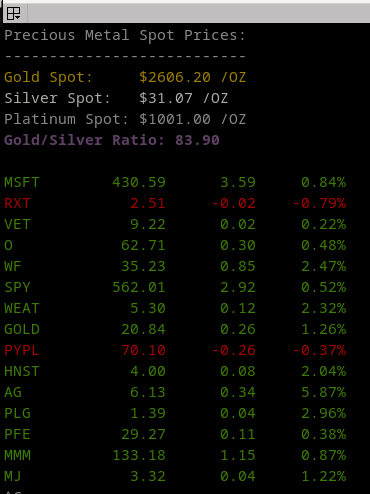
- Fetch live stock prices by providing stock symbols (e.g., AAPL, MSFT, GOOG).
- Display live spot prices for gold, silver, and platinum.
- Calculate and display the Gold/Silver ratio.
- Color-coded output for price changes and metal prices.
- Option to disable colorization by setting the
NO_COLORenvironment variable.
Ensure the following dependencies are installed:
To use AI alerts (-r flag) and SEC filing analysis (-f flag), you'll need:
- Python 3.8 or higher
- Required packages:
openai>=1.0.0,python-dotenv>=1.0.0
Install Python dependencies:
pip install -r requirements.txtOr install individually:
pip install openai python-dotenv-
Clone the repository or download the
ticker.shscript. -
Ensure the script is executable:
chmod +x ticker.sh
-
Install the required shell dependencies:
sudo apt-get install jq bc curl # For Debian-based systems -
(Optional) Install Python dependencies for AI features:
pip install -r requirements.txt
You can fetch live stock prices by passing the stock symbols as arguments in the order that you would like to see. For example, to retrieve the prices for Apple (AAPL), Microsoft (MSFT), and Google (GOOG), use the following command:
./ticker.sh AAPL MSFT GOOG BTC-USD
This will display the current price, the price change, and the percentage change.
To fetch the spot prices for gold, silver, platinum, and the gold-to-silver ratio, use the -g flag:
./ticker.sh -g
You can also fetch both stock prices and precious metal prices in a single command:
./ticker.sh -g AAPL MSFT GOOG BTC-USD
This will display both the spot prices for the metals and the prices for the given stock symbols.
You can also sort the stock prices by gain/loss percentage with the -s flag:
./ticker.sh -s AAPL MSFT GOOG BTC-USD
This will sort the stock prices for the given stock symbols.
If you are running the script in an environment that doesn't support color or if you prefer plain text output, you can disable colorization by setting the NO_COLOR environment variable:
NO_COLOR=1 ./ticker.sh AAPL MSFT GOOG BTC-USD
This fork adds an optional AI-powered alerting feature that analyzes recent price indicators and returns a compact recommendation. Take advice with CAUTION.
- Trigger an alert for each symbol with a timeframe using
-a TIMEFRAMEor--alert TIMEFRAME(e.g.1m,5m,1h,1d). - Include
-ror--rationaleto print a short rationale after the recommendation. - Use
-cor--compactto show only signals (BUY/SELL/HOLD) without detailed reasoning. - Use
-dor--debugto print the helper payload preview and raw model response for debugging.
Note: If you pass -r/--rationale without -a/--alert, the script will default to a 1d timeframe for the AI alert.
Examples:
    # Request AI alert (compact recommendation)
    ./ticker.sh -a 5m RXT

    # Include rationale and debug info
    ./ticker.sh -a 5m -r -d RXT

    # Show signals only without detailed reasoning
    ./ticker.sh -r -c AAPL MSFT
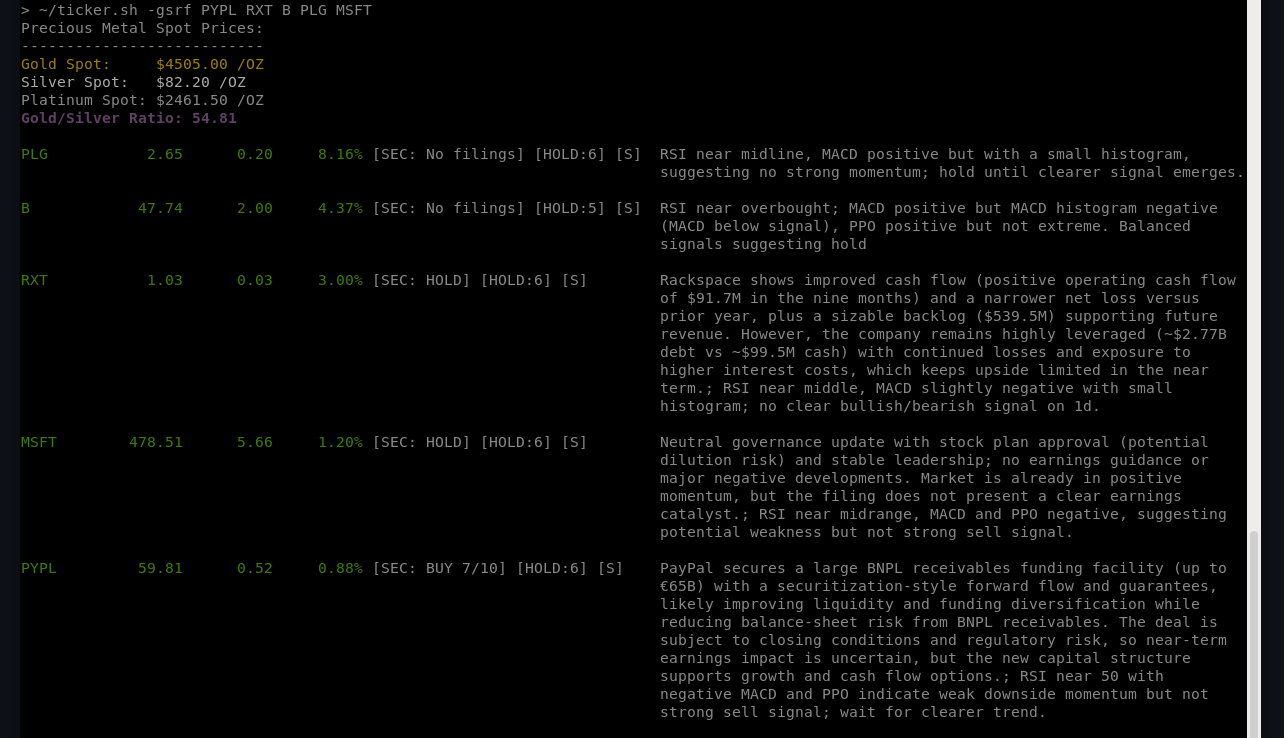
The -f or --filings flag enables AI-powered analysis of recent SEC filings (8-K, 10-Q, 10-K) to detect material events and provide buy/sell/hold recommendations.
- Use
-fto show SEC filing analysis inline with stock prices. - Combine
-fand-rto display both SEC reasoning and price-based AI rationale.
Examples:
    # Show SEC filing analysis
    ./ticker.sh -f MSFT

    # Show both SEC and price rationale
    ./ticker.sh -f -r MSFT

    # Show signals only without detailed reasoning
    ./ticker.sh -f -c MSFT
Environment and configuration
- Place your OpenAI API key in a
.envfile or exportOPENAI_API_KEY. - Optional environment variables:
OPENAI_MODEL(model for price-based AI alerts, default:gpt-5-nano- recommended for lowest API costs)SEC_OPENAI_MODEL(model for SEC filing analysis, default:gpt-4.1) - considergpt-5-nanofor lowest costs here too.COMPACT_MODE(set to1to show signals only without detailed reasoning, default:0)OPENAI_MAX_COMPLETION_TOKENS(default:650)OPENAI_USE_RESPONSES(set to1to use the Responses API - recommended; default0)SEC_ONLY_FORMS(comma-separated list of filing types to monitor, default:8-K,10-Q,10-K)SEC_MAX_FILINGS(maximum number of recent filings to review, default:3)
Notes
- The helper script
ai_alert.pyperforms the indicator calculations (RSI, MACD, PPO) locally and sends a deterministic prompt to the OpenAI API. When no API key is present the helper returns a simple RSI-based heuristic (no network call). - The script rate-limits AI calls (configurable via
ALERT_DELAY) when processing multiple symbols to avoid overage.
When the script prints an AI recommendation inline it may include a status marker and a confidence score. The markers indicate whether the helper contacted the model:
- [S] — AI helper called the model successfully and returned a recommendation.
- [F] — AI helper failed to call the model (network or API error) and used local fallback heuristics to produce a recommendation.
Confidence score:
- Recommendations include an integer confidence score from 1 to 10 (10 = highest confidence). Use the score to weigh the recommendation.
Note
Use a foreloop for continuous 5 minute monitoring with AI rationale and SEC filings:
while true; do ./ticker.sh -gs -r 5m -f SPY B HNST MSFT PFE PLG PYPL RXT WEAT; sleep 300; clear; doneThis script is provided as-is under the MIT License. You are free to modify and distribute it under the terms of the license.
Contributions are welcome! If you encounter bugs or have feature suggestions, feel free to submit an issue or pull request.
Created by @pstadler
Updated by @appatalks