shoggoth is a self-hosted development service multitool intended for personal
use.
- Caching:
- Debian/Ubuntu package caching proxy (
apt-cacher-ng). - Docker registry caching proxy.
- Python package caching proxy (
proxpi). - Build cache server, to be used with ccache or sccache.
- Debian/Ubuntu package caching proxy (
- Development:
- Local AI model server (
ollama). - Docker registry.
- Git server (
gitea) with CI/CD actions support. - Gitea MCP server for AI coding agent integration.
- Local AI model server (
- Project management
- Redmine project management server.
- Redmine MCP server for AI agent integration.
The system consists of three parts:
- A set of services managed using docker compose, located in
shoggothsubfolder. - A set of utilities for (remote) control over docker compose, refer to
Makefilefor more information. - A setup script for configuration of service clients.
The main use-case is to run the services on a dedicated headless server and use or control them from multiple client computers.
The following services are available:
| Service | Hostname | Description |
|---|---|---|
apt-cache |
apt-cache.<host> |
APT package caching proxy |
docker-cache |
<host> |
Docker registry caching proxy |
docker-registry |
docker-registry.<host> |
Private Docker registry |
dns |
<host> |
Unbound DNS resolver |
web |
<host> |
Welcome home page and angie reverse proxy |
web |
build-cache.<host> |
Build cache storage |
ollama |
ollama.<host> |
Local AI model server |
git |
git.<host> |
Gitea Git server with web UI |
git-pages |
git-pages.<host> |
Git Pages static site hosting |
gitea-runner |
- | Gitea Actions runner |
gitea-mcp |
gitea-mcp.<host> |
Gitea MCP server for AI agents |
proxpi |
proxpi.<host> |
Python package caching proxy |
redmine |
redmine.<host> |
Redmine project management server |
redmine-mcp |
redmine-mcp.<host> |
Redmine MCP server for AI agents |
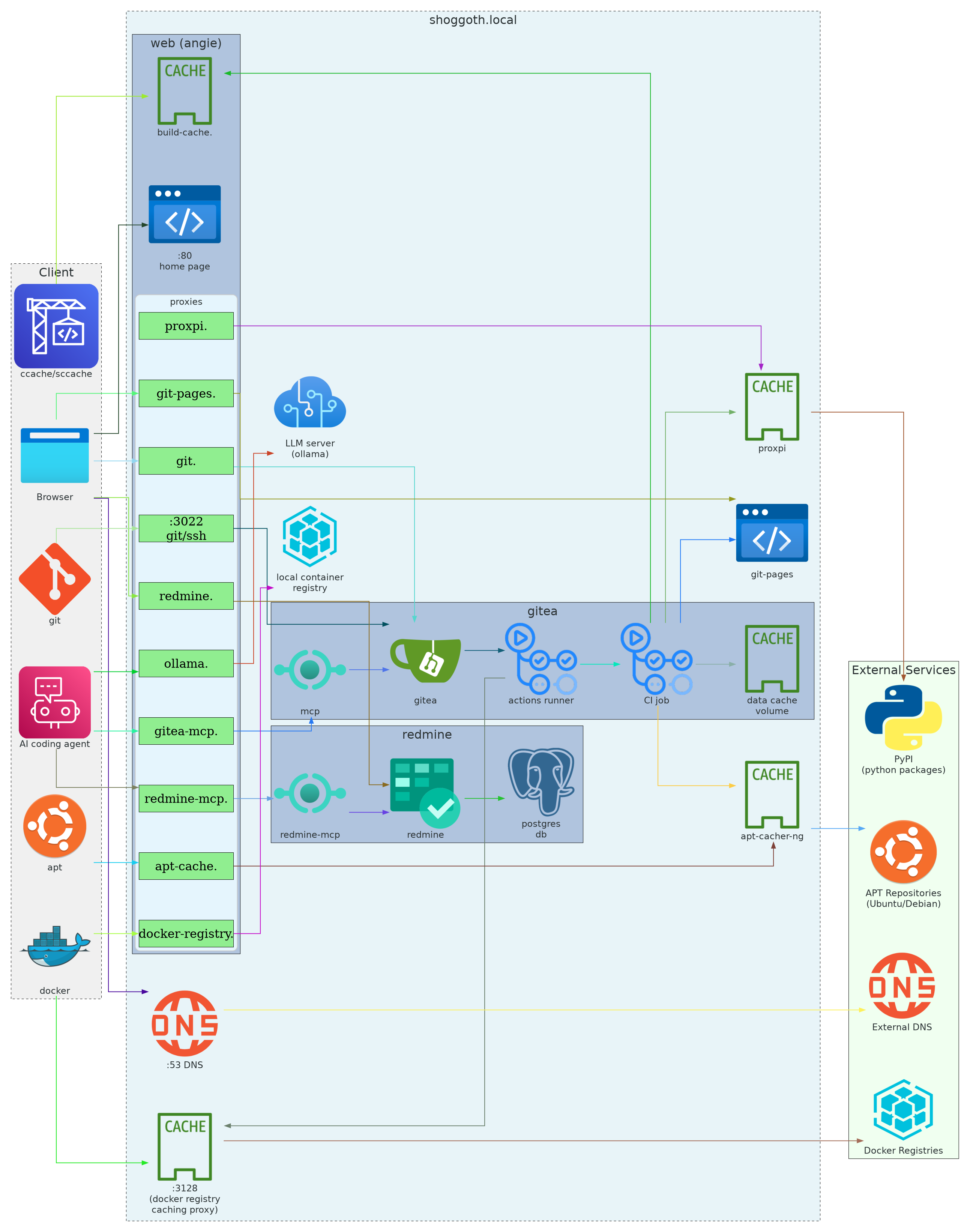
Domain names are used to access services via the angie reverse proxy server. Two resolution methods are supported:
Add service hostnames to /etc/hosts on each client machine:
# Using the setup script
./shoggoth/setup-client.sh --update-hosts --host shoggoth.local --host-ip 192.168.1.100

# Or manually add to /etc/hosts:
192.168.1.100 shoggoth.local
192.168.1.100 <service>.shoggoth.localThe dns service (Unbound) can be configured as the DNS server on client
machines. It resolves all service hostnames automatically. Configure your
network settings to use the shoggoth server IP as the DNS server.
Run the setup script on each client machine.
# Generate config files in default directory `~/.config/shoggoth/`
./shoggoth/setup-client.sh --client-conf --host shoggoth.local

# Generate config files in a custom directory
./shoggoth/setup-client.sh --client-conf /path/to/dir --host shoggoth.local

# Configure Docker caching proxy (default port 3128) and registry
./shoggoth/setup-client.sh --docker --host shoggoth.local --host-ip 192.168.1.100

# Update /etc/hosts with service hostnames (modifies /etc/hosts directly)
./shoggoth/setup-client.sh --update-hosts --host shoggoth.local --host-ip 192.168.1.100

# Install apt cache config to system apt config (requires --client-conf first)
./shoggoth/setup-client.sh --client-conf --apt-cache --host shoggoth.local --host-ip 192.168.1.100

# Configure Docker, hosts, apt cache, and generate client config files
./shoggoth/setup-client.sh --all --host shoggoth.local --host-ip 192.168.1.100

# Configure with Gitea and Redmine tokens (generates env, qwen.json)
./shoggoth/setup-client.sh --client-conf --host shoggoth.local --gitea-token your-token --redmine-token your-token
The script generates the following files when --client-conf is used:
| File | Description |
|---|---|
env |
Environment variables for all services (ollama, ccache, proxpi, gitea, redmine) |
apt-cache.conf |
APT cache configuration |
resolv.conf |
DNS resolver configuration |
qwen.json |
Qwen Code MCP server configuration (generated when tokens are provided) |
Source the env file in your ~/.bashrc or ~/.zshrc:
echo 'set -a; source ~/.config/shoggoth/env; set +a' >> ~/.bashrc
source ~/.bashrcNeither redmine nor gitea cli clients can be configured exclusively with environment variables. Moreover gitea cli requires user name to be specified in addition to a token for smooth operation.
After running --apt-cache, APT requests are automatically cached:
sudo apt update
sudo apt install <package>

# View cache statistics
firefox http://apt-cache.shoggoth.local/acng-report.html
Docker pulls are cached after initial configuration:
docker pull nginx:latest
docker pull ubuntu:24.04Source the env file and build with ccache:
set -a; source ~/.config/shoggoth/env; set +a
# CCACHE_REMOTE_STORAGE and CCACHE_REMOTE_ONLY are already setQuery the local AI model:
set -a; source ~/.config/shoggoth/env; set +a
curl http://ollama.shoggoth.local/api/tags
curl http://ollama.shoggoth.local/v1/completions \
    -H "Content-Type: application/json" \
    -H "Authorization: ollama" \
-d '{"model": "qwen3-coder:30b", "prompt": "What is the capital of UAE?"}'Clone repositories via SSH or HTTP, note that port 3022 is used to avoid conflicts with ssh server running on the host machine:
# SSH (configure SSH key in Gitea first)
git clone ssh://git@git.shoggoth.local:3022/admin/repo.git

# HTTP
git clone http://git.shoggoth.local/admin/repo.git
Configure the tea CLI by providing a token:
./shoggoth/setup-client.sh --host shoggoth.local --gitea-token your-token
set -a; source ~/.config/shoggoth/env; set +a
tea issues listThe --gitea-token flag also generates qwen.json with the Gitea MCP server
configuration. Copy the relevant server block into your Qwen Code MCP settings.
Access the Redmine web interface:
# Open Redmine in browser
firefox http://redmine.shoggoth.local

# Default credentials (change after first login)
# Username: admin
# Password: admin
Install plugins by cloning them into the shoggoth/redmine/plugins directory
and restarting the service.
- Log in to Redmine with administrator privileges
- Go to “Administration” → “Settings” → “API” tab
- Check “Enable REST web service”
- Generate “API access key” in personal settings.
./shoggoth/setup-client.sh --host shoggoth.local --redmine-token your-tokenThe --redmine-token flag configures both the Redmine CLI environment variables
and generates the MCP server entry in qwen.json.
Push static sites using Gitea Actions, refer to ./examples/git-pages.yml for
an example.
Use the Makefile targets for server management:
# Start all services
make up

# Stop all services
make down

# View logs
make log SERVICE=ollama

# SSH to server
make ssh

# Sync changes and restart
make sync_restart- cmake builds fail to find packages in Ubuntu due to missing system
information, e.g.,
CMAKE_LIBRARY_ARCHITECTURE: check that build cache is operational.
