Basic architecture for using Agent Skills in Strands Agents SDK
This package implements the AgentSkills.io standard for use with Strands Agents SDK. It provides a reusable and extensible Agent Skills system designed based on the Progressive Disclosure principle.
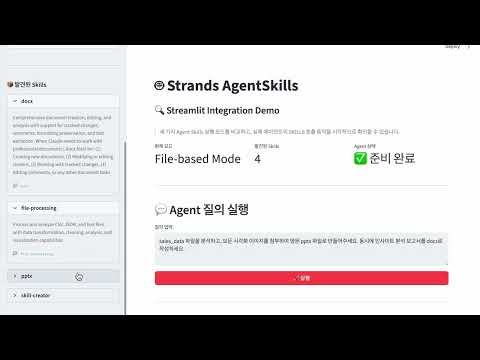

[skills/docx] Output |

[skills/pptx] Output |
Agent Skills are modular capabilities that give AI Agents specialized abilities. Each Skill packages domain-specific knowledge (web research, file processing, etc.), workflows, and best practices to transform a general-purpose Agent into a domain expert.
Limitations of traditional tool-based approaches:
- Token inefficiency: All tool specifications are always loaded into context
- Complexity increase: As tools increase, Agent decision complexity grows exponentially
- Lack of reusability: Difficult to reuse specialized knowledge in other projects
Agent Skills solutions:
- Progressive Disclosure: Load only necessary information when needed
- Modularization: Manage as independent Skills for improved reusability
- Specialization: Encapsulate complex multi-step tasks as a single Skill
This implementation follows these core principles:
Fully implements the AgentSkills.io standard:
- SKILL.md format (YAML frontmatter + Markdown)
- Required fields:
name,description - Optional fields:
license,compatibility,allowed-tools,metadata - Name validation (kebab-case, max 64 characters)
- Progressive disclosure pattern
- Security (path traversal prevention, file size limits)
For SKILL documentation, see WHAT_IS_SKILL.md.
Implements Progressive Disclosure following AgentSkills.io's 3-phase loading pattern. Load minimal metadata first, and full content only when needed:
- Phase 1 - Metadata (~100 tokens/skill): Load only Skill name and description during Discovery
- Phase 2 - Instructions (<5000 tokens): Load SKILL.md instructions when Skill is activated
- Phase 3 - Resources (as needed): Load resource files (
scripts/,references/,assets/) only when needed
Token efficiency:
| Phase | Timing | Content | Tokens |
|---|---|---|---|
| 1 | Startup | All skill metadata | ~100/skill |
| 2 | Activation | Single skill instructions | <5000 |
| 3 | As needed | Individual resource files | Variable |
- Path validation: Prevents directory traversal attacks
- File size limits: Prevents loading large files (max 10MB)
- Strict validation: Enforces Agent Skills standard
- Clear errors: Provides clear feedback on failure
Skills are not executable code. Skills are:
- Prompt templates: Domain-specific instructions
- Single tool pattern: One Meta-tool manages all skills
- LLM-based selection: Agent naturally selects appropriate skill
- Context expansion: Skill injects specialized instructions into agent context
This package provides 3 implementation patterns for using Agent Skills in Strands Agents SDK:
flowchart TB
    subgraph "Agent Skills Implementation Patterns"
        direction TB

        P1["`**Pattern 1: File-based**
        LLM reads SKILL.md directly via file_read
        Most natural approach`"]

        P2["`**Pattern 2: Tool-based**
        Load Instructions via skill() tool
        Explicit skill activation`"]

        P3["`**Pattern 3: Meta-Tool (Agent as Tool)**
        Execute isolated Sub-agent via use_skill()
        Complete context separation`"]
    end

    P1 --> Result1["`Agent reads files directly
    ✓ Most natural
    ✓ Flexible access`"]

    P2 --> Result2["`Inject into Agent context
    ✓ Structured approach
    ✓ Easy token tracking`"]

    P3 --> Result3["`Independent Sub-agent execution
    ✓ Complete isolation
    ✓ Suitable for complex Skills`"]

    style P1 fill:#e8f5e9
    style P2 fill:#e3f2fd
    style P3 fill:#fff3e0
Pattern 1: File-based : LLM reads files directly. Most flexible and token-efficient.
Pattern 2: Tool-based
: Explicitly load instructions via skill tool. Use when structured approach is needed.
Pattern 3: Meta-Tool (Agent as Tool) : Meta-Tool approach where each Skill runs in an isolated Sub-agent as a tool.
- Complete isolation: Each Skill runs in an independent Sub-agent (as a tool)
- Explicit control: Skill execution is clearly visible
- Context independence: Separation between Main agent and Sub-agent contexts
- Tool restrictions: Explicitly specify tools to provide per Skill
| Aspect | File-based | Tool-based | Meta-Tool |
|---|---|---|---|
| Execution method | LLM reads files directly | Inject into context | Isolated Sub-agent |
| Context isolation | ❌ Shared | ❌ Shared | ✅ Complete isolation |
| Flexibility | ✅ High | ||
| Token tracking | ✅ Easy | ✅ Easy | |
| Complexity | ✅ Low | ||
| Recommended use | General cases | When explicit control needed | Complex isolated execution |
💡 Selection Guide
- Inline Mode (Pattern 1, 2) — Choose for simple workflows, natural LLM skill selection, lightweight implementation
- Multi-Agent Mode (Pattern 3) — Choose when Skill isolation, explicit control, per-Skill tool separation, or usage tracking is needed
flowchart TD
    Start([skills_dir<br/>├── skill-a<br/>└── skill-b]) --> Discover[discover_skills<br/>load_metadata]
    Discover --> Props["SkillProperties<br/>- name, description<br/>- path, skill_dir"]

    Props --> Prompt[generate_skills_prompt]
    Prompt --> SysPrompt["System Prompt<br/>Only skill metadata<br/>~100 tokens/skill"]

    SysPrompt --> Agent["Main Agent created"]
    UserReq["User request"] --> Agent

    Agent --> Pattern{Implementation pattern?}

    Pattern -->|"Pattern 1: File-based"| FileRead1["file_read call<br/>LLM reads SKILL.md directly"]
    FileRead1 -.-> FileReadRes["(optional) Read Resources via file_read"]

    Pattern -->|"Pattern 2: Tool-based"| SkillTool["skill() call<br/>load_instructions"]
    SkillTool --> InstBody["Add Instructions to<br/>Agent context"]
    InstBody -.-> FileReadRes

    FileReadRes --> Response

    Pattern -->|"Pattern 3: Meta-Tool"| UseSkill["use_skill() call"]

    UseSkill --> SubAgentCreate

    subgraph SubAgentBox["Sub-agent (isolated execution environment)"]
        SubAgentCreate["Sub-agent created"]
        SubAgentCreate --> LoadSkill["Load SKILL.md<br/>→ system_prompt"]
        LoadSkill -.-> FileReadRes3["(optional) Read Resources via file_read"]
        FileReadRes3 --> SubExec["Execute and generate results"]
    end

    SubExec --> ReturnMain["Return results to<br/>Main Agent"]
    ReturnMain --> Response

    Response[Agent generates final response]

    style Start fill:#e1f5ff
    style Props fill:#fff4e1
    style SysPrompt fill:#fff4e1
    style Agent fill:#e8f5e9
    style Pattern fill:#f5f5f5
    style FileRead1 fill:#c8e6c9
    style SkillTool fill:#bbdefb
    style InstBody fill:#bbdefb
    style FileReadRes fill:#f5f5f5,stroke-dasharray:5 5
    style UseSkill fill:#ffe0b2
    style SubAgentBox fill:#fff8e1,stroke:#ff9800,stroke-width:2px
    style SubAgentCreate fill:#ffe0b2
    style LoadSkill fill:#ffe0b2
    style FileReadRes3 fill:#ffe0b2,stroke-dasharray:5 5
    style SubExec fill:#ffe0b2
    style ReturnMain fill:#ffe0b2
    style Response fill:#e8f5e9
agentskills/
├── __init__.py      # Public API
├── models.py        # SkillProperties (Phase 1 metadata)
├── parser.py        # load_metadata, load_instructions, load_resource
├── validator.py     # AgentSkills.io standard validation
├── discovery.py     # discover_skills (skill scanning)
├── tool.py          # create_skill_tool (Pattern 2: Tool-based)
├── agent_tool.py    # create_skill_agent_tool (Pattern 3: Meta-Tool)
├── prompt.py        # generate_skills_prompt (system prompt generation)
└── errors.py        # Exception hierarchy
For core API information, see API.md.
- Python 3.13 or higher
- Strands Agents SDK 1.0.0 or higher
- Strands Agents Tools 0.2.0 or higher
# Using requirements.txt
pip install -r requirements.txt

# Package installation (development mode)
pip install -e .from agentskills import discover_skills, generate_skills_prompt
from strands import Agent
from strands_tools import file_read
# 1. Skill discovery (Phase 1: load only metadata)
skills = discover_skills("./skills")
# 2. Generate system prompt (include only skill metadata)
base_prompt = "You are a helpful AI assistant."
skills_prompt = generate_skills_prompt(skills)
full_prompt = base_prompt + "\n\n" + skills_prompt
# 3. Create Agent
agent = Agent(
system_prompt=full_prompt,
tools=[file_read], # LLM reads SKILL.md when needed
model="us.anthropic.claude-sonnet-4-5-20250929-v1:0",
)
# 4. Progressive Disclosure in action:
# Phase 1: metadata in system prompt
# Phase 2: LLM reads SKILL.md via file_read
# Phase 3: LLM reads resources via file_read
response = await agent.stream_async("Research Physical AI")from agentskills import discover_skills, create_skill_tool, generate_skills_prompt
from strands import Agent
from strands_tools import file_read
# 1. Skill discovery (Phase 1: load only metadata)
skills = discover_skills("./skills")
# 2. Create skill tool
skill_tool = create_skill_tool(skills, "./skills")
# 3. Create agent with system prompt and skill tool
agent = Agent(
system_prompt=base_prompt + "\n\n" + generate_skills_prompt(skills),
tools=[skill_tool, file_read], # skill + file_read combination
model="us.anthropic.claude-sonnet-4-5-20250929-v1:0",
)
# Progressive Disclosure in action:
# Phase 1: metadata in system prompt
# Phase 2: skill(skill_name="web-research")
# Phase 3: read resources via file_read
response = await agent.stream_async("Research Physical AI")from agentskills import discover_skills, create_skill_agent_tool, generate_skills_prompt
from strands import Agent
from strands_tools import file_read, file_write, shell
# 1. Skill discovery (Phase 1)
skills = discover_skills("./skills")
# 2. Create meta-tool (Agent as Tool pattern)
meta_tool = create_skill_agent_tool(
skills,
"./skills",
additional_tools=[file_read, file_write, shell] # Tools to provide to Sub-agent
)
# 3. Generate system prompt
base_prompt = """You are a helpful AI assistant with specialized skills.
Use the use_skill tool to execute skills in isolated sub-agents."""
full_prompt = base_prompt + "\n\n" + generate_skills_prompt(skills)
# 4. Create main agent
agent = Agent(
system_prompt=full_prompt,
tools=[meta_tool], # Sub-agent runs in isolation
model="us.anthropic.claude-sonnet-4-5-20250929-v1:0",
)
# Progressive Disclosure + Meta-Tool:
# Phase 1: metadata in system prompt
# Phase 2: use_skill(skill_name, request) call
# Phase 3: Sub-agent receives SKILL.md as system prompt and executes
response = await agent.stream_async("Research Physical AI")Complete examples are available in examples/:
-
1-discovery_skills.py - Pattern 1: File-based approach
- LLM directly reads SKILL.md files using
file_readtool - Naturally performs Progressive Disclosure Phase 1-2-3
- LLM directly reads SKILL.md files using
-
2-skill_tool_with_progressive_disclosure.py - Pattern 2: Tool-based approach
- Load instructions using
skilltool - Visually track token usage for Phase 1-2
- Load instructions using
-
3-skill_agent_tool.py - Pattern 3: Meta-Tool approach (Agent as Tool)
- Each Skill runs in an isolated Sub-agent
- Complete context separation and independent execution
-
4-streamlit_prompt_simulation.py - Streamlit-based Progressive Disclosure visualization
- Visually check token usage and prompt status by phase
- Simulate Skill activation and Resource loading
-
5-streamlit_strands_integration.py - Streamlit-based comparison demo of 3 patterns
- Real-time comparison of File-based, Tool-based, Meta-Tool modes
- Live execution using actual Strands Agents SDK
For detailed example descriptions, see examples/README.md.
See CONTRIBUTING for more information.
This library is licensed under the MIT-0 License. See the LICENSE file.