
Last Updated: March 15th, 2021
What a feeling when you meet someone that you have a connection with. What do you do with that connection if it's not a romantic one? The hesistation to open up and time constraints impede deep connections from developing. What if there was a space where people could commit to developing a relationship and do so on their own schedule? Becoming BFFs will create a platform for two people to form a deeper connection by being prompted to share stories, facts, and answers to the deep questions about their lives.
Create a mobile app for two people to share intimacy on the internet.
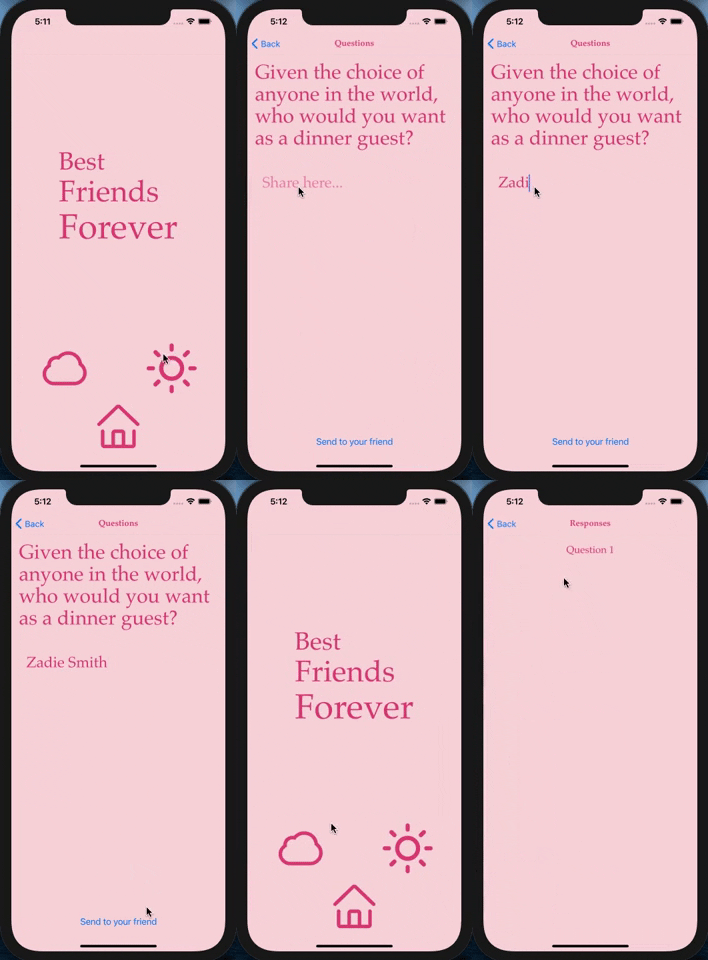
- As a user, I want to be able to sign in to the application.
- As a user, I want to be able to establish a friendship on the app.
- As a user, I want to be able to answer the provided questions and then have those responses available for my friend to see.
- As a user, I want to be able to see my friends's responses to the questions.
- As a user, I want to be able to see my own responses.
- As a user, I want to be encouraged to answer questions thoughtfully and be guided through the process.
- Allow users to share in different formats (audio, video, pictures)
- Notifications when friend has answered a question
- Instructive screen that encourages thoughtful responses
- Tracker to show progress
- Add more questions
- Encourage artistry and nonconventional story telling by having Miranda July write the prompts
- Dynamic links to invite friend
| Name | GitHub Profile | |
|---|---|---|
| Bess Campbelll | besscampbell | bess-campbell |
- Visual Studio Code
- Git/GitHub
- React Native
- JavaScript
- Node.js
- npm
- Babel
- Eslint
- Webpack
- Expo CLI
- XCode
- DrawIO
- Firebase
- The Experimental Generation of Interpersonal Closeness by Arthur Aron
- To Fall in Love With Anyone, Do This by Mandy Len Catron
- npm & Node.js
- Expo CLI
- XCode or Andriod Emulator or download Expo go to view app on your own phone.
- Internet browser, such as Chrome
- A code editor, Visual Studio Code is reccommended
- Open your preferred command line program.
- Navigate to the location or directory you'd like the project directory to be created in. (e.g.,
cd Desktopif you'd like to clone the project to your desktop) - Enter the command
$ git clone https://github.com/besscampbell/bffs.gitin your command line.
- Navigate to the project repository in your browser.
- Click the green "Code" button toward the top right of the page.
- Click "Download ZIP" and extract the files.
- Open the newly-downloaded project in your preferred code editor.
Once the project has been cloned and you have all the necessary items on your local computer, open the project in the application of your choice (Visual Code Studio was used and is recommended by the application builder)
- In the terminal type
npm installto install the JSON package - Run
npm startto view the site in a browser. - The Expo developer tools will open in a browser, if they do not press
dto open the Metro bundler. - Once the Metro bundler is opened you can use the options on the left to open on either your XCode iPhone simulator or your Andriod Emulator or scan the QR code to open using the Expo Go app.
- Note: There is also the option to open this app in your browser using the Metro bundler, however, some of the functions of the app will not be available as it was built to be used on a mobile device.
- Sign in and get a friend to create an account as well!
| Date | Error | Handled | Solution |
|---|---|---|---|
| 03/15 | Sorting responses retrieved from firestore, throwing error |

Copyright (c) 2021 Bess Cammpbell