An autonomous business intelligence system that converts natural language questions into KumoRFM predictions and delivers actionable strategy reports. Unlike existing KumoRFM cookbooks that hardcode single-task PQL queries, PredictiveAgent discovers schemas, generates PQL autonomously, executes predictions with native explanations, and synthesizes results into a strategy report -- all without human intervention.
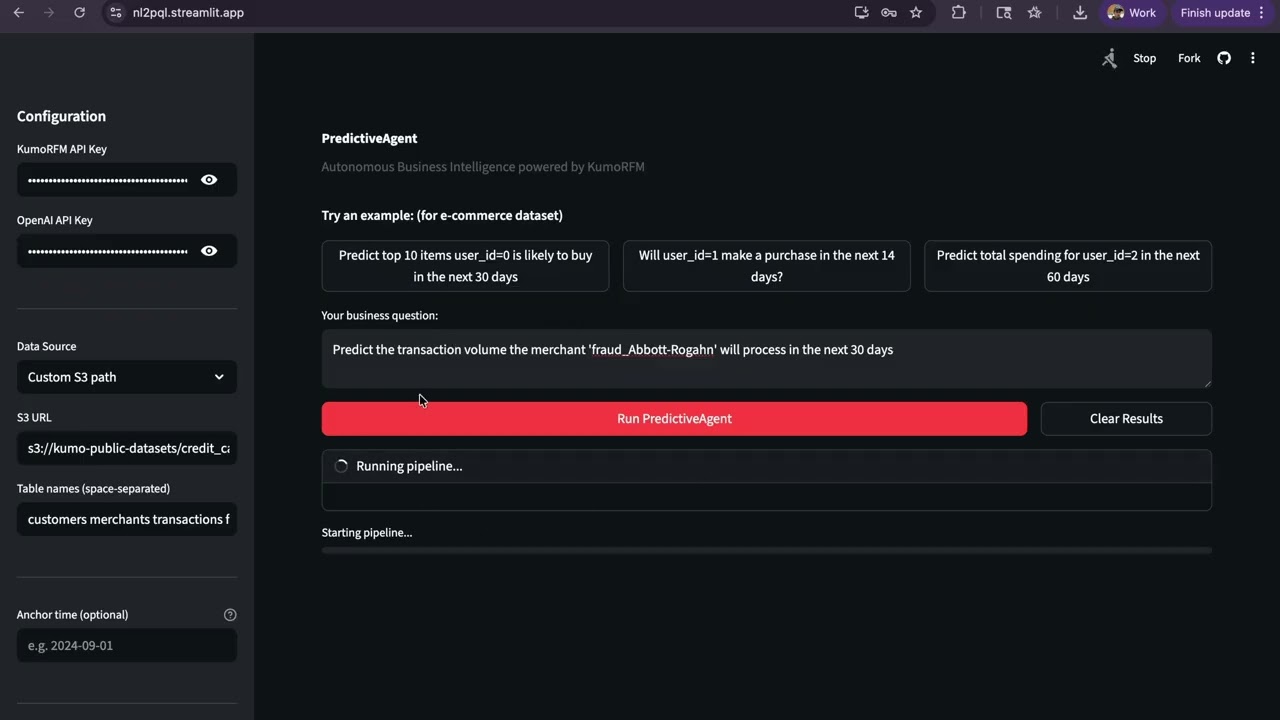
Given a business question and a relational dataset (local or S3), PredictiveAgent:
- Table Inspection -- loads tables, infers primary/foreign keys, time columns, and entity/event classification via LLM. Extracts KumoRFM semantic types (
ID,categorical,numerical,timestamp) per column to guide downstream aggregation choices. - Hypothesis Generation -- uses RAG retrieval from a PQL knowledge base, the full PQL reference, semantic type annotations, and static validation with retry to generate 4-6 diverse PQL queries. Aggregation-column compatibility rules prevent invalid combinations (e.g. COUNT_DISTINCT on ID columns).
- Graph Building -- analyzes generated PQL queries to determine required entity-target links, performs denormalization (copies FKs through intermediate tables) when the target is >1 hop from the entity, then builds the KumoRFM graph.
- Prediction Execution -- runs each PQL query via KumoRFM with
explain=Truefor native model explanations. Multi-entity queries are automatically decomposed: bulk predict without explain, then individual explain calls for the top entities. Failed queries are retried once after LLM-based fix. Supports optionalanchor_timefor historical predictions. - Strategy Synthesis -- pre-computes data statistics (prediction value summaries, model explanation factors, data quality metrics) and feeds them to an LLM to produce a data-driven strategy report with executive summary, key findings, data-backed recommended actions, and risk assessment.
git clone <repo-url>
cd kumo
pip install -r requirements.txt
Required Python >= 3.10.
Set your API keys via environment variables or a .env file in the project root:
export KUMO_API_KEY="your_kumo_api_key"
export OPENAI_API_KEY="your_openai_api_key"
Both keys are required. KumoRFM keys are available at https://kumorfm.ai.
# Default dataset (Kumo online-shopping)
python main.py --question "Which customers are likely to churn?"

# Custom S3 dataset
python main.py --question "Your question" --data s3://bucket/path --tables table1 table2 table3

# Custom local dataset (auto-discovers .parquet and .csv files)
python main.py --question "Your question" --data /path/to/data/

# Historical predictions with anchor time
python main.py --question "Your question" --anchor-time "2024-09-01"

# Custom output directory (default: auto-timestamped under outputs/)
python main.py --question "Your question" --output outputs/my_runstreamlit run ui/app.pyThe UI provides API key input, data source selection (default S3, custom S3, or local path), optional anchor time for historical predictions, example questions, live pipeline progress, and a downloadable report. Each run saves outputs to a timestamped folder.
To run on your own dataset:
- Local data -- place
.parquetor.csvfiles in a directory. Each file becomes one table (filename = table name). Use--data /path/to/dir/. - S3 data -- provide the S3 URL and table names:
--data s3://bucket/prefix --tables t1 t2 t3. Files must be named{table_name}.parquet.
The system automatically infers primary keys, foreign keys, time columns, numeric/categorical roles, and entity vs event tables from the data. No configuration files needed.
To quickly run and check the system you can use the sample data arguments:
python main.py --question "Predict top 10 items user_id=0 is likely to buy in the next 30 days" --data s3://kumo-public-datasets/online-shopping --tables users items orderspython main.py --question "Predict the transaction volume (count of transactions) the merchant 'fraud_Abbott-Rogahn' will process in the next 30 days" --data s3://kumo-public-datasets/credit_card_fraud --tables customers merchants transactions fraud_reportskumo/
├── main.py # CLI entry point
├── agents/
│ ├── graph.py # LangGraph orchestration (5-node pipeline)
│ ├── schema_discovery.py # Table loading, PK/FK inference, semantic type extraction
│ ├── hypothesis_generator.py # RAG + PQL reference + semantic types + LLM + static validation
│ ├── graph_builder.py # Query-driven graph construction with denormalization
│ ├── prediction_executor.py # KumoRFM predict with explain + multi-entity decomposition + LLM retry
│ └── strategy_synthesizer.py # Data-driven strategy report (pre-computed stats + LLM)
├── tools/
│ ├── llm.py # Centralized LLM initialization (gpt-4o-mini)
│ ├── kumo_tools.py # KumoRFM SDK wrappers + semantic type extraction
│ ├── pql_validator.py # Static PQL syntax/semantic validator (incl. stype checks)
│ └── pql_knowledge_base.py # RAG retrieval over 33 PQL examples
├── ui/
│ └── app.py # Streamlit interface
├── pql_reference.txt # Full PQL language reference
├── pql_knowledge_base.json # 33 annotated PQL examples for RAG
├── outputs/ # Pipeline output files
└── requirements.txt
- KumoRFM -- Relational Foundation Model for zero-shot predictions on relational data
- LangGraph -- Multi-agent state graph orchestration
- LangChain + OpenAI -- LLM calls (gpt-4o-mini)
- sentence-transformers -- Embedding model (all-MiniLM-L6-v2) for PQL RAG retrieval
- Streamlit -- Web UI
- KumoRFM SDK -- the
kumoaipackage is installed andKUMO_API_KEYis valid. The graph is built with explicitLocalTableobjects andgraph.link()calls based on LLM-inferred schema. - OpenAI API --
gpt-4o-miniis used for all LLM calls (schema inference, hypothesis generation, query fixing, strategy synthesis). No Anthropic fallback. - Schema inference -- an LLM analyzes column names, dtypes, uniqueness counts, and sample values to determine primary keys, time columns, and foreign key links. PKs do not need "id" in the name (e.g.
cc_num,merchant,trans_numare valid). KumoRFM semantic types (ID,categorical,numerical,timestamp) are extracted viarfm.LocalTableand propagated to guide aggregation choices. - Graph building -- the graph is built AFTER PQL queries are generated (query-first approach). FK relationships are inferred by the LLM and validated. When a PQL target table is >1 hop from the entity table, denormalization copies the entity FK through intermediate tables to create a direct link. Links are created via
graph.link(src_table, fkey, dst_table). - Time column inference -- determined by the LLM based on datetime/timestamp dtypes and column semantics.
- Event vs entity tables -- a table is classified as an event table if it has both a time column and at least one foreign key reference. Otherwise it is an entity table.
- S3 datasets --
--tablesis required for custom S3 paths (no S3 listing). Files are assumed to be.parquet. Only the default online-shopping dataset auto-defaults to[users, items, orders]. - Local datasets -- all
.parquetand.csvfiles in the given directory are loaded. Filename (without extension) becomes the table name. - PQL validation -- the static validator checks table/column existence, aggregation types, numeric constraints, PK usage in FOR clauses, time window bounds, and aggregation-stype compatibility (e.g. COUNT_DISTINCT rejected on ID columns). It does not validate WHERE clause column values.
- explain=True -- KumoRFM's explain only works for single-entity predictions. For multi-entity queries (
FOR x.id IN (...)), the system automatically decomposes: runs bulk prediction without explain, then explains the top 3 most interesting entities individually. - Prediction retry -- if a PQL query fails at execution, the LLM is asked to fix it once based on the error message. If the fix also fails, the prediction is marked as failed.
- Confidence score -- computed as the ratio of successful predictions to total predictions. Not a statistical confidence interval.
- Strategy report -- generated by the LLM based on prediction results and is not independently verified. It should be treated as a starting point for analysis, not a final recommendation.