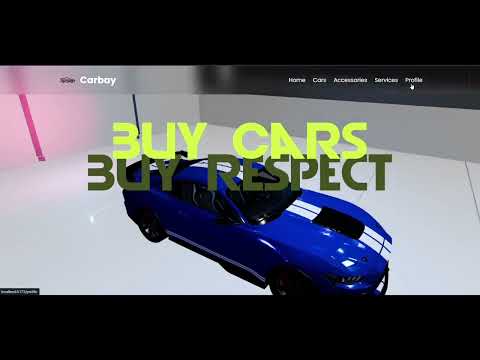
Carbay is a modern full-stack web application designed for buying, selling, and managing cars, accessories, and automotive services. Featuring a robust Node.js/Express backend and a sleek React frontend, Carbay offers secure user authentication, a dynamic product catalog, shopping cart and order management, admin tools, email notifications, and an interactive 3D car viewer. The platform is mobile-friendly and built for both end-users and administrators, making automotive e-commerce seamless and efficient.
Disclaimer: The name "Carbay" is used for educational and non-commercial purposes. To the best of our knowledge, "Carbay" is not a registered trademark for automotive marketplace software. However, before using this name for commercial purposes, please conduct your own trademark search and legal due diligence to ensure there are no conflicts in your jurisdiction.
git clone https://github.com/deekshithgowda85/Carbay.git
cd Carbay
Carbay is a comprehensive full-stack web application for car and accessory sales and services, featuring a robust Node.js/Express backend and a modern React frontend.
Carbay/
  backend/         # Node.js/Express backend (API, models, routes)
  my-react-app/    # React frontend (UI, components, pages)
- User Authentication & Profiles: Secure registration, login, and profile management for users and admins.
- Product & Service Listings: Browse, search, and filter a wide range of cars, accessories, and automotive services.
- Shopping Cart & Orders: Add products/services to cart, checkout, and track order status.
- Admin Dashboard: Manage users, products, orders, and services with dedicated admin tools.
- Order Management: View order history, order details, and manage delivery addresses.
- Payment Integration: Seamless payment workflow for purchases (integration-ready).
- Email Notifications: Automated emails for order confirmations and status updates.
- Responsive UI: Modern, mobile-friendly design for a smooth user experience.
- Protected Routes: Secure access to user and admin-only pages.
- 3D Car Viewer: Interactive 3D models for select cars (GLB support).
- Node.js (v16+ recommended)
- npm or yarn
cd backend
npm install
npm startcd my-react-app
npm install
npm run devFrom the root folder, you can run both servers together using concurrently:
npm install -g concurrently # if not already installed
npm install
npm run dev
This will start both the backend and frontend in development mode.
- Create a
.envfile in bothbackend/andmy-react-app/as needed for your configuration (e.g., database URI, API keys).
MIT