A Linux based tool or windows used to administrate multiple Ubuntu based or derived Linux systems across the same home network. I was waiting for Zorin to release Zorin Grid so I ended up making my own. Detailed Project Functionality The Remote Linux Manager is a secure, multi-threaded GUI application designed for the mass administration of Linux PCs over SSH.
“Designed for Linux tinkerers and homelabbers who think Ansible is overkill.”
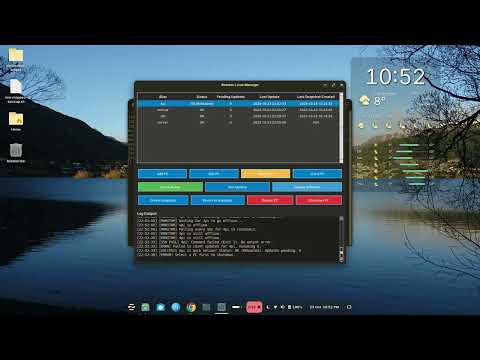
Centralized PC Management Storage: Stores the hostname (or IP), username, and password for multiple remote PCs in a local SQLite database (pc_manager.db). Security: Passwords are not stored in plaintext; they are secured using Fernet symmetric encryption. A unique key (.secret.key) is generated and used to encrypt/decrypt credentials. Interface: Allows users to easily Add, Edit, and Delete PC entries via dedicated dialogs. Resolution: Automatically attempts to resolve hostnames by appending .local (e.g., 4pi becomes 4pi.local) to support mDNS/Avahi discovery.
Live Status and Monitoring Non-Blocking Status Check: Runs multi-threaded checks to determine if a PC is reachable and responsive via SSH. Update Detection: Executes a command (apt update followed by apt list --upgradable) to determine the exact number of pending software updates on each machine. Real-Time Logging: Provides a live activity log that displays connection attempts, command output, errors (Auth/SSH/Timeout), and success messages. Power Cycle Monitoring: After a Reboot or Shutdown command is initiated, a dedicated monitoring thread polls the PC every 10 seconds to track its status (e.g., "Rebooting (Offline)") and confirms its successful return to service or final offline state.
Mass Action Execution Multi-Select: Users can select and execute actions on multiple PCs simultaneously. Secure Command Execution: Commands requiring root privileges use the sudo -S flag to securely pipe the decrypted password to the remote machine's standard input. Run Update: Executes a full system update (apt update; apt-get upgrade -y) on the selected machines. Deploy Software: Prompts the user for a list of packages and runs the corresponding installation command (apt-get install -y) on selected machines. Reboot/Shutdown: Runs non-blocking power control commands (sudo -S reboot now & or sudo -S shutdown now &) followed by immediate monitoring.
Technologies and Libraries Used GUI Framework tkinter - The main module for creating the Graphical User Interface (GUI), including the root window, frames, and basic widgets. Programming Language Python 3 The core logic of the application. Remote Access Paramiko The essential Python library for establishing secure and stable SSH connections and executing remote commands. Data Persistence SQLite 3 Used for the local, embedded database to store PC configuration details. Data Security Cryptography (Fernet) Used to generate the encryption key and securely encrypt/decrypt sensitive SSH passwords before saving them to the database. Concurrency Python's threading Manages simultaneous connections, status checks, and monitoring loops to keep the main GUI responsive. Startup & Setup Shell Script (manage-pcs.sh) Handles the essential pre-flight checks: ensures Python/GTK dependencies are installed, creates a virtual environment (venv), and installs required Python packages (paramiko, cryptography) for a simple start. Configuration CSS Styling Uses a custom CSS provider to apply the distinctive Nord color palette and ensure a clean, modern look.
Create Snapshot and Revert to snapshot functionality If a user selects a pc from the list and then selects to create a snapshot, an apt --list is performed and stored in the local databse against that pc. then at a later date the user selects the same pc and selects revert to snapshot, the apt --list is performed again but then a diff is performed to generate the sudo apt remove list. this will then revert the pc back to its state when the snapshot was performed regardless of software versions.
Requirements for running under Windows :-
updated and moved away from gtk library so the only requirement is now python on Linux or Windows. the Windows.bat file now checks for python and installs any extra software on first run up Same for Linux.sh as well
Added support for running from a Mac OS system. just run mac.sh to run the program.
Should now work on Windows, Linux, Chrome OS (using linux subsystem) and Mac OS.
Just unzip the attached file and this will make a Manage-PC directory. Within this folder run up the linux.sh script if running from Linux or window.bat if on windows. You may get prompted for sudo password on first run up to install the supporting files (python 3, pip etc) but subsequant runs wont ask you for sudo password and the app will just run up.
Backup & Migration (if you want to move this tool to another pc keeping the database and secret hash key
To backup your PC list and move to another machine:
-
Backup these files from your installation directory along with linux.sh, manager.py and windows.bat:
pc_manager.db(your PC list).secret.key(required to decrypt passwords)- Important: These files contain sensitive data!
-
On the new machine, run the launcher once to create the folder structure
-
Replace the generated
.secret.keyandpc_manager.dbwith your backups -
Your PC list will be restored with all credentials intact