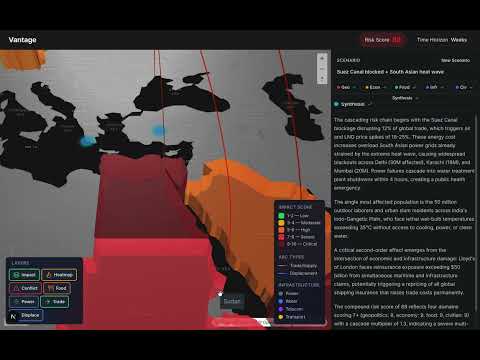
Multi-Agent Catastrophic Risk Simulation Platform
- Addresses the difficulty of predicting second-and-third-order effects of global catastrophes
- OpenAI (GPT-5.2) for analysis, MiniMax (M2.5) for agents in swarm
- Next.js Web Application with a custom AI agent orchestration backend and a WebGL-powered geospatial frontend
- Next Improvement: More Agents (Pandemic, Cybersecurity, Nuclear Threat domains)
- Node.js 20+
- npm or yarn
cp .env.example .env.local| Variable | Required | Description |
|---|---|---|
OPENAI_API_KEY |
Yes | OpenAI API key for orchestrator and synthesis agents. Get from platform.openai.com |
MINIMAX_API_KEY |
Yes | MiniMax API key for specialist agents. Get from platform.minimaxi.com |
NEXT_PUBLIC_MAPTILER_KEY |
Yes | MapTiler API key for map tiles. Get from cloud.maptiler.com |
CDS_UID |
No | Copernicus Climate Data Store username. Get from cds.climate.copernicus.eu |
CDS_API_KEY |
No | Copernicus Climate Data Store API key. Get from cds.climate.copernicus.eu/api-how-to |
NASA_API_KEY |
No | NASA API key for satellite imagery and Earth observation data. Get from api.nasa.gov |
The NEXT_PUBLIC_MAPTILER_KEY is exposed to the client for browser-based map tile loading. To restrict it:
- Go to your MapTiler Dashboard
- Edit your key to add domain restrictions
- Only allow domains where you deploy the app
For CI pipelines and production deployments, set the environment variables as secrets:
# Vercel example
vercel env add OPENAI_API_KEY
vercel env add MINIMAX_API_KEY
vercel env add NEXT_PUBLIC_MAPTILER_KEY
vercel env add CDS_UID
vercel env add CDS_API_KEY
vercel env add NASA_API_KEY

# Or use -e flag with deployment
vercel deploy --env OPENAI_API_KEY=$OPENAI_API_KEY ...
Important: Never commit real API keys to the repository. The .env and .env*.local files are gitignored.
# Install dependencies
npm install

# Run development server
npm run dev

# Build for production
npm run build├── app/ # Next.js App Router
│ ├── api/analyze/ # SSE endpoint for analysis
│ ├── page.tsx # Main page
│ └── layout.tsx # Root layout
├── components/
│ ├── map/ # MapLibre + deck.gl components
│ └── sidebar/ # Sidebar UI components
├── hooks/
│ └── use-analysis.ts # SSE client hook
├── lib/
│ ├── agents/ # AI agent implementations
│ ├── data/ # Data loading utilities
│ └── types.ts # Shared TypeScript types
└── public/ # Static assets