Add files via upload #1
Open
Conversation
This file contains hidden or bidirectional Unicode text that may be interpreted or compiled differently than what appears below. To review, open the file in an editor that reveals hidden Unicode characters.
Learn more about bidirectional Unicode characters


For the assignment , I did the following changes:
1. I used one image to be the background of TextView like "MON" , by the following code:
<TextView
                android:layout_width="48dp"
                android:layout_height="48dp"
                android:gravity="center"
                android:text="mon"
                android:background="@drawable/blue_bg"
                android:textAllCaps="true"
                android:textColor="#909090" />
before:
I added one permission to allowed the application to access the net_work state.
add the Internet check code and the weather get code
Sign up for free
to join this conversation on GitHub.
Already have an account?
Sign in to comment
1 participant

Add this suggestion to a batch that can be applied as a single commit.
This suggestion is invalid because no changes were made to the code.
Suggestions cannot be applied while the pull request is closed.
Suggestions cannot be applied while viewing a subset of changes.
Only one suggestion per line can be applied in a batch.
Add this suggestion to a batch that can be applied as a single commit.
Applying suggestions on deleted lines is not supported.
You must change the existing code in this line in order to create a valid suggestion.
Outdated suggestions cannot be applied.
This suggestion has been applied or marked resolved.
Suggestions cannot be applied from pending reviews.
Suggestions cannot be applied on multi-line comments.
Suggestions cannot be applied while the pull request is queued to merge.
Suggestion cannot be applied right now. Please check back later.
For the assignment , I did the following changes:
background:
before:

after:
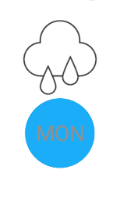
I changed the icon that required by changing those code:

this is what I choosed:
I added a imagebutton to refresh the data that required. I used the icon that android stdio are loaded and changed the background color of it, which looks like that:

the code is following:
The function btnRefresh() is the function that refresh the data. And the code is following:
public void btnRefresh(View view) {
new DownloadUpdate().execute();//update the temperature
myUploadData();// update the date information
}
private void myUploadData() {
Calendar c = Calendar.getInstance();
int year = c.get(Calendar.YEAR);//get year
int month = c.get(Calendar.MONTH)+1;//get month
int day = c.get(Calendar.DAY_OF_MONTH);//get day
//get
String mWay = String.valueOf(c.get(Calendar.DAY_OF_WEEK));
if("1".equals(mWay)){
mWay ="SUNDAY";
}else if("2".equals(mWay)){
mWay ="MONDAY";
}else if("3".equals(mWay)){
mWay ="TUESDAY";
}else if("4".equals(mWay)){
mWay ="WEDNESDAY";
}else if("5".equals(mWay)){
mWay ="THURSDAY";
}else if("6".equals(mWay)){
mWay ="FRIDAY";
}else if("7".equals(mWay)){
mWay ="SATURDAY";
}
String date = null;
if(day>9&&month>9) {
date = Integer.toString(month) + '/' + Integer.toString(day) + '/' + Integer.toString(year);
}
else if(day<10&&month>9){
date = Integer.toString(month) + '/' + '0'+Integer.toString(day) + '/' + Integer.toString(year);
}
else if(month<10&&day>9){
date ='0' + Integer.toString(month) + '/' +Integer.toString(day) + '/' + Integer.toString(year);
}
else{
date ='0' + Integer.toString(month) + '/' +'0'+Integer.toString(day) + '/' + Integer.toString(year);
}
((TextView) findViewById(R.id.head_date)).setText(mWay);
((TextView) findViewById(R.id.tv_date)).setText(date);
}
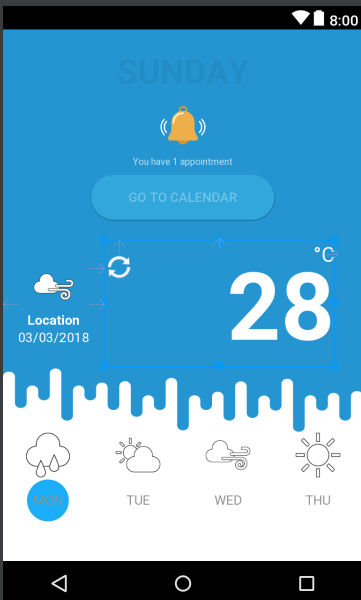
this the before I pressed the imgbutton:
and this is after:
If there are some bugs that I don't find out please tell me, thank you.
Yori
杨译绗
20151639