
https://github.com/equalithon-team-three/traid-frontend
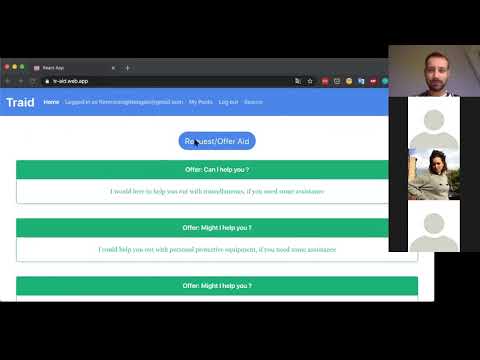
Responsive web app that allows users to offer and request aid from others in their community.
MVP completed using Agile methodologies in 7 days for the Essteem Hackathon for COVID-19 Relief sponsored by Girls Who Code, in which it won first place.
Built using Ruby, Ruby on Rails, and Active Record on the backend and React and Bootswatch on the frontend.
- Tal Luigi (LinkedIn | GitHub)
- Graham Troyer-Joy (LinkedIn | GitHub)
- Meredith Strickland (LinkedIn | GitHub)
- Jessica Lin (LinkedIn | GitHub)
Users ----< Posts >-------- PostCategory
              |                  |
              |                  |
              |                  ^
              |             Taggability
              |                 \/
              |                  |
              |                  |
              |            TagCategories
              |                  |
              |                  |
              |                  |
              |                  |
              |                  ^
              ----------------< Tags
- Install dependencies using
bundle install - Run local development server using
rails server
- Set up the Heroku command line tools
- Authenticate using
heroku login - Add a git remote for heroku:
-
If you are creating a new app...
heroku createorheroku create YOUR-APP-NAMEif you have a name in mindheroku addons:create heroku-postgresql:hobby-devto add ("provision") a PostgreSQL database to your heroku dyno
-
If you already have a Heroku app...
heroku git:remote YOUR-APP-NAME -
If you changed migrations...
heroku run rake db:migrate -
If migrating doesn't update your table columns...
heroku pg:resetto reset your provisioned PostgreSQL databaseheroku run rake db:schema:loadto create the tables in your provisioned PostgreSQL database using /db/schema.rb
-
If you want to seed your provisioned PostgreSQL database...
heroku run rake db:seedto seed your provisioned PostgreSQL database using /db/seeds.rb -
If you want to manually deploy your local master branch to your Heroku app...
git push heroku master -
If you want to manually deploy another local branch to your Heroku app...
git push heroku LOCAL-BRANCH-NAME:masterorgit push --force heroku LOCAL-BRANCH-NAME:master -
If you want to check that your Heroku app is running successfully post-deployment...
heroku logs --tail