

- Built for AI workflows — speak your prompt, paste to OpenCode, Claude, Codex, ...
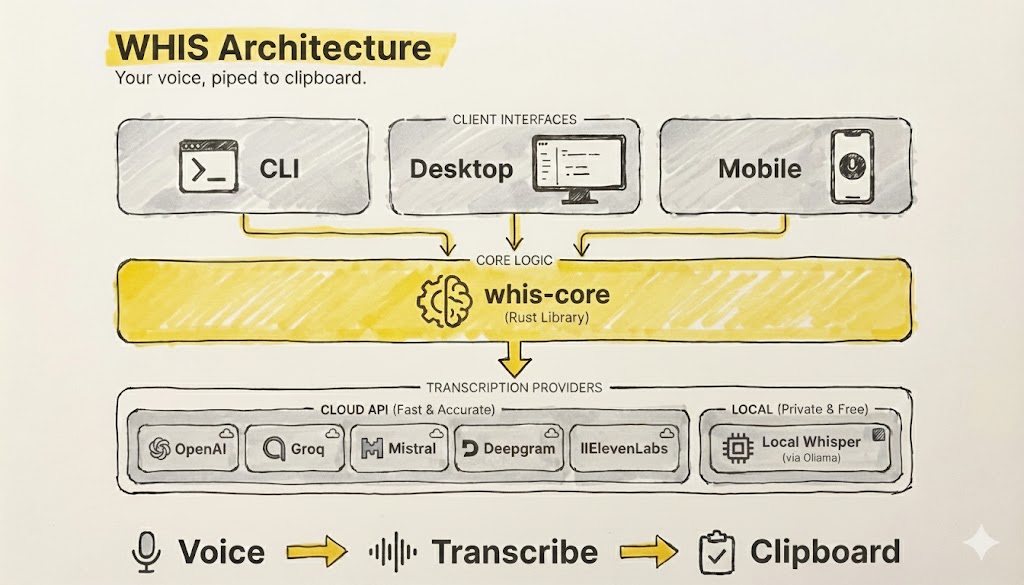
- Cloud or local — OpenAI, Mistral, Groq, Deepgram, ElevenLabs, or free with local Whisper
- Simple — record → transcribe → clipboard
# Install
cargo install whis-cli

# Setup (interactive wizard)
whis setup

# Run
whis               # Press Enter to stop — text copied!
# Record once
whis

# Background service mode
whis start         # Start background service
whis toggle        # Toggle recording (bind to your compositor hotkey)

# Post-process with AI (presets define the transformation)
whis --post-process

# Use with terminal AI assistants
claude "$(whis --as ai-prompt)"    # Start session with voice prompt
whis --as ai-prompt --print        # For shell mode (outputs to stdout)

# Presets
whis --as email          # Use preset
whis preset              # List all
whis preset new xyz      # Print template for new preset
whis preset edit xyz     # Edit in $EDITOR

# Transcribe existing audio
whis -f recording.wav

# Help - for you or your helper
whis --help cargo install whis-cliOr download binaries from GitHub Releases.
- API key from OpenAI, Mistral, Groq, Deepgram, or ElevenLabs — or use local Whisper/Parakeet (no API key needed)
- Linux only: Vulkan SDK for local transcription
sudo apt install libvulkan-dev vulkan-tools glslc libshaderc-dev  # Ubuntu/Debian
sudo pacman -S vulkan-headers vulkan-tools shaderc                # Arch
- Linux (X11/Wayland), macOS, or Windows
For hotkey mode (Linux, pick one):
# Option 1: Compositor keybinding (no permissions needed)
# GNOME: Settings > Keyboard > Custom Shortcuts → whis toggle
# Sway:  bindsym Ctrl+Alt+w exec whis toggle
# Hyprland: bind = CTRL ALT, W, exec, whis toggle

# Option 2: Direct capture
sudo usermod -aG input $USER && logout
# Then: whis startgit clone https://github.com/frankdierolf/whis.git
cd whis
just # List all commands
just install-cli # Build and install CLISee CONTRIBUTING.md for full setup instructions.
MIT