Conversation


 nwankwo-ikemefuna
left a comment
nwankwo-ikemefuna
left a comment
nwankwo-ikemefuna
left a comment
There was a problem hiding this comment.
More work required
profile.html
Outdated
| <input | ||
| type="checkbox" | ||
| id="change-pin" | ||
| onclick="displayFormToUpdate()" |
There was a problem hiding this comment.
displayFormToUpdate() does not describe what this checkbox does. How about togglePinChangeSectionDisplay(). The idea is that when the checkbox is checked, the PIN change section will show, otherwise it will be hidden.
Also, it's advised to attach an "onchange" event listener to the element instead of directly adding the function to onclick attribute. This is to separate html and javascript properly and give you more control.
profile.js
Outdated
| let userToBeUpdated = allUsers.find( | ||
| (user) => user.accountNumber == accountNumberElem.value | ||
| ); | ||
| userToBeUpdated.accountName = accountNameElem.value; | ||
| userToBeUpdated.accountPin = newPinElem.value; | ||
| // changing the updated properties to a string | ||
| const updatedObject = JSON.stringify(allUsers); | ||
| // storing it back in local storage | ||
| localStorage.setItem("MB_USER_ACCOUNTS", updatedObject); |
There was a problem hiding this comment.
You're not doing it right here. You haven't added the modified user to the users array. You're simply pushing back the same users array to local storage.
See sample of how to update a user's details in deposit.js:
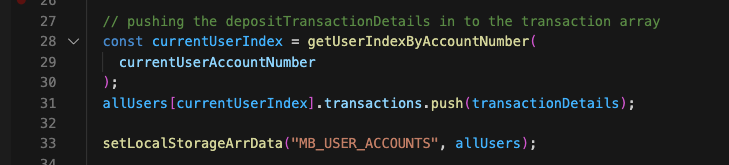
See how it's done on line 31.
Suggested pseudocode:
const currentUserIndex = getUserIndexByAccountNumber(currentUserAccountNumber);
allUsers[currentUserIndex].accountName = the updated account name;
// You need to check that user is updating PIN before you update it, otherwise, it will be updated to empty string
if (user is also changing PIN) {
  allUsers[currentUserIndex].accountPin = the updated account PIN;
}
setLocalStorageArrData("MB_USER_ACCOUNTS", allUsers);
profile.html
Outdated
| <input | ||
| type="password" | ||
| id="new-pin" | ||
| required |
There was a problem hiding this comment.
Changing PIN should be optional. You should programmatically add the required attribute if the checkbox is checked, and remove it otherwise. As it is now, you can't submit the form unless the checkbox is checked.
profile.html
Outdated
| <input | ||
| type="password" | ||
| id="confirm-new-pin" | ||
| required |
There was a problem hiding this comment.
Changing PIN should be optional. You should programmatically add the required attribute if the checkbox is checked, and remove it otherwise. As it is now, you can't submit the form unless the checkbox is checked.
profile.html
Outdated
| <input | ||
| type="password" | ||
| id="current-pin" | ||
| required |
There was a problem hiding this comment.
Changing PIN should be optional. You should programmatically add the required attribute if the checkbox is checked, and remove it otherwise. As it is now, you can't submit the form unless the checkbox is checked.
| updateBtnElem.addEventListener("click", () => updateForm()); | ||
|
|
||
| function deleteUserAccount() { | ||
| const registeredUsers = localStorage.getItem("MB_USER_ACCOUNTS"); |
There was a problem hiding this comment.
Don't we have a function for getting all users defined in common.js? Why do this?
profile.js
Outdated
| function deleteUserAccount() { | ||
| const registeredUsers = localStorage.getItem("MB_USER_ACCOUNTS"); | ||
| console.log(registeredUsers); | ||
| let usersArray = JSON.parse(registeredUsers); |
There was a problem hiding this comment.
What is your justification for using let here instead of const?
There was a problem hiding this comment.
I've changed it since i am nor re-assigning any variable to a new value
profile.js
Outdated
| let usersArray = JSON.parse(registeredUsers); | ||
| const index = getUserIndexByAccountNumber(currentUserAccountNumber); | ||
| usersArray.splice(index, 1); | ||
| const newArrayOfUsers = JSON.stringify(usersArray); |
There was a problem hiding this comment.
JSON.stringify(usersArray) will produce a string, so calling it newArrayOfUsers is misleading.
profile.js
Outdated
| } | ||
| updateBtnElem.addEventListener("click", () => updateForm()); | ||
|
|
||
| function deleteUserAccount() { |
There was a problem hiding this comment.
There should be confirm action incase the user clicks the button by error.
There was a problem hiding this comment.
Isn't closeUserAccount()a more appropriate function name?
| <li><a href="#">Account Profile</a></li> | ||
| <li><a id="logout-btn" href="#">Logout</a></li> | ||
| </ul> | ||
| </nav> |
There was a problem hiding this comment.
Where's the account balance section?

|
More general comments:
|
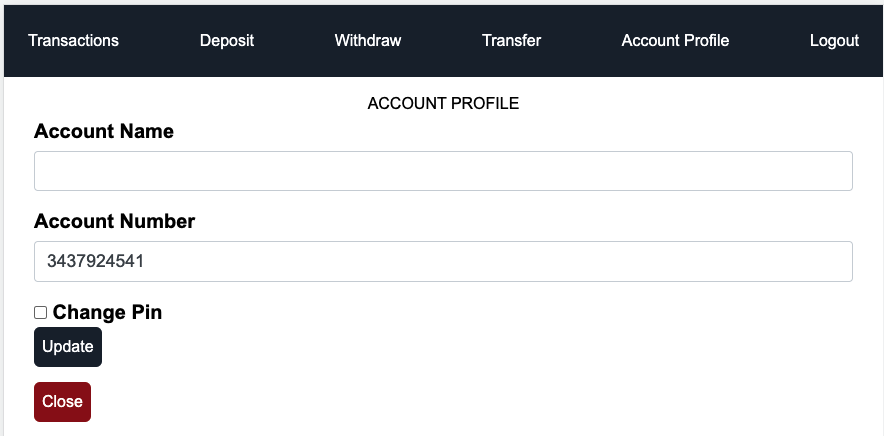
profile.js
Outdated
|
|
||
| // finding the current user to update profile | ||
|
|
||
| let userToBeUpdated = allUsers.find( |
There was a problem hiding this comment.
What is your justification for using let here instead of const?
3 participants


Added profile page