A tiny macOS dictation tool for fast voice input from the menu bar or terminal.
minidic is published on PyPI for macOS users.
uv tool install minidicTo upgrade an existing install:
uv tool upgrade minidicuv tool installs minidic to ~/.local/bin/minidic.
Make sure ~/.local/bin is on your PATH.
On first use, macOS will prompt for the permissions required by minidic. In general, you need to grant these permissions to the terminal app you use to run minidic:
- Microphone — needed to capture live audio for dictation
- Accessibility — needed to inject transcribed text into the active app and handle global hotkeys in menu bar mode
Environment variables:
GROQ_API_KEY— required when using--onlineor--polish
Run an interactive dictation session in the terminal. It records from your microphone, transcribes speech, and prints the result.
By default, minidic uses the offline Parakeet backend for local transcription. On first use it will download mlx-community/parakeet-tdt-0.6b-v3 (~2 GB).
minidic console
minidic console --online
minidic console --polish
minidic console --online --polish
--online switches to Groq Whisper. --polish enables the built-in Groq polish backend for punctuation and phrasing cleanup after transcription.
Transcribe an existing WAV file from disk instead of recording live microphone input.
minidic transcribe path/to/file.wav
minidic transcribe --online path/to/file.wav
minidic transcribe --polish path/to/file.wav
minidic transcribe --online --polish path/to/file.wavRun minidic in menu bar mode with a background daemon and a global F5 hotkey to toggle dictation.
minidic menubar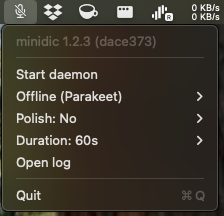
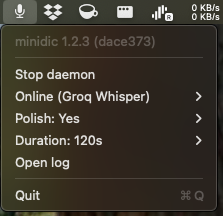
The menubar command itself does not accept online or polish flags. Use the menu bar UI to change backend, polish, and duration.
The menu bar UI lets you change settings without restarting the daemon; changes apply on the next transcription:
- Start menu bar mode.
- Optionally choose Backend:
Offline (Parakeet)orOnline (Groq Whisper). - Optionally choose Polish:
NoorYes. - Optionally choose a max recording length from Duration.
- Click Start daemon.
- Press
F5to toggle start/stop dictation.
Groq features require GROQ_API_KEY. If the key is missing, minidic raises an error; in daemon mode, the error is logged to daemon.log.
minidic captures microphone audio, normalizes it to 16 kHz, and runs speech-to-text plus optional cleanup.
- Offline ASR:
mlx-community/parakeet-tdt-0.6b-v3 - Online ASR: Groq
whisper-large-v3-turbo - Polish model: Groq
openai/gpt-oss-20b
- Capture mic audio with
sounddevice - Resample to 16 kHz with
soxrwhen needed - Transcribe with Parakeet or Groq depending on whether
onlineis enabled - Apply local regex cleanup by default to remove filler words like
umanduh - Optionally run Groq polish when enabled
- Inject text into the active app on macOS in daemon mode
The daemon mode is hotkey-driven and lazily loads and unloads the ASR model to reduce idle resource usage.
~/.minidic/
├── settings.json          # persisted settings for online mode, polish, and recording duration
└── recordings/            # WAV recordings created during dictation/transcription

~/.local/state/minidic/
├── daemon.error           # last daemon error message (transient)
├── daemon.log             # daemon logs
├── daemon.pid             # daemon process ID
├── daemon.state           # current daemon state: idle, recording, transcribing, error
├── menubar.log            # menu bar mode logs
└── menubar.pid            # menu bar process ID
minidic stores persistent configuration in ~/.minidic/settings.json as a flat JSON object with these keys:
online:trueorfalsepolish:trueorfalseduration_secondsgroq_whisper_prompt: optional prompt string passed to Groq Whisper when the daemon starts
Default settings.json:
{
  "duration_seconds": 60.0,
  "groq_whisper_prompt": "",
  "online": false,
  "polish": false
}