
Transform your LeetCode experience with AI-powered hints and real-time scoring!




Your support helps us build better features and maintain this free extension!
ThinkDSA AI Extnsion is a powerful Chrome extension that revolutionizes how you learn algorithms and data structures on LeetCode. Instead of giving away solutions, it provides intelligent hints and tracks your understanding with an AI-powered scoring system.
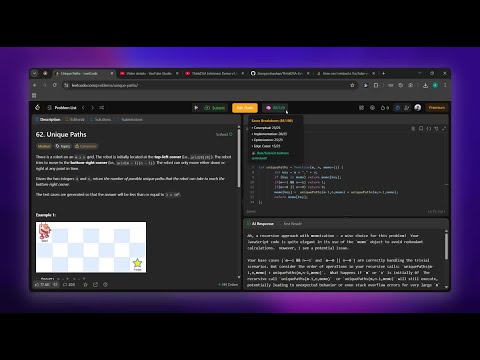
� Click the thumbnail above to watch ThinkDSA AI Extension in action!
- 🤖 Smart AI Hints - Get contextual guidance without spoiling the solution
- 📊 Real-time Scoring - Track your understanding with detailed breakdowns
- 🎯 Progressive Learning - Unlock Run/Submit buttons only when you truly understand (80+ score)
- 🎨 Clean UI Integration - Seamlessly integrates with LeetCode's interface
- 💾 Progress Tracking - Your scores are saved per problem for future reference
- Load a LeetCode Problem - The extension automatically activates
- Get Initial Guidance - Sudo provides a first hint to get you started
- Write Your Code - Implement your solution in the editor
- Ask for Help - Click "Ask Sudo" for intelligent, contextual hints
- Track Progress - Watch your understanding score improve in real-time
- Unlock Features - Achieve 80+ score to unlock Run/Submit buttons
Your AI score is calculated across four key areas:
| Category | Weight | Description |
|---|---|---|
| Conceptual Understanding | 25% | How well you grasp the problem |
| Implementation Quality | 25% | Code structure and approach |
| Optimization | 25% | Efficiency and algorithmic thinking |
| Edge Case Handling | 25% | Robustness and completeness |
- Visit the Microsoft Edge Add on
- Click "Add to Edge"
- Enable the extension
P.S. I'm a broke college student who spent way too much on coffee while building this extension... so if you find it helpful, maybe buy me one back? 🥺☕
-
Download the Extension
git clone https://github.com/itsaryanchauhan/ThinkDSA-Extension.git cd ThinkDSA-Extension -
Load in Chrome
- Open Chrome and go to
chrome://extensions/ - Enable "Developer mode" (top right toggle)
- Click "Load unpacked"
- Select the extension folder
- Open Chrome and go to
-
Configure the Extension
- Get a Gemini API key from Google AI Studio
- Click the extension icon in Chrome toolbar
- Enter your API key
- Toggle "Enable Extension" to ON
- You're ready to go!
-
🌐 Navigate to LeetCode
- Go to any LeetCode problem page
- The extension will automatically load
-
👁️ Expand Code Viewport
⚠️ - Important: Before clicking "Ask Sudo", expand your code editor viewport
- Make sure ALL your code is visible in the window
- This ensures the AI can see your complete solution
- We're working on a fix so you won't need to do this manually!
-
🚀 Get Your First Hint
- The extension provides an initial hint automatically
- Your score starts at 0/100
-
💡 Ask for More Help
- Write some code first
- Click "Ask Sudo" for intelligent hints
- Your score updates based on your progress
-
📈 Track Your Progress
- Hover over the 🧠 score button for detailed breakdown
- Green score (80+) = Run/Submit buttons unlocked!
- 🔶 Ask Sudo Button - Get AI-powered hints
- 🧠 Score Display - Shows your current understanding (hover for breakdown)
- ☕ Buy Me Coffee - Support the project
- 📋 AI Response Panel - Replaces the testcase tab with AI feedback
We're constantly improving ThinkDSA AI! Here's what's coming next:
| Feature | Status | Description |
|---|---|---|
| 🤖 Multiple AI Models | 🔄 Planning | Choose between GPT-4, Claude, Gemini |
| 🎨 Custom Themes | 🔄 Planning | Dark/Light themes, custom color schemes |
| 📊 Advanced Analytics | 🔄 Planning | Progress charts, learning insights |
| 🔧 Better Code Detection | 🚧 In Progress | Auto-detect all code without viewport expansion |
| 💬 Smart Prompting | 🔄 Planning | More contextual and personalized hints |
| 📱 Mobile Support | 💭 Idea | Support for LeetCode mobile interface |
| 🎓 Learning Paths | 💭 Idea | Guided problem sequences by topic |
| 👥 Community Features | 💭 Idea | Share hints, compare scores |
| 🔊 Voice Hints | 💭 Idea | Audio explanations for accessibility |
| 📝 Note Taking | 💭 Idea | Save notes and insights per problem |
Your feedback is essential! Help us prioritize features by:
- 🌟 Starring this repository
- 🐛 Reporting bugs in Issues
- 💬 Suggesting features in Discussions
- ☕ Supporting development with Buy Me a Coffee
- JavaScript ES6+ - Core functionality
- Chrome Extensions API - Browser integration
- Google Gemini AI - AI-powered hints and scoring
- CSS3 - Beautiful UI styling
- ✅ Chrome 88+
- ✅ Chromium-based browsers (Edge, Brave, etc.)
- ❌ Firefox (planned for future release)
activeTab- Access to current LeetCode tabstorage- Save your progress and scoreshttps://leetcode.com/*- LeetCode integration
We welcome contributions! Here's how you can help:
- Check existing issues
- Create a new issue with detailed description
- Include browser version and error logs
- Open a discussion
- Describe your idea and use case
- We'll consider it for future releases!
- Fork the repository
- Create a feature branch (
git checkout -b feature/amazing-feature) - Commit your changes (
git commit -m 'Add amazing feature') - Push to the branch (
git push origin feature/amazing-feature) - Open a Pull Request
This project is licensed under the MIT License - see the LICENSE file for details.
- LeetCode - For providing the platform we all love
- Google AI - For powering our AI hints with Gemini
- Chrome Extensions Community - For the awesome documentation
- Contributors - Everyone who helps make this project better!
- 🐛 Bug Reports: GitHub Issues
- 💬 Feature Requests: GitHub Discussions
- ☕ Support Development: Buy Me a Coffee
- 📧 Email: your.email@example.com
Made with ❤️ for the coding community
⭐ Star this repo if you found it helpful! ⭐


