A python toolkit for fluorescence microscopy that features IDS uEye industrial-grade CMOS cameras.
The Acquisition Module allows multi-cam image acquisition within one graphical user interface.
The Control Module allows setting the laser excitation presets, manual focus and automatic focus stabilization by monitoring the peak position of a totally internally reflected IR beam and moving the piezo stage accordingly.
The Tiff Viewer Module allows accessing tiff images (single file and sequecnces) of order TYX (2D SMLM), also allows for visualizing the filtering-localization process WYSIWYG.
This toolkit is compatible with the hardware we are using in our microscope. For further details check our microscope's github (TBA)
- Numpy
- scipy
- pandas
- Zarr
- dask
- pyueye
- cv2
- tifffile
- PyQt5
- pyqtgraph
- qdarkstyle
- ome-types
- lmfit
- pyqode.python (Jedi Fix)
- VimbaPython (Included in Vimba SDK and installed manually)
How to Install Package
> pip install microEye
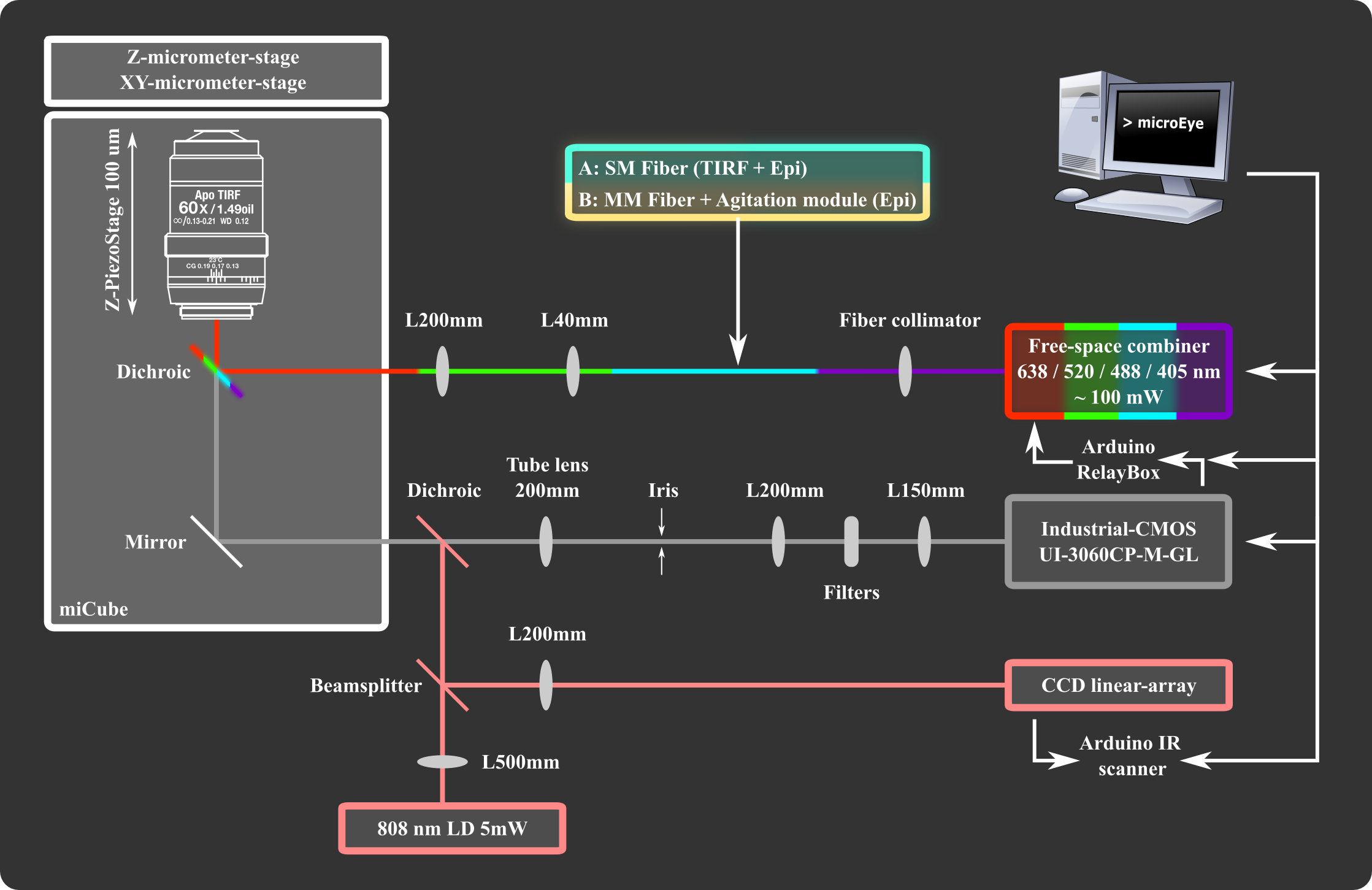
- Supported Cameras:
- IDS uEye industrial-grade CMOS cameras, specifically UI-3060CP Rev. 2.
- Thorlabs DCx cameras using the UC480 driver, specifically DCC1545M.
- Allied Vision cameras using Vimba SDK, specifically Alvium 1800 U-158m.
- Integrated Optics Multi-wavelength Laser Combiner MatchBox.
- Piezo Concept nanopositioner for microscope objectives FOC.
- Parallax Linescan Camera Module used for IR autofocus stabilization tracking TSL1401-DB (#28317) acquisition done by an Arduino LineScanner.
- RelayBox arduino for laser control using the camera flash signal with different presets.
- Parts list related to our iteration of hohlbeinlab miCube (TBA).

from microEye.hardware import acquisition_module

try:
    app, window = acquisition_module.StartGUI()
    app.exec_()
except Exception as e:
    traceback.print_exc()
finally:
    # dispose camera adapters
    for cam in window.ids_cams:
        cam.dispose()

    # Destroys the OpenCv windows
    cv2.destroyAllWindows()
For Vimba SDK to work the script should be executed as administrator on Windows and wrapped in a with statement:
 from microEye.hardware import acquisition_module

 try:
     import vimba as vb
 except Exception:
     vb = None

 with vb.Vimba.get_instance() as vimba:
     app, window = acquisition_module.StartGUI()

     app.exec_()

from microEye.hardware import control_module

app, window = control_module.StartGUI()
app.exec_()


from microEye import tiff_viewer

app, window = tiff_viewer.StartGUI('D:/')

app.exec_()
Mohammad Nour Alsamsam

Dr. Marijonas Tutkus (supervision)

Aurimas Kopūstas (sample preparation and experiments)
