Please be advised, in order to compile this program you must have the required dependencies. If you are just running the supplied .jar file, you do not need any of them, as they are bundled in the .jar. All dependencies are being bundled in a .jar file to guarantee program is operable.
In the directory of the CryptoProject.jar file, please create a command prompt and type the following:
java -cp CryptoProject.jar EchoServer
then open a new command prompt in the same folder and type the following:
java -cp CryptoProject.jar EchoClient.
This is the window you will be using to interact with the program.
Also the Maven coordinates (for importing into an IDE for compilation) are:
com.google.code.gson:gson:2.8.2
com.squareup.retrofit2:converter-gson:2.4.0
com.squareup.retrofit2:retrofit:2.4.0
org.slf4j:slf4j-nop:1.7.25
This Java application shows how to create a Wallet object used to trade cryptocurrencies and store holdings. It is created for a class project, but can later be adapted to have more features.
The goal of this application is to make hesitant traders more willing to try trading cryptocurrencies by not adding the pressure of using real money. All other values and operations are real however. We do this by freely allowing for the withdrawal and deposit of USD, but without having any effect.
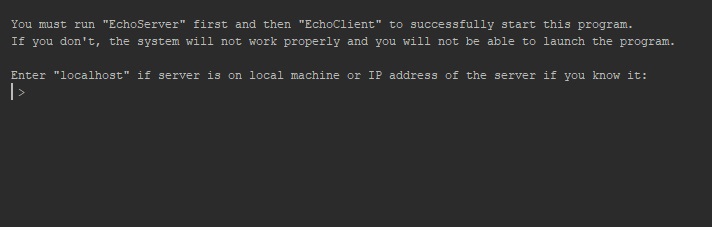
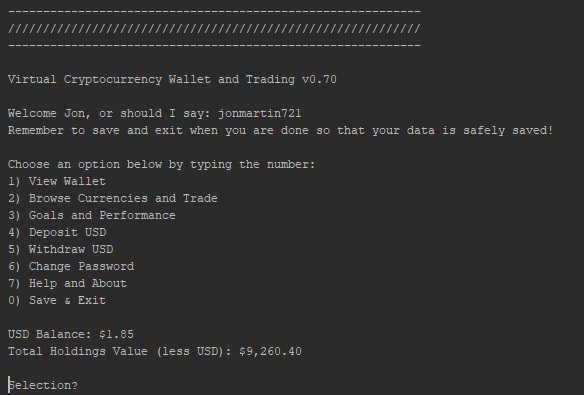
For this application, you should run EchoServer before running EchoClient. Just type in 'localhost' if you're using the same machine, or you can type in the IP address if you know it (see picture 1). After you set-up your login information and username, you will see a selection menu (see picture 2). From this menu, you can navigate to different parts of the program like viewing how much is in your wallet, adding to your wallet, browsing current cryptocurrencies and trades. You can even establish some financial goals you'd like to set for your portfolio. You can move money into your wallet via the 'Deposit USD' option, and also withdraw from your wallet. Changing or updating your password is an integral part of any proper application, and even though we did not implement encryption, the basic functionality of authentication is available via serialization of the files. Obviously if this was published application, encryption would have to be implemented.
There is also a help feature that explains all the menu options in detail. And finally the save and exit options when the user is done with the program. The final feature displays the user's exit balance in USD along with the value of total holdings. Many safeguards have been implemented to catch any exceptions that might be thrown so the program with run relatively error-free.
This is a list of final features. They may not be fully implemented yet, but are feasible and will be added by the completion of the project.
- Secure login info storage and wallet storage
- Trade Bitcoin, Ethereum, Litecoin, Bitcoin Cash, Ripple, Dash, Monero, Neo, EOS, Cardano, Stellar
- Live data from the CryptoCompare API
- File operations
- Client/Server architecture
- Full BigDecimal for currency support
Less impressive but still important OOP features:
- Modular design
- Clearly commented code
- Clean interface
- Inheritance
- Abstraction
- Exception handling
- Serialization
- Networking
CryptoCompare is an API that brings all the latest streamed pricing data in the world of cryptocurrencies. All the latest trades like Bitcoin, Ethereum, BTC Cash, Ripple and Litcoin to name a few. The current rates for these crytocurrencies can be updated while program is running by selecting the "r" button that reloads the query in that area of the application (see picture 3).
Cryptocurrencies are digital currencies that have some features that set them apart from their real-world counterparts. They are traded online and are much more volatile in value compared to traditional exchanges. Some of their features are:
- Anonymous (mostly)
- Quickly exchanged without physical interaction
- Built on new bleeding-edge platforms
- Can represent and be traded for smart contracts, electricity, computing power, or anything else agreed upon.
When using this application, don't terminate execution prematurely. Save and exit at the main menu (option 0). This prevents files from being corrupted.
If you modify the Wallet class or any of its subclasses, all wallet files (***_wallet.ser) will not be usable anymore. This is because the UID of the wallet serialized and Wallet class do not match. All serialized files must be manually deleted if this happens.
This is the initial client/server connection (picture 1):
We use a menu, like the one shown below (picture 2):
See the live API data in action (picture 3):
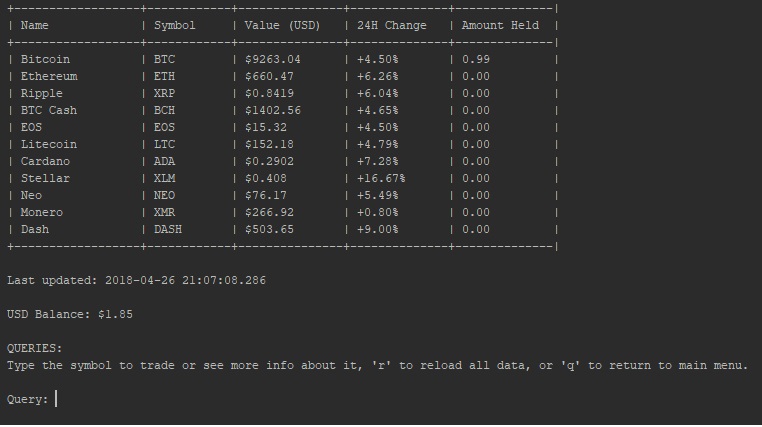
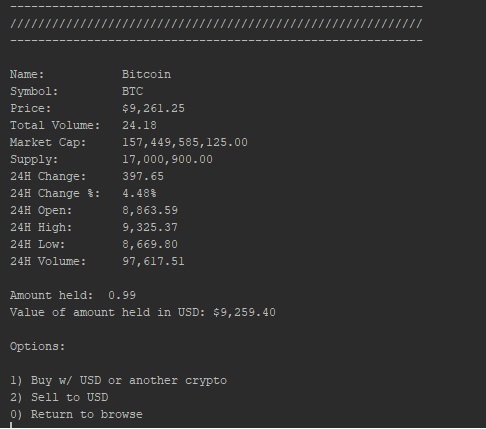
More detailed information or cryptocurrency within last 24 hours with a choice of options (picture 4):
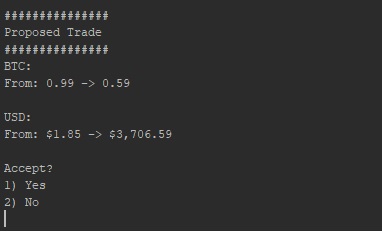
Example of what a proposed trade looks like (picture 5):