



Session-based Slack MCP for Claude and MCP clients. Local-first stdio/web with secure-default hosted HTTP in v3.
npx -y @jtalk22/slack-mcp --setup
npx -y @jtalk22/slack-mcp@latest --version
npx -y @jtalk22/slack-mcp@latest --doctor
npx -y @jtalk22/slack-mcp@latest --status
Setup guide · 30-second verify reference · Autoplay demo landing · Latest release · npm package
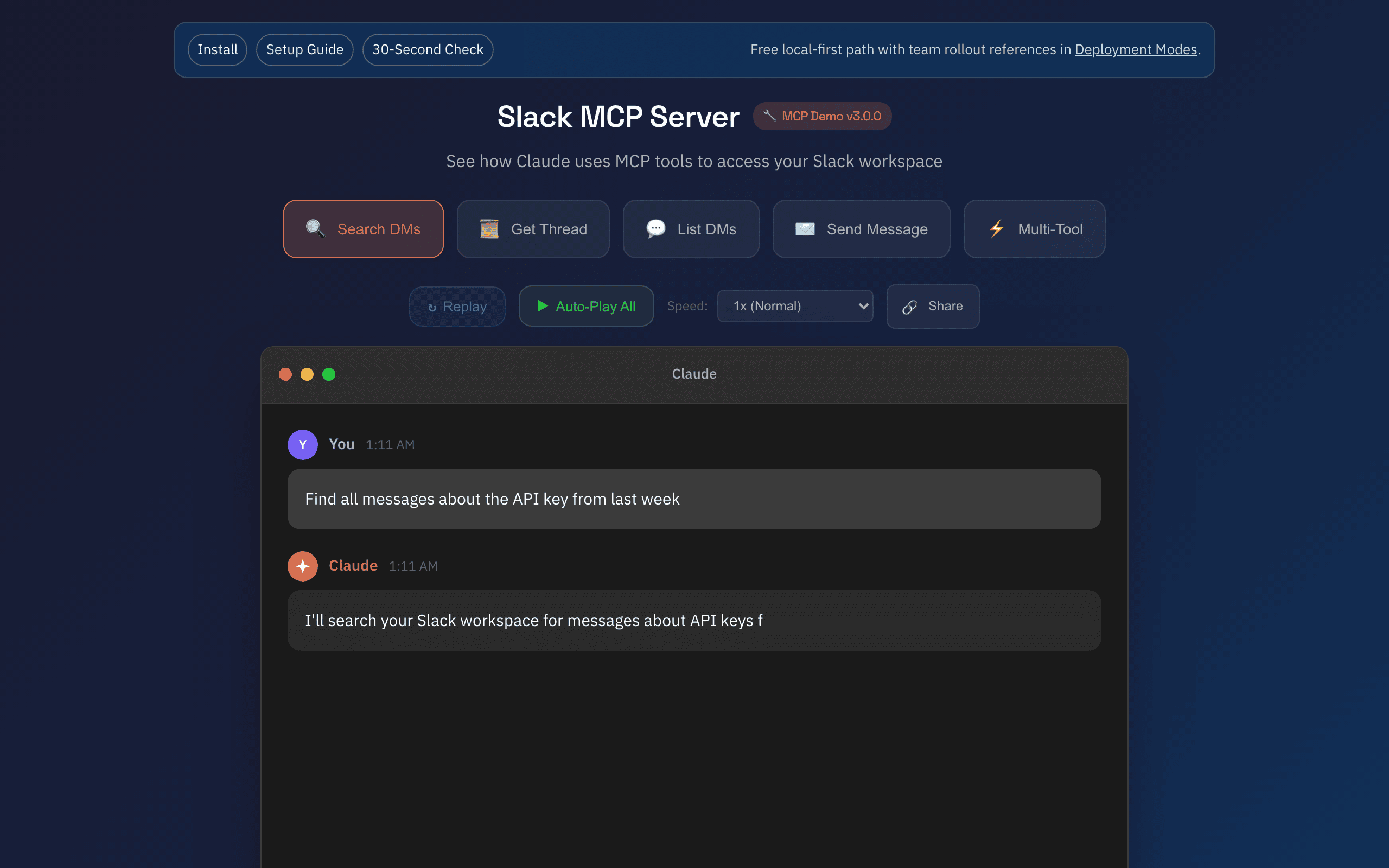
Motion proof: 20-second mobile clip · Live demo walkthrough · Share card
Hosted migration note: v3.1.0 keeps local stdio/web flows unchanged; hosted /mcp requires SLACK_MCP_HTTP_AUTH_TOKEN and SLACK_MCP_HTTP_ALLOWED_ORIGINS.
Maintainer/operator: jtalk22 (james@revasser.nyc)
Release: v3.1.0 · Notes: v3.1.0 notes · Support: deployment intake
If this saved you setup time, consider starring the repo. Maintenance support: GitHub Sponsors · Ko-fi · Buy Me a Coffee
- Hosted HTTP
/mcpnow requires bearer auth by default (SLACK_MCP_HTTP_AUTH_TOKEN). - Hosted HTTP CORS now uses explicit allowlisting (
SLACK_MCP_HTTP_ALLOWED_ORIGINS). - Local-first paths (
stdio,web) stay compatible. - MCP tool names stay stable (no renames/removals).
No token management. No Docker. No Chrome extensions. One URL and you're connected.
Skip all local setup — paste one URL into Claude and get 13 Slack tools running in under 60 seconds. Encrypted token storage on Cloudflare's global edge (300+ PoPs). The only cloud-hosted session-based Slack MCP on the market.
| Plan | Price | Includes |
|---|---|---|
| Solo | $19/mo | 10 standard tools, AES-256-GCM encrypted storage, 5K requests/mo |
| Team | $49/mo | 13 tools (incl. AI summaries, action items, decisions), 3 workspaces, 25K requests/mo |
Get Your API Key — live in 60 seconds. Privacy Policy.
Once configured, ask Claude naturally:
-
Catch up on a channel — "Summarize what happened in #engineering this week" Uses
slack_list_conversations→slack_conversations_history→ Claude synthesis. -
Find a decision — "What did the team decide about the API migration?" Uses
slack_search_messageswith query"API migration", thenslack_get_threadto pull full context. -
Export a conversation — "Export my full DM history with Sarah including threads" Uses
slack_list_conversationsto resolve Sarah's DM ID →slack_get_full_conversationwithinclude_threads: true. -
Send a standup update — "Post my standup in #daily-standup: shipped auth refactor, reviewing PR #42 today" Uses
slack_send_messageto the target channel. -
AI-powered action items (Team plan) — "What action items came out of #product-sync today?" Uses
slack_extract_action_itemsto identify owners, deadlines, and commitments.
export SLACK_TOKEN=xoxc-...
export SLACK_COOKIE=xoxd-...
export SLACK_MCP_HTTP_AUTH_TOKEN=change-this
export SLACK_MCP_HTTP_ALLOWED_ORIGINS=https://claude.ai
node src/server-http.js
Request with:
Authorization: Bearer <SLACK_MCP_HTTP_AUTH_TOKEN>Emergency local fallback only:
SLACK_MCP_HTTP_INSECURE=1 node src/server-http.jsFor guided hosted rollout requirements, open: deployment intake
I built this because I was working with someone to help me manage a complex workload, and we kept hitting walls. They needed context from my messages—"what did X say about Y?"—and standard app/OAuth flows were too constrained for that workflow.
Screenshotting messages is not a workflow.
This server bridges the gap. It creates a secure, local bridge between Claude and your Slack web session. It gives your MCP client the same access you already have in the browser—search history, summarize threads, and retrieve prior context—without fighting the platform.
Instead of authenticating as a bot, this server leverages your existing Chrome session credentials (macOS) or manual token injection (Linux/Windows). It mirrors your user access exactly—if you can see it in Slack, Claude can see it too.
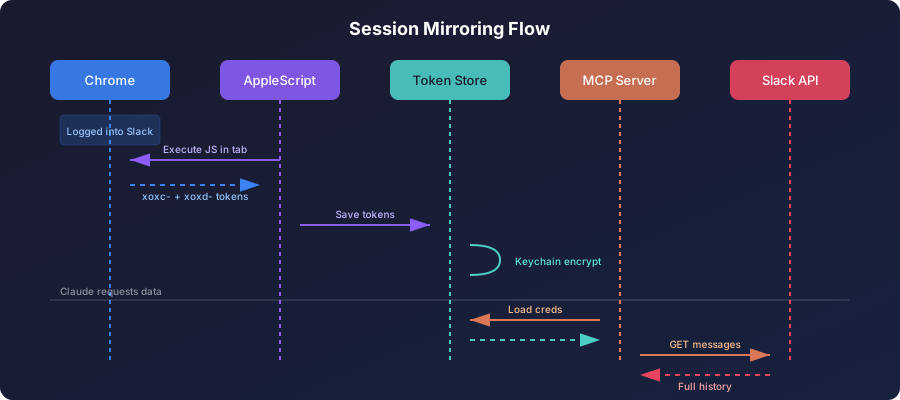
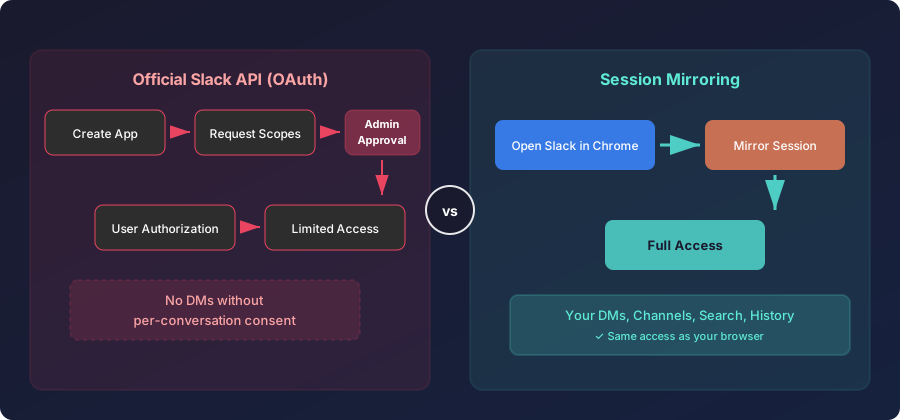
Trade-off: Session tokens expire every 1-2 weeks. Auto-refresh (macOS) or manual update keeps things running.
- Read Any Message - DMs, private channels, public channels
- Full Export - Conversations with threads and resolved usernames
- Search - Query across your entire workspace
- Send Messages - DMs or channels, with thread support
- User Directory - List and search 500+ users with pagination
- Auto Token Refresh - Extracts fresh tokens from Chrome automatically (macOS only)
- Atomic Writes - File operations use temp-file-then-rename to prevent corruption
- Zombie Protection - Background timers use
unref()for clean process exit - Race Condition Safety - Mutex locks prevent concurrent token extraction
- Rate Limit Handling - Exponential backoff with jitter
| Tool | Description |
|---|---|
slack_health_check |
Verify token validity and workspace info |
slack_token_status |
Detailed token age, health, and cache stats |
slack_refresh_tokens |
Auto-extract fresh tokens from Chrome |
slack_list_conversations |
List DMs/channels (with lazy discovery cache) |
slack_conversations_history |
Get messages from a channel or DM |
slack_get_full_conversation |
Export full history with threads |
slack_search_messages |
Search across workspace |
slack_send_message |
Send a message to any conversation |
slack_get_thread |
Get thread replies |
slack_users_info |
Get user details |
slack_list_users |
List workspace users (paginated, 500+ supported) |
Runtime: Node.js 20+
npx -y @jtalk22/slack-mcp --setup
npx -y @jtalk22/slack-mcp --doctor
npx -y @jtalk22/slack-mcp --status
Expected:
--setuplaunches the interactive wizard--doctorreturns one clear next action with exit code:0ready1missing credentials2invalid/expired credentials3connectivity/runtime issue
--statusis read-only and non-mutating
Command reference: HN launch kit
- Claude Desktop (macOS/Windows/Linux)
- Claude Code CLI
- Local browser mode (
web) - Hosted Node runtime (
http) - Cloudflare Worker / Smithery transport
Compatibility matrix: compatibility matrix
npm install -g @jtalk22/slack-mcpgit clone https://github.com/jtalk22/slack-mcp-server.git
cd slack-mcp-server
npm installdocker pull ghcr.io/jtalk22/slack-mcp-server:latesttmpdir="$(mktemp -d)"
cd "$tmpdir"
npx -y @jtalk22/slack-mcp --version
npx -y @jtalk22/slack-mcp --help
npx -y @jtalk22/slack-mcp --statusExpected:
--versionand--helpexit0--statusexits non-zero until credentials are configured--statusis read-only and never attempts Chrome extraction
The interactive setup wizard handles token extraction and validation automatically:
npx -y @jtalk22/slack-mcp --setup- macOS: Auto-extracts tokens from Chrome (have Slack open in a tab)
- Linux/Windows: Guides you through manual extraction step-by-step
- Validates tokens against Slack API before saving
- Stores tokens securely at
~/.slack-mcp-tokens.json
npx -y @jtalk22/slack-mcp --status# macOS auto-extraction
npm run tokens:auto
# Manual entry (all platforms)
npm run tokens:refresh
# Check health
npm run tokens:statusEdit ~/Library/Application Support/Claude/claude_desktop_config.json:
{
  "mcpServers": {
    "slack": {
      "command": "npx",
      "args": ["-y", "@jtalk22/slack-mcp"]
    }
  }
}Edit %APPDATA%\Claude\claude_desktop_config.json:
{
  "mcpServers": {
    "slack": {
      "command": "npx",
      "args": ["-y", "@jtalk22/slack-mcp"],
      "env": {
        "SLACK_TOKEN": "xoxc-your-token",
        "SLACK_COOKIE": "xoxd-your-cookie"
      }
    }
  }
}
Note: Windows/Linux users must provide tokens via
envsince auto-refresh is macOS-only.
Add to ~/.claude.json:
{
  "mcpServers": {
    "slack": {
      "type": "stdio",
      "command": "npx",
      "args": ["-y", "@jtalk22/slack-mcp"]
    }
  }
}
Claude Code reads tokens from ~/.slack-mcp-tokens.json automatically.
{
  "mcpServers": {
    "slack": {
      "command": "docker",
      "args": ["run", "-i", "--rm",
               "-v", "~/.slack-mcp-tokens.json:/root/.slack-mcp-tokens.json",
               "ghcr.io/jtalk22/slack-mcp-server"]
    }
  }
}Fully quit and reopen Claude. The Slack tools will appear.
Priority 1: Environment Variables (SLACK_TOKEN, SLACK_COOKIE)
    ↓ fallback
Priority 2: Token File (~/.slack-mcp-tokens.json)
    ↓ fallback
Priority 3: macOS Keychain (encrypted)
    ↓ fallback
Priority 4: Chrome Auto-Extraction (macOS only)
All file operations (tokens, DM cache) use atomic writes:
Write to temp file → chmod 600 → rename to target
This prevents JSON corruption if the process is killed mid-write.
Background refresh timers use unref():
const timer = setInterval(refreshTokens, 4 * 60 * 60 * 1000);
timer.unref(); // Process can exit even if timer is pending
When Claude closes the MCP connection, the server exits cleanly.
A mutex lock prevents concurrent Chrome extractions:
if (refreshInProgress) return null; // Skip if already refreshing
refreshInProgress = true;
try { return extractFromChromeInternal(); }
finally { refreshInProgress = false; }Claude now supports remote MCP connectors on paid plans. For claude.ai, the preferred path is adding a remote connector in Settings -> Connectors.
Reference:
- https://support.anthropic.com/en/articles/11995447-connectors-in-claude
- https://support.anthropic.com/en/articles/11175166-about-custom-integrations-using-remote-mcp
Use this Web UI when you want a local localhost dashboard, REST access, or a fallback workflow without remote connector hosting:
npm run web
# Or: npx -y @jtalk22/slack-mcp web
Magic Link: The console prints a one-click URL with the API key embedded:
════════════════════════════════════════════════════════════
  Slack Web API Server v3.1.0
════════════════════════════════════════════════════════════

  Dashboard: http://localhost:3000/?key=smcp_xxxxxxxxxxxx
Just click the link - no copy-paste needed. The key is saved to your browser and stripped from the URL for security.
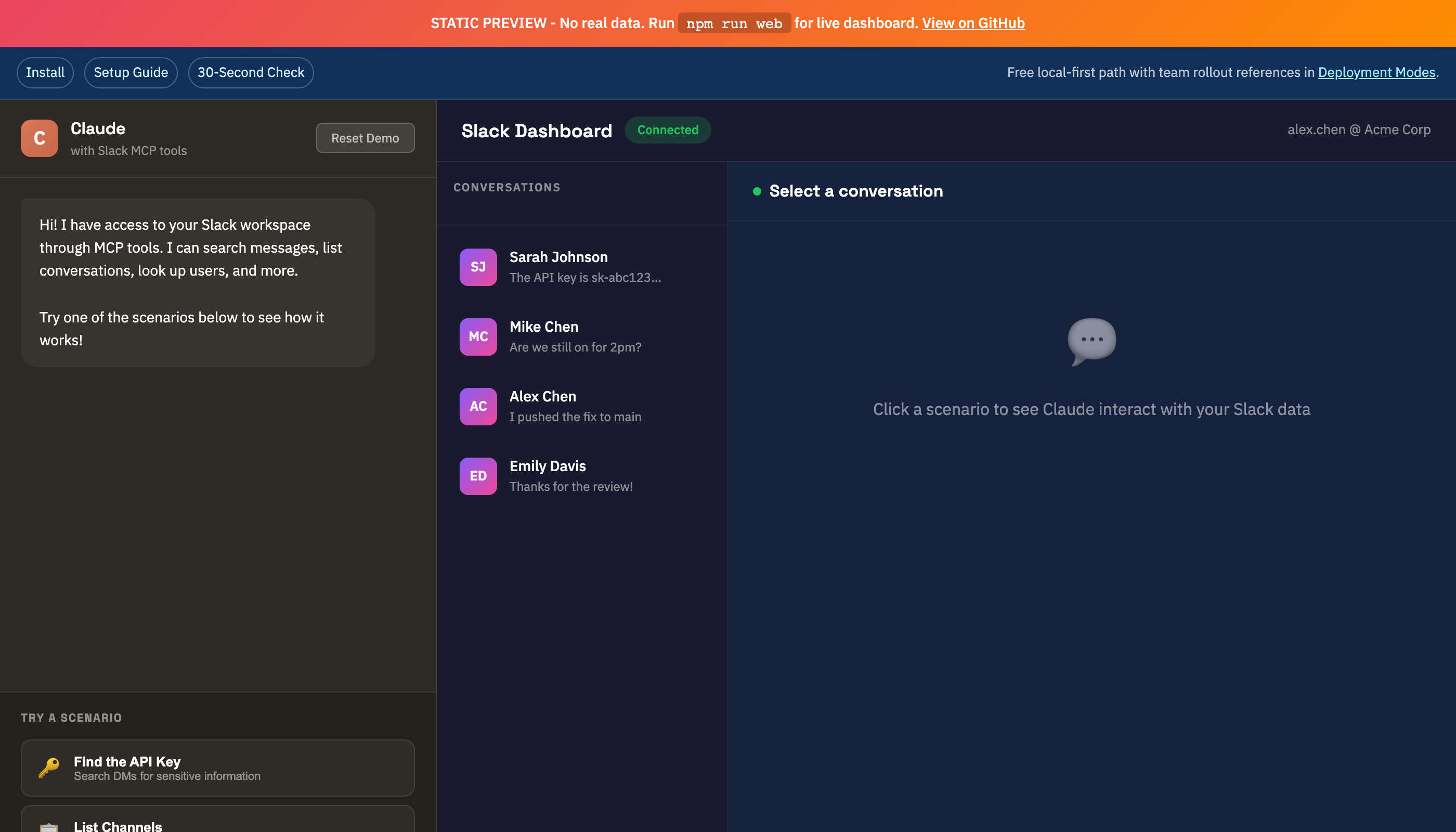
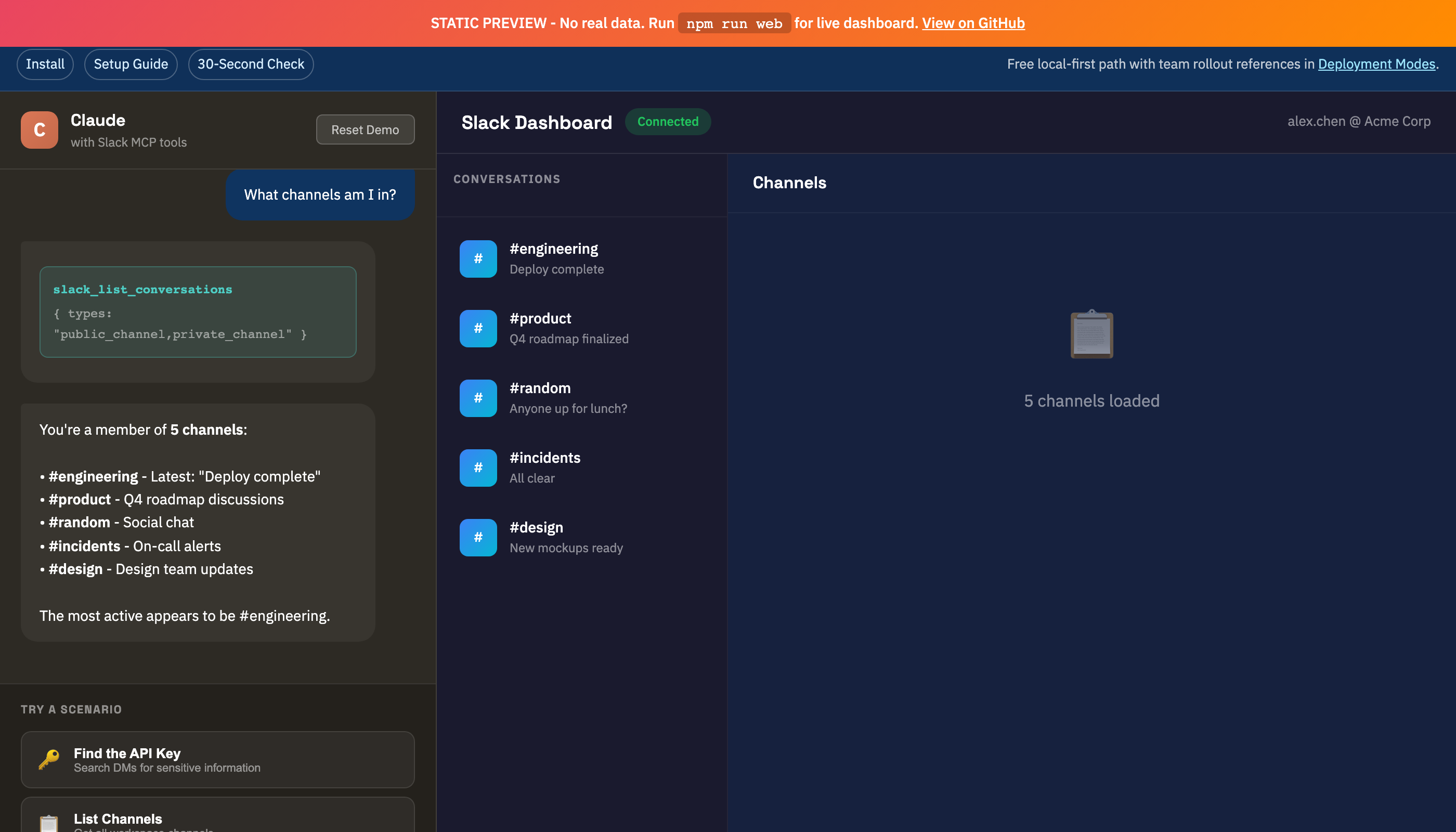
Screenshots
| DMs View | Channels View |
|---|---|
 |
 |
Use this mode only when you need a remote MCP endpoint:
SLACK_TOKEN=xoxc-...
SLACK_COOKIE=xoxd-...
SLACK_MCP_HTTP_AUTH_TOKEN=change-this
SLACK_MCP_HTTP_ALLOWED_ORIGINS=https://claude.ai
node src/server-http.js
Behavior:
/mcprequiresAuthorization: Bearer <SLACK_MCP_HTTP_AUTH_TOKEN>by default.- Cross-origin browser calls are denied unless origin is listed in
SLACK_MCP_HTTP_ALLOWED_ORIGINS. - For local testing only, you can opt out with
SLACK_MCP_HTTP_INSECURE=1.
- Docs Index - One-click index for setup, API, troubleshooting, deployment, and support docs
- Deployment Modes - Choose the right operating model (
stdio,web, hosted HTTP, Smithery/Worker) - Use Case Recipes - 12 copy/paste prompts mapped to current tool contracts
- Support Boundaries - Scope, response targets, and solo-maintainer capacity limits
- Release Health - Track setup reliability and support-load targets through this release cycle
If you're evaluating team rollout, start with Deployment Modes before exposing remote endpoints.
- Run:
npx -y @jtalk22/slack-mcp --version
npx -y @jtalk22/slack-mcp --doctor
- If setup fails, run:
npx -y @jtalk22/slack-mcp --setup
- Open an issue with full environment details:
- For guided hosted rollout support:
- Check scope and response targets:
# macOS: Auto-refresh from Chrome
slack_refresh_tokens  # In Claude
# Or: npm run tokens:auto

# Package setup wizard
npx -y @jtalk22/slack-mcp --setup

# Linux/Windows: Manual update
# Edit ~/.slack-mcp-tokens.json with fresh valuesUse discover_dms: true to force discovery:
slack_list_conversations with discover_dms=true
This caches DM channel IDs for 24 hours.
- Chrome must be running (not minimized to Dock)
- Slack tab must be open at
app.slack.com - You must be logged in
- In Chrome menu, enable
View > Developer > Allow JavaScript from Apple Events
- Verify JSON syntax in config file
- Check logs:
~/Library/Logs/Claude/mcp*.log - Fully restart Claude (Cmd+Q, then reopen)
slack-mcp-server/
├── src/
│   ├── server.js         # MCP server (stdio transport)
│   └── web-server.js     # REST API + Web UI
├── lib/
│   ├── token-store.js    # 4-layer persistence + atomic writes
│   ├── slack-client.js   # API client, LRU cache, retry logic
│   ├── tools.js          # MCP tool definitions
│   └── handlers.js       # Tool implementations
├── public/
│   ├── index.html        # Web UI
│   └── demo.html         # Interactive demo
└── scripts/
    └── token-cli.js      # Token management CLI
- Token files stored with
chmod 600(owner-only) - macOS Keychain provides encrypted backup
- Web server binds to localhost only
- Never commit tokens to version control
- API keys are cryptographically random (
crypto.randomBytes)
| Feature | macOS | Linux | Windows |
|---|---|---|---|
| MCP Server | Yes | Yes | Yes |
| Token File | Yes | Yes | Yes |
| Auto-Refresh from Chrome | Yes | No | No |
| Keychain Storage | Yes | No | No |
| Web UI | Yes | Yes | Yes |
PRs welcome. Run node --check on modified files before submitting.
If this project saves you setup time, consider starring the repository.
MIT - See LICENSE
This project uses unofficial Slack APIs. Use at your own risk. Not affiliated with or endorsed by Slack Technologies.

