
Latest NIST FRVT evaluation report 2024-12-20

🆔 ID Document Liveness Detection - Linux - Here 
🤗 Hugging Face - Here
📚 Product & Resources - Here
🛟 Help Center - Here
💼 KYC Verification Demo - Here
🙋♀️ Docker Hub - Here
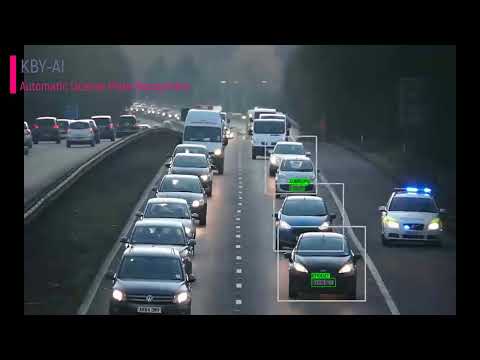
We implemented ANPR/ALPR(Automatic Number/License Plate Recognition) engine with unmatched accuracy and precision by applying cutting-edge deep learning techniques in this repository.
KBY-AI's LPR solutions utilizes artificial intelligence and machine learning to greatly surpass legacy solutions. Now, in real-time, users can receive a vehicle's plate number.
| No. | Repository | SDK Details | Status |
|---|---|---|---|
| 1 | LPR - Linux | License Plate Recognition Linux SDK | Available |
| 2 | LPR - Docker | License Plate Recognition Docker Image | Available |
| 3 | LPR - Flutter | License Plate Recognition Flutter SDK | Available |
| 4 | LPR - C# | License Plate Recognition C# SDK | Available |
| 5 | LPR - Android | License Plate Recognition Android SDK | Available |
| ➡️ | LPR - iOS | License Plate Recognition iOS SDK | Available |
To get more products, please visit products here:


You can visit our YouTube video for ANPR/ALPR model's performance here to see how well our demo app works.
- The code line below shows how to update
SDKwith thelicense key:Automatic-License-Plate-Recognition-iOS/ALPRDemo/ViewController.swift
Lines 35 to 40 in 491bcd3
- To request
license key, please contact us:
🧙Email:contact@kby-ai.com
🧙Telegram:@kbyaisupport
🧙WhatsApp:+19092802609
🧙Discord:KBY-AI
🧙Teams:KBY-AI
-
Copy the
SDKlibrary (alprsdk.frameworkfolder) and pre-builtonnxruntimelibrary (onnxruntime.frameworkfolder) to therootfolder in your project. -
Add
alprsdk.frameworkandonnxruntime.frameworkto your project inXcode.
Project Navigator -> General -> Frameworks, Libraries, and Embedded Content

- Add the bridging header to your project settings
Project Navigator -> Build Settings -> Swift Compiler - General

- Activate the
SDKby calling thesetActivationmethod:
var ret = ALPRSDK.setActivation("xxx...")- Get license plate number and its coordinates by calling the
processImagemethod:
  let processImage = pickedImage.fixOrientation()
  let alprBoxes = ALPRSDK.processImage(processImage) as! [ALPRBox];
  let imageWithBoxes = drawALPRBoxes(on: processImage, boxes: alprBoxes)