A Chrome extension to inspect and manipulate WebAssembly memory at runtime. Read, view, and copy memory values to assist in reverse engineering
WASM Memory Tools is a developer tool that lets you view, read, write, and search through a WASM module’s memory in real time using a clean, interactive DevTools panel. It's built for reverse engineers, cybersecurity researchers, and WebAssembly developers.
- ✅ Read and write all major data types (Int8, Int16, Int32, Int64, Float32, Float64)
- ✅ Read and write strings and byte arrays
- ✅ Search memory for values or strings
- ✅ View memory contents as:
- Decimal
- Hexadecimal
- Character
- ✅ Easy-to-use DevTools panel
- ✅ Injected memory wrapper class (
MemoryWrapper) accessible from the console - ✅ Works on all pages running WebAssembly modules
The extension injects a helper class (MemoryWrapper) into every page that uses WebAssembly. This class simplifies reading and writing directly to the WASM memory buffer.
Once the page loads, open your browser DevTools and go to the "WASM Memory tools" tab to explore and manipulate memory.
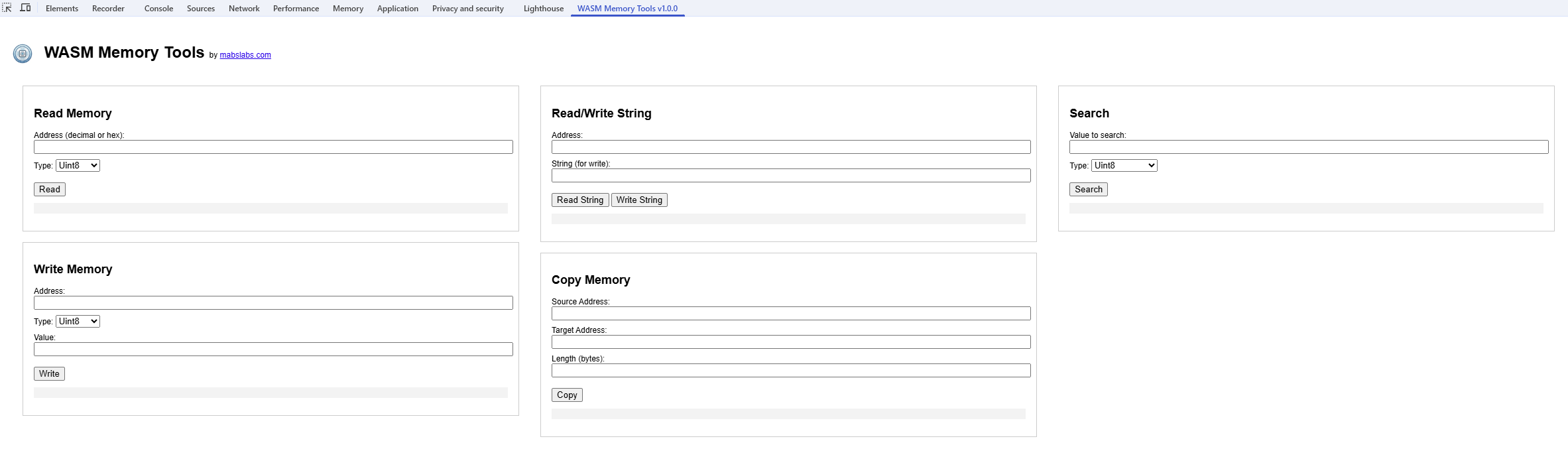
The DevTools panel provides:
- Input fields to read/write memory at specific addresses
- Buttons to search values or strings
- A display of the result in decimal, hexadecimal, and ASCII
- Download the extension from:
- Chrome Web Store
- Firefox Add-ons (coming soon)
- Or install manually for development:
- Clone this repo
- Open
chrome://extensions/in your browser - Enable Developer mode
- Click Load unpacked
- Select the project folder
This extension integrates the excellent WASMToolkit library by Excellium SA, which provides the core memory manipulation functions.
Special thanks to their team for open-sourcing such a solid foundation.
Made by mabslabs.com
GitHub: https://github.com/kernel64
Licensed under the MIT License.