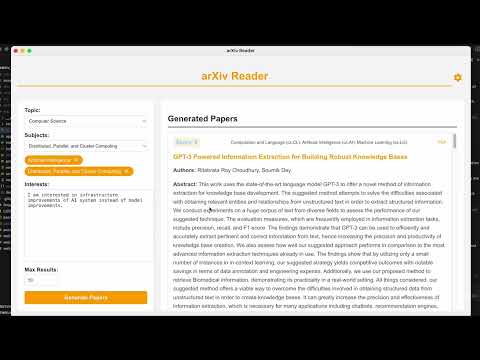
ArXiv Reader is an Electron-based desktop application that helps researchers and academics discover relevant papers from arXiv.org based on their interests and preferences.
- Browse the latest papers from various scientific fields on arXiv
- Filter papers by subject areas
- Rank papers based on relevance to user-specified interests
- View paper details including title, authors, abstract, and links
- Open PDF versions of papers directly from the app
Check out our demo video to see ArXiv Reader in action:
This project was inspired by AutoLLM/ArxivDigest.
Download the latest version of ArXiv Reader:
- macOS: ArXiv Reader.dmg
- Launch the ArXiv Reader application
- Enter your OpenAI API key in the settings (required for paper ranking)
- Select a topic and subjects of interest
- Enter your specific research interests
- Click "Search" to fetch and rank relevant papers
- Browse through the ranked list of papers
- Click on paper titles to view more details or open PDFs
To set up the development environment:
- Clone the repository
- Install dependencies:
npm install - Start the app in development mode:
npm start - To build the app:
npm run make
- Electron
- React
- Python (for arXiv scraping and paper ranking)
- OpenAI API (for relevance scoring)
For support or queries, please contact [zhoukuan1@gmail.com]